The buying decision here is not about chasing a polished studio voice. It is about how much of your room your microphone hears while you play: mechanical key switches, a mouse clicking, fans spinning up under load, a TV in the next room. A dynamic microphone used close to your mouth puts your voice far ahead of that noise, which is why it suits gaming desks better than a sensitive condenser across the room. The real choice is which dynamic design fits your setup and budget.
This guide serves Discord players who want cleaner callouts, new streamers building a first setup, and experienced players upgrading from a headset mic or a USB condenser. It also covers buyers who already own an audio interface and those who refuse to buy one. Every pick below was chosen from the product names and specifications printed on its Amazon product page, so the patterns, outputs and included accessories are exactly what each listing states.
Quick Picks
As an Amazon Associate we earn from qualifying purchases.
| Product | Best for | Key spec from title |
|---|---|---|
| RØDE PodMic USB | Gamers who want USB today and XLR later | XLR and USB connectivity |
| FIFINE AmpliTank K688 | First dynamic mic on a tight budget | XLR/USB with mute, headphone jack and monitoring control |
| RØDE PodMic | Interface owners who want a simple broadcast mic | Cardioid dynamic with integrated swing mount |
| Samson Q9x | Players whose PCs and consoles hum and buzz | Broadcast dynamic with humbucking coil |
| Shure SM7B | Streamers building a long-term flagship setup | XLR studio mic with detachable windscreen |
How to Choose
Dynamic vs Condenser in a Real Gaming Room
A condenser is built to hear everything, which is a liability beside a gaming PC. Its sensitivity picks up fan noise, key switches and room echo from across the desk, so it only behaves in a quiet, treated space. A dynamic capsule is far less sensitive and is designed to be worked close, a few centimetres from your mouth. At that distance your voice dominates and the room falls away. If your PC sits on the desk and your walls are bare, dynamic is the safer design; save condensers for treated studios.
USB, XLR, or Both — and What Each Chain Costs You
A USB dynamic plugs straight into the PC and needs nothing else, which keeps a first setup simple. An XLR model is only a microphone: it also needs an audio interface or mixer, an XLR cable, and usually a boom arm, so the true cost is the chain, not the mic. Hybrid models with both outputs start on USB and move to XLR when you buy an interface, avoiding a second purchase. Our wider gaming microphone guide covers the broader field, while this article stays with dynamic designs only.
Pickup Pattern and Placement
Every pick here uses a cardioid pattern, which hears the front of the microphone and rejects the sides and rear. That rejection only works if you cooperate: speak into the front, keep the rear pointed at your keyboard and PC, and stay roughly a hand’s width away. Move twice as far back and your voice drops while the room stays, undoing the pattern’s work. Most dynamic mics are end-address, so the top faces your mouth, not the ceiling. A boom arm makes that position easy to hold for a whole session.
Gain, Monitoring and the Extras That Matter
Dynamic capsules output a quiet signal, and the quietest broadcast models are demanding: the SM7B listing itself recommends at least 60 dB of preamp gain, which many budget interfaces cannot supply cleanly, so an inline activator may join the shopping list. USB models sidestep that with built-in preamps and controls. Zero-latency headphone monitoring matters more than most extras, because hearing your own voice without delay keeps you at a steady distance and volume. A hardware mute button is the other extra worth having mid-game.
The 5 Best Options
RØDE PodMic USB

The PodMic USB is the easiest recommendation for a gamer who wants one purchase to cover several years of setup changes. Run it over USB today with its built-in processing and headphone monitoring, then move it to an interface over XLR later without replacing the microphone. Its tight cardioid capsule is aimed squarely at desk noise, the internal shock mount and double pop filtering suit close, animated talking, and the swing mount bolts straight onto a boom arm. It is heavy for its size, so pair it with a sturdy arm.
Specs
- Dynamic microphone with neodymium capsule
- Polar pattern: cardioid
- Outputs: XLR and USB
- USB output with APHEX digital signal processing
- Zero-latency headphone output with level control
- Integrated pop filter, plus an external pop filter included
- Internal shock mount and integrated swing mount
- Power source: XLR or USB
- All-metal construction; weight 1.9 pounds
- Compatible with computers and iOS/Android devices
Best for: Streamers who want USB convenience now and an XLR upgrade path later.
Watch out for: At 1.9 pounds it will sag on lightweight boom arms; budget for a counterweighted arm.
ASIN: B0BQM4TKF7
FIFINE AmpliTank K688

The K688 is the budget route into dynamic gaming audio, and its listing is unusually honest about what that money buys. You get both USB and XLR outputs, a tap-to-mute button, a gain knob and headphone monitoring with its own volume control, features that usually arrive a price tier higher. The included shock mount and windscreen handle the basics, and the USB cable is in the box. What is missing matters too: there is no stand, no arm and no XLR cable, so interface users should price those before ordering.
Specs
- Dynamic microphone with cardioid (unidirectional) pickup
- Connectivity: USB and XLR outputs
- Tap-to-mute button and gain knob
- Headphone jack with monitoring volume control
- Shock mount and windscreen included
- In the box: 8.2 ft (2.5 m) USB-C to USB cable and 5/8″ to 3/8″ adapter
- Arm stand, mic stand and XLR cable not included
- Metal body; weight 0.51 kg
Best for: Beginners who want dynamic noise rejection without buying an interface.
Watch out for: No stand or arm is included, and the mic must sit close to your mouth to work as intended.
ASIN: B0B8SNVK5K
RØDE PodMic

The original PodMic strips the idea back to a single XLR output and a swing mount, and for interface owners that simplicity is the appeal. Its internal pop filter and shock mounting forgive the plosives and desk bumps of an animated gaming session, and the capsule’s controlled proximity effect adds weight when you lean in for quiet callouts. There are no controls, no USB and no headphone socket, so your interface handles everything. It is also a dense, heavy microphone, and that weight dictates your choice of boom arm.
Specs
- Dynamic microphone
- Polar pattern: cardioid (unidirectional)
- Connector: XLR only
- Integrated swing mount
- Internal pop filter and internal shock mounting
- Impedance: 150 ohms
- Frequency range: 20 Hz to 20 kHz
- Weight: 937 g; metal construction
- Warranty: 2 years
Best for: Gamers who already own an interface and want a fit-and-forget broadcast mic.
Watch out for: It is one of the heaviest picks here at 937 g; cheap arms will droop under it.
ASIN: B07MSCRCVK
Samson Q9x

The Q9x is the pick for desks where electrical noise is part of the problem. Its humbucking coil is designed to reduce the electromagnetic and radio-frequency interference that gaming PCs, monitors and consoles radiate, and its cardioid pattern handles the acoustic side. A switchable mid-boost adds presence when your voice gets lost under game audio, the yoke mount and internal shock mount simplify positioning, and the foam windscreen is included. It is XLR only, so an interface with healthy gain is part of the deal, and there is no headphone monitoring on the mic itself.
Specs
- Dynamic element with humbucking coil
- Polar pattern: cardioid
- Output: male XLR connector
- Impedance: 270 ohms
- Sensitivity: -58 dBV/Pa at 1 kHz
- Maximum SPL: greater than 140 dB
- Mid presence boost switch
- Integrated yoke mount and shock mount
- Dual-layer grille and foam windscreen included
- Aluminum body; weight 1.7 lb
Best for: Players fighting hum and buzz from a desk full of electronics.
Watch out for: XLR only with a low -58 dBV/Pa output; check your interface can supply enough clean gain.
ASIN: B0BGJKMWFQ
Shure SM7B
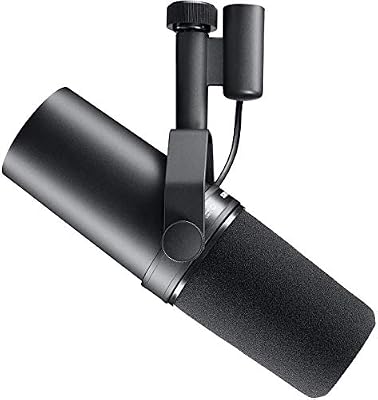
The SM7B is the long-term answer for streamers who would rather buy once. Its cardioid capsule, internal shock mounting and detachable windscreen produce the controlled broadcast sound heard across professional streams, and its bass rolloff and presence boost switches let you shape tone without software. The demands are equally famous: it is XLR only, and the listing recommends at least 60 dB of preamp gain, which pushes many owners toward a high-gain interface or an inline activator. Budget for that chain, plus a boom arm that can hold its weight, before the mic itself.
Specs
- Dynamic microphone
- Polar pattern: cardioid
- Output: XLR
- Frequency range: 50 Hz to 20 kHz
- Impedance: 150 ohms
- Does not require phantom power
- Listing recommends at least 60 dB of preamp gain
- Bass rolloff and mid-range presence boost switches
- Detachable A7WS windscreen included
- Metal construction; item weight 2.7 pounds
Best for: Committed streamers building a flagship XLR setup around a proven broadcast mic.
Watch out for: The microphone is only part of the cost; a high-gain interface or activator and a strong arm are effectively required.
ASIN: B0002E4Z8M
Which One Fits Your Situation
You Play in a Noisy Shared Room
Choose the RØDE PodMic USB. Its tight cardioid capsule is built to reject keyboard taps and mouse clicks, and close placement over USB keeps your voice well ahead of a television or conversation behind you. The built-in headphone output lets you hear exactly how much room is leaking in, so you can fix your distance before it reaches your teammates or your stream.
You Want One Mic That Grows With Your Setup
The FIFINE AmpliTank K688 and the PodMic USB both start on USB and keep an XLR output in reserve. Pick the K688 if the budget is tight today, since its mute button, gain knob and monitoring cover the essentials. Pick the PodMic USB if you can spend more once, because its processing, external pop filter and build quality carry further into an interface-based setup.
You Already Own an Audio Interface
Skip the USB hardware entirely and choose between the RØDE PodMic and the Samson Q9x. The PodMic is the straightforward broadcast choice with its swing mount and internal filtering. The Q9x earns its place when your current recordings carry hum or buzz from the PC, thanks to its humbucking coil, and its mid-boost switch helps quieter voices cut through game audio.
You Are Building a Serious Streaming Desk
The Shure SM7B is the endgame pick, provided the supporting chain is funded with it. Pair it with an interface that truly delivers the gain the listing recommends, or add an inline activator, and mount it on an arm rated for its weight. Set up that way, it is the microphone least likely to be replaced as the rest of your desk improves.
Common Mistakes
- Placing a dynamic mic at the far side of the desk, where its low sensitivity turns your voice down and the room up.
- Buying an XLR microphone without budgeting for the interface, cable and boom arm it needs before it makes any sound.
- Ignoring gain requirements, then blaming the microphone for hiss that actually comes from a budget interface running at its limit.
- Pointing the rear of a cardioid mic at your mouth’s reflection path instead of at the keyboard and PC it should reject.
- Leaving monitoring off, drifting away from the mic mid-game, and wondering why callouts fade in and out.
Frequently Asked Questions
Do dynamic microphones work well for Discord and in-game chat?
Yes. Discord and game chat compress your voice heavily, so the clarity that matters comes from a strong voice-to-noise ratio rather than fine detail. A dynamic mic used close delivers exactly that: your callouts stay forward while keyboard and fan noise fall behind. Any of the USB picks here works with chat apps as a standard input device, and XLR models work through your interface.
Do I need an audio interface for a dynamic microphone?
Only for XLR models. The PodMic, Q9x and SM7B produce no digital signal, so an interface or mixer must convert and amplify their output before the PC can use it. The PodMic USB and K688 contain their own conversion and plug straight into a USB port. Hybrid models let you start without an interface and add one later for more control.
How close should I sit to a dynamic microphone?
Much closer than most new owners expect. A distance of roughly five to fifteen centimetres from the grille is the working range these broadcast designs are built around, slightly off to one side to soften plosives. At that distance your voice is far louder than the room, which is the entire point of the design. A boom arm helps hold that position without hunching over the desk.
Does a dynamic microphone need phantom power?
No. Dynamic capsules generate their own signal and need no power to operate; the SM7B listing states this outright and notes it is unaffected if phantom power is present on the input. The exception is accessories: some inline gain activators used with quiet dynamic mics do draw phantom power from the interface, even though the microphone itself never uses it.