

A gaming chair supports good posture when its published adjustments let the chair fit your body instead of the other way round. The four figures that matter most are the lumbar support type and how far it adjusts, the seat depth, the seat height range, and how the armrests and tilt behave while you play. Every pick below was chosen because the maker publishes those figures, and each section separates the maker’s stated specs from the setup guidance that follows.
Disclosure: As an Amazon Associate we earn from qualifying purchases.
For a wider shortlist grouped by posture feature, see our guide to the best gaming chairs for posture after you have compared the fit figures here.
What to check before you buy
- Lumbar support type. Adjustable pads move in height and depth. Dynamic or self-adaptive systems flex with your back as you shift. Back-curve systems reshape the whole backrest. A built-in arch is fixed, so it only suits you if its position happens to match your belt line.
- Seat depth. Sit with your back against the lumbar support: you want roughly two to three finger widths between the front edge of the seat and the back of your knees. A sliding seat pan is the surest way to get that gap right.
- Seat height range. Your feet should rest flat with knees at about 90 to 100 degrees. Compare the chair’s minimum seat height with your lower-leg length, not with your total height alone.
- Armrest adjustability. Armrests should meet your forearms with your shoulders relaxed, at about desk height, without lifting your shoulders or forcing your elbows out.
- Tilt behaviour. A tilt limiter or lockable recline lets you work at roughly 90 to 100 degrees and open up to 100 to 110 degrees for cutscenes and breaks, instead of slumping to find support.
The picks
1. Herman Miller Embody — the back that follows your spine

The Embody takes a different route from a lumbar pad: Herman Miller’s BackFit adjustment changes the curve of the whole backrest to match the curve of your spine, and the back itself is a central spine with flexible ribs (the maker’s Pixelated Support design) that move as you shift position. PostureFit sacral support at the base of the back is standard. The honest trade-off is that there is no separate lumbar pad to raise, lower or firm up — the BackFit dial is the adjustment you get. This is the same chair design sold in gaming trim as the Herman Miller x Logitech G Embody Gaming Chair.
Specs (maker figures)
- Back support: BackFit adjustable back curve, PostureFit sacral support, flexible-rib back
- Seat depth: 15 to 18 in, adjustable
- Seat height: 16 to 20.5 in
- Armrests: fully adjustable — height (6.5 to 11.5 in above the seat), width (12 to 21 in apart), depth and pivot
- Tilt: tilt limiter and tension control
- Weight capacity: 300 lb
- Warranty: 12 years
Best for: players who move and recline a lot during a session and want support that follows them, plus anyone whose desk is also their work desk all day.
2. Razer Enki — gaming-native, with a fixed lumbar arch
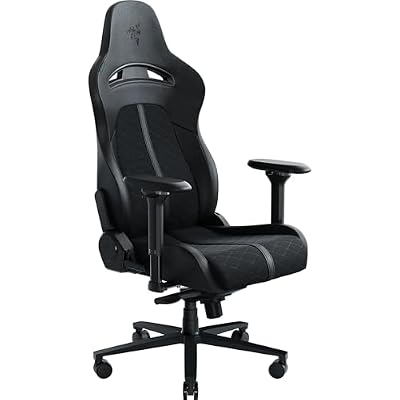
The Enki builds its lumbar support into the backrest as a moulded arch, so there is nothing to set up and nothing to slide out of place — but also nothing to adjust if the arch does not land on your belt line. Razer shapes the backrest with 110-degree extended shoulder arches and fits a wide, flat seat rather than deep bucket bolsters, which makes it easier to sit back properly. Its reactive seat tilt responds as you lean, and the backrest reclines to 152 degrees for breaks.
Specs (maker figures)
- Back support: built-in lumbar arch (fixed, not adjustable)
- Seat size: 21.25 in wide, about 20.7 in deep
- Seat height: 17.5 to 21.5 in
- Armrests: 4D (height, width, forward/back, angle)
- Tilt: reactive seat tilt; backrest recline to 152 degrees
- Recommended user height: 166.5 to 204 cm; maximum weight 136 kg
- Headrest: memory foam pillow included
- Warranty: 3 years
Best for: taller players who want a proper gaming chair with set-and-forget support, and anyone who knows a fixed lumbar arch suits their back.
3. AndaSeat Kaiser 4 XL — the most adjustable lumbar here

The Kaiser 4’s pop-out lumbar support is the most adjustable system in this roundup: the pad swings out through a 24-degree range and locks at any angle, and a built-in mechanism adds 4-way fine adjustment of 76 mm up and down and 30 mm in and out. That range means the support can be placed exactly at your belt line and set to the depth your back actually needs. The 6D armrests adjust in height, width, depth and rotation, with a tilting front section on each pad. This XL size is the one to check if you are tall; a smaller L size covers shorter players.
Specs (maker figures, XL size)
- Back support: pop-out lumbar, 24-degree range, any-angle lock; 76 mm height and 30 mm depth fine adjustment
- Armrests: 6D
- Recline: 90 to 135 degrees, plus 15-degree rocking mode
- Recommended user height: 181 to 210 cm; recommended weight 80 to 180 kg
- Headrest: magnetic memory foam pillow
- Seat cushion: high-density cold-cure foam
- Warranty: 5 years
Best for: big and tall players, and anyone who has found fixed or pillow-style lumbar support landing in the wrong place.
4. SIHOO Doro C300 Pro — dynamic lumbar in full mesh

The Doro C300 Pro uses a dynamic lumbar support that adapts to your back as you change position, rather than a pad you set once. The seat depth slides, the backrest height adjusts, and the 6D armrests give the widest arm adjustment here alongside the Kaiser 4. The back and seat are mesh, which suits warm rooms and long sessions, and this variant adds a footrest for lean-back breaks. SIHOO’s published figures for the C300 Pro list a weight-sensing recline with stops at 105, 120 and 135 degrees.
Specs (maker/listing figures)
- Back support: dynamic self-adaptive lumbar support
- Seat depth: adjustable (sliding seat)
- Backrest: mesh, height adjustable
- Armrests: 6D
- Recline: weight-sensing, with published stops at 105, 120 and 135 degrees
- Footrest: included on this variant
- Warranty: 3-year parts warranty per published spec summaries
Best for: players in warm rooms who want mesh airflow, adaptive lumbar support and a footrest for breaks between matches.
5. Steelcase Leap — dialled lumbar firmness, widest fit ranges

The Leap’s LiveBack backrest changes shape as you move, and its lumbar support adjusts two ways most gaming chairs do not offer: the pad moves up and down (Steelcase lists 5 in of lumbar height travel) and a separate control sets how firmly it pushes. The seat depth slides across a wide range, the minimum seat height is the lowest here — useful for shorter players — and the Natural Glide recline has four stops plus an upright lock, so your back stays supported as the seat moves with you.
Specs (maker figures)
- Back support: LiveBack flexible back; height-adjustable lumbar with firmness control
- Seat depth: 15.75 to 18.75 in, adjustable
- Seat height: 15.5 to 20.5 in
- Armrests: 4D (height, width, depth, pivot; 15 to 20 in apart)
- Recline: Natural Glide with 4 stops and upright lock
- Weight capacity: 400 lb
- Warranty: 12 years
Best for: shorter players who need a low seat height, heavier players who need the 400 lb capacity, and anyone who wants to fine-tune lumbar firmness rather than just position.
Desk setup configurations by need
A supportive chair only works as part of a setup. Use these configurations as starting points, then adjust in small steps.
Standard desk (about 28 to 30 in high), average height
- Set the seat height so your feet are flat on the floor and your knees sit at roughly 90 to 100 degrees.
- Slide the seat depth (or choose your chair) so two to three finger widths remain behind your knees.
- Raise the armrests until they sit just under your forearms with shoulders relaxed — ideally level with the desk surface so your wrists stay straight on keyboard and mouse.
- Position the lumbar support at your belt line.
- Set the monitor so the top third of the screen is at eye level, about an arm’s length (20 to 28 in) away.
Shorter player, or a chair that will not go low enough
- Choose a chair with a low minimum seat height first (the Leap starts at 15.5 in, the Embody at 16 in).
- If your feet still dangle with the seat at elbow-friendly height, add a footrest. Dangling feet pull you forward out of the lumbar support, which undoes the chair’s work.
- Keep the monitor on a stand if raising the chair has lifted your eye line above the screen.
Tall player
- Start from chairs with higher fit ranges: the Kaiser 4 XL is the maker’s pick for 181 to 210 cm, and the Enki is listed for up to 204 cm.
- Check seat depth before anything else — a seat that ends mid-thigh concentrates pressure and encourages slouching. The Kaiser 4 and Enki have the deepest seats here.
- Raise the monitor on a riser so you are not bending your neck down to a screen set for a shorter seated height.
Long sessions with recline breaks
- Work and play at about 90 to 100 degrees of backrest angle, then open the recline to roughly 100 to 110 degrees for cutscenes, queues and breaks.
- Use the chair’s own controls to hold that angle: the Embody’s tilt limiter, the Leap’s recline stops, the Kaiser 4’s lockable recline, or the C300 Pro’s recline stops.
- If your chair has a footrest (C300 Pro) or you recline deeply (Enki, to 152 degrees), treat that as a break position, not a playing position — your neck and wrists leave their neutral alignment long before the backrest reaches its limit.
How to choose among these five
- You want the back itself to adapt: Embody (BackFit curve and flexible ribs) or SIHOO Doro C300 Pro (dynamic lumbar).
- You want to set the lumbar exactly and lock it: AndaSeat Kaiser 4 XL for depth and angle range, or Steelcase Leap for height plus firmness.
- You want a gaming chair with nothing to adjust: Razer Enki — but only if a fixed lumbar arch matches your back, since it cannot be moved.
- You are shorter than average: Leap or Embody, for the lowest seat heights and sliding seat depths.
- You are tall or heavy: Kaiser 4 XL (maker figures to 210 cm and 180 kg) or Leap (400 lb capacity).
Whichever you pick, spend the first session adjusting in this order — seat height, seat depth, lumbar position, armrests, then tilt — and re-check the gap behind your knees after a day of use. Posture comes from the fit, and the fit comes from those five settings.









