

- Top Pick: Lexar D40E 128GB Dual USB 3.2 Gen 1 Type-C Jump Drive, Champagne Silver | USB-C Flash, Metal Housing, Swivel Design, Thumb Drive
- Best Value: Lexar D40E 64GB Dual USB 3.2 Gen 1 Type-C Jump Drive, Champagne Silver | USB-C Flash, Metal Housing, Swivel Design, Thumb Drive
- Premium Choice: 2-Pack 128GB USB C Flash Drive Dual Type C + USB A Memory Stick Jump Drive 2-in-1 Thumb Drive for Storage and Backup (128GB*2 Black&Blue)
The humble USB flash drive has split into two jobs. One is the tiny stick that carries a few documents between a desktop and a laptop. The other is the fast dual-connector drive that moves game saves, mod packs, installer files and phone photos between a USB-A gaming PC, a USB-C laptop and a tablet. Most of the nine drives here lean toward the second job, which means the useful questions in 2026 are the connector type, the capacity tier, and whether the advertised read speed in the title is something you can compare across brands.
This guide is for gamers who want a bootable installer stick or a game-save courier, students moving files between lab computers and personal laptops, and anyone who has a phone or tablet with a USB-C port and a desktop with older USB-A ports. All comments rest on what each listing title says. Two color versions of the Lexar D40E 128GB are treated as a single entry, so the list shows nine distinct choices instead of ten.
Quick Picks
As an Amazon Associate we earn from qualifying purchases at no extra cost to you.


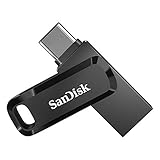
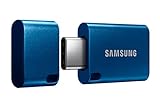


| Product | Best for | Key spec taken from the product title |
|---|---|---|
| Lexar D40E 128GB | Everyday USB-C and USB-A use | Dual USB 3.2 Gen 1; metal housing; swivel design |
| Lexar D40E 64GB | Light document carrying | Same dual-connector design in 64GB |
| 128GB 2-Pack USB-C and USB-A | Sharing or backups | Two 128GB drives; dual connectors |
| SanDisk Ultra Dual Drive Go 64GB | Phones and tablets | Up to 300MB/s read; automatic backup |
| Samsung Type-C 256GB | Large files on USB-C | Up to 400MB/s; waterproof |
| SanDisk Ultra Dual Drive Go 128GB | Fast mid-size carrying | Up to 400MB/s read; USB 3.2 Gen 1 |
| Lexar D40E 256GB | Big libraries on a stick | 256GB; dual USB 3.2 Gen 1 |
| Samsung Type-C 128GB | USB-C laptops | Up to 400MB/s; 4GB in 15 seconds |
| SanDisk Ultra Dual Drive 128GB | Retractable connectors | Up to 150MB/s; USB 3.1 Gen 1 |
How to Choose
Connector type
Check which ports you have before you check anything else. A dual drive includes both USB-C and USB-A ends, which covers a phone, a modern laptop and an older desktop with a single stick. A Type-C-only drive such as the Samsung models needs a USB-C port or an adapter on a desktop. Thin laptops often have only USB-C, while many gaming desktops still keep plenty of USB-A on the rear panel.
Capacity tiers
Sixty-four gigabytes covers documents, drivers and a Windows installer. One hundred twenty-eight suits game saves, mod packs and a few large videos. Two hundred fifty-six gigabytes works as a portable library for modded game folders or backups. Because flash drives slow down as they fill, buy one tier above what you plan to store if you move big files often.
Speed claims and interface
USB 3.2 Gen 1 and USB 3.1 Gen 1 both describe the same 5Gbps interface, so the real difference is the controller and flash inside. Titles quote read speeds, such as 150, 300 or 400MB/s, but those are best-case figures that apply to reading and not necessarily to writing. If you write large files often, expect lower numbers, and treat a missing speed figure as a reason to read the maker page.
Build quality and where budget models cut corners
A metal housing and a swivel cap resist wear better than a bare plastic sleeve, and retractable connectors avoid a loose cap you can lose. Budget drives often skip water resistance, have slower write speeds and lack backup software. An unbranded two-pack with no named controller or speed figure is the most likely to disappoint on a large transfer, so keep it for light jobs.
The 9 Best Options
Lexar D40E 128GB (Champagne Silver or Titanium Grey)
A dual USB 3.2 Gen 1 drive with a metal body and a swivel design, offered in two colors. It suits owners of a USB-C laptop who also have a USB-A desktop and want a single stick that plugs into both without an adapter.
- Type-C and USB-A connectors on one drive
- Metal housing with a swivel design that protects the connector
- Trade-off: the title does not state read or write speeds
It is a mid-range pick that suits everyday moves between machines, and the two finishes let you pick one that matches a laptop. Skip it if you need a quoted speed figure to compare drives. Check the maker page for write speeds if you plan to copy big folders often.
Lexar D40E 64GB
The smaller sibling of the D40E line, with the same dual connectors and metal swivel build. It fits documents, installers, school files and a few photos for someone who does not carry large game folders.
- Dual USB 3.2 Gen 1 and Type-C support
- Metal housing
- Trade-off: 64GB fills quickly with game or video files
It is a budget-tier choice for light carrying, and a sensible spare in a desk drawer. Skip it if you move large files, mod packs or long recordings.
128GB 2-Pack USB-C and USB-A
Two 128GB drives with USB-C and USB-A ends, sold as a pair in black and blue. It suits a household that wants one stick for each person, or one stick for daily use and one kept aside for backups.
- Two drives in a single package for sharing
- Dual connectors on each stick
- Trade-off: the title gives no brand-level speed or controller details
It sits in the value tier, and the two colors make it easy to tell the sticks apart. Skip it if you rely on a drive for frequent large transfers. As with any unbranded pair, copy a sample folder back and forth once before trusting it with anything important.
SanDisk Ultra Dual Drive Go 64GB
A reversible USB-C and USB-A drive with read speeds up to 300MB/s listed. It targets smartphones, tablets and Macs, and the title mentions automatic backup, which helps people who forget to copy photos off a phone.
- Up to 300MB/s read speed
- Reversible connectors with USB 3.2 Gen 1
- Trade-off: 64GB limits it to small libraries
It lands in the mid-range tier and fits a phone-first routine. Skip it if you want more than 64GB of room.
Samsung Type-C 256GB
A Type-C drive in a 256GB capacity with up to 400MB/s listed speed and waterproof wording. It suits USB-C laptops and phones where capacity matters and you rarely plug into older USB-A ports.
- USB 3.2 Gen 1 with up to 400MB/s listed
- 4GB transfers in about 15 seconds, according to the title
- Trade-off: Type-C only, so USB-A desktops need an adapter
It sits in the premium tier because of its capacity. Skip it if your main machine is a USB-A desktop.
SanDisk Ultra Dual Drive Go 128GB
The 128GB version of the Go line, with read speeds up to 400MB/s and reversible USB-C and USB-A connectors. A flexible choice for mixed-device households that want one drive to follow them everywhere.
- Up to 400MB/s read speed
- Reversible connectors and automatic backup
- Trade-off: the quoted speed applies to reading, not writing
It is a mid-range pick with the most balanced list of features here. Skip it if you want a metal body.
Lexar D40E 256GB
The largest Lexar dual-connector drive here, with the same metal swivel body. It suits users who want a portable library for game folders, mod collections or video footage and still need both connector types.
- 256GB capacity
- Dual USB 3.2 Gen 1 and Type-C
- Trade-off: no quoted speed in the title
It sits in the upper-mid tier and works as a single-stick backup of a whole project folder. Skip it if you want a stated read speed. Anyone building a bootable installer plus a spare folder of drivers will find the extra space useful, because the stick can hold several operating system images at once.
Samsung Type-C 128GB
The 128GB Type-C Samsung drive, with up to 400MB/s listed and waterproof wording. It suits USB-C laptops and phones where a smaller capacity is enough and a quick transfer matters more than a second connector.
- Up to 400MB/s listed speed
- Waterproof wording in the title
- Trade-off: Type-C only
It is a mid-range choice for a streamlined kit. Skip it if you need a USB-A end for a desktop tower. The waterproof wording is a bonus for a drive that lives in a pocket or a gear bag, though it is no substitute for a second backup copy.
SanDisk Ultra Dual Drive 128GB
A retractable dual-connector drive with up to 150MB/s listed, USB 3.1 Gen 1 and a gray and silver finish. It suits those who dislike loose caps and want the connector hidden when it is not in use.
- Retractable connectors, so there is no cap to lose
- Automatic backup feature mentioned
- Trade-off: the slowest quoted speed of the SanDisk drives
It is a mid-range pick for simple everyday transfers. Skip it if you want higher quoted speeds. Buyers who copy mostly documents and photos will rarely notice the difference between 150 and 400MB/s on small files.
Which One Fits Your Situation
You move between a USB-A desktop and a USB-C laptop
Choose a dual drive such as the Lexar D40E 128GB or the SanDisk Ultra Dual Drive Go 128GB. Both include the two connector types, so one stick covers a gaming desktop at home and a thin laptop on the go.
You carry large game folders or footage
The Samsung Type-C 256GB and the Lexar D40E 256GB offer the most capacity, with the Samsung adding a listed 400MB/s read figure for USB-C setups.
You only need a light stick
The Lexar D40E 64GB or the SanDisk Ultra Dual Drive Go 64GB keeps the cost down while still giving you both connectors for documents and installers.
You share drives with others
The 128GB 2-Pack gives you two drives for one purchase, which is handy for a roommate, a family member or a labeled backup copy.
Common Mistakes
- Buying a Type-C-only drive for a USB-A desktop and then needing an adapter
- Treating quoted read speeds as write speeds for large copies
- Filling a drive to the brim, which slows later transfers
- Skipping safe removal and risking corrupted files
- Keeping the only copy of important files on a flash drive
Related guides
- Aio Liquid Coolers For High Performance Gaming
- How To Lower Input Delay In Competitive Shooters
- Wireless Gaming Headsets Under 100 For Pc
Frequently Asked Questions
Is USB 3.2 Gen 1 the same as USB 3.0?
Yes, it is the same 5Gbps interface under a newer name, as is USB 3.1 Gen 1. The labels differ, but the raw bandwidth is identical.
Can I boot a PC from these drives?
Most flash drives can hold a bootable installer, but check your motherboard boot settings and use a tool that writes the installer correctly.
Are dual drives slower than single-connector ones?
Not by design. Speed depends on the controller and flash chips, so compare the quoted figures and capacity rather than the connector count.
How much capacity do I need?
Pick 64GB for documents and small installers, 128GB for game saves and mixed media, and 256GB if you want a portable backup of a larger folder.















