Buying a Windows 10 ultrabook now is a deliberate decision, not a default one. Microsoft ended support for Windows 10 in October 2025, so a laptop that ships with it no longer receives security updates through the normal channel. The purchase can still make sense if your work software is validated on Windows 10, or if the hardware can move up to Windows 11 when you are ready. It makes little sense if you expect years of updates from a system that no longer gets them.
This guide is written for remote workers whose employers still standardise on Windows 10, students who need a light machine for documents and classes, and travellers who want thin hardware with a clear path forward. Every pick comes from Amazon US listings whose details name Windows 10 or Windows 10 Pro for the exact configuration on sale, and the specs quoted are taken from those listing names and detail fields rather than from other versions of the same model.
Quick Picks
As an Amazon Associate we earn from qualifying purchases
| Product | Best for | Key spec from title |
|---|---|---|
| HP Spectre x360 2-in-1 14 | Heavy multitasking and meetings on a convertible OLED screen | Intel Core Ultra 7 155H, 32GB memory, 2TB SSD |
| Dell XPS 13 9310 2-in-1 | Presenting and annotating with the screen folded back | Core i7-1165G7, 32GB memory, 13.4-inch touchscreen |
| ASUS ZenBook 13 UX325EA-ES71 | All-day carrying with OLED contrast in a 13.3-inch frame | Core i7-1165G7, 13.3-inch OLED Full HD display |
| Dell XPS 13 9310 (Windows 10 Pro) | Office rules that require Pro encryption and management | Core i7-1185G7, 16GB memory, Windows 10 Pro |
How to Choose
Windows 11 Upgrade Path and TPM Checks
Support for Windows 10 ended in October 2025, so the first question is whether the machine can move to Windows 11. Check three things on the listing and again on the delivered unit: a supported processor, TPM 2.0, and Secure Boot. On the laptop itself, open Settings, then Update and Security, then Windows Update to read the eligibility message, and run Microsoft’s PC Health Check app for a second opinion. Know the way back before you upgrade: within ten days, Settings, Update and Security, Recovery offers a go-back option; after that window, returning means a clean install, so back up first.
Processor and Memory for the Work
Processor and memory decide how long these machines stay useful. The Core Ultra 7 155H in the Spectre is a newer platform with sixteen cores, while the 11th generation Core i7 chips in the Dell and ASUS picks handle office work, browsing and calls without strain. Memory matters more day to day: 8GB covers documents and light browsing, 16GB is the comfortable middle for most workers, and 32GB suits virtual machines, large spreadsheets or dozens of open tabs. Ultrabook memory is soldered, so the figure on the listing is the figure you keep; there is no later upgrade.
Screen, Size and Weight for Travel
Screen and chassis decide how a laptop feels after a month of commuting. The 13.3 and 13.4 inch picks disappear into a small bag, while the 14 inch Spectre trades a little size for a larger canvas. OLED panels on the Spectre and ZenBook give deep contrast for documents and film, and the taller 1920 x 1200 panels on the XPS models show more of a page at once. If your days are full of calls, the built-in camera is the weak point of most thin laptops, so pairing one with one of the best webcams for Windows 10 lifts picture quality at your desk.
Seller and Configuration Checks on Older Stock
Windows 10 ultrabooks are now older stock, so the listing itself needs checking. Sellers group several configurations on one page, and the headline may describe a Windows 11 version while a different configuration ships with Windows 10, or the reverse. Open the product details for the exact combination in your basket and confirm the operating system field, the memory and the drive size before ordering. Check the condition wording too: know whether the unit is new, renewed or open-box, what the return window is, and whether the battery is covered, since batteries age even on a shelf.
The 4 Best Options
HP Spectre x360 2-in-1 14 (Windows 10 Home)

This is the pick for buyers who want current hardware and a long runway. The listing pairs an Intel Core Ultra 7 155H with 32GB of LPDDR5 memory and a 2TB NVMe drive, a combination that shrugs off heavy browser sessions, large spreadsheets and back-to-back meetings. The 14-inch OLED touchscreen and 360-degree hinge let it switch between laptop, tent and tablet modes, and Intel Arc graphics cover everyday creative work. Because the Core Ultra platform comfortably clears the Windows 11 requirements, this is also the easiest machine here to move forward when your Windows 10 software finally allows it.
Specs
- Processor: Intel Core Ultra 7 155H, 16 cores, up to 4.8 GHz
- Memory: 32GB LPDDR5
- Storage: 2TB NVMe M.2 SSD
- Display: 14-inch OLED touchscreen, 2880 x 1800
- Graphics: Intel Arc Graphics
- Connectivity: Thunderbolt 4, Wi-Fi 6E
- OS: Windows 10 Home
Best for: Heavy multitaskers who want the strongest hardware and an OLED screen with a long upgrade runway.
Watch out for: Confirm the configuration in your basket is the 32GB and 2TB build with Windows 10 Home, since the Spectre line is also sold in other configurations and with Windows 11.
ASIN: B0DM576K21
Dell XPS 13 9310 2-in-1 (Windows 10 Home)
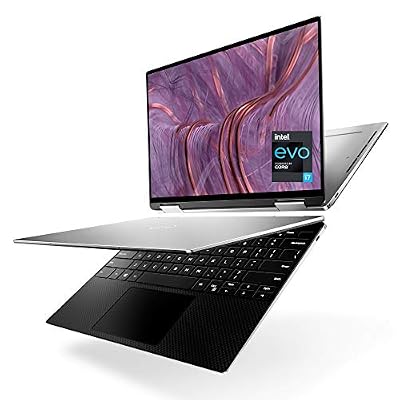
Dell’s convertible XPS 13 suits buyers who present, annotate or read in tablet mode as often as they type. This listing runs an 11th generation Intel Core i7-1165G7 with 32GB of LPDDR4x memory and a 512GB PCIe NVMe drive, so multitasking headroom is generous even though the storage is mid-sized. The 13.4-inch touchscreen uses a taller 1920 x 1200 format that shows more of a document than older 16:9 screens. Intel Iris Xe graphics are built in, and the 11th generation platform meets the Windows 11 requirements, leaving the upgrade open for later.
Specs
- Processor: Intel Core i7-1165G7, up to 4.7 GHz
- Memory: 32GB LPDDR4x at 4267MHz
- Storage: 512GB PCIe NVMe SSD
- Display: 13.4-inch touchscreen, 1920 x 1200
- Graphics: Intel Iris Xe Graphics
- OS: Windows 10 Home
Best for: Presenters and note-takers who want a convertible that flips into tablet mode.
Watch out for: Check the 512GB drive against your storage needs before ordering, because the memory and drive in this class of machine are not parts you can swap later.
ASIN: B08LKTW8WP
ASUS ZenBook 13 UX325EA-ES71 (Windows 10 Home)

The ZenBook 13 is the smallest machine here and the one built for people who carry a laptop all day. Its listing names an Intel Core i7-1165G7, 8GB of LPDDR4X memory and a 512GB solid state drive behind a 13.3-inch OLED Full HD NanoEdge display, whose deep blacks suit documents and film in equal measure. The touchpad hides a NumberPad for spreadsheet entry, and two Thunderbolt 4 ports plus Wi-Fi 6 keep docking simple. The honest limit is memory: 8GB fits office work and media, but heavy multitaskers should pick a 32GB model above.
Specs
- Processor: Intel Core i7-1165G7
- Memory: 8GB LPDDR4X
- Storage: 512GB SSD
- Display: 13.3-inch OLED Full HD NanoEdge
- Connectivity: Thunderbolt 4, Wi-Fi 6, NumberPad touchpad
- OS: Windows 10 Home
Best for: Frequent travellers who want OLED contrast in the smallest frame on this list.
Watch out for: The 8GB memory is fixed for the life of the machine, so be sure it matches your workload before you commit to this configuration.
ASIN: B082L4GNRB
Dell XPS 13 9310 (Windows 10 Pro)

This clamshell XPS 13 exists for one reason: it ships with Windows 10 Pro while the others run Home. The configuration pairs an Intel Core i7-1185G7 with 16GB of LPDDR4x memory and a 512GB drive behind a 13.4-inch FHD+ touchscreen. Pro brings BitLocker encryption, Remote Desktop hosting and group policy support, which matters where an employer’s rules or exam software are validated on Windows 10. The hardware satisfies the Windows 11 requirements, so the machine can be upgraded later without a hardware change, once your workplace allows the move.
Specs
- Processor: Intel Core i7-1185G7
- Memory: 16GB LPDDR4x at 4267MHz
- Storage: 512GB SSD
- Display: 13.4-inch FHD+ touchscreen
- Graphics: Intel Iris Xe Graphics
- OS: Windows 10 Pro
Best for: Professionals whose employer requires BitLocker, Remote Desktop hosting or group policy.
Watch out for: Confirm the configuration in your basket is the Pro edition, since this model family was sold in both Home and Pro editions on shared listing pages.
ASIN: B08ML2PW6W
Which One Fits Your Situation
Your Employer Still Standardises on Windows 10
Pick the Dell XPS 13 9310 with Windows 10 Pro. Pro gives you BitLocker, Remote Desktop hosting and group policy, and it keeps you compliant while workplace tools remain validated on Windows 10. When your employer approves Windows 11, the same hardware upgrades in place. Its 16GB of memory and 512GB drive cover a standard office load comfortably.
You Want One Laptop to Last for Years
Pick the HP Spectre x360 2-in-1 14. Its Core Ultra processor, 32GB of memory and 2TB drive give it the most headroom here, and the platform clears the Windows 11 requirements with room to spare. The OLED screen and convertible hinge keep it useful as your work changes. It is the safest long-term buy on this list.
You Commute or Fly Every Week
Pick the ASUS ZenBook 13. It is the smallest machine here, built for people who carry a laptop all day, and its OLED screen suits documents and film in equal measure. The NumberPad in the touchpad helps with expense sheets on the move. Accept the 8GB memory only if your travel work is documents, mail and browsing; otherwise take the Spectre.
Your Days Are Back-to-Back Video Calls
Pick one of the convertibles. The Dell XPS 13 9310 2-in-1 folds into tent mode for calls and carries 32GB of memory for the apps running behind them, while the HP Spectre x360 adds a bigger OLED screen and more storage. Either way, confirm the exact configuration names Windows 10 before you order.
Common Mistakes
- Assuming the headline operating system applies to every configuration on the page, when sellers group Windows 10 and Windows 11 versions under one listing.
- Buying an 8GB model for heavy multitasking, forgetting that ultrabook memory is soldered and cannot be added later.
- Skipping the Windows 11 eligibility check on the delivered unit until a work deadline depends on the upgrade going smoothly.
- Upgrading to Windows 11 on day one and missing the ten-day go-back window, after which returning to Windows 10 needs a clean install.
- Ignoring condition and battery wording on older stock, including whether the unit is new or renewed and what the return window covers.
Frequently Asked Questions
Is it safe to buy a Windows 10 laptop now that support has ended?
It can be reasonable with a plan. Support ended in October 2025, so Windows 10 no longer receives security updates through the normal channel. Every pick here meets the Windows 11 requirements, so you can upgrade the operating system on the same machine rather than replacing the laptop when your software allows it.
How do I confirm a specific listing really ships with Windows 10?
Read the operating system field in the product details for the exact configuration you are ordering, not the model family headline. Sellers often group Windows 10 and Windows 11 configurations on one page, so the edition named for your selected combination of processor, memory and storage is the one that counts.
What is the difference between Windows 10 Home and Windows 10 Pro?
Pro adds BitLocker drive encryption, Remote Desktop hosting, and management features such as group policy and domain join. Home covers most students and home workers comfortably. Choose Pro only if an employer policy or a specific tool requires it, as with the XPS 13 9310 Pro configuration in this guide.
Can these ultrabooks be upgraded to Windows 11 later?
Yes, based on the hardware named in their listings. The Core Ultra 7 and 11th generation Core i7 platforms include TPM 2.0 and Secure Boot support and appear on Microsoft’s supported processor lists. Verify on your own unit with the Windows Update screen or the PC Health Check app before relying on the upgrade for a deadline.