Buying a gaming keyboard for a Windows PC is really a decision about feel and control. You are choosing how every key press registers during a match, how much desk the board takes from your mouse, and how much of its setup lives inside a Windows app instead of on the board itself. Those three choices interact, and getting one wrong is hard to undo after the box is open.
This guide serves competitive players who chase fast actuation, typists who share a desk between work and play, and compact-desk users who need mouse room more than a number pad. Every pick below was selected from its Amazon listing name and printed specifications, including switch type, layout, connection and software support.
Quick Picks
As an Amazon Associate we earn from qualifying purchases
| Product | Best for | Key spec from title |
|---|---|---|
| Razer BlackWidow V4 Pro | Macro-heavy games at a fixed desk | Razer Green mechanical switches with Command Dial |
| Corsair K70 RGB PRO | Fast linear play with profiles that travel | Cherry MX Speed RGB Silver switches |
| Logitech G PRO X TKL Lightspeed | Small desks and flexible wireless play | Lightspeed wireless tenkeyless design |
| HyperX Alloy Origins | Full-size typing and gaming with simple setup | HyperX Red linear switches, 104 keys |
| SteelSeries Apex Pro Gen 3 | Players who tune actuation per key | OmniPoint 3.0 HyperMagnetic adjustable switches |
How to Choose
Switch Type and Actuation Decide How a Press Feels
Switch feel shapes every input, so settle it before anything else. Linear switches travel smoothly with no bump, which suits rapid repeated movement keys. Tactile switches add a small bump you can feel without looking down, helpful for typing accuracy. Clicky switches add sound as well as feel, a real problem in shared rooms. Actuation distance matters too: the Corsair board below registers at 1.2 mm, so light touches count, while the SteelSeries board lets you set each key anywhere from 0.1 mm to 4.0 mm. Match the switch to your games and your room first.
Layout Size Decides How Much Mouse Room You Keep
A full-size board keeps a number pad, dedicated macro keys on some models, and a familiar spacing for office work. The trade is width: a wide board pushes your mouse hand further out, which can strain your shoulder during long sessions and cramp low-sensitivity aiming. A tenkeyless board drops the pad and pulls the mouse closer, which is why compact models dominate small desks. Measure your desk before ordering, count the space your mousepad actually needs, and be honest about whether you use a number pad weekly or only imagine using it.
The Maker App and Onboard Profiles Decide What Travels
Every board here types the moment Windows detects it, with no software involved. The maker’s Windows app is where macros, per-key lighting and deeper settings live: Synapse for Razer, iCUE for Corsair, G Hub for Logitech, NGENUITY for HyperX and GG for SteelSeries. The key question is what survives without that app. Corsair stores up to 50 profiles on the board itself, so layouts follow you between PCs. Other boards keep only basic lighting or settings onboard. Set up on your main PC first: install the app, apply firmware updates with the cable connected, save a named profile to the board where supported, then close the app and confirm the macro still runs.
Wired or Wireless Decides Latency Worries and Desk Clutter
A wired connection is the simplest path: one cable, no charging, no pairing, and no battery anxiety before a long session. It suits a fixed desk where the board never moves. Wireless earns its place when the board travels between rooms or the desk doubles as a workspace that must clear quickly. The Logitech pick below connects by Lightspeed adapter, Bluetooth or USB-C cable, so it can stay plugged in at home and pair to a laptop elsewhere. Whichever route you choose, check what the cable or adapter situation looks like on your own desk, because a board that fights your setup gets replaced, not enjoyed.
The 5 Best Options
Razer BlackWidow V4 Pro
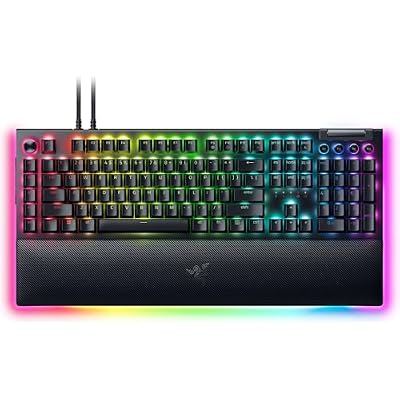
This full-size wired board suits players who build their game around macros and want audible confirmation of every press. Razer Green switches are tactile and clicky, so each input registers with a bump and a snap that typists often enjoy. Dedicated macro keys and the Command Dial give extra controls without layering shortcuts onto standard keys, and the magnetic wrist rest supports long sessions at a fixed desk. The honest catch is noise: in a shared room or on voice chat, the click will be heard. Choose it when macro depth and feedback matter more than quiet.
Specs
- Switch: Razer Green mechanical, tactile and clicky
- Layout: Full-size, wired USB
- Keycaps: Doubleshot ABS
- Lighting: Razer Chroma RGB, per-key
- App: Razer Synapse on Windows
- Extras: Command Dial, macro keys, magnetic wrist rest
Best for: Macro-heavy gaming and typing at a permanent desk
Watch out for: Clicky switches are loud, so check your room and microphone setup before buying
ASIN: B0BT3VC25K
Corsair K70 RGB PRO

Fast-paced players who move between PCs will get the most from this board. Its Cherry MX Speed RGB Silver switches are linear with a listed 1.2 mm actuation distance, so presses register early and repeated inputs feel even. Corsair’s iCUE app handles per-key lighting, macros and key assignments, and the board stores up to 50 profiles onboard, which means a tuned layout can travel to another Windows machine without installing anything. A tournament switch locks down macros and lighting during competition. The short actuation takes adjustment, because resting fingers can trigger keys while you learn the lighter touch.
Specs
- Switch: Cherry MX Speed RGB Silver, linear, 1.2 mm actuation
- Layout: Full-size, wired USB Type-C
- Polling: Up to 8,000 Hz with Corsair AXON
- Keycaps: PBT double-shot PRO
- App: Corsair iCUE on Windows
- Onboard storage: Up to 50 profiles
Best for: Fast linear play with profiles that move between Windows PCs
Watch out for: The 1.2 mm actuation is easy to trigger by accident until you adjust to it
ASIN: B09NCLR4M6
Logitech G PRO X TKL Lightspeed

Compact-desk players who need mouse room should look here first. Dropping the number pad pulls your mouse hand closer, and the GX Brown tactile switches give clear feedback for typing without the sharp click of the Razer board. Connection flexibility is the headline: Lightspeed wireless through the USB adapter for play, Bluetooth for a second machine, and USB-C wired mode that also charges. Logitech G Hub handles LIGHTSYNC lighting, assignments and macros on Windows, while onboard lighting profiles carry a saved look between machines. Pick it when one board must serve a gaming desk and a laptop without a cable swap.
Specs
- Switch: GX Brown tactile
- Layout: Tenkeyless
- Connection: Lightspeed wireless, Bluetooth, USB-C wired
- Keycaps: Double-shot PBT
- Lighting: LIGHTSYNC RGB
- App: Logitech G Hub on Windows
Best for: Small desks, wide mouse movement and one board across two machines
Watch out for: There is no number pad, so spreadsheet-heavy work loses its fastest input method
ASIN: B0BQBSH6NQ
HyperX Alloy Origins

If you want a full-size board that keeps setup simple, this is the straightforward pick. HyperX Red linear switches press smoothly with no bump, suiting repeated movement keys and fast, even typing, and the 104-key layout keeps the number pad for work between sessions. A detachable USB-C cable makes the board easier to pack or reroute than a fixed lead. Customisation runs through HyperX NGENUITY on Windows, which controls lighting, macros and Game Mode; the listing describes that control as software-based, so plan on installing the app to use those features. Without it, you still have a complete, planted-feeling keyboard.
Specs
- Switch: HyperX Red, linear
- Layout: Full-size, 104 keys
- Connection: Wired, detachable USB-C
- Dimensions: 17.4 x 5.2 x 1.5 inches
- Lighting: Per-key RGB LED
- App: HyperX NGENUITY on Windows
Best for: Full-size typing and gaming with the least setup fuss
Watch out for: Lighting, macros and Game Mode need the NGENUITY app, so confirm it suits your PC
ASIN: B07W86N3JV
SteelSeries Apex Pro Gen 3

Players who want to tune how deep a press must go before it counts should begin here. OmniPoint 3.0 HyperMagnetic switches allow actuation from 0.1 mm to 4.0 mm across 40 levels, set per key in the SteelSeries GG app, so movement keys can fire on a shallow touch while ability keys sit deeper to prevent slips. Rapid Trigger resets a key as it rises, helping repeated strafing inputs. An OLED display and PBT keycaps round out a full-size board aimed at tinkerers. If you never plan to open the tuning screens, simpler boards above deliver the same everyday typing with less setup.
Specs
- Switch: OmniPoint 3.0 HyperMagnetic
- Actuation: Adjustable, 0.1 mm to 4.0 mm, 40 levels
- Layout: Full-size, model 64660
- Keycaps: PBT
- Display: OLED smart display
- App: SteelSeries GG on Windows
Best for: Players who tune actuation per key for competitive play
Watch out for: Actuation tuning lives in the GG app, so finish setup on your main PC first
ASIN: B0D4RKYZJ5
Which One Fits Your Situation
You Play Fast Shooters and Move Between Two PCs
Choose the Corsair K70 RGB PRO. Its linear switches register at a listed 1.2 mm, which rewards quick, light inputs, and up to 50 onboard profiles mean your bindings and lighting are already set when you sit down at the second machine. No app installation stands between plugging in and playing.
Your Desk Is Small and Your Mouse Needs Room
Choose the Logitech G PRO X TKL Lightspeed. Removing the number pad frees the space your mouse arm actually uses, and the three connection modes let the same board cover a desktop and a laptop. Our wider look at machines that pair well with a compact setup, the best Windows gaming laptops, shows how much desk a tenkeyless layout can reclaim.
You Type All Day and Game at Night
Choose the HyperX Alloy Origins if you want one full-size board with a number pad and calm linear keys, or the Razer BlackWidow V4 Pro if you prefer clicky feedback and macro keys. Both type well for work; the deciding factor is noise, because the Razer board will be heard through a thin wall.
You Want Every Key Tuned to a Different Depth
Choose the SteelSeries Apex Pro Gen 3. Per-key actuation across 40 levels lets movement keys react almost instantly while less-used keys demand a deliberate press, and Rapid Trigger sharpens repeated inputs. Set aside your first evening for the GG app, test each setting in a practice match, and adjust in small steps, because the tuning is the entire point of this board.
Common Mistakes
- Buying a clicky board for a shared room, then discovering the sound carries through voice chat and thin walls.
- Choosing full-size out of habit, then losing mouse room and playing with a stretched, uncomfortable arm angle.
- Setting up macros in the maker app but never saving a profile to the board, so nothing works on a second PC.
- Ignoring keycap material, even though ABS and PBT caps age differently under daily typing and gaming.
- Chasing the highest polling figure while leaving actuation, layout and switch feel undecided, which matter far more.
Frequently Asked Questions
Do these keyboards need the maker app to work on Windows?
No. Each board types as a standard keyboard as soon as Windows detects it, before any software is installed. The app is only required for extras: macros, detailed per-key lighting, profile editing and, on the SteelSeries board, actuation changes. Install it on your main PC, save what the board supports onboard, and everyday typing never depends on it again.
What is the difference between onboard memory and app profiles?
An app profile lives in software on one PC and works only while that app is present and running. A profile saved to onboard memory travels inside the keyboard itself, so your bindings and lighting appear on another Windows PC with nothing installed. Boards differ widely here, so check the listing for onboard profile counts before assuming your setup will travel.
Which switch type is quietest for a shared room?
Linear switches are the calmest choice in this lineup, because they have neither a click mechanism nor a tactile bump to announce each press. The Corsair and HyperX boards both use linear switches. Tactile Brown switches sit in the middle, while the Razer Green switches are deliberately clicky and will be heard by anyone nearby.
Should I choose full-size or tenkeyless for gaming?
Choose full-size if you genuinely use a number pad for work, data entry or extra game bindings every week. Choose tenkeyless if desk space and mouse room matter more, because the narrower board lets your mouse sit closer to your body. Most players who switch for space reasons do not miss the pad during games.