A server fan is not bought for airflow alone. Inside a rack chassis, air gets dragged through a perforated door, a dust filter and a wall of hot drives, and any fan that cannot hold pressure against that stack simply stops moving air. The real decision is how much pressure and speed your hardware genuinely needs, weighed against a noise level that, at full speed, nobody can work beside for long.
This guide serves home lab owners cooling a cupboard rack, small office admins keeping an always-on machine alive, and workstation builders whose cases borrow server mounts. Every pick was chosen from its Amazon listing name and stated specs — frame size, speed range, pressure figure, bearing type — rather than from brand reputation. Readers cooling a quiet desktop tower instead are better served by our guide to the best PC case fans.
Quick Picks
As an Amazon Associate we earn from qualifying purchases
| Product | Best for | Key spec from title |
|---|---|---|
| Noctua NF-F12 industrialPPC-3000 PWM | Dense racks that run hot around the clock | 3000 RPM, 7.63 mm H2O static pressure |
| Noctua NF-F12 industrialPPC-2000 PWM | Workstations and home labs in rooms with people | 2000 RPM, 29.7 dB(A) at full speed |
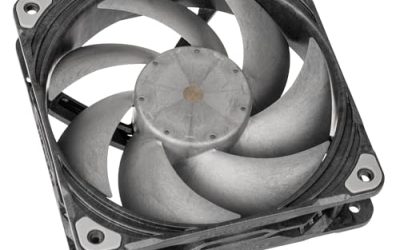
| Wathai 12038 PWM High Airflow Fan | Chassis where brute force beats quiet running | 5300 RPM, 230 CFM free-air rating |
| GDSTIME 92mm x 38mm PWM Fan | 92 mm mounts in compact rack cases | 5800 RPM, 118.8 CFM free-air rating |
How to Choose
Size and thickness in the chassis
Start with a ruler, not a spec sheet. Server cases commonly take 80, 92 or 120 mm fans, and the mounting hole spacing has to match the frame exactly. Depth matters just as much: desktop fans are usually 25 mm thick, while true server fans often use 38 mm frames that need extra clearance behind the mount. A 120 x 120 x 38 mm fan will not fit where a slim fan sat before, and forcing it can foul cables or drive cages. Measure the old fan, check the gap behind it, and only then compare speed figures.
Static pressure vs free airflow
Airflow ratings are measured with nothing in front of the fan, which never happens inside a server. Perforated doors, filters and packed drive bays all resist the airstream, and static pressure — quoted in mm H2O — is the figure that shows how much flow survives that resistance. A fan boasting huge free-air flow but weak pressure can lose most of its output in a dense 2U chassis. For open workstation cases, airflow matters more; for racks, pressure wins. Compare both numbers, and weight pressure higher the tighter the chassis gets.
PWM, tach wiring and header current
A 4-pin PWM fan gives the board two things a voltage-controlled fan cannot: precise speed control and a tachometer signal that reports actual RPM back. That tach wire lets firmware raise an alarm or shut the machine down when a fan stalls, which is essential in an unattended rack. Current draw is the trap. One high-speed fan can pull more than a standard motherboard header should supply, and stacking several on one header invites failure. Check each fan’s wattage against your board manual, and feed big arrays from a powered hub or server board header instead.
Maker figures vs installed reality
Treat every headline number as a best case measured on a test bench. Airflow is quoted in free air, noise at a set distance in a quiet room, and neither survives contact with a real chassis. Behind a grille and a row of drives, delivered airflow drops well short of the printed figure, while noise often rises as air forces through perforations. Use maker figures to rank fans against each other, not as promises. Buy enough pressure headroom that the fan rarely needs full speed, because a fast fan throttled back is quieter and longer-lived than a weak fan running flat out.
The 4 Best Options
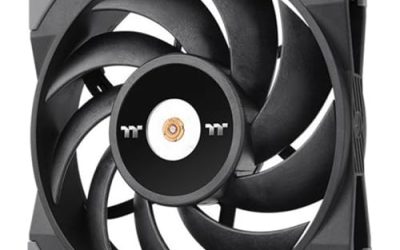
Noctua NF-F12 industrialPPC-3000 PWM

This is the heavy-duty rebuild of Noctua’s focused-flow 120 mm design, made for machines that cannot stop. The frame and impeller use fibre-glass reinforced polyamide, a three-phase motor is driven by Noctua’s own PWM controller chip, and a varnish coating brings an IP52 ingress protection grade. At 3000 RPM it posts the strongest pressure figure in this guide, which suits dense rack chassis where air must be pushed through drive cages and filters. The trade-off is noise: at full speed it is plainly audible through a closed door, so it belongs on a PWM curve in any room people enter.
Specs
- Size: 120 x 120 x 25 mm, mounting holes 105 x 105 mm
- Connector: 4-pin PWM with tachometer signal
- Speed range: 750 to 3000 RPM via PWM
- Airflow: 186.7 m³/h free air
- Static pressure: 7.63 mm H2O
- Noise at full speed: 43.5 dB(A)
- Bearing: SSO2
- Ingress protection: IP52, MTTF over 150,000 hours, 6-year maker warranty
Best for: Dense 120 mm rack chassis that run hot and unattended around the clock.
Watch out for: Full-speed noise of 43.5 dB(A) — plan a PWM curve before installing it near people.
ASIN: B00KFCRATC
Noctua NF-F12 industrialPPC-2000 PWM
The 2000 RPM sibling keeps everything that makes the industrial line durable — reinforced polyamide build, three-phase motor, SSO2 bearing, IP52 protection — and simply caps the top speed lower. That single change transforms its character. Pressure still doubles what a typical desktop fan offers, enough for filters and drive cages, yet full-speed noise falls to a level an office can tolerate. Its PWM range also reaches down to roughly 450 RPM, so a sensible curve keeps it near silent at idle and lets it climb only under load. Modest power draw makes multi-fan arrays easier on headers too.
Specs
- Size: 120 x 120 x 25 mm, mounting holes 105 x 105 mm
- Connector: 4-pin PWM with tachometer signal
- Speed range: 450 to 2000 RPM via PWM
- Airflow: 121.8 m³/h free air
- Static pressure: 3.94 mm H2O
- Noise at full speed: 29.7 dB(A)
- Bearing: SSO2
- Max power: 1.2 W, MTTF over 150,000 hours, 6-year maker warranty
Best for: Workstations and home lab racks that share a room with people.
Watch out for: Lower pressure headroom than the 3000 RPM model — very dense chassis may still run warm.
ASIN: B00KFCR5BA
Wathai 12038 PWM High Airflow Fan

Where the Noctua pair are 25 mm thick, this Wathai stretches to a 38 mm deep frame, and that depth is the whole point. Deep frames on dual ball bearings are the pattern genuine server hardware uses, because they sustain pressure against stacked drives and tight grilles hour after hour. The listing rates it at 5300 RPM with a headline 230 CFM in free air, fed through a 4-pin PWM lead with a speed signal for monitoring. Nothing about it pretends to be quiet or frugal; it is equipment-room hardware for chassis where temperatures, not ears, set the requirements.
Specs
- Size: 120 x 120 x 38 mm
- Connector: 4-pin PWM with speed signal
- Maximum speed: 5300 RPM at 12 V DC
- Airflow: 230 CFM free air per listing headline
- Noise at full speed: 58 dB
- Max power: 22.8 W
- Bearing: dual ball, rated for continuous duty
Best for: Dense 120 mm chassis in a separate room, where maximum pressure matters most.
Watch out for: The 22.8 W draw can exceed a single motherboard header — use a powered hub or server board header.
ASIN: B07SGWNV5J
GDSTIME 92mm x 38mm PWM Fan

Plenty of rackmount cases and compact workstations mount 92 mm fans, and this GDSTIME applies the same deep-frame recipe at that smaller size. Its 92 x 92 x 38 mm body carries a brushless motor on dual ball bearings, spins to 5800 RPM, and the maker claims 118.8 CFM of free-air flow with high static pressure. The listing is blunt that it is not designed for silent running, quoting up to 53 dBA. The 4-pin PWM lead lets a board tie speed to temperature and read the tach signal back, so a stalled fan in an unattended machine gets noticed.
Specs
- Size: 92 x 92 x 38 mm
- Connector: 4-pin PWM
- Maximum speed: 5800 RPM at 12 V DC
- Airflow: 118.8 CFM free air, high static pressure design
- Noise at full speed: 53 dBA
- Bearing: dual ball
- Motor: brushless
Best for: Compact rack cases and workstations built around 92 mm mounts.
Watch out for: The 38 mm depth needs more clearance than the 25 mm fans these mounts often hold — measure first.
ASIN: B0B1V5L4WB
Which One Fits Your Situation
A rack in a separate room or closet
Noise stops being the deciding factor once the machine lives behind a closed door. Pick the Wathai 12038 for 120 mm mounts: its deep frame and dual ball bearings deliver the strongest sustained pressure here, and its roar stays in the room with the hardware. Just feed it from a powered hub, because its draw is more than a desktop header should carry alone.
A workstation under your desk
You need pressure for drive cages and filters without a soundtrack. The NF-F12 industrialPPC-2000 PWM is the pick: it keeps the industrial build and monitoring of its faster sibling, drops full-speed noise to 29.7 dB(A), and idles down near 450 RPM on a curve. It is the only fan in this guide that can share an office all day.
A compact case with 92 mm mounts
Smaller mounts rule out the 120 mm options entirely. The GDSTIME 92mm x 38mm is built for exactly this hole pattern, with server-style depth, ball bearings and a tach signal for failure alerts. Confirm the chassis swallows a 38 mm frame before ordering, since many compact cases ship with slimmer fans and tight cable runs behind the mount.
A home lab that must never overheat unattended
Monitoring matters as much as airflow when nobody is watching the machine. Choose the NF-F12 industrialPPC-3000 PWM: its tach signal lets the board flag a stall, its pressure headroom covers clogged filters between cleanings, and the six-year maker warranty suits hardware expected to run for years. Set the curve so full speed stays a reserve, not a routine.
Common Mistakes
- Buying on free-air CFM alone, then watching a low-pressure fan move almost nothing through a perforated rack door.
- Plugging a high-draw fan like the Wathai into a standard motherboard header and overloading it.
- Assuming a 38 mm deep server fan fits a mount that held a 25 mm desktop fan, without measuring clearance.
- Running server fans at full speed permanently instead of setting a PWM curve, then blaming the hardware for the noise.
- Skipping the tachometer connection on an unattended machine, so a failed fan goes unnoticed until drives overheat.
Frequently Asked Questions
Can I run a server fan on a normal desktop motherboard?
Usually yes, provided the mount fits and the header can supply the current. Use a 4-pin PWM header, set a fan curve in firmware, and add up the draw when fitting several fans. High-draw models such as the Wathai are safer on a powered hub or a server board header than on a desktop board.
Why does static pressure matter more than airflow in a rack?
A rack forces air through perforated doors, filters and tightly packed drives, and every layer resists the flow. A fan with generous free-air airflow but weak pressure loses most of its output against that resistance. A pressure-focused fan keeps pushing air through the stack, which is why mm H2O is the number to compare for dense chassis.
How loud are these fans in a home office?
At full speed, most are far too loud for a desk in the same room: maker figures here run from 43.5 dB(A) up to 58 dB. The 2000 RPM Noctua, at 29.7 dB(A), is the exception that can live near people. Any PWM model also becomes tolerable once a curve keeps everyday speeds low.
What happens if a server fan fails while the machine is unattended?
A board reading the tachometer signal can spot a stopped fan and raise an alert, throttle workloads or shut the system down before temperatures climb. That monitoring is a core reason to choose 4-pin PWM fans with a speed signal for any machine that runs without supervision.