

- Top Pick: Xbox Wireless Controller (Carbon Black)
- Runner-up: Apple Mac mini with M4 Chip (16GB Unified Memory, 512GB SSD)
- Also consider: Samsung T7 Portable SSD 1TB
For most of the iPhone’s life, emulation lived outside Apple’s walls: jailbreaks, enterprise certificates and computer-tethered sideloading were the only routes. That changed in April 2024, when Apple rewrote its App Review Guidelines and let retro console emulators into the App Store worldwide. An iPhone or iPad is now a legitimate emulation machine, no workarounds required.
As an Amazon Associate, we earn from qualifying purchases.
Legitimate, but bounded. The apps that arrived are genuinely good, yet an entire tier of systems is missing, for a single technical reason: how iOS lets apps run code. This guide maps what Apple allows, which apps to install, where the ceiling sits, and the routes around it. Throughout, games mean files you dumped from cartridges and discs you own.
This article contains affiliate links, and we may earn a commission if you buy through them.
Quick Answer
Emulation on iPhone and iPad is App Store legal since April 2024: Delta covers systems from the NES to the DS, RetroArch spans systems through its cores, and PPSSPP handles PSP. The hard limit is just-in-time compilation, which Apple does not grant App Store apps, so GameCube, Wii and PS2 emulators stay off the store.
The Rule Change: Guideline 4.7
The door opened on 5 April 2024, when Apple revised App Review Guideline 4.7, the section covering software an app may load after review. The added sentence is short: retro game console emulator apps can offer to download games. The change applied worldwide, and an August 2024 revision extended the same permission to PC emulator apps.
Two conditions shape everything that followed. First, the developer is responsible for all software offered in the app, including ensuring it complies with the guidelines and all applicable laws. In practice emulators ship empty: no games are bundled, and in-app downloads must be content the developer has the rights to offer. Second, guideline 4.7 covers retro consoles, a word Apple has never defined by a list, so each app is judged at review.
The Apps That Followed
Delta, by Riley Testut, arrived on 17 April 2024 and became the proof of concept. It emulates the NES, SNES, Nintendo 64, Game Boy, Game Boy Color, Game Boy Advance and Nintendo DS in one polished app, with save states and cheat support, and it is free.
RetroArch followed on 15 May 2024, free and ad-free: a frontend running separate libretro cores, from the Atari 2600 through the PlayStation and PSP. One iOS catch follows from Apple’s signing rules: the App Store build bundles its cores with the app rather than downloading new ones at runtime, so its catalogue is broad but fixed between updates.
PPSSPP, the PSP emulator, was approved the same day. Creator Henrik Rydgård’s release post is the most candid document in this guide, because his app shows how a good emulator lives within the JIT rule rather than being stopped by it.
The JIT Ceiling
Fast emulators for newer consoles do not interpret code instruction by instruction. They use just-in-time compilation, translating the console’s code into native machine code and caching the result. iOS does not let App Store apps do this: an app may only execute code Apple signed, and new code generated at runtime is reserved for Apple’s own software, with Safari and, in Europe, alternative browsers as the exceptions.
The Dolphin team’s iOS developer, OatmealDome, stated the consequence plainly: DolphiniOS will not come to the App Store, because GameCube and Wii emulation needs JIT to run at usable speed and Apple does not allow it. The team even filed a Digital Markets Act interoperability request for JIT access, and Apple rejected it. Footage the developer shared of Dolphin on its interpreter alone shows demanding games crawling far below full speed.
PPSSPP shows the other outcome. Rydgård’s announcement lists the JIT recompiler as not supported, then explains the workaround: an efficient IR-based caching interpreter, translating code into an intermediate form it can cache. Because the PSP’s processor is relatively cheap to emulate, he notes iOS devices run nearly all PSP games at full speed anyway. The pattern generalises: systems through the PS1, DS and PSP generations interpret fast enough on modern Apple chips, while GameCube, Wii, PS2 and everything heavier is built around a JIT. Those emulators are absent from the App Store, and RetroArch’s iOS build omits its Dolphin and Dreamcast cores.
Sideloading and the EU Route
Two routes exist outside the App Store, both narrower than they first appear. Classic AltStore, Testut’s long-running project, installs apps from your own computer using your Apple ID, and apps must be periodically refreshed to keep working. It is a documented, legitimate tool, but a chore by design: it works within Apple’s developer-signing rules rather than around them.
Inside the European Union, the Digital Markets Act forced a real alternative. Since iOS 17.4, Apple permits alternative app marketplaces in the EU, and AltStore PAL launched in April 2024 as the first, distributing Delta free of charge. Marketplace apps skip full App Review but still pass Apple’s Notarization, a baseline malware and integrity check. Crucially, the JIT restriction is a platform rule, not a store rule: marketplace apps get no JIT entitlement either, so the EU route widens distribution without raising the ceiling.
Your Games, Files and Storage
Every app above ships without games, so the workflow starts on a computer. You dump your own cartridges and discs there, then move the files across. Each emulator keeps its library in its own container, visible in the Files app under On My iPhone or On My iPad, and files copy in through Finder file sharing, iCloud Drive, or a USB drive on the iPad.
The honest limit is storage. No iPhone or iPad has a card slot, and the internal capacity you bought is the whole library budget, shared with photos, apps and the system itself. Cartridge-era games are tiny, but disc images are not. Keep the master copy of your dumps on a computer or external drive, and treat the phone as the portable subset, not the archive.
On the iPad, the bigger screen is a real advantage for the DS library in Delta, where two stacked screens stop being a compromise, and for text-heavy PSP and PS1 games. iPadOS also brings Stage Manager on supported models, keeping an emulator window alongside a guide window. It changes nothing about which systems run, but it makes the iPad the better couch machine.
Gear for an iPhone and iPad Setup
8BitDo Pro 2 Bluetooth Controller
The flexible pad for Apple devices: Apple documents Bluetooth controller pairing across iPhone and iPad, and this one also serves a Switch or PC.
Specs:
- Connectivity: Bluetooth, wired USB-C
- Sticks: Hall Effect analog sticks
- Compatibility: Switch, Windows, macOS, Android, Raspberry Pi, as listed by the maker
- Battery: built-in rechargeable pack, capacity not stated
- Extras: remappable back buttons, profile switching
Xbox Wireless Controller (Carbon Black)

The reference pad in Apple’s own support pages: it pairs over Bluetooth, and iOS offers per-controller button customisation under Settings, General, Game Controller.
Specs:
- Connectivity: Bluetooth, USB-C wired
- Controls: hybrid D-pad, dedicated Share button
- Audio: 3.5mm stereo headset jack
- Power: AA batteries
- Compatibility: Xbox, Windows, iOS and Android, as listed by the maker
Apple Mac mini with M4 Chip (16GB Unified Memory, 512GB SSD)
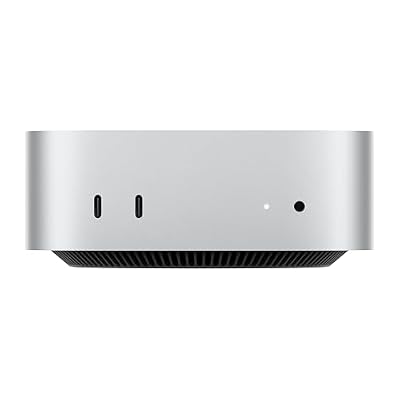
The dumping workstation: cartridges and discs are ripped on a computer, and a Mac mini does that job while doubling as a desktop emulation machine itself.
Specs:
- Chip: Apple M4, 10-core CPU (4 performance, 6 efficiency cores)
- Graphics: 10-core GPU, hardware-accelerated ray tracing
- Memory: 16GB unified memory, 120GB/s bandwidth
- Storage: 512GB SSD
- Networking: Gigabit Ethernet, Wi-Fi, Bluetooth
- Item model number: MU9E3LL/A
Samsung T7 Portable SSD 1TB

The archive drive for the library the phone cannot hold: master dumps live here, on the computer, and only the travelling subset goes onto the device.
Specs:
- Capacity: 1TB
- Interface: USB 3.2 Gen 2, USB-C
- Read speed: up to 1,050 MB/s, as rated by the maker
- Build: metal enclosure, drop resistant per the maker
- Item model number: MU-PC1T0T/AM
Anker 341 USB-C Hub (7-in-1)

The iPad’s wired bridge: one USB-C connection adds the ports a tablet lacks, so a flash drive of dumps, a wired controller or a display plugs straight in.
Specs:
- Ports: HDMI, USB-C data, 2 USB-A, SD and microSD card slots, USB-C power input
- Video: 4K HDMI output at 30Hz, as rated by the maker
- Charging: USB-C power-delivery pass-through
- Host connection: USB-C
- Item model number: A8346
How to Choose
Start with your library. If your games are Nintendo cartridges through the DS era, install Delta and stop reading comparisons: it is free, focused and finished. If your shelves span Sega, Sony and the 8-bit computers, RetroArch’s bundled cores cover the widest map in one install, at the cost of a steeper learning curve. PSP owners add PPSSPP either way, since PSP is the one heavier system that loses nothing important to the JIT rule.
Then check the ceiling honestly. If your games are GameCube, Wii or PS2 titles, no App Store app serves you: the choice is original hardware, a computer or handheld running Dolphin and PCSX2 natively, or sideloading with its refresh chores. Finally, count storage before dumping: free space decides how much of the collection travels.
Who Should Skip
Skip iOS emulation if your library centres on GameCube, Wii, PS2 or Switch games: the JIT rule excludes their emulators from the App Store, and sideloading does not restore store-grade convenience. Skip it if you want games downloadable in bulk from inside an app, because guideline 4.7 makes the developer responsible for everything offered, so legitimate apps ship empty. And skip the iPhone for the iPad if dual-screen DS games are your main draw: the stacked layout deserves the larger panel.
FAQ
Is emulation legal on an iPhone?
Yes, as Apple now frames it: guideline 4.7 explicitly permits retro game console emulator apps on the App Store. The games are the legal line, not the software. Playing dumps of cartridges and discs you own is the accepted route; downloading copies of games is downloading copyrighted material, which is why legitimate emulators include none.
Why is there no Dolphin on the App Store?
Because GameCube and Wii emulation depends on just-in-time compilation, which Apple does not grant App Store apps. The DolphiniOS developer has said the emulator will not come to the App Store under that rule, shared interpreter-only footage showing how far below full speed it falls, and had an EU interoperability request for JIT access rejected by Apple.
Can EU users get better emulators through alternative marketplaces?
They get wider distribution, not more power. Alternative marketplaces such as AltStore PAL exist in the EU under the Digital Markets Act, and their apps pass Apple’s Notarization rather than full App Review. But the JIT ban is enforced by the operating system, not the storefront, so a marketplace build faces the same ceiling as an App Store build.
Where do I put my game files?
On a computer first: dump your own cartridges and discs there, then transfer the files into the emulator’s folder, visible in the Files app under On My iPhone or On My iPad. Finder file sharing, iCloud Drive and, on iPad, USB storage all work. Keep the full archive on the computer, because device storage is fixed and shared with everything else.
Final Verdict
Emulation on iPhone and iPad is a door opened halfway, deliberately. Guideline 4.7 made Delta, RetroArch and PPSSPP ordinary App Store downloads, and for the cartridge era through the PSP that is the whole story: legal, free and genuinely good. The JIT rule draws a clean line under the heavier consoles, and no storefront change, EU included, moves it. Treat the iPhone or iPad as an excellent retro handheld for the systems Apple lets it run, keep a computer for the rest, and it will not disappoint you.










