

Picking a hydraulic bearing fan is really a decision about how a build should age. Plain sleeve fans are fine on day one, then grow rough and loud as their thin oil film wears. Ball and magnetic bearings solve that, but they aim at workstations and servers. A hydraulic bearing traps lubricant in grooves around the shaft, which keeps everyday gaming PCs smooth and calm for years without exotic hardware.
This guide serves three kinds of buyer: radiator owners who need pressure, glass-panel builders who want lit fans that stay composed, and anyone filling a whole case in one purchase. Every pick is a 120 mm fan sold on Amazon US whose listing names a hydraulic or hydro-dynamic bearing, and the figures quoted come from those listing names and spec tables.
Quick Picks
As an Amazon Associate we earn from qualifying purchases
| Product | Best for | Key spec from title |
|---|---|---|
| Thermaltake ToughFan 12 | Radiator and filtered intake duty | 500–2000 RPM PWM, 58.35 CFM, 2.41 mm-H2O |
| AsiaHorse Nyota 120mm | A single lit fan for a glass-panel build | 800–1800 RPM PWM, 61.5 CFM, ARGB |
| AsiaHorse Dawn 120mm | Lit fans that still move serious air | Up to 1850 RPM, 71 CFM, 2.6 mmH2O |
| DARKROCK F120 3in1 | A matched infinity mirror three pack | 800–1600 RPM PWM, 46.7 CFM per fan |
| ID-COOLING AS-120-K Trio | A plain black pack with a wide speed span | 300–2000 RPM PWM, 58 CFM per fan |
How to Choose
What “hydraulic” actually means on a listing
Hydraulic is a family name, not one single design. In practice it describes a sleeve-style bearing upgraded with grooves, seals or a closed oil loop that keeps lubricant pressed against the shaft instead of letting it escape. Thermaltake calls its version Hydraulic Bearing Gen. 2, AsiaHorse lists the Dawn’s bearing as an HDB with closed loop oiling, and DARKROCK shortens the same idea to hydraulic HDB. The practical test when reading any listing is simple: the bearing line should say hydraulic or hydro-dynamic, and the maker should quote a service life, here ranging from 40,000 hours to beyond 50,000.
Size, hub and connector fit for lit kits
Every pick in this guide is a 120 by 120 by 25 mm frame, which covers most case mounts and 120 mm or 240 mm radiator rows, but none of them fills a 140 mm position, so measure the mount before ordering. Lit models add a second decision. The Nyota, Dawn and F120 each need a 5V 3-pin addressable RGB header for lighting alongside the 4-pin PWM header that controls speed. That lighting lead must never be forced onto a 12V 4-pin RGB header, because the voltage difference damages the LEDs. Boards without the 5V header pair better with the unlit ToughFan 12 or AS-120-K Trio.
PWM control versus fixed speed
All five picks use 4-pin PWM control, which lets the motherboard raise and lower speed with temperature instead of running one fixed pace. That range matters more than the top figure. The AS-120-K Trio idles down to 300 RPM, the ToughFan 12 to 500 RPM, and both can sit nearly silent during desktop work, then climb when a game loads the system. A fixed-speed fan gives up that behaviour entirely. When comparing fans, read the bottom of the range as carefully as the ceiling, because the low end decides how the machine sounds for most of the day.
Maker figures versus installed reality
Airflow, pressure and noise figures come from open-air bench runs, so treat them as comparison tools rather than promises. A fan rated at 71 CFM delivers less once a dust filter, grille or radiator sits in its path, and a fan quoted at 22.3 dBA grows louder once blades work against that resistance. Static pressure is the figure that predicts how much output survives a restrictive mount. For a broader look at how sizes and bearing types compare across the whole market, our guide to the best PC case fans sets this bearing class against the alternatives side by side.
The 5 Best Options
Thermaltake ToughFan 12

This is the workhorse of the group: a single unlit 120 mm fan built around a metal reinforced hub and a second generation hydraulic bearing. Thermaltake rates it from 500 to 2000 RPM with 2.41 mm-H2O of static pressure, the strongest pressure figure here, which makes it the natural pick for a radiator or a filtered intake where pressure decides how much air actually arrives. The included low noise cable caps speed at 1500 RPM and trims the rated noise, giving quiet builds a gentler ceiling without any software setup.
Specs
- Size: 120 x 120 x 25 mm, single fan
- Bearing: Hydraulic Bearing Gen. 2
- Connector: 4-pin PWM, plus low noise cable
- Speed: 500-2000 RPM (500-1500 with cable)
- Airflow and pressure: 58.35 CFM, 2.41 mm-H2O
- Noise: 22.3 dBA max, 19.2 dBA with cable
Best for: Pushing air through a radiator or a dust-filtered intake in a build with no lighting.
Watch out for: It sells as a single fan, so count your positions before ordering; the low noise cable also caps speed at 1500 RPM.
AsiaHorse Nyota 120mm
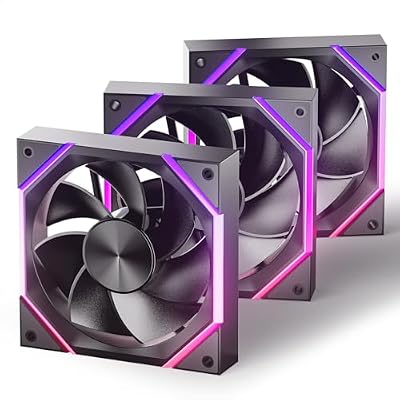
The Nyota suits a build that should look as calm as it sounds. This single 120 mm fan pairs addressable lighting with high precision hydraulic bearings, and AsiaHorse rates it at up to 61.5 CFM with noise kept under 29 dBA. Speed runs from 800 to 1800 RPM under PWM control, gentle at idle and brisk under load. Because it balances airflow and appearance rather than chasing pressure, it fits open intake and exhaust positions in a glass-panel case, where the lit face stays visible and the air path stays easy.
Specs
- Size: 120 x 120 x 25 mm, single fan
- Bearing: Hydraulic bearing
- Connector: 4-pin PWM, 5V 3-pin ARGB lighting
- Speed: 800-1800 RPM, PWM controlled
- Airflow: 61.5 CFM
- Noise: under 29 dBA
Best for: A glass-panel build that needs one or two lit fans in open intake or exhaust spots.
Watch out for: Lighting needs a 5V 3-pin ARGB header on the board; confirm yours has one, and never use a 12V 4-pin RGB header instead.
AsiaHorse Dawn 120mm

The Dawn leads the lit fans here on output. AsiaHorse rates this 120 mm model at up to 71 CFM with 2.6 mmH2O of static pressure and a headline speed of 1850 RPM under PWM control, so it keeps working when a filter or grille adds resistance. Its hydro-dynamic bearing uses closed loop oiling that the maker credits with over 50,000 hours of life, the longest figure in this guide. Forward and reverse blade versions let an intake keep its lit face showing, and a modular daisy chain links units together to cut cable clutter.
Specs
- Size: 120 mm, single fan, forward and reverse versions
- Bearing: Hydro-dynamic bearing (HDB)
- Connector: 4-pin PWM, daisy chain, ARGB lighting
- Speed: up to 1850 RPM, PWM
- Airflow and pressure: 71 CFM, 2.6 mmH2O
- Noise: 29 dBA max; life over 50,000 hours
Best for: A showcase build that wants lit fans with enough pressure for filtered intakes.
Watch out for: Choose the blade direction carefully when ordering, since the reverse version exists for intakes that must show the lit face.
DARKROCK F120 3in1

The F120 3in1 is a three pack built around an infinity mirror design, with 24 LED lights per fan and mirror panels set into the hub and frame. Behind the looks sits a hydraulic HDB bearing, nine blades and eight rubber pads that calm vibration. DARKROCK rates each fan from 800 to 1600 RPM under PWM control, with 46.7 CFM of airflow and a 27.7 dB noise figure. That output is modest beside the ToughFan or the Dawn, so read this pack as a style-first choice for open ventilation rather than radiator duty.
Specs
- Size: 120 mm, three fans per pack
- Bearing: Hydraulic HDB bearing
- Connector: PWM control, ARGB lighting, linkable
- Speed: 800-1600 RPM, PWM controlled
- Airflow: 46.7 CFM per fan
- Noise: 27.7 dB per fan
Best for: Filling a mesh-front case with a matched infinity mirror look across two intakes and a rear exhaust.
Watch out for: Airflow and pressure are the lowest here, so keep these on open mounts; the lighting also needs a 5V 3-pin ARGB connection.
ID-COOLING AS-120-K Trio

The AS-120-K Trio is the plain, practical three pack: no lighting, just three black 120 mm fans with hydraulic bearings and the widest speed range in this guide, 300 to 2000 RPM under PWM control. ID-COOLING rates each fan at 58 CFM with 1.94 mm-H2O of static pressure and a maximum noise figure of 27.2 dBA. At the low end these fans crawl for a near silent idle, and at the top they have real pace for a warm case. A daisy chain connector links the three in sequence, so the whole set runs from fewer motherboard headers.
Specs
- Size: 120 mm, three fans per pack
- Bearing: Hydraulic bearing
- Connector: 4-pin PWM, daisy chain linking
- Speed: 300-2000 RPM, PWM controlled
- Airflow and pressure: 58 CFM, 1.94 mm-H2O
- Noise: 27.2 dBA max
Best for: A no-lights build that needs three matched fans with a very low idle speed.
Watch out for: Any 2000 RPM fan is plainly audible at its ceiling, and a daisy chain means one header drives all three, so check the current limit for that header in your board manual.
Which One Fits Your Situation
You cool a radiator or a filtered intake
Pick the Thermaltake ToughFan 12. Restrictive mounts reward static pressure over raw airflow, and its 2.41 mm-H2O figure is the strongest here, with a speed range that still drops to 500 RPM when the loop is cool. The Dawn is the fallback when the same mount must also carry lighting.
You want a lit build that stays calm
Start with the AsiaHorse Nyota for single positions, since its rated noise stays under 29 dBA and its 800 RPM floor keeps desktop hours gentle. Step up to the Dawn when the lit fans also face a filter or a denser front panel, because its stronger pressure figure protects airflow there.
You are filling a whole case in one purchase
Choose between the two three packs by looks. The DARKROCK F120 3in1 gives a matched infinity mirror set for a mesh-front case, while the ID-COOLING AS-120-K Trio skips lighting and returns a wider 300 to 2000 RPM range. Either way, confirm the case takes 120 mm fans in every position you plan to fill.
You want silence at idle above all
Pick the ID-COOLING AS-120-K Trio. Its 300 RPM floor is the lowest in this guide, so a sensible fan curve keeps the machine close to silent during reading, browsing and video. The ToughFan 12, with its low noise cable fitted, is the single-fan alternative for the same goal when only one mount needs filling.
Common Mistakes
- Plugging a 5V 3-pin ARGB lead into a 12V 4-pin RGB header, which damages the lighting instead of powering it.
- Ordering 120 mm fans for a case position or radiator that only accepts 140 mm mounts.
- Judging a radiator fan by free-air CFM alone and ignoring the static pressure figure that decides delivered airflow.
- Leaving fans at a fixed full speed instead of setting a PWM curve, then blaming the bearing for the noise.
- Assuming the maker’s dBA figure will repeat inside a case, where grilles, filters and radiators all add sound.
Frequently Asked Questions
Can hydraulic bearing fans be mounted horizontally?
Yes. A plain sleeve bearing prefers a vertical shaft and wears faster when laid flat, because its oil film drains away from the contact surface. A hydraulic design keeps lubricant trapped in grooves around the shaft, so the film stays in place in any orientation. Top exhaust positions and horizontal radiator mounts are both fine for the fans in this guide.
How long do hydraulic bearing fans last?
The makers in this guide quote service life from 40,000 hours for the ToughFan 12 to over 50,000 hours for the AsiaHorse Dawn. Those are laboratory figures rather than guarantees, and heat plus dust shorten real life, but they show why this bearing class suits a build kept in service for many years of daily use.
Can I run a PWM fan on a 3-pin header?
A 4-pin PWM fan fits a 3-pin header and spins normally, but speed control then depends on voltage adjustment in the motherboard settings rather than a PWM signal. Curves feel coarser and some boards handle the low end poorly. For the smooth, quiet control these fans are bought for, use a 4-pin header set to PWM mode.
Do lit hydraulic fans need a separate controller?
Not always. The Nyota, Dawn and F120 can run their lighting from a motherboard 5V 3-pin ARGB header and their speed from ordinary PWM headers, with daisy chains reducing the cable count. A separate controller only becomes necessary when the board lacks that 5V header or when you want lighting effects the board software does not offer.







