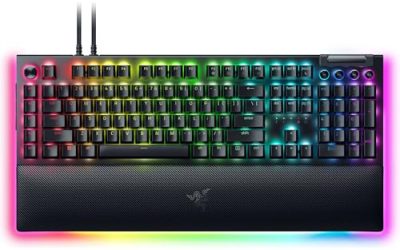
The hall effect vs mechanical keyboard debate comes down to one design choice: how a press is detected. A mechanical switch watches two metal contacts touch. A Hall effect switch watches a magnet move, measures how far it has travelled, and lets software decide what counts as a press. That difference changes actuation, reset behavior, feel, sound, durability, and how much you depend on an app.
Neither technology wins for everyone. Hall effect boards such as the Wooting 60HE+ and the SteelSeries Apex Pro line lead in competitive shooters because of adjustable actuation and rapid trigger. Mechanical boards built around switches from makers like Cherry and Gateron offer far more choice in feel, sound, layouts, and price tiers, with no tuning required. This guide compares the two head to head.
As an Amazon Associate we earn from qualifying purchases.
How Each Switch Senses a Press
A mechanical switch is an electrical contact wrapped in a spring and stem. Inside the housing, two metal leaves sit apart. As you press, the stem lets the leaves touch at a fixed depth, closing a circuit and registering the keypress. Release the key and the leaves separate past a fixed reset point. The keyboard only learns two states: open or closed.
A Hall effect switch keeps the stem, spring, and housing but removes the leaves. The stem carries a small magnet, and a Hall effect sensor on the board beneath it changes its output as the magnetic field changes. As the key travels, the controller converts that reading into a position in fractions of a millimeter. As Keychron puts it, a mechanical switch tells the keyboard yes or no, while a magnetic switch tells it how far.
That continuous reading is the foundation for everything that follows. Because the firmware knows where the stem is at every moment, adjustable actuation, rapid trigger, and analog input become software decisions rather than physical properties. It also removes contact bounce, the electrical chatter mechanical firmware must filter out with a debounce delay.
Fixed vs Adjustable Actuation
Actuation is the depth at which a press registers. On a mechanical switch, that depth is built in at the factory and never changes. Common gaming switches actuate at around 2.0 mm into roughly 4.0 mm of travel, while speed variants shorten that to about 1.0 to 1.5 mm. To change it, you change the switch itself.
On a Hall effect board, actuation is a setting, usually per key. Wooting lists 0.1 mm to 4.0 mm for the Lekker switches in the 60HE+, set key by key in Wootility. SteelSeries lists 0.2 mm to 3.8 mm per key for its OmniPoint 2.0 switches in the Apex Pro line. You can set movement keys to fire at a light touch, an ability key much deeper so it never fires by accident, and letter keys in a comfortable middle range.
The extremes need care. A very shallow setting invites accidental presses from resting fingers, while a very deep setting throws away the speed you paid for. Most players use a moderate range and reserve the shallowest settings for movement keys.
Rapid Trigger, Analog Input, and Extra Actions
Rapid trigger is the feature that most separates the two technologies in fast games. A mechanical key must travel back past its fixed reset point before it can register again. With rapid trigger, a Hall effect key resets as soon as the firmware detects the stem moving upward, and can actuate again as soon as it moves down, from whatever depth it is at. That removes dead travel between release and re-press, helping repeated taps and direction changes. Counter-strafing in tactical shooters is the use case cited most often.
The same position data enables related features that should not be confused with each other. Analog input maps key depth to a gradual value like a gamepad trigger, so a light press can walk and a full press can run, but only in games that accept that input. Dual-action bindings assign one action at a shallow depth and another deeper in the same press. Last-input priority for opposing keys, sold as Snap Tap or Snappy Tappy, makes the newest direction win automatically. That last category crosses into automation for some rule makers: Valve announced in August 2024 that hardware features automating counter-strafing would no longer be allowed on official Counter-Strike 2 servers, and players using them could be kicked. Check your game’s rules before enabling priority features in competitive play.
Mechanical keyboards cannot replicate any of this, because a contact switch has no position to report. What they offer instead is predictability: actuation and reset never drift with a profile, an update, or a calibration routine.
Response Behavior and Polling
Both technologies can feel effectively instant, and total response depends on the whole chain: finger travel to actuation, firmware processing, and polling rate, how often the keyboard reports to the PC. A 1000 Hz rate, about one report per millisecond, remains common on both types, including the standard Wooting 60HE+ configuration. Some newer Hall effect models, such as the Keychron Q6 HE 8K, offer 8000 Hz polling wired.
In practice, travel and reset usually matter more than polling alone. A shallow actuation setting shortens the distance before a press counts, and rapid trigger shortens the distance before the next press counts, advantages you can feel in rapid movement. Higher polling trims a smaller slice of total delay.
Durability and Failure Modes
Mechanical switches wear at the point that makes them work. Over years, contact leaves can oxidize, collect contamination, or fatigue, and the classic symptom is chatter, where one press registers twice. The ratings are high and the fix is easy: Cherry rates many MX switches at more than 50 million to more than 100 million actuations per key depending on the model, and on a hot-swappable board one failing switch can be replaced in minutes.
Hall effect switches remove that failure mode entirely. With no contact to oxidize or bounce, chatter is designed out, and magnetic switch makers commonly rate their switches at around 100 million actuations. That is a genuine advantage, but not immortality. The spring still fatigues slowly, the stem and housing still see friction, and lubrication still thins. Instead of chatter, a magnetic board is more likely to need recalibration if readings drift, and a failed sensor is a harder repair than swapping one switch.
For most buyers, spills and cables end a keyboard’s life before its switches do. Durability on paper slightly favors Hall effect; repairability favors mechanical.
Typing Feel, Switch Variety, and Sound
This is mechanical’s strongest ground. The MX-style ecosystem offers a huge range of linear, tactile, and clicky switches with different spring weights, travel, and lubrication from many makers. Whatever you want, a pronounced bump, a deliberate click, a heavy switch that resists mistakes, or a light smooth linear, there is a mechanical switch built for it. Our roundup of the best gaming keyboards shows how wide that spread has become.
Hall effect switches are, with few exceptions, linear. The stem travels straight down with no bump and no click, because the design is built around clean magnet movement. Makers offer different spring weights and some variation in smoothness, but the menu is far shorter, and no software setting can add a physical bump the switch does not have.
Sound depends mostly on case, plate, mounting, keycaps, and stabilizers rather than the sensing method, so a well-built board of either type can sound clean. The difference is choice: mechanical includes dedicated silent switches for shared spaces, alongside loud clicky options. Hall effect’s silent range remains narrower.
Price Tiers, Ecosystem, and Software
Mechanical keyboards exist at every tier, from entry-level boards to premium custom kits, with a deep aftermarket. MX-style keycaps fit an enormous range of boards, and replacement switches are sold everywhere. Keycap swapping is just as easy on most Hall effect boards, which use the same MX-style stems.
Switch swapping is where the ecosystems diverge. A hot-swappable mechanical board accepts MX-style switches from many brands. A Hall effect board only accepts magnetic switches compatible with its specific sensors and calibration, which varies by brand and model, so confirm supported switches for your exact model before buying spares.
On price, Hall effect has moved from an enthusiast niche into mid-range gaming boards, while feature-heavy magnetic models still sit in the upper tiers. With Hall effect, much of the cost buys sensing and software. With mechanical, more can go toward build, feel, and switch choice.
Software dependence follows the same split. A mechanical keyboard is plug and play, and behaves identically if the maker’s software disappears, because its behavior lives in the switch hardware. A Hall effect keyboard’s defining features live in software and firmware: actuation, rapid trigger, profiles, and analog mapping are set in the maker’s app or web tool, with onboard memory carrying settings between computers.
Comparison Table
| Feature | Hall Effect (Magnetic) | Traditional Mechanical |
|---|---|---|
| How a press is sensed | Magnet and sensor read position continuously | Metal contacts touch at a fixed depth |
| Actuation point | Adjustable in software, often per key | Fixed by switch design |
| Typical actuation range | About 0.1 to 4.0 mm (Wooting 60HE+) | About 1.0 to 2.2 mm by switch |
| Reset behavior | Rapid trigger, resets on upward movement | Fixed reset point |
| Analog and dual-action | Available on supported models and games | Not available |
| Feel options | Mostly linear, limited variants | Linear, tactile, clicky, very wide range |
| Sound options | Build dependent, fewer silent options | Wide range, including silent switches |
| Durability ratings | Around 100 million actuations (magnetic makers) | More than 50 to 100 million (many Cherry MX) |
| Main failure mode | Spring wear, sensor or calibration issues | Contact wear and chatter |
| Switch swapping | Compatible magnetic switches only, model dependent | Broad MX-style compatibility |
| Software dependence | High, core features in software | Low, works with no app |
Frequently Asked Questions
Is a Hall effect keyboard faster than a mechanical keyboard?
It can respond with less finger travel, because you can set a shallower actuation point and enable rapid trigger for faster resets. That shows up most in fast movement in shooters. In general typing, both feel effectively instant.
Can you put mechanical switches in a Hall effect keyboard, or the reverse?
No, not in any supported way. A mechanical board expects a switch that closes a circuit, while a Hall effect board expects a magnet it can measure, with firmware calibrated for that switch. Even among Hall effect boards, compatibility is model dependent.
Do Hall effect keyboards feel worse for typing?
They feel different rather than simply worse. Most are smooth linears, which many people type on happily, and a deeper actuation setting reduces accidental presses. What they cannot offer is a true tactile bump or click, so if that feedback matters, mechanical suits you better.
Are Hall effect features allowed in competitive games?
Rapid trigger and adjustable actuation are widely used in competitive shooters, but rules are set per game and per platform. Features automating opposing-direction inputs have been restricted before, notably on official Counter-Strike 2 servers under Valve’s August 2024 decision. Check your game’s rules first.
Verdict: Which Should You Choose?
For competitive FPS players, Hall effect is the stronger choice. Adjustable actuation on movement keys, rapid trigger for cleaner counter-strafing, and per-key profiles are advantages a contact switch cannot offer. Pick a model with reliable software, keep a deeper profile for typing, and leave priority features off where games restrict them.
For players who mix gaming with heavy typing, it depends on your workday. If your games are fast shooters and your typing is mostly chat and documents, a Hall effect board with a sensible typing profile covers both jobs well. If you write or code for long stretches and care about tactile feedback or one specific switch feel, a mechanical board will likely make you happier for most of your hours. For this group, feel usually beats features.
For enthusiasts, mechanical remains the deeper hobby. Switch variety, the keycap and case ecosystem, repair culture, and the ability to rebuild one board into something completely different are unmatched by the younger magnetic ecosystem. Hall effect makes an excellent dedicated gaming board, but it does not yet replace MX-style experimentation.
The short answer: buy the sensing technology if your games reward it, and the switch ecosystem if your hands reward it. Hall effect wins on control and competitive features. Mechanical wins on choice, feel, and sound.