

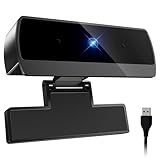
- Top Pick: 4K Webcam with Windows Hello, Facial Recognition, Log-on with Windows hello | Sliding Privacy Cover, Built-in Microphone, USB Webcam, Works with Microsoft Teams, Zoom, Google Meet
- Best Value: Diccik 1080P Webcam with Microphone, Full HD Video Calling Web Camera, HD Light Correction Streaming Webcam for Zoom/Skype/Teams, Plug and Play PC Camera Web cam for Windows & Mac
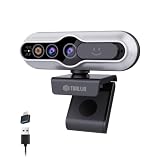
- Premium Choice: TOALLIN 4K Webcam for PC, Windows Hello Compatible, IR Facial Recognition | Autofocus, Built-in Mic & Privacy Cover, USB Computer Camera for PC Laptop, Streaming, Conferencing & Video Calls
Almost any USB webcam will show a picture on a Windows 10 desktop, because the operating system ships with a generic camera driver. So the useful question is not whether a webcam works, but which extras actually help on this platform. The biggest one is Windows Hello, Microsoft’s face sign-in feature: a camera with an infrared sensor can unlock the PC with your face, something a plain 1080p camera cannot do however sharp its picture looks.
This guide is for people running Windows 10 on a desktop or laptop who want a better camera than the built-in one, or who want face sign-in without buying a new computer. It compares seven USB webcams, from a 720p classic to 4K models with infrared sensors, using only what each title says. Heading into 2026, the older Microsoft LifeCam sits beside newer models, which makes the generation gap easy to see. Expect the older model to lead on clear operating system wording and the newer ones to lead on resolution and sign-in features.
Quick Picks
As an Amazon Associate we earn from qualifying purchases at no extra cost to you.



| Product | Best for | Key spec from the title |
|---|---|---|
| 4K Windows Hello Webcam (unbranded title) | Face sign-in at 4K | 4K, facial recognition, sliding cover |
| Diccik 1080P Webcam | Plain video calls | Full HD, light correction, plug and play |
| TOALLIN 4K Webcam | Sign-in plus streaming | 4K, IR facial recognition, autofocus |
| Microsoft LifeCam Cinema | Verified Windows 10 support | 720p, noise-cancelling mic, Windows 8/10/11 |
| Lenovo Performance FHD | USB-C setups | 1080p, Windows Hello, 4X digital zoom |
| MOERTEK 2K Webcam | Laptop and learning use | 2K, infrared Windows Hello, noise-canceling mics |
| Full HD 1080P Webcam (unbranded title) | Broad compatibility | 1080P, privacy cover, Windows/Linux/macOS |
How to Choose
Decide whether you want Windows Hello
Face sign-in requires an infrared camera, and listings use phrases like IR facial recognition or infrared Windows Hello. A webcam that merely says it works with Windows will not unlock the PC, and a listing that only says Windows Hello compatible still deserves a read of the full description. If sign-in matters, narrow the field to the four listings that name it before comparing anything else.
Resolution and what you really need
For video calls, 1080p is plenty on a laptop-sized display, and the picture is limited as much by lighting as by pixels. A lamp behind the monitor will do more for your image than a jump from 1080p to 2K. 2K and 4K add room to crop or record, but they need more USB bandwidth and a meeting app that will use the extra pixels. A 720p camera like the LifeCam suits plain calls but looks soft next to modern sensors.
Microphones, covers, and mounting
Dual or noise-canceling microphones help in a noisy room, but a headset microphone often beats any webcam. A sliding privacy cover or shutter is a useful physical safeguard, and several of these listings include one. It matters most on a desktop that stays powered on with the camera facing a living space. Check the mounting clip for fit on thin laptop lids or tall monitors, and look for a tripod thread if you want to place the camera away from the screen, and look at the USB connector type, since the Lenovo listing names USB-C.
What to ignore, and where budget cameras cut corners
Ignore long keyword strings listing every app the camera supposedly works with, because almost every camera does. Budget models typically cut corners on lens quality, autofocus, and microphone clarity, and their driver software can be basic. A listing with a recognizable maker, a stated lens angle, and a clear sign-in claim is easier to judge than a title that is mostly a list of apps.
The 7 Best Options
4K Windows Hello Webcam (unbranded title)
A 4K camera aimed at face sign-in. The title lists Windows Hello, facial recognition, log-on, a sliding privacy cover, a built-in microphone, and compatibility with Teams, Zoom, and Google Meet. No brand appears in the title. It fits someone who wants face sign-in on a desktop without a built-in camera and who is comfortable judging an unfamiliar product by its listed features alone.
- 4K resolution combined with sign-in support
- Sliding privacy cover included
- Trade-off: with no brand in the title, warranty and support details need a closer look
Skip it if you prefer a camera from a well-known maker or want the lens angle and microphone type spelled out before ordering.
Diccik 1080P Webcam
A straightforward Full HD camera with a microphone for video calling. The title lists HD light correction, streaming support, Zoom, Skype, and Teams, plug-and-play setup, and Windows and Mac compatibility. It suits a student, a remote worker, or a relative who needs a clearer picture than a laptop camera gives and has no interest in extra software or sign-in features.
- Plug-and-play setup with no software required
- Light correction named for dim rooms
- Trade-off: no Windows Hello or privacy cover appears in the title
Skip it if you want face sign-in or a physical lens cover, since neither appears in the title.
TOALLIN 4K Webcam
A 4K camera combining Windows Hello compatibility with IR facial recognition. The title also lists autofocus, a built-in microphone, a privacy cover, and use for streaming, conferencing, and video calls. It is a reasonable match for a desktop user who streams a little and wants to unlock the PC with a glance, all through one USB connection.
- IR facial recognition named explicitly
- Autofocus helps when you lean in, hold up a document, or move around
- Trade-off: 4K needs bandwidth and a meeting app that makes use of it
Skip it if plain 1080p already covers your calls, because a 4K sensor adds data load without changing how a small call window looks.
Microsoft LifeCam Cinema
The only listing that names Windows 10 by version. The title lists 720p HD, a built-in noise-cancelling microphone, light correction, USB connectivity, and compatibility with Windows 8, 10, and 11 and Mac, for Teams and Zoom. It is the safe choice for an older Windows 10 machine where a known model with a stated operating system list beats a newer, unfamiliar one.
- Windows 10 compatibility stated outright
- Noise-cancelling microphone and light correction included, a combination that helps in plain calls
- Trade-off: 720p is lower than every other camera in the roundup
Skip it if you want a sharper image, face sign-in, or a physical privacy cover, none of which the title mentions.
Lenovo Performance FHD
A 1080p camera with a USB-C connection and Windows Hello log-on. The title lists dual microphones, a 95 degree lens, 4X digital zoom, a sliding privacy shutter, and a black finish. It suits a business laptop user who already relies on USB-C docking and wants a single cable for video plus a face sign-in option.
- USB-C connection suits newer laptops
- Privacy shutter and dual microphones included
- Trade-off: digital zoom crops rather than magnifies
Skip it if your computer lacks a USB-C port or an adapter, or if you need optical rather than digital zoom.
MOERTEK 2K Webcam
A 2K laptop webcam with infrared Windows Hello facial recognition. The title lists a privacy cover, noise-canceling microphones, and uses such as conferencing, live streaming, and online learning. A student with a laptop whose built-in camera is poor, or a teacher who streams lessons, would find the combination of sign-in and microphones convenient.
- Infrared sign-in with a 2K image
- Noise-canceling microphones and privacy cover
- Trade-off: the title does not state the lens angle or autofocus
Skip it if you want a stated field of view or a camera whose title confirms autofocus.
Full HD 1080P Webcam (unbranded title)
A plug-and-play 1080P camera with a microphone, a privacy cover, and support for PC, laptop, desktop, and Mac. The title names YouTube, Zoom, Skype, and Facetime, and lists Windows, Linux, and macOS. It suits a household that shares one camera across a Windows PC and a Mac, or someone who may switch operating systems later.
- Broad operating system support listed
- Privacy cover included
- Trade-off: no brand name or sign-in support appears in the title
Skip it if you want face sign-in, a recognizable brand, or a stated resolution beyond Full HD.
Which One Fits Your Situation
You want to sign in with your face
The TOALLIN 4K or the MOERTEK 2K name infrared facial recognition explicitly, which is the detail that matters most for sign-in, and the Lenovo Performance FHD adds USB-C. Set up face recognition in the Windows account settings after plugging in, and keep a password as a backup.
You just want clean video calls
The Diccik 1080P is a plain Full HD camera with light correction for dim rooms, and the unbranded 1080P model adds a privacy cover and wider operating system support, which suits a shared family computer.
You want to confirm Windows 10 support
The Microsoft LifeCam Cinema names Windows 10 outright and lists Teams and Zoom use, which is the clearest compatibility claim in the group. Buyers who run an older machine and want fewer surprises will appreciate that clarity.
You stream and want extra headroom
The TOALLIN 4K offers autofocus and 4K, while the unbranded 4K model adds a sliding cover. Both also support face sign-in, so a streamer gets a login shortcut as well. Add a key light, since lighting limits a sensor more than resolution does.
Common Mistakes
- Assuming any webcam supports Windows Hello, when only infrared models can unlock the PC
- Choosing 4K without checking whether your meeting and streaming apps actually send that resolution
- Ignoring the USB connector type on newer laptops, then needing an adapter that crowds the port beside it
- Relying on webcam microphones in a noisy room when a headset would capture voice far more cleanly
- Judging by app logos instead of lens, sensor, and sign-in details, since nearly every camera claims to work with every app
Related guides
- Aio Liquid Coolers For High Performance Gaming
- How To Lower Input Delay In Competitive Shooters
- External Hard Drives For Music Production
Frequently Asked Questions
Do I need special drivers on Windows 10?
Most plug-and-play webcams work with the built-in driver, so a plain camera should show a picture within seconds of plugging it in. Extra software may unlock zoom or tuning controls, and infrared sign-in cameras may ask Windows to set up face recognition in the account settings.
What makes a webcam work with Windows Hello?
An infrared camera sensor. A normal color-only webcam can show video but cannot unlock the PC by face, so check that the listing says infrared or IR.
Is 1080p good enough?
For video calls on most displays, yes. Streaming or recording may justify 2K or 4K. Lighting and lens quality shape the image as much as resolution, so a bright, even light source gives the biggest improvement for the least effort.
Are privacy covers useful for everyday work?
They physically block the lens when you are not using it, which matters on a PC that stays on all day. That gives reassurance that no software setting can match, and it also removes any doubt about whether an app is quietly using the camera.







