

- Top Pick: PNY 64GB Elite-X Class 10 U3 V30 A1 microSDXC Flash Memory Card 3-Pack | up to 100MB/s Read, UHS-I, 4K UHD, Full HD, Smartphones, Tablets, Drones, Surveillance Cameras, Video Cameras, Computers
- Best Value: SanDisk 32GB Ultra® microSDHC 120MB/s A1 Class 10 UHS-I
- Premium Choice: SANDISK 64GB Ultra microSD Card + Adapter, Up to 140MB/s Read Speeds | UHS-I, Full HD, C10, U1, A1, Ideal for Android Smartphones, Tablets and MIL cameras – SDSQUAB-064G-GN6MA
A Raspberry Pi has no internal drive, so the microSD card is the system disk, and a poor choice shows up as slow boots, laggy desktops, and corrupted installs. The decision comes down to three things: capacity that leaves room beyond the operating system, an application class suited to many small reads and writes, and whether you want a blank card you image yourself or one that arrives with Raspberry Pi OS already on it.
This guide is for hobbyists setting up a Pi 4, Pi 5, Pi 400, Zero 2 W, or an older 3B-class board for a retro console, home server, or media box in 2026. Every pick is judged only from its listing title: capacity, speed class markings, read speed figures, pack size, and any preloaded-software claim. Specs the title leaves out are treated as unknown, and it is worth confirming compatibility on the product page before buying.
Quick Picks
As an Amazon Associate we earn from qualifying purchases at no extra cost to you.


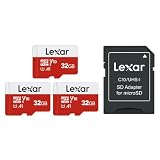

| Product | Best for | Key spec from the title |
|---|---|---|
| PNY Elite-X 64GB 3-pack | Several Pi projects at once | U3, V30, A1, up to 100MB/s read |
| SanDisk Ultra 32GB (120MB/s) | A single basic build | A1, Class 10, UHS-I, 120MB/s |
| SanDisk Ultra 64GB with adapter | Extra room for apps | Up to 140MB/s read, A1, U1 |
| PNY Elite 32GB 5-pack | Classroom or lab sets | C10, U1, V10, five cards |
| Fastoe 64GB preloaded | Newest Pi boards, ready to boot | Pi OS preloaded, Pi 5/500 and 4B/400 |
| STEADYGAMER 32GB preloaded | Mixed Pi generations | Preloaded, works with many Pi models |
| Generic 32GB microSD with adapter | Light, secondary use | 90MB/s read, 25MB/s write |
| Beamo 64GB preloaded | First-time setups | Pi OS preloaded, adapter included |
| Lexar E-Series 32GB 3-pack | Spare cards for backups | 100MB/s, A1, V10, adapter |
| SanDisk Ultra 32GB with adapter | A familiar, simple card | UHS-I, Class 10, adapter |
How to Choose
Capacity: how much room you need
Thirty-two gigabytes is comfortable for Raspberry Pi OS plus a handful of apps or a small emulator library. Sixty-four gigabytes is smarter for media servers, game collections, or projects that log data. Anything under 16GB leaves little room after updates. Remember that listed capacity is slightly higher than usable space, because formatting and the boot partition take a share before you save a single file. If a project logs data, caches video, or stores save states, size up rather than hoping a small card stretches.
Application class and speed markings
The A1 marking in a title points to better small random reads and writes, which is what an operating system does constantly. U1 and U3 describe sequential write floors, and V10 or V30 are video classes. A card with only Class 10 is usable but lacks the application class. Headline read numbers like 100MB/s or 140MB/s are marketing peaks, and a Pi’s own card reader may not reach them. Real-world feel depends more on how well the card handles lots of tiny operations than on a big peak number, which is why the A1 marking deserves more attention than the largest megabytes-per-second figure on the box.
Preloaded versus blank
Preloaded cards save the imaging step, which suits beginners without a second computer handy. Blank cards are flexible and let you flash the exact OS release you want. Check the Pi models named in a preloaded title, since that tells you which boards the image was prepared for. A preloaded image is also a snapshot, so plan to run system updates on first boot, and do not assume the bundled version is the newest release.
Pack sizes and what to ignore
Multi-packs make sense if you run several Pis or want a spare for backups. Ignore camera and drone wording in titles, since it describes general use rather than Pi suitability. Entry-level and no-name cards often skip the application class, state only a read speed, or leave out the write figure. Those gaps do not make a card unusable, but they leave you guessing, and guessing is a poor strategy for a card that will hold your whole system. A little extra attention to the listed markings up front saves a reflash later.
The 10 Best Options
PNY Elite-X 64GB microSDXC 3-Pack
Aimed at people building more than one Pi, such as a pair of retro consoles and a small home server. The title lists Class 10, U3, V30, A1, UHS-I, and up to 100MB/s read speeds, with three 64GB cards in the pack.
- A1 plus U3 markings cover both app performance and sequential writes.
- Three 64GB cards cover several projects, or leave two spares.
- Trade-off: 100MB/s is the headline read figure, below some single-card rivals.
Skip it if you only need one small card and have no use for the extras.
SanDisk Ultra 32GB microSDHC, 120MB/s
A straightforward 32GB card for a single build, such as a media box or a small web server. The title lists 120MB/s, A1, Class 10, and UHS-I, which together cover the basics a Pi asks of its boot card.
- The A1 marking is listed for app-style workloads.
- The 120MB/s read figure is higher than the PNY packs.
- Trade-off: no adapter is mentioned in the title.
Skip it if you plan to store large libraries or want a card with an adapter.
SanDisk Ultra 64GB microSD with Adapter
The roomier SanDisk, with up to 140MB/s read, UHS-I, C10, U1, A1, and an included adapter. The extra space suits emulation libraries, media storage, or a desktop Pi that gathers files over time.
- 140MB/s is the highest read figure in this group.
- An adapter helps when flashing from a full-size SD slot.
- Trade-off: only U1 is listed, not U3.
Skip it if you want several cards in one order.
PNY Elite 32GB microSDHC 5-Pack
Five 32GB cards in one pack, which makes sense for workshops, classrooms, or tinkerers who keep a library of ready-made images. The title lists C10, U1, V10, UHS-I, and up to 100MB/s read.
- Five cards allow separate cards for separate projects.
- A 32GB size is plenty for a stock operating system.
- Trade-off: no A1 marking appears in the title.
Skip it if you want the snappiest possible desktop response or more than 32GB per card.
Fastoe 64GB Raspberry Pi OS Preloaded microSD
A 64GB card with Raspberry Pi OS already loaded, built for people who would rather insert and boot. The title names the Pi 5/500, 4B/400, 3B/3B+, and Zero 2 W, which covers most boards sold today.
- It is ready to boot on the newest boards the title lists.
- 64GB leaves headroom after updates and added software.
- Trade-off: no speed class or read figure is shown.
Skip it if you want to flash your own OS release or need a documented speed class.
STEADYGAMER 32GB Raspberry Pi Preloaded SD Card
A preloaded 32GB card whose title names the Pi 5, 400, 4, 3B+, 3A+, 3B, 2, and Zero. That spread makes it the one to consider if you own several generations of boards and want a single card type for all of them.
- It has the widest model list of any card here.
- The preloaded OS skips the imaging step.
- Trade-off: no speed class or read figure is stated.
Skip it if you plan a storage-heavy project that needs 64GB or more.
Generic 32GB High-Speed Micro SD Card with Adapter
A no-brand card that states 90MB/s read and 25MB/s write, with an adapter. The listing aims at cameras, drones, and portable devices, so a Pi is a secondary use rather than the target.
- It gives both a read figure and a write figure.
- An adapter is included for flashing.
- Trade-off: no A1 marking, and the title never mentions Raspberry Pi.
Skip it if you want a card positioned for operating-system duty.
Beamo 64GB MicroSD with Raspberry Pi OS
Preloaded and described as ready to use: insert the card, power on, and skip downloads or imaging tools. An SD adapter is included. It speaks to first-time Pi owners without a spare computer for flashing.
- The setup flow is about as simple as it gets.
- 64GB capacity comes with an adapter.
- Trade-off: no speed classes appear in the title.
Skip it if you already have an imaging workflow or want a specific OS build.
Lexar E-Series 32GB Micro SD, 3-Pack
Three 32GB cards with an adapter. The title lists 100MB/s, C10, U1, A1, and V10 markings, which makes it a multi-pack that still carries the A1 marking for operating-system use.
- It pairs a three-card pack with an A1 marking.
- An adapter is included.
- Trade-off: each card is only 32GB.
Skip it if your project needs 64GB per card.
SanDisk Ultra 32GB UHS-I Class 10 microSDHC
A familiar SanDisk Ultra 32GB card with an adapter and UHS-I Class 10 markings. It fits small Pi projects such as a network tool, a clock display, or a simple script runner.
- It is a recognizable brand with an adapter in the box.
- 32GB suits lightweight builds.
- Trade-off: no A1 marking or read figure is shown in the title.
Skip it if the application class matters to you, since the other SanDisk listings spell it out.
Which One Fits Your Situation
You are setting up your first Pi
The Beamo 64GB or Fastoe 64GB preloaded cards skip the imaging step. Beamo describes insert-and-power-on setup, while Fastoe lists the newest boards by name, so pick whichever matches the Pi you bought.
You want a responsive desktop or emulator
The SanDisk Ultra 64GB with A1 and the Lexar E-Series with A1 are the better listed fits. Both name the A1 marking, and the SanDisk adds a higher read figure and the roomier 64GB capacity for larger libraries.
You run several Pis
The PNY Elite-X 3-pack or PNY Elite 5-pack gives you spares. The Elite-X adds A1 and U3 markings at 64GB, while the five-card Elite pack gives you the most separate cards for labeled projects.
You have an older Pi
The STEADYGAMER 32GB card names the broadest range of models, including the 3A+, 3B, and Pi 2, so an older board from a drawer has a matching card.
Common Mistakes
- Buying only on headline read speed and ignoring the A1 marking.
- Choosing 16GB or smaller cards that fill up after updates.
- Assuming a camera card is built for constant operating-system writes.
- Using a preloaded card without checking the Pi model named in the title.
- Keeping no spare card or backup image.
Related guides
- Aio Liquid Coolers For High Performance Gaming
- How To Lower Input Delay In Competitive Shooters
- Wireless Gaming Headsets Under 100 For Pc
Frequently Asked Questions
What does A1 mean for a Pi?
It signals better small random read and write performance, which is what an operating system does. It matters more than peak sequential speed, particularly for boot time and app launches on a desktop Pi.
Is 32GB enough?
For Raspberry Pi OS and a few apps, yes. Choose 64GB for media, emulation, or data logging.
Are preloaded cards worth it?
They save time for beginners, but blank cards let you pick your own OS release.
Do I need the adapter?
Only if you flash from a full-size SD slot. A USB card reader works without it, and the adapter is also handy as a spare for cameras or other devices that take full-size cards.










