- Top Pick: SanDisk 128GB Extreme PRO SD UHS-I Card, Up to 250MB/s Read and 120MB/s Write, 4K UHD, Full HD, U3, V30, SDSDXXJ-128G-GSCIN
- Best Value: SanDisk 256GB Extreme PRO SD UHS-I Card, Up to 250MB/s Read and 170MB/s Write, 4K UHD, Full HD, U3, V30, SDSDXXJ-256G-GSCIN
- Premium Choice: SanDisk 64GB Ultra SDXC UHS-I Memory Card – 100MB/s, C10, U1, Full HD, SD Card
Fujifilm shooters tend to ask more of a memory card than casual photographers do. Burst shooting on an X-series body fills a buffer quickly, and 4K video from a mirrorless camera writes data at a steady rate that a slow card cannot sustain. The keyword narrows the field to full-size SD cards that suit those cameras, so the decision comes down to capacity, the video speed class printed on the label, and whether the card matches the slot in your particular body.
This guide is for photographers upgrading from a kit card, for travelers who want a spare, and for hybrid shooters recording clips. In 2026, most of the choice is between a fast Extreme PRO tier for video and burst work and a lighter Ultra tier for stills. Each card is judged solely from facts in its listing title: capacity, stated read and write speed, UHS bus, U and V speed classes, and any durability or data recovery extras. Check your own camera manual for the exact slot standard.
Quick Picks
As an Amazon Associate we earn from qualifying purchases at no extra cost to you.




| Product | Best for | Key spec from the title |
|---|---|---|
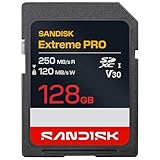
| SanDisk Extreme PRO 128GB | 4K clips and bursts | 250MB/s read, 120MB/s write, U3, V30 |
| SanDisk Extreme PRO 256GB | Long shoots | 250MB/s read, 170MB/s write, U3, V30 |
| SanDisk Ultra 64GB | Everyday stills | 100MB/s, C10, U1 |
| SanDisk Ultra 256GB | Rugged travel stills | 150MB/s read, temperature, water and shock proof |
| SanDisk Ultra 128GB | Mid-size storage for stills | 100MB/s, C10, U1 |
| SanDisk Ultra 32GB | Backup or small shoots | SDHC, 100MB/s read, water-resistant |
| SanDisk Extreme PRO 64GB | Light 4K use | C10, U3, V30, 4K UHD |
| Gigastone 256GB | Large capacity with recovery | 170MB/s, A1, V30, 5-year data recovery |
| Gigastone 128GB | Mid capacity with recovery | 150MB/s read, A1, V30, U3, 5-year data recovery |
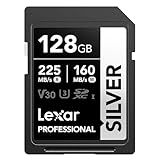
| Lexar 128GB Silver | Fast reads for offloading | 225MB/s read, 4K, V30, U3 |
How to Choose
Match the speed class to what you shoot
Stills and Full HD video can run on a U1 card listed at 100MB/s. For 4K video, look for U3 and V30, which guarantee a minimum sustained write speed of 30MB/s. A V30 label is a floor, not a ceiling. If you shoot higher-bitrate video modes, check your camera manual for the card class it asks for, and treat the listed read speed as a download-speed hint rather than a recording speed.
UHS-I and UHS-II compatibility
Every card in this list is UHS-I. Some Fujifilm bodies have UHS-II slots, and UHS-I cards work in them, but they do not use the extra speed. If your camera is a UHS-II model and you shoot long bursts, remember the cards here cap out at UHS-I speeds. Read your manual before buying a faster tier.
Capacity and workflow
A 64GB card holds many RAW stills, while 128GB to 256GB suits video and long trips. Larger cards store more in one place, but a failure puts more at risk, so many photographers carry two smaller cards. Exact file counts depend on your file format, so rely on your own file sizes rather than marketing math. Cards over 32GB are SDXC and are formatted in the camera.
Durability, recovery and what to ignore
Water and shock resistance helps for outdoor work, and a few cards offer data recovery service. Ignore headline read speeds as a sign of quality; the write speed and V class matter more for recording. Budget cards sometimes skip the V class, so confirm it is printed. Buy sealed cards from a trusted seller, because counterfeit memory cards are a known problem.
The 10 Best Options
SanDisk Extreme PRO 128GB
A high-end pick for Fujifilm users who record 4K clips and shoot bursts. It is the middle capacity of the two Extreme PRO listings, a sensible balance for a day of mixed stills and video without carrying several cards.
- Up to 250MB/s read and 120MB/s write are stated in the title.
- U3 and V30 classes with 4K UHD and Full HD support are listed, which covers most video modes.
- Trade-off: it is UHS-I only, so a UHS-II body will not use any faster bus speed.
Skip it if you only shoot occasional stills, or if your workflow needs the highest write rate in this group.
SanDisk Extreme PRO 256GB
The large-capacity version for long shoots, weddings and travel days when swapping cards is awkward. It carries the same family label as the 128GB model but a faster stated write rate.
- A 170MB/s write rate is stated alongside the 250MB/s read figure, the highest write number among the SanDisk cards.
- U3 and V30 classes support 4K UHD recording, as well as Full HD.
- Trade-off: more footage on one card means more at risk if that card fails.
Skip it if you prefer working with several smaller cards, or if your clips are short and stills-heavy. Anyone who rarely fills a card should consider a smaller size.
SanDisk Ultra 64GB SDXC
A basic, sensible card for everyday photography with a Fujifilm body. It makes sense as a first upgrade over a kit card or as a card for a camera that mostly shoots stills in good light.
- 100MB/s, Class 10 and U1 are stated in the title.
- Full HD video support is listed, which is enough for casual clips.
- Trade-off: no 4K label or V class appears in the listing, so video options are limited.
Skip it if you shoot 4K video, burst-heavy sports or high-bitrate clips. A faster class is worth having for those uses.
SanDisk Ultra 256GB
A big card with rugged claims, aimed at travelers and outdoor photographers who want a lot of space and some protection from the weather. The title describes it as suited to compact and mid-range cameras and camcorders.
- Up to 150MB/s read speed on UHS-I is stated.
- Temperature, water and shock proof protection is listed in the title.
- Trade-off: it carries only a U1 class, so it is better for stills and Full HD than for demanding 4K video.
Skip it if you shoot 4K or need a V30 label on the card. The Extreme PRO listings cover those needs instead.
SanDisk Ultra 128GB SDXC
A mid-size everyday card for photographers who want more room than 64GB offers but do not shoot video seriously. It suits a long weekend of RAW stills without going to the largest size.
- A 100MB/s figure, Class 10 and U1 are stated.
- Full HD support makes it fine for snapshots of video moments.
- Trade-off: no 4K or V class is stated, so it is not the choice for heavy video.
Skip it if you plan on 4K recording or sustained burst work. Stills shooters with a steady pace will not miss the faster tiers.
SanDisk Ultra 32GB SDHC
The smallest card in the group, most useful as a backup or a dedicated card for a spare body. Its sturdy feature list is the main reason to consider it.
- A 100MB/s read figure is stated, along with a water-resistant design.
- Impact-resistant construction is also named in the title.
- Trade-off: the capacity is low and it is SDHC rather than SDXC, which limits RAW stills and video.
Skip it for video, long trips or any shoot where you cannot swap cards. It makes the most sense as a spare in the bag.
SanDisk Extreme PRO 64GB SDXC
A light 4K option for someone who wants the speed class of the Extreme PRO line but not the larger capacity. It suits short clips and stills rather than a full day of recording.
- Class 10, U3 and V30 are named in the title.
- 4K UHD support is listed, with an SDXC UHS-I format.
- Trade-off: 64GB fills quickly with 4K footage, and the title gives no read or write figures.
Skip it if you record long clips or want a stated speed number. The 128GB and 256GB versions give more room for the same class.
Gigastone 256GB 4K Camera Pro
A large card with an extra safety net: the title mentions a five-year data recovery service. It speaks to photographers who worry about losing files from a corrupted card.
- Up to 170MB/s, A1 and V30 are all stated, with 4K UHD video speed.
- Five-year data recovery and a mini case are included.
- Trade-off: it comes from a smaller brand than SanDisk or Lexar, and the title gives no write speed.
Skip it if you want a big-name card or never use the recovery service. Read the terms of the recovery offer before relying on it.
Gigastone 128GB 4K Camera Pro
A mid-size card with the same recovery promise, for people who want more detail on speed than the larger Gigastone provides. The title spells out several classes.
- A 150MB/s read rate, A1, V30, U3 and Class 10 are listed.
- Five-year data recovery and a mini case are included.
- Trade-off: it is from a smaller brand, so check seller terms and return policy.
Pairing it with a second card is wise for an important shoot. Skip it if you want a more established name on the label. The 256GB version adds capacity if you need it.
Lexar 128GB Silver
A fast-reading card for photographers who offload to a computer often and want 4K support. It is a good counterpoint to the SanDisk and Gigastone options in this group.
- A 225MB/s read speed, 4K plus V30 and U3 classes are stated.
- The title says it is compatible with Canon, Sony and Nikon cameras, and it is UHS-I.
- Trade-off: Fujifilm is not named in the title, and no write speed is given.
Skip it if you want a card that explicitly names Fujifilm or lists write speed. Your camera manual remains the final word on supported cards.
Which One Fits Your Situation
You record 4K clips
The SanDisk Extreme PRO 128GB lists U3 and V30 with a 120MB/s write figure, a solid place to begin for 4K UHD video and bursts on a Fujifilm body.
You travel and want less swapping
The SanDisk Extreme PRO 256GB gives you the most space with a 170MB/s write rate, so a long trip needs fewer card changes. Pair it with a second card as a backup.
You only shoot stills
The SanDisk Ultra 64GB lists 100MB/s, Class 10 and U1, which is enough for everyday photography without paying for video-grade speeds you will not use.
You want data recovery
The Gigastone 128GB lists five-year data recovery along with V30, U3 and A1, which suits a photographer who values a safety net on irreplaceable events.
Common Mistakes
- Buying on the headline read speed alone, when the write speed and V class decide video performance.
- Skipping the V30 label for 4K and discovering dropped frames halfway through a clip.
- Expecting UHS-II speed from a UHS-I card.
- Not formatting the card in the camera, which can cause file errors with a new SDXC card.
- Using one huge card as the only copy of an important shoot.
Related guides
- Combination Smoke And Carbon Monoxide Detectors
- Aio Liquid Coolers For High Performance Gaming
- Graphics Cards For Low Wattage Power Supplies
Frequently Asked Questions
What does V30 mean?
V30 is a video speed class that guarantees a minimum sustained write speed of 30MB/s. It matters for 4K recording because the camera writes data continuously, and a slower card can stop a clip early.
Do I need UHS-II?
Only if your body has a UHS-II slot and you shoot long bursts or high-bitrate video. Every card in this list is UHS-I, which works in a UHS-II slot at UHS-I speed. Check your manual first.
Is 64GB enough?
For stills, it can be, especially if you swap cards between shoots. RAW files add up quickly, though, and 4K video fills 64GB fast, so 128GB or more makes more sense for video.
Should I format in camera?
Yes. Formatting in the camera sets up the file structure the body expects and clears any leftover data. Back up your files first, since formatting erases everything.