

- Top Pick: Asus ROG Strix B550-F Gaming WiFi II AMD AM4 (3rd Gen Ryzen) ATX DDR4 Gaming Motherboard (PCIe 4.0,WiFi 6E, 2.5Gb LAN, BIOS Flashback, HDMI 2.1, Addressable Gen 2 RGB Header and Aura Sync)
- Best Value: GIGABYTE B550 Eagle WIFI6 AMD AM4 ATX Motherboard, Supports Ryzen 5000/4000/3000 Processors, DDR4, 10+3 Power Phase, 2X M.2, PCIe 4.0, USB-C, WIFI6, GbE LAN, PCIe EZ-Latch, EZ-Latch, RGB Fusion
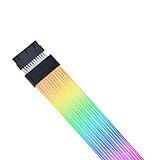
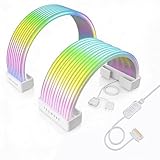
- Premium Choice: Lian Li Strimer Wireless 24-Pin-PW24-1W-T
An RGB motherboard is the lighting hub of a modern build. The best boards do two jobs: they carry addressable and standard RGB headers so you can plug in fans, strips and coolers, and they tie everything together through a single lighting ecosystem — ASUS Aura Sync, Gigabyte RGB Fusion or MSI Mystic Light — so your whole rig pulses in sync. Some boards also feature their own onboard illumination on the chipset heatsink or rear I/O cover. This guide rounds up the best RGB motherboards in 2026 across AMD AM4, AM5 and Intel platforms, and is honest about which boards lead with built-in lighting versus which mainly provide headers to drive your own.
- Best RGB Motherboards at a Glance
- 1. ASUS ROG Strix X570-E Gaming ATX Motherboard, Aura Sync RGB Lighting
- 2. ASUS ROG Strix B550-F Gaming Motherboard, ATX, AM4, DDR4
- 3. GIGABYTE Z790 AORUS Elite AX LGA 1700 ATX Motherboard, RGB Fusion
- 4. MSI MAG B550 Tomahawk Gaming Motherboard, AM4, DDR4, PCIe
- 5. GIGABYTE B650 AORUS Elite AX AMD AM5 ATX Motherboard, RGB Fusion
- 6. GIGABYTE B550 AORUS Elite AX V2 AMD AM4 ATX Motherboard, RGB Fusion
- How to Choose an RGB Motherboard
- Frequently Asked Questions
- Related Guides
- Related Articles
Our picks were chosen on RGB capability and ecosystem, the headers available for expanding your lighting, the board’s core platform and features, and value. Prices span from around $140 to around $491, covering mainstream B550 and B650 boards, a high-end X570 model, and a current Intel Z790 option. Crucially, we flag which boards genuinely shine with onboard RGB and Aura Sync versus those that focus on solid headers with more restrained built-in lighting, so you can match the board to how much glow you actually want. Below is an at-a-glance comparison, then a closer look at each and a buyer’s guide built around RGB headers, ecosystems and onboard lighting.
As an Amazon Associate we earn from qualifying purchases at no extra cost to you.




🛒 Best Price Today on Amazon
Prime members get fast, free shipping on everything above, plus member-only deals. New members get a 30-day free trial — cancel anytime.
Best RGB Motherboards at a Glance
| Motherboard | Best For | Standout Spec | Approx Price |
|---|---|---|---|
| ASUS ROG Strix X570-E Gaming | Maximum onboard RGB (Aura Sync) | X570, PCIe 4.0, Aura Sync RGB | around $491 |
| ASUS ROG Strix B550-F Gaming | Aura Sync on a mainstream board | B550 ATX, Aura Sync RGB headers | around $249 |
| GIGABYTE Z790 AORUS Elite AX | Intel RGB Fusion build | Z790 LGA1700, RGB Fusion headers | around $190 |
| MSI MAG B550 Tomahawk | Headers-first value AM4 | B550, Mystic Light headers | around $160 |
| GIGABYTE B650 AORUS Elite AX | AM5 RGB Fusion value | B650 AM5, RGB Fusion headers | around $150 |
| GIGABYTE B550 AORUS Elite AX V2 | Budget AM4 with headers | B550 AM4, RGB Fusion headers | around $140 |
1. ASUS ROG Strix X570-E Gaming ATX Motherboard, Aura Sync RGB Lighting

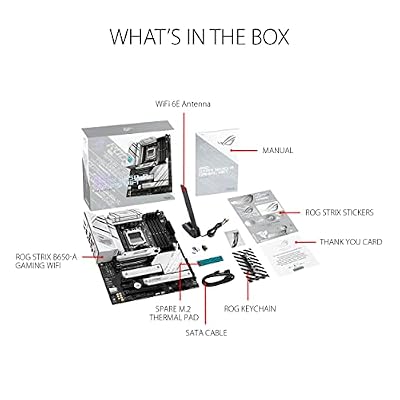
ASUS ROG Strix B650-A Gaming WiFi AMD B650 AM5 Ryzen™ Desktop 9000 8000 & 7000 ATX motherboard, 12 + 2 power stages, DDR5, 3x M.2 slot, PCIe® 4.0, 2.5G LAN, WiFi 6E, USB 3.2 Gen 2x2 Type-C®, Aura Sync



As an Amazon Associate we earn from qualifying purchases. Product prices and availability are accurate as of the date/time indicated.
The ASUS ROG Strix X570-E is the RGB showpiece of this list. It is the board that most clearly earns the ‘RGB motherboard’ label, combining genuine onboard Aura Sync illumination with the headers to extend lighting across your whole build, all on a feature-rich X570 platform with PCIe 4.0. At around $491 it is the premium pick, and the lighting and feature set are the reason.
This is the board to choose if you want the lighting to be a defining feature rather than an afterthought. ROG Strix boards lead with built-in RGB on the I/O shroud and chipset area, Aura Sync ties motherboard, RAM, fans and peripherals into one coordinated effect, and the addressable and standard headers let you add strips and fans freely. Backed by a strong X570 feature set, the Strix X570-E is the standout for an enthusiast who wants maximum, well-integrated RGB.
Pros: Genuine onboard Aura Sync RGB, full header set, premium X570 features, PCIe 4.0.
Cons: By far the most expensive here; X570 is a previous-gen AM4 platform.
2. ASUS ROG Strix B550-F Gaming Motherboard, ATX, AM4, DDR4

Asus ROG Strix B550-F Gaming WiFi II AMD AM4 (3rd Gen Ryzen) ATX DDR4 Gaming Motherboard (PCIe 4.0, WiFi 6E, 2.5Gb LAN, BIOS Flashback, HDMI 2.1, Addressable RGB Header and Aura Sync)


As an Amazon Associate we earn from qualifying purchases. Product prices and availability are accurate as of the date/time indicated.
The ASUS ROG Strix B550-F brings the ROG RGB experience to a more mainstream price. It carries ASUS’s Aura Sync ecosystem with addressable and standard RGB headers and ROG’s signature accent lighting, on a well-rounded B550 ATX board for AMD Ryzen. At around $249 it is the pick for builders who want genuine Aura Sync integration without stepping up to an X570 flagship.
This is the board to choose if you are building on AM4 and want lighting that is properly part of the package. The Aura Sync support synchronises your motherboard, memory and peripherals into one look, the RGB headers let you expand to fans and strips, and the ROG accents add built-in flair. With a solid B550 feature set behind it, the Strix B550-F is a strong mainstream RGB choice that hits the sweet spot between cost and coordinated lighting.
Pros: Aura Sync ecosystem, addressable and standard RGB headers, ROG accent lighting, solid B550.
Cons: DDR4 AM4 platform; pricier than value B550 boards here.
3. GIGABYTE Z790 AORUS Elite AX LGA 1700 ATX Motherboard, RGB Fusion
The Gigabyte Z790 AORUS Elite AX is the Intel RGB pick, supporting 14th and 13th Gen Core CPUs on the LGA 1700 socket. It brings Gigabyte’s RGB Fusion ecosystem with addressable and standard headers, plus AORUS styling and built-in Wi-Fi, on a capable Z790 ATX board. At around $190 it is a well-equipped foundation for an Intel build that wants coordinated lighting.
This is the board to choose if you are going Intel and want RGB Fusion to tie your lighting together. RGB Fusion lets you synchronise the board’s headers with compatible RAM, fans and strips for a unified effect, the AORUS design adds tasteful accents, and the Z790 chipset supports fast memory and modern expansion. As a feature-rich Intel platform with a mature RGB ecosystem and headers to grow into, the Z790 AORUS Elite AX is a strong, sensibly priced pick.
Pros: RGB Fusion ecosystem with full headers, current Z790 Intel platform, Wi-Fi, AORUS styling.
Cons: Onboard lighting is restrained versus ROG; RGB devices mostly added via headers.
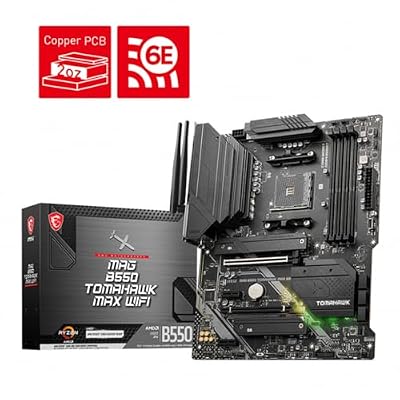
4. MSI MAG B550 Tomahawk Gaming Motherboard, AM4, DDR4, PCIe

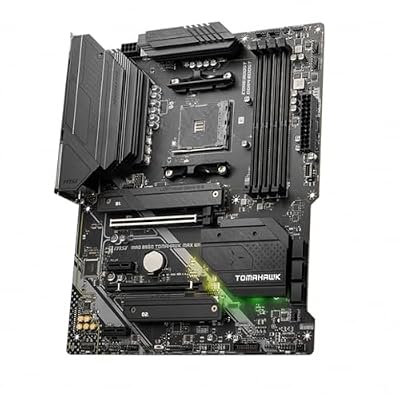
MSI MAG B550 Tomahawk MAX WiFi Gaming Motherboard (AMD Ryzen 5000 Series, AM4, DDR4, PCIe 4.0, SATA 6Gb/s, M.2, USB 3.2 Gen 2, HDMI/DP, Wi-Fi 6E, Bluetooth 5.2, 2.5Gbps LAN, ATX)



As an Amazon Associate we earn from qualifying purchases. Product prices and availability are accurate as of the date/time indicated.
The MSI MAG B550 Tomahawk is the headers-first value pick, and a deservedly popular B550 board. Rather than splashing onboard RGB everywhere, it focuses on robust power delivery and connectivity while providing MSI Mystic Light addressable and standard RGB headers so you can drive your own fans and strips. At around $160 it is excellent value for a dependable AM4 foundation.
Here is the honest framing: the Tomahawk is prized more for its build quality and Mystic Light headers than for flashy built-in lighting. It is the board to choose if you plan to supply your own RGB fans, strips and coolers and simply want reliable headers and software to control them. The strong VRM and feature set make it a rock-solid Ryzen base, and Mystic Light synchronises whatever you plug in. For a value RGB build driven by your own components, it is a smart choice.
Pros: Mystic Light RGB headers, excellent VRM and build quality, strong value AM4 base.
Cons: Minimal onboard RGB; lighting comes mainly from devices you connect.
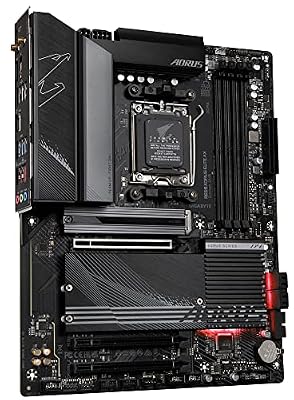
5. GIGABYTE B650 AORUS Elite AX AMD AM5 ATX Motherboard, RGB Fusion

GIGABYTE B650 AORUS Elite AX AMD AM5 ATX Motherboard, Support Ryzen 9000/8000/7000 Series, DDR5, 14+2+1 Power Phase, PCIe 5.0 M.2, USB-C 3.2 Gen 2, WIFI6E, 2.5GbE, EZ-Latch, Q-Flash, RGB Fusion



As an Amazon Associate we earn from qualifying purchases. Product prices and availability are accurate as of the date/time indicated.
The Gigabyte B650 AORUS Elite AX is the AM5 value pick for a modern AMD build. It supports Ryzen 7000, 8000 and 9000 series CPUs on the current AM5 socket, and brings Gigabyte’s RGB Fusion ecosystem with addressable and standard headers plus built-in Wi-Fi. At around $150 it is a well-priced way onto AMD’s latest platform with a capable lighting setup ready to go.
This is the board to choose if you want a future-facing AM5 foundation and RGB Fusion to coordinate your lighting. The headers let you connect and synchronise RGB fans, strips and compatible memory, the AORUS styling adds subtle accents, and AM5 support means a clear upgrade path for years. The onboard lighting is tasteful rather than extravagant, so it leans on your own RGB devices for the full effect, but as a value AM5 RGB platform it is a compelling pick.
Pros: Current AM5 platform, RGB Fusion headers, Wi-Fi, strong value, long upgrade path.
Cons: Onboard RGB is subtle; full effect relies on connected RGB devices.
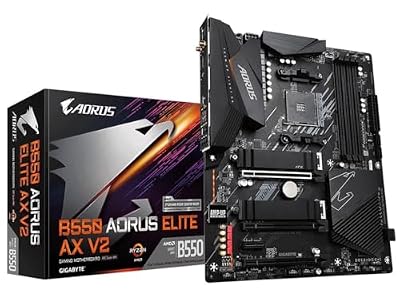
6. GIGABYTE B550 AORUS Elite AX V2 AMD AM4 ATX Motherboard, RGB Fusion
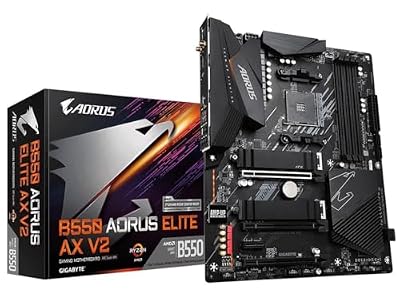
GIGABYTE B550 AORUS Elite AX V2 AMD AM4 ATX Motherboard, Supports Ryzen 5000/4000/3000 Processors, DDR4, 12+2 Power Phase, 2X M.2, PCIe 4.0, Front USB-C, WIFI6, 2.5 GbE LAN, Q-Flash Plus, RGB Fusion
As an Amazon Associate we earn from qualifying purchases. Product prices and availability are accurate as of the date/time indicated.
Rounding out the list is the Gigabyte B550 AORUS Elite AX V2, the budget AM4 pick. It supports Ryzen 5000 and 4000 series CPUs and provides Gigabyte’s RGB Fusion headers — addressable and standard — alongside built-in Wi-Fi, on a dependable B550 ATX board. At around $140 it is the most affordable option here and a sensible base for a value AMD build.
This is the board to choose for a cost-conscious AM4 build where you want reliable RGB headers and a mature ecosystem rather than lavish onboard lighting. RGB Fusion lets you synchronise the fans, strips and memory you add, the AORUS design keeps things clean, and the included Wi-Fi is a welcome bonus at this price. Like the other AORUS boards here, its built-in glow is restrained, so the headers do the heavy lifting — but for affordable, header-driven RGB on AM4, it fits the bill.
Pros: Affordable AM4 board, RGB Fusion headers, built-in Wi-Fi, dependable B550 base.
Cons: Subtle onboard lighting; previous-gen AM4 platform reliant on added RGB devices.
How to Choose an RGB Motherboard
The first thing to understand is that ‘RGB motherboard’ can mean two different things: a board with extensive onboard lighting, and a board that mainly provides headers to drive your own RGB. On this list the ASUS ROG Strix models lead with genuine built-in illumination, while the Gigabyte AORUS and MSI Tomahawk boards are more restrained onboard and lean on their headers. Decide early whether you want the board itself to glow, or whether you are happy to supply lighting via fans and strips and use the board as the control hub.
Headers are the practical heart of any RGB build, so check what each board offers. You want a mix of addressable RGB (ARGB) headers for individually controllable strips and fans, and standard 12V RGB headers for simpler single-colour devices. All six boards here provide RGB headers, which is what lets you expand lighting beyond the board, so count the headers against the number of fans, strips and coolers you plan to connect and make sure there are enough to go around.
The lighting ecosystem ties everything together, and it follows the brand. ASUS uses Aura Sync, Gigabyte uses RGB Fusion, and MSI uses Mystic Light — each is software that synchronises the motherboard, compatible RAM, fans, strips and peripherals into one coordinated effect. For the cleanest result it helps to stay within one ecosystem where possible, so choose your board’s brand with an eye on the RGB components you already own or plan to buy, and you will avoid juggling multiple apps.
Finally, never let RGB override the fundamentals — the platform and features matter most. Match the socket to your CPU: AM4 for Ryzen 5000 and earlier (the B550 and X570 boards here), AM5 for Ryzen 7000 and newer (the B650), and LGA 1700 for 13th and 14th Gen Intel (the Z790). Then weigh VRM quality, memory support, connectivity and price. Pick the board whose platform fits your CPU and budget first, then make sure its RGB headers, ecosystem and onboard lighting match how much glow you want. That order is how you get a build that performs as well as it looks.
Frequently Asked Questions
Which of these boards has the most actual onboard RGB?
The ASUS ROG Strix X570-E and ROG Strix B550-F lead clearly on built-in lighting, with genuine onboard RGB and full Aura Sync integration. The Gigabyte AORUS boards and the MSI Tomahawk are more restrained onboard and focus on providing RGB headers to drive your own fans, strips and coolers. If you want the board itself to glow, choose a ROG Strix; if you will supply your own lighting, the others are excellent header hubs.
What is the difference between ARGB and standard RGB headers?
Addressable RGB (ARGB) headers control each LED individually, enabling rainbow waves, chasing effects and per-zone colour on compatible strips and fans. Standard 12V RGB headers set a single colour across the whole device at once. The boards here offer both types, so check that you have enough ARGB headers for your addressable fans and strips, plus standard headers for any simpler single-colour accessories you plan to use.
Do I have to use the same brand for motherboard and RGB parts?
You do not have to, but it makes life easier. Each brand’s ecosystem — ASUS Aura Sync, Gigabyte RGB Fusion, MSI Mystic Light — synchronises compatible components into one coordinated effect through a single app. Mixing brands can mean running multiple lighting programs that do not always sync perfectly. Staying within one ecosystem where you can gives the cleanest, most unified lighting result across your build.
Should I choose a board for its RGB or its features?
Always prioritise the platform and features first. Match the socket to your CPU — AM4, AM5 or LGA 1700 — and weigh VRM quality, memory support and connectivity, because those determine how well your system runs. Treat RGB as the tiebreaker: once a board fits your CPU, budget and feature needs, then compare its onboard lighting, headers and ecosystem. A great-looking board that does not suit your build is the wrong choice.
Related Guides
- Best Motherboards
- Best AM5 Motherboards
- Best RGB RAM
- Best RGB PC Cases
- Best Gaming PC Builds
- Best Budget Gaming Setup
Affiliate Disclosure: As an Amazon Associate, we earn from qualifying purchases. If you click a link and make a purchase, we may earn a small commission at no extra cost to you. Prices and availability are accurate as of publication and may change.










