

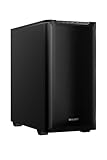
- Top Pick: be quiet! Pure Base 600 ATX Midi Tower PC Case| 2 Pre-Installed Pure Wings Fans | Black | BG021
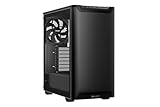
- Best Value: be quiet! Pure Base 501 Black ATX Case | 2 Preinstalled Pure Wings 3 140mm PWM Fans | Optimized Air Pressure | Compact PC Case | Vertical GPU Installation | USB 3.2 Gen. 2 Type C | BG073
- Premium Choice: CORSAIR 4000D RS ARGB Frame Modular Mid-Tower ATX PC Case, High Airflow, 3X Pre-Installed RS Fans, InfiniRail™ Mounting System, ASUS BTF, MSI Zero, Gigabyte Stealth, Black
🛒 Best Price Today on Amazon
Prime members get fast, free shipping on everything above, plus member-only deals. New members get a 30-day free trial — cancel anytime.
- Top Quiet Cases Picks for 2026
- Best Quiet PC Cases at a Glance
- 1. Cooler Master MasterBox Q300L Micro-ATX PC Case
- 2. NZXT H6 Flow Compact Dual-Chamber Mid-Tower Airflow Case
- 3. CORSAIR 4000D RS ARGB Modular Mid-Tower ATX PC Case
- 4. Hyte Y70 Modern Aesthetic Gaming PC Case, Panoramic Glass
- 5. CORSAIR 7000D Airflow Full-Tower ATX PC Case
- 6. HYTE Y70 Touch Infinite Modern Aesthetic Gaming PC Case
- How to Choose a Quiet PC Case
- Frequently Asked Questions
- Related Guides
- Related Articles
Top Quiet Cases Picks for 2026
Here are our current top quiet cases picks, compared on real Amazon owner reviews, price, and features. Live prices update below.
As an Amazon Associate we earn from qualifying purchases at no extra cost to you.



A quiet PC case is about controlling the sound your components make before it ever reaches your ears. There are two routes to a low-noise build: dedicated sound-dampened panels that physically absorb noise, and a clever airflow design that lets your fans spin slowly — and quietly — because the case breathes so well it does not need them screaming. Both work, and the best approach often blends the two. This guide rounds up the best quiet PC cases in 2026 across the styles people actually shop for: a compact budget chassis, airflow-first mid-towers that thrive on low fan speeds, and a roomy full-tower with the space to cool in near silence.
We will be honest where it counts. Several popular cases are marketed for airflow or aesthetics rather than acoustic insulation, and we have flagged that throughout: a high-airflow mesh front lets fans run slower for less noise, but it is not the same as a foam-lined silent case. Our picks span from around $40 to around $350, and we chose them on the things that actually make a build quiet — low-restriction airflow, room for large slow-spinning fans, fan-speed control, and where present, dampening material. Below is an at-a-glance comparison of all six, then a closer look at each and a buyer’s guide built around the real levers of a low-noise PC.
Best Quiet PC Cases at a Glance
| Case | Best For | Standout Spec | Approx Price |
|---|---|---|---|
| Cooler Master MasterBox Q300L | Budget compact quiet build | Micro-ATX, fan-control airflow | around $40 |
| NZXT H6 Flow | Airflow-led low-noise mid-tower | Dual-chamber, mesh front | around $90 |
| CORSAIR 4000D RS ARGB | Quiet-capable ARGB mid-tower | 3x pre-installed fans, mesh | around $100 |
| Hyte Y70 (panoramic glass) | Showpiece with airflow room | Panoramic glass, high-airflow | around $170 |
| CORSAIR 7000D Airflow | Silent cooling headroom (full-tower) | Full-tower, huge fan support | around $270 |
| HYTE Y70 Touch Infinite | Premium aesthetic flagship | Integrated 2.5K LCD touchscreen | around $350 |
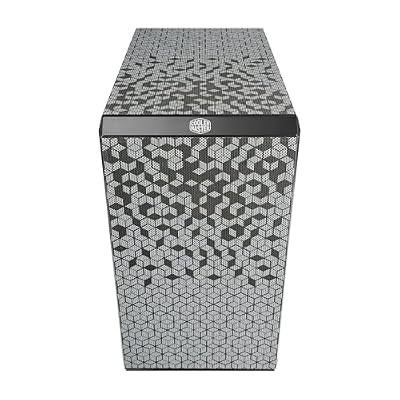
1. Cooler Master MasterBox Q300L Micro-ATX PC Case

Cooler Master Q300L V1 Micro-ATX PC Case, High Airflow, Transparent Panel








As an Amazon Associate we earn from qualifying purchases. Product prices and availability are accurate as of the date/time indicated.
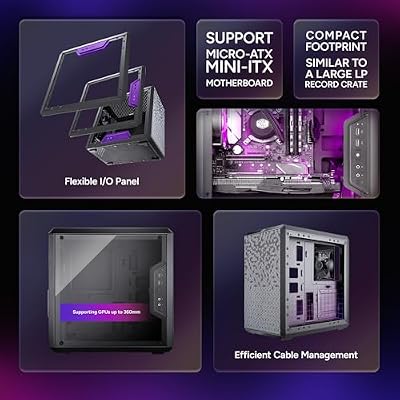
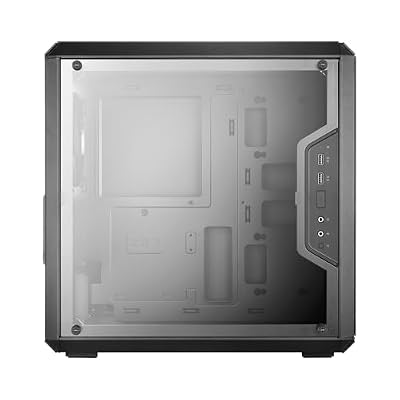
The Cooler Master MasterBox Q300L is the budget-friendly starting point for a quiet compact build. It is a small Micro-ATX chassis with a magnetic dust filter, adjustable I/O placement, and enough fan mounting flexibility to set up a gentle, low-speed airflow path. At around $40 it is the cheapest case here, and a sensible foundation for a quiet system on a tight budget.
For a low-noise build the Q300L earns its place through fan control rather than acoustic foam — it has no sound-dampening panels, so the trick is to fit a couple of larger fans and run them slowly. In a compact mATX system with modest, efficient components, that approach keeps things genuinely hushed. Pair it with a quiet CPU cooler and a low fan curve and the Q300L delivers a tidy, affordable, and quiet little machine. Just be clear-eyed that this is an airflow-and-control case, not an insulated silent chassis.
Pros: Very affordable, compact mATX, flexible fan mounting for low-speed quiet airflow, dust filter.
Cons: No sound-dampening panels; small interior limits very large coolers.
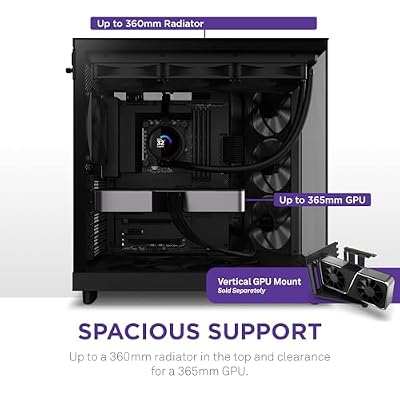
2. NZXT H6 Flow Compact Dual-Chamber Mid-Tower Airflow Case

NZXT H6 Flow | CC-H61FB-01 | Compact Dual-Chamber Mid-Tower Airflow Case | Panoramic Glass Panels | High-Performance Airflow Panels | Includes 3 x 120mm Fans | Cable Management | Black




As an Amazon Associate we earn from qualifying purchases. Product prices and availability are accurate as of the date/time indicated.
The NZXT H6 Flow is the airflow-led pick for a low-noise mid-tower, and it is our lead recommendation for most quiet builds here. Its compact dual-chamber layout separates the hot components from the cable clutter, and a perforated mesh front feeds the intake fans directly. At around $90 it offers a clean, modern look with the kind of breathing room that lets fans stay slow and quiet.
The quiet logic is simple: because the H6 Flow moves air so freely, your fans do not have to work hard to keep temperatures in check, and slow fans are quiet fans. The dual-chamber design also gives large, gently spinning intakes room to do their job, and the angled triple-fan front layout is a signature touch. It is an airflow case rather than a foam-lined silent one, but for a low-noise build that also runs cool, the H6 Flow is the sweet spot — capable, good-looking, and sensibly priced.

Pros: Excellent airflow lets fans run slow and quiet, dual-chamber layout, clean modern design.
Cons: Mesh front is airflow-first, not acoustically insulated; no included dampening.
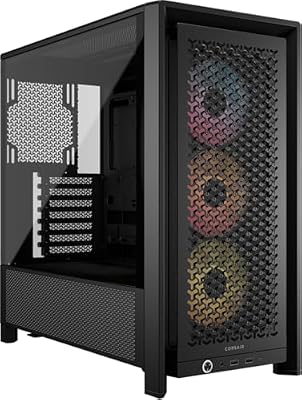
3. CORSAIR 4000D RS ARGB Modular Mid-Tower ATX PC Case


As an Amazon Associate we earn from qualifying purchases. Product prices and availability are accurate as of the date/time indicated.
The CORSAIR 4000D RS ARGB is the quiet-capable mid-tower for builders who want lighting without giving up low-noise potential. It ships with three pre-installed ARGB fans, a high-airflow modular front panel, and CORSAIR’s famously builder-friendly interior with generous cable routing. At around $100 it is a well-rounded, popular chassis that pairs RGB flair with a sensible airflow foundation.
For a quiet system, the 4000D RS gives you a head start: three large included fans mean you can spread the cooling load and run each one slowly rather than pushing a couple of fans hard. The airflow front panel keeps intake restriction low so a gentle fan curve still cools effectively, and the roomy interior accepts large air coolers or radiators that run quietly. It is built for airflow and looks rather than insulation, so frame your expectations accordingly — but as a quiet-friendly ARGB mid-tower, it is a strong value.
Pros: Three included fans spread cooling for low speeds, airflow front panel, roomy and builder-friendly.
Cons: ARGB-and-airflow focus, not sound-dampened; lighting adds to the noise-vs-looks trade-off.
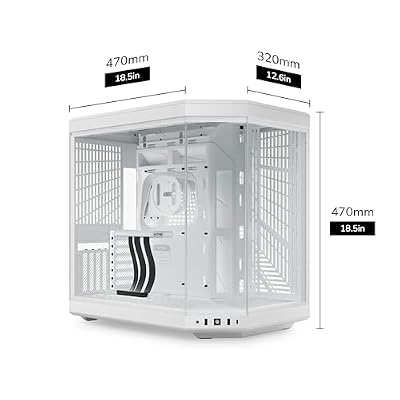
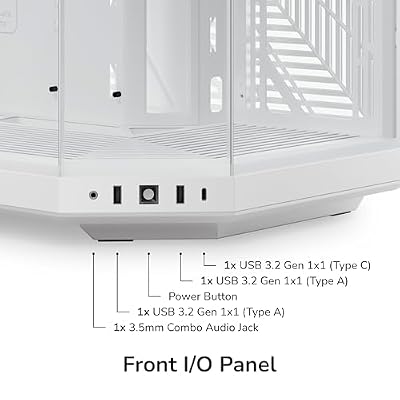
4. Hyte Y70 Modern Aesthetic Gaming PC Case, Panoramic Glass

Hyte Y70 Modern Aesthetic Gaming PC Case - Panoramic Glass | High-Airflow Design | Cable Management | Dual Chamber ATX Mid-Tower Chassis | 10 Fan Capacity | Luxury PCIe 4.0 Riser Cable - Snow White


As an Amazon Associate we earn from qualifying purchases. Product prices and availability are accurate as of the date/time indicated.
The Hyte Y70 (panoramic glass edition) is the showpiece pick that still leaves room for a quiet build. It is a striking dual-chamber case with a wraparound panoramic glass front and side, designed to put your hardware on full display while keeping a high-airflow layout behind the scenes. At around $170 it is a statement chassis for a build you want to look at as much as listen to.
Be honest about the priority here: the Y70 is bought first for its looks, and the expansive glass means it is not an acoustically dampened design. That said, the dual-chamber interior is spacious and supports large radiators and fans, so you can build for low-speed, quiet cooling if you choose your components carefully. The trick with a glass showpiece like this is to pair it with a quiet liquid cooler or large slow fans and a careful fan curve. It is an aesthetic case that can be made quiet, rather than a silent case by design.

Pros: Stunning panoramic glass, spacious dual-chamber interior with room for quiet large-fan cooling.
Cons: Aesthetics-first with extensive glass; no sound dampening, so quiet depends entirely on your fans.
5. CORSAIR 7000D Airflow Full-Tower ATX PC Case

CORSAIR 7000D Airflow Full-Tower ATX PC Case – High-Airflow Front Panel – Spacious Interior – Easy Cable Management – 3X 140mm AirGuide Fans with PWM Repeater Included – Black


As an Amazon Associate we earn from qualifying purchases. Product prices and availability are accurate as of the date/time indicated.
The CORSAIR 7000D Airflow is the full-tower pick for builders who want silent cooling headroom. It is a large, spacious chassis with a high-airflow front panel and support for a huge complement of fans and radiators, giving you the room to over-cool a system and then dial the fans right down. At around $270 it is the serious-build option here, and the extra space is the whole point.
Counterintuitively, a big case is often a quieter case: with room for many large fans and big radiators, each component can run slowly and still keep temperatures low, and slow fans are quiet fans. The 7000D’s generous interior swallows the largest air coolers and multi-radiator liquid loops with ease, and the cable management space helps maintain clean, unrestricted airflow. It is an airflow-focused full-tower rather than a foam-insulated silent case, but for a high-end build where you want maximum cooling at minimum fan speed, the headroom it provides is exactly what makes a quiet system possible.
Pros: Full-tower space for many large slow fans, huge cooling support, low-restriction airflow design.
Cons: Large footprint and premium price; airflow-focused rather than acoustically insulated.
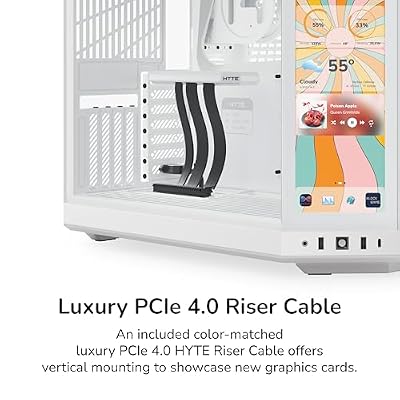
6. HYTE Y70 Touch Infinite Modern Aesthetic Gaming PC Case

HYTE Y70 Touch Infinite Modern Aesthetic Gaming PC Case - Integrated 2.5K LCD Touchscreen Screen Display - Dual Chamber ATX Desktop Chassis - 10 Fan Capacity - Luxury PCIe 4.0 Riser Cable - Snow White




As an Amazon Associate we earn from qualifying purchases. Product prices and availability are accurate as of the date/time indicated.
Rounding out the list is the HYTE Y70 Touch Infinite, the premium aesthetic flagship and by far the most expensive case here at around $350. Its headline feature is an integrated 2.5K LCD touchscreen built into the panoramic glass front, turning the chassis into an interactive showpiece. It is the case you buy when the build itself is the centrepiece of the room.
We will be straight about this one’s role: the Y70 Touch Infinite is a luxury-display case, not a dedicated quiet chassis, and the integrated screen and extensive glass mean acoustics are not its design goal. However, like its panoramic-glass sibling, the spacious dual-chamber interior gives you the freedom to build a quiet system inside it — large slow fans, a capable liquid cooler, and a careful fan curve. If you want a quiet build that also doubles as a piece of interactive art, this delivers the canvas; just remember the silence comes from your cooling choices, not the case itself.

Pros: Spectacular integrated 2.5K touchscreen, spacious interior with room for a quiet large-fan loop.
Cons: Highest price by far; a display-led showpiece, not a sound-dampened silent case.
How to Choose a Quiet PC Case
Start by understanding the two paths to a quiet PC, because they shape every other decision. The first is sound dampening: panels lined with acoustic foam that physically absorb noise. The second — and the one every case on this list leans on — is airflow. A case that breathes freely, like the NZXT H6 Flow or the CORSAIR airflow models, lets your fans spin slowly while still keeping temperatures low, and a slow fan is a quiet fan. Be honest with yourself about which you are buying; none of these are foam-insulated silent chassis, so the quiet here comes from smart airflow and fan control.
Fan strategy is where a quiet build is actually won or lost. The goal is to move enough air at the lowest possible speed, which means favouring more large, slow-spinning fans over a few small fans running hard — large fans push the same air at lower RPM and far less noise. A case with several fan mounts and pre-installed fans, like the 4000D RS ARGB with its three included fans, gives you a head start. Then set a gentle fan curve in your motherboard or fan controller so the fans only ramp up under genuine load.
Size and cooling headroom matter more than people expect for noise. A larger case — up to the full-tower CORSAIR 7000D — has room for big radiators and more large fans, letting every component run slowly and quietly even under load. A compact case like the MasterBox Q300L can absolutely be quiet too, but with less room you must be more deliberate about pairing efficient components with a good low-noise cooler. Match the case size to how much cooling headroom your hardware needs, and remember that breathing room buys you silence.
Finally, weigh acoustics against aesthetics honestly, then build accordingly. Glass showpieces like the Hyte Y70 and Y70 Touch Infinite are bought for their looks first, and their open glass design means quiet depends entirely on the fans and cooler you fit. There is nothing wrong with that — a beautiful case can still be quiet if you choose a good liquid cooler or large slow fans and tune the curve. Decide what you want the case to be, pick your cooling to match, and the quietest PC is the one whose fans you simply forget are spinning.
Frequently Asked Questions
What actually makes a PC case quiet?
Two things: sound-dampening panels that absorb noise, and a high-airflow design that lets fans spin slowly. Every case in this guide relies on the second approach — none are foam-insulated silent chassis. A case that breathes well, like the NZXT H6 Flow, keeps temperatures low at low fan speeds, and a slow fan is a quiet fan. Pair any of these with large fans, a quiet cooler, and a gentle fan curve for the best results.
Are airflow cases the same as silent cases?
No, and it is an important distinction. A silent case uses acoustic foam to physically dampen noise, sometimes at the cost of some airflow. An airflow case, like the CORSAIR 4000D RS or 7000D, instead lets fans run slowly and quietly by removing airflow restriction. Both can produce a quiet PC, but they do it differently. The cases here are airflow-led, so quiet comes from low fan speeds rather than insulation.
Do bigger cases run quieter than small ones?
Often, yes. A larger case like the full-tower CORSAIR 7000D has room for more large fans and bigger radiators, so each one can spin slowly while still keeping components cool — and slow fans are quiet. A compact case such as the MasterBox Q300L can be quiet too, but you have less cooling headroom, so you need efficient components and a good low-noise cooler to keep it hushed under load.
Can a glass showpiece case like the Hyte Y70 be quiet?
It can, but the quiet comes entirely from your cooling choices, not the case. The Hyte Y70 and Y70 Touch Infinite are bought for their looks first, and their extensive glass means no acoustic dampening. The spacious dual-chamber interior, though, has plenty of room for a quiet liquid cooler or large slow fans. Build it with low-noise cooling and a careful fan curve and a showpiece case can still run quietly.
Related Guides
- Best PC Cases
- Best Airflow PC Cases
- Best CPU Coolers for Intel
- Best Case Fans
- Best Gaming PC Builds
- Best Power Supplies
Affiliate Disclosure: As an Amazon Associate, we earn from qualifying purchases. If you click a link and make a purchase, we may earn a small commission at no extra cost to you. Prices and availability are accurate as of publication and may change.
Ready to decide? Our #1 pick for 2026 is the Cooler Master MasterBox Q300L.
Live price & availability on Amazon.


