

The legal routes come first: Nintendo Switch Online’s Game Boy, Game Boy Advance and Nintendo 64 apps, the modern Switch remakes, and original cartridges played on real hardware. Emulator software itself is legal, but it needs game data, and the only defensible source is a cartridge you already own and dump yourself.
Pokemon is the one retro library where “just emulate it” is bad advice given carelessly. Nintendo and The Pokemon Company police these titles far more aggressively than most publishers, the mainline Game Boy and Game Boy Advance games have never been added to Switch Online, and the 3DS store that once sold them legitimately is closed. So the honest version of this guide is layered: what you can buy today, what you can play on hardware you may already own, and what the emulation software is actually for.
Play Classic Pokemon Games Legally: The Official Routes
Start here, because for several of the games there is a supported, DRM-clean way to play that costs less effort than the alternative.
| What you want | Legitimate route | What it costs you |
|---|---|---|
| Kanto’s story on a modern TV | Pokemon: Let’s Go, Pikachu! / Eevee! on Switch | Full retail game; simplified catching, no wild battles |
| Sinnoh remade | Brilliant Diamond / Shining Pearl on Switch | Full retail game; very faithful, divisive art style |
| Hoenn or Johto remade | Omega Ruby / Alpha Sapphire (3DS), HeartGold / SoulSilver (DS) | Second-hand cartridge plus a working 3DS or DS |
| Pokemon Stadium, Snap, Puzzle League | Nintendo 64 app on Switch Online + Expansion Pack | Subscription; Transfer Pak features do not carry over intact |
| Pokemon Trading Card Game (Game Boy) | Game Boy app on Switch Online | Base subscription |
| The original Red, Blue, Gold, Emerald, FireRed | Original cartridge + real handheld, or a clone console | Collector pricing; possibly a dead save battery |
| Old Pokemon moved into current games | Pokemon HOME (with a valid transfer chain) | Premium HOME plan; one-way, and the chain has gaps |
Nintendo Switch Online’s Game Boy and GBA libraries
The Game Boy / Game Boy Color app ships with the base subscription; the Game Boy Advance app requires the Expansion Pack tier. Both include save states, rewind, display border options, and online play with a friend for titles that supported the link cable. That last feature matters more for Pokemon than for anything else in the library.
The catch is the catalogue. As of 2026 the mainline RPGs, Red and Blue through FireRed and Emerald, are still absent. Nintendo has added Pokemon-branded titles around the edges, the Trading Card Game on Game Boy and the Nintendo 64 entries on the Expansion Pack app, but the games most people are searching for have not appeared. Check the current library before you subscribe rather than assuming, because Nintendo adds titles in unannounced batches and this is exactly the gap people want closed.
What happened to the 3DS Virtual Console
This is the route that used to be perfect and no longer exists. Between 2016 and 2018 Nintendo sold Red, Blue, Yellow, Gold, Silver and Crystal as 3DS Virtual Console releases, faithfully emulated, with wireless standing in for the link cable so trades and trade evolutions worked. The 3DS and Wii U eShops closed on 27 March 2023, so those purchases can no longer be made.
If you bought them before the shutdown, they still work: redownloading previously purchased software on a 3DS you own continued to function after the storefront closed. Pokemon Bank was also made free to use, which is how a Virtual Console Mew or Celebi reaches Pokemon HOME and then a current game. Treat that pipeline as finite. Nintendo has already retired several legacy online services and has never promised this one runs forever, so if you own those titles and care about the creatures in them, move them sooner rather than later.
Cartridges and a handheld that can read them
Buying the original is still the cleanest answer and often the one people skip. A loose Game Boy Advance cartridge plus a backlit AGS-101 SP, or a Game Boy Player for the GameCube, gets you the real game with no legal ambiguity at all. Modern FPGA hardware is the polished version of this: the Analogue Pocket accepts Game Boy, Game Boy Color and Game Boy Advance carts directly and drives the original hardware behaviour from a field-programmable chip rather than software. If you are weighing that against a software handheld, our comparison of emulation handhelds covers where each approach wins.
Two warnings about the second-hand market. Counterfeit Pokemon cartridges are rampant, frequently with the wrong label font, a Phillips screw instead of the 3.8mm security screw, or no battery at all. And a genuine twenty-year-old cartridge may have a dead save battery, which is its own section below.
The Emulator Software Landscape (For Cartridges You Own)
Emulators are ordinary software and legal to run. What follows assumes you are supplying game data dumped from your own cartridge. This guide does not tell you where to download anything, and you should not go looking.
| Emulator | Systems | Accuracy | Link / trading support | Best for |
|---|---|---|---|---|
| mGBA | GB, GBC, GBA | Very high | Yes – several linked instances, plus socket linking | The default pick on desktop and handhelds |
| SameBoy | GB, GBC | Reference-grade | Yes, including the Game Boy Printer | Gen 1 and 2 when you want cycle-level correctness |
| BGB | GB, GBC (Windows) | Very high | Yes – link over TCP/IP to another person | Trading with a friend remotely; deep debugging |
| melonDS | DS, DSi | High | Yes – emulated local wireless between instances | Diamond/Pearl, Platinum, HeartGold/SoulSilver, Black/White |
| RetroArch (mGBA, Gambatte, SameBoy, melonDS cores) | All of the above | Core-dependent | Varies by core; netplay is separate | One frontend, shaders, controller mapping everywhere |
| Dolphin | GameCube (Colosseum, XD, Box Art) | High | Built-in mGBA integration for GC-to-GBA linking | The GameCube Pokemon side stories |
In practice mGBA is what most people should install first. It is accurate, actively maintained, cross-platform, and its multiplayer implementation runs up to four linked instances inside one process, which is the mechanism that makes single-player trade evolutions possible. SameBoy edges it on pure Game Boy accuracy and is the better choice if you are chasing frame-exact behaviour in Gen 1 and 2. RetroArch is a wrapper rather than a rival; it runs those same cores with a unified interface, and if you are new to it our RetroArch setup walkthrough saves a frustrating evening. For the Game Boy Advance specifically, the deeper GBA emulator comparison covers audio mixing and shader differences that matter more on that system.
None of this is demanding hardware. Any machine built in the last decade runs these at full speed; a mid-range budget gaming PC build is overkill for Game Boy emulation and only starts to matter for Dolphin’s higher internal resolutions.
Dumping a Cartridge You Own
A cartridge dumper is a USB device with a Game Boy or GBA slot. It reads the mask ROM into a file and, crucially, reads and writes the save file too, which is the part collectors care about most.

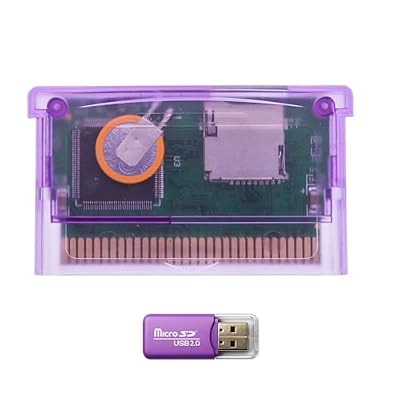


The well-known options are the Epilogue GB Operator, which handles GB, GBC and GBA with free desktop software and is the most beginner-friendly; the insideGadgets GBxCart RW, which is cheaper and more technical; the BennVenn Joey Jr; and the open-source Sanni cartridge reader for people who want to build their own. The GB Operator doubles as a way to play the cartridge on a PC while the cart stays in the device, which sidesteps the dumping question entirely for casual use.
- Back up the save first, before anything else. On Gen 1 and Gen 2 the save lives in battery-backed SRAM. If that battery dies or is disconnected, the save is gone permanently. Dump the save file the moment you have a reader.
- Then dump the ROM. Read it twice and compare the two files. A mismatch means dirty contacts, not a bad dump tool.
- Clean the contacts if reads fail. Isopropyl alcohol on a cotton swab, dried fully before reinserting. This fixes the large majority of read errors.
- Keep the save file paired with the cartridge. mGBA and melonDS expect an .sav next to the ROM; restoring a save back to the cartridge later works the same way in reverse.
The save-battery reality on twenty-year-old carts
Which games have a battery, and what it does, varies by generation, and people get this wrong constantly:
- Red, Blue, Yellow, Gold, Silver, Crystal: a CR2025 keeps the save alive. In Gold, Silver and Crystal it also drives the real-time clock. When it dies you lose the save and the day/night cycle.
- Ruby, Sapphire, Emerald: saves are in flash memory and survive without power. The battery only runs the internal clock, so a dead one means berries stop growing and tides stop changing, with a “the internal battery has run dry” message on boot. Your save is fine.
- FireRed and LeafGreen: no clock battery at all. Nothing to replace.
Replacing one needs a 3.8mm gamebit screwdriver to open the shell and a soldering iron. Buy a tabbed CR2025 rather than soldering to a bare coin cell, which is both a poor joint and a genuine fire risk. Desolder the old tabs, fit the new cell with the same polarity, and reassemble. Dump the save before you start, because cutting power on a Gen 1 or Gen 2 cart erases it instantly. If soldering is not for you, plenty of reputable repair shops do this cheaply, and it is worth doing on any cart you plan to keep.
Trading, Evolution and Why the Link Cable Is the Hard Part
This is the genuine sticking point in Pokemon emulation, and no amount of emulator accuracy makes it disappear. Kadabra, Machoke, Graveler and Haunter only evolve by trade. Gen 2 adds trade-with-held-item evolutions: Scyther and Onix with a Metal Coat, Poliwhirl and Slowpoke with a King’s Rock, Seadra with a Dragon Scale, Porygon with an Up-Grade. Add version exclusives and a solo player cannot legitimately complete the Pokedex in a single cartridge.
Emulators handle it three ways. mGBA can run several instances linked to each other on one machine, so you trade with yourself, move the Pokemon across, let it evolve and trade it back. BGB links over TCP/IP, which means an actual second person on another computer. melonDS emulates the DS local wireless layer between instances for the DS-era games. All three work, and all three are fiddlier than plugging in a cable.
The official side has its own answer: Switch Online’s Game Boy app supports online play with friends for link-compatible titles, and the 3DS Virtual Console releases used wireless for exactly this. On real hardware you need a Game Boy link cable, a GBA link cable, or, for Gen 4 and later, just DS wireless. A decent USB controller handles the input side on PC; the link side is the part you plan around.
Troubleshooting
- “The internal battery has run dry” on a GBA game. Expected on a Gen 3 cart. Your save is intact; only the clock stopped. Replace the battery only if you want berries and tides back.
- Save vanishes every time you power off a Gen 1 or 2 cart. Dead save battery. Dump what you can and replace the cell.
- Trade in mGBA hangs at the Cable Club. Both instances must be the same emulator build and running at the same speed. Turn off fast-forward and frame skip on both before connecting.
- Dumper reports inconsistent reads. Contacts, almost always. Clean with isopropyl, dry fully, reseat. Persistent failure on one cart among several usually means a counterfeit board.
- Audio crackles in Gen 3. An emulator audio-buffer issue, not the game. Raise the buffer or switch backends; see the retro console emulation notes for the usual suspects.
One closing note, and not legal advice: emulator software is lawful and courts have upheld that. Downloading game files you do not own is not, and the position of personal cartridge backups under the DMCA’s anti-circumvention rules has never been settled in your favour by a court. Keep your dumps to yourself, keep the cartridge, and you are in the most defensible place available.
Frequently Asked Questions
Is it legal to emulate Pokemon games I own on cartridge?
The emulator itself is unambiguously legal; US courts settled that in the Sony v. Connectix and Bleem cases. Dumping your own cartridge is far greyer, because the DMCA’s anti-circumvention provisions have never been tested in a ruling that clearly protects personal backups. Owning the cartridge is the strongest position available, but it is not a court-confirmed right, and downloading files you have not dumped yourself is straightforwardly infringement.
Are the mainline Pokemon games on Nintendo Switch Online?
Not the RPGs. The Game Boy and Game Boy Advance apps have never included Red, Blue, Yellow, Gold, Silver, Crystal, Ruby, Sapphire, Emerald, FireRed or LeafGreen. What is there is Pokemon-adjacent: the Game Boy Trading Card Game title, and Pokemon Stadium, Stadium 2, Snap and Puzzle League on the Nintendo 64 app under the Expansion Pack tier. Check the live library before subscribing, since Nintendo adds titles without warning.
Can I still buy Pokemon Red or Gold on the 3DS eShop?
No. Both the 3DS and Wii U eShops closed permanently on 27 March 2023, which removed the last official digital storefront selling those Virtual Console releases. If you purchased them beforehand you can still redownload them to a 3DS you own, and Pokemon Bank was made free to use so transfers upward remain possible. Treat that as a service with a finite life and move anything you care about now.
How do I get trade evolutions like Alakazam without a second player?
On emulator, run two linked instances of mGBA on the same machine, trade the Kadabra across, let it evolve in the second instance and trade it straight back. melonDS emulates DS local wireless for the Gen 4 and 5 games the same way. On real hardware you need a second Game Boy and a link cable, or DS wireless from Gen 4 onward, where a second console is genuinely unavoidable.
Does a dead cartridge battery mean my save is gone?
Only on Gen 1 and Gen 2. Red through Crystal keep the save in battery-backed SRAM, so a dead CR2025 erases everything and stops the day/night clock. Ruby, Sapphire and Emerald store saves in flash memory that survives without power; their battery only runs the internal clock, so a dry one just breaks berry growth and tides. FireRed and LeafGreen have no battery at all.
















