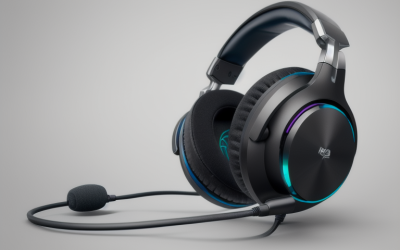
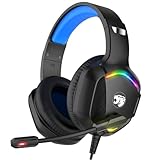
- Top Pick: Ozeino Gaming Headset for PC, Ps4, Ps5, Xbox Headset with 7.1 Surround Sound Gaming Headphones with Noise Canceling Mic, LED Light Over Ear Headphones for Switch, Xbox Series X/S, Laptop, Mobile White
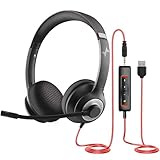
- Best Value: Lenovo USB-A Wired Stereo Headset for PC/Laptop, AI Noise Canceling via APP, 140g Lightweight, Replaceable Earcups, Double-Sided Boom Mic, in-line Controls with Mute for Call. Work with Teams/Zoom
- Premium Choice: EKSA E1000 USB PC Gaming Headset with Mic, 7.1 Surround Sound | Computer Headphones with Microphone Noise Cancelling, RGB Light, Wired Headphones for PS4, PS5 Console, Laptop, Call Center
A PC headset has to do two jobs at once: carry game audio to your ears and carry your voice to teammates, coworkers, or a video call. Stay under 100 dollars and you can get both, but the choices split into very different families. Some are gaming headsets built around 7.1 surround sound and RGB, some are USB office headsets built around call clarity and a mute button, and a few are wireless models that trade the cord for a charging routine.
This guide is for desktop and laptop users in 2026 who want one headset for ranked matches, remote work, and online classes. It compares ten listed models using only the facts in each product title, and it flags which ones lean toward play, which lean toward calls, and which try to do both. Because the cap is the first filter, confirm that a favorite actually sits under it when you buy.
Quick Picks
As an Amazon Associate we earn from qualifying purchases at no extra cost to you.


| Product | Best for | Key spec from the title |
|---|---|---|
| Ozeino Gaming Headset | Multi-platform gaming | 7.1 surround, noise canceling mic, LED |
| Lenovo USB-A Wired Stereo Headset | Work calls on a laptop | 140g, replaceable earcups, mute control |
| EKSA E1000 USB | USB gaming with surround | 7.1 surround, RGB, USB |
| BENGOO G9000 | Long sessions on a budget | Memory earmuffs, 7.1 surround, LED |
| Wireless Office Headset (USB dongle) | Cord-free desk calls | Bluetooth, charging base, mute button |
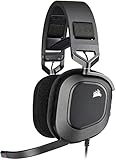
| Corsair HS80 RGB USB | Mic quality focus | Dolby Audio 7.1, memory foam earpads |
| IMYB A36 | Simple wired gaming | RGB, over-ear, noise cancelling mic |
| JIAMQISHI USB Headset | Classes and home office | USB plus 3.5mm, in-line control |
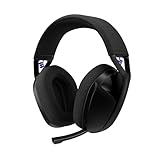
| Logitech G321 Lightspeed | Wireless gaming | 20+ hrs battery, 16 kHz boom mic |
| 321Wasay USB Headset | Basic wired calls | USB, full ear cups |
How to Choose
Decide between gaming and call-first designs
Gaming headsets add surround processing, flashy lighting, and bigger earcups. Office headsets add mute buttons, in-line volume, and a boom mic placed for speech. A boom mic that sits near the corner of the mouth usually carries a voice better than a tiny inline pickup, so look for a boom if you talk to teammates or customers daily. A flip-to-mute or in-line mute switch is worth having if your day includes meetings, since reaching for a software toggle mid-call is easy to forget.
Wired or wireless
Wired headsets never need charging and are a safe default for desktops. A wireless model should list a battery figure; 20 hours or more is a good floor for a workweek between charges. Wireless headsets with a USB dongle usually behave better than Bluetooth alone on a PC, so look for a dongle if you want low-hassle pairing. A charging base is a bonus because it gives the headset a home on the desk.
Connector and platform support
USB headsets bring their own sound processing and avoid the quality of a weak motherboard jack. A 3.5mm plug works on nearly everything, including controllers and phones. If the headset will be used on more than a PC, confirm that the title names your other platforms.
Comfort, and what to ignore
Under 100 dollars, comfort matters more than a surround claim. Look for memory foam or soft earmuffs, a weight low enough for all-day wear, and replaceable earcups. A headset marketed with a “7.1” label is usually virtual surround, produced by software, so do not treat the number as a hardware difference. Budget models also cut corners on hinge materials and cable strain relief, so a headset with replaceable earcups or a reinforced cable can outlast a flashier rival. Weight matters as well: anything near 140g is easy to wear through a workday, while bulkier gaming frames can feel heavy after a few hours.
The 10 Best Options
Ozeino Gaming Headset
A white over-ear gaming headset with 7.1 surround sound, a noise canceling mic, and an LED light. The title lists PC, PS4, PS5, Xbox, Switch, laptop, and mobile, so it makes sense for a household that shares one headset across several devices and wants a single purchase to cover a console in the living room and a PC in the bedroom.
- Strength: broad platform list in the title.
- Strength: gaming features plus an included mic.
- Trade-off: LED and surround labeling add little over a plain stereo setup.
Skip it if you want a minimal, work-style look.
Lenovo USB-A Wired Stereo Headset
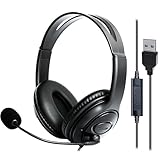
This one is built for calls. The title lists a 140g body, replaceable earcups, a double-sided boom mic, and in-line controls with mute. AI noise canceling through an app is also named, and the title says it works with Teams and Zoom, which fits remote workers who spend hours in meetings and want to avoid a heavy gaming frame.
- Strength: light weight and swappable earcups.
- Strength: dedicated mute control on the cord.
- Trade-off: stereo only, with no surround processing for games.
Skip it if gaming immersion matters more than call clarity.
EKSA E1000 USB
A USB gaming headset with 7.1 surround sound, a noise cancelling mic, and RGB lighting. Because it connects over USB, it brings its own sound processing rather than depending on the motherboard jack. The title also lists console and call-center use, so it can double as a work headset when the lighting is not a concern.
- Strength: USB connection and surround sound in one package.
- Strength: flexible use across PC, consoles, and laptops.
- Trade-off: the RGB and surround labels are marketing more than hardware.
Skip it if you prefer a 3.5mm connection for phones.
BENGOO G9000
A stereo gaming headset listing noise cancelling over-ear cups, an LED light, 7.1 surround, and soft memory earmuffs. The title names PS4, PC, Xbox, and Switch, which suits a younger gamer who moves between a console and a PC and needs comfort for long evening sessions more than a premium finish.
- Strength: soft memory earmuffs aim at comfort.
- Strength: wide platform list.
- Trade-off: a plainer design with a basic feature set.
Skip it if you want modern wireless convenience.
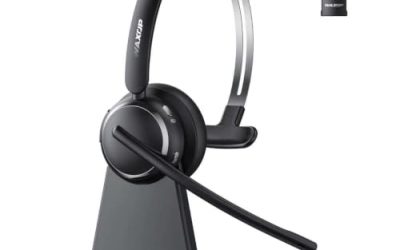
Wireless Office Headset (USB dongle)
This is a work headset, not a gaming model. It lists Bluetooth, a USB dongle, a charging base, a noise cancelling mic, and a mute button. It targets call centers, remote workers, and drivers who want to stand up and move around without a cord, with a base that keeps the headset charged between meetings.
- Strength: cord-free movement and a charging base.
- Strength: mute button for meetings.
- Trade-off: no gaming features or battery figure in the title.
Skip it if you play competitive games.
Corsair HS80 RGB USB
The title names a clear broadcast-quality mic, Dolby Audio 7.1, memory foam earpads, plug-and-play USB, and on-ear controls. It is the most mic-focused gaming headset here and fits a player who also streams, records voice, or talks a lot, and who prefers a recognized brand name on a wired headset.
- Strength: mic and Dolby Audio emphasis.
- Strength: memory foam earpads with controls on the ear cup.
- Trade-off: it may sit near the top of the cap.
Skip it if the cap is strict.
IMYB A36
A wired over-ear gaming headset with RGB, a noise cancelling mic, and a platform list covering PS5, Xbox, Switch, Mac, and PC. It is a plain, entry-tier pick for a secondary setup, a spare for a sibling, or a first headset that does not need to impress anyone.
- Strength: broad compatibility, including Mac.
- Strength: over-ear cups suit gaming sessions.
- Trade-off: little brand or audio detail beyond the labels.
Skip it if you want a recognized name.
JIAMQISHI USB Headset
This on-ear model lists USB and 3.5mm connections, a noise cancelling mic, and in-line control. Its wording points to home office, online class, Skype, and Zoom rather than play, so it fits students and remote workers who need clear speech and a simple plug.
- Strength: two connection options.
- Strength: in-line control within reach.
- Trade-off: on-ear cups can feel less isolating than over-ear ones.
Skip it if you want big earcups or surround sound.
Logitech G321 Lightspeed
The only wireless gaming headset in this group. It lists Bluetooth, a 16 kHz boom mic, 20+ hours of battery, and a dynamic comfort and fit design, and it works with PC, PlayStation, Switch, and mobile. That battery figure is a useful floor for a week of casual evenings.
- Strength: 20+ hour battery figure is stated.
- Strength: Lightspeed and Bluetooth give two connection routes.
- Trade-off: wireless models tend to sit at the upper end of the cap.
Skip it if a cable is fine with you.
321Wasay USB Headset
A minimal wired USB headset with a mic and full ear cups, listed for PC and laptop. The title offers few specs, so it fits a bare-bones role: a spare for a classroom, a shared desk, or an office drawer, where reliability matters more than features.
- Strength: plug-in USB simplicity.
- Strength: full ear cups.
- Trade-off: almost no feature detail in the title.
Skip it if you want gaming features.
Which One Fits Your Situation
You work from home and play at night
The Corsair HS80 RGB USB gives a mic-forward USB design for both purposes, while the Lenovo USB-A Wired Stereo Headset leans harder toward work and keeps weight low for long meetings.
You want to cut the cord
The Logitech G321 Lightspeed is the gaming pick, with a stated 20+ hours of battery, and the wireless office headset is the pick for calls where you want to stand up and move around.
You share one headset across devices
The Ozeino Gaming Headset lists PC, PS4, PS5, Xbox, and Switch, so one headset can follow the family from the console to the desktop without extra adapters in most cases.
You need a basic spare
The 321Wasay USB Headset or the JIAMQISHI USB Headset covers calls simply, and the JIAMQISHI adds a 3.5mm option for devices without a free USB port.
Common Mistakes
- Buying on a surround label instead of comfort and mic quality.
- Choosing wireless without a stated battery figure.
- Forgetting that a USB-A plug needs a free port.
- Using an office headset and expecting gaming-grade soundstage.
- Ignoring ear cup size and clamp force, which decides whether a headset is wearable for a full afternoon.
Related guides
- Aio Liquid Coolers For High Performance Gaming
- How To Lower Input Delay In Competitive Shooters
- External Hard Drives For Music Production
Frequently Asked Questions
Is 7.1 surround real?
On most headsets it is virtual, created by software. It can help with direction, but it is not a sign of a better driver, so judge comfort and mic first and treat the surround label as a bonus feature.
USB or 3.5mm?
USB adds its own sound processing, while 3.5mm works on more devices, including controllers and many phones. A model with both, like the JIAMQISHI, gives the most flexibility.
Do I need a boom mic?
For daily calls and team chat, yes. A boom sits close to the mouth and carries a voice better.
Is wireless good enough for gaming?
A dongle-based model handles most games well, but a wired headset is still the simplest. Bluetooth alone is better kept for phones and casual listening, since it can add noticeable delay in fast games. Whichever you pick, read the battery figure before you commit.