

🛒 Best Price Today on Amazon
Prime members get fast, free shipping on everything above, plus member-only deals. New members get a 30-day free trial — cancel anytime.
- Top Cases Game Development Picks for 2026
- Best PC Cases for Game Development at a Glance
- 1. CORSAIR 4000D RS ARGB Frame Modular Mid-Tower ATX PC Case
- 2. Corsair iCUE 220T RGB Airflow Tempered Glass Mid-Tower Smart ATX Case
- 3. MSI MPG GUNGNIR 110R Premium Mid-Tower Gaming PC Case
- 4. CORSAIR iCUE Link 3500X RGB Mid-Tower ATX PC Case
- 5. Cooler Master MasterBox Q300L Micro-ATX PC Case
- 6. HYTE Y70 Touch Infinite Modern Aesthetic Gaming PC Case
- How to Choose a PC Case for Game Development
- Frequently Asked Questions
- Related Guides
- Related Articles
- Related Guides
Top Cases Game Development Picks for 2026
Here are our current top cases game development picks, compared on real Amazon owner reviews, price, and features. Live prices update below.
As an Amazon Associate we earn from qualifying purchases at no extra cost to you.



Building a PC for game development is a different exercise from building a pure gaming rig. A dev box spends its day compiling shaders, baking lightmaps, importing assets and running engine editors alongside the game under test, so the case has to keep a hard-working CPU and GPU cool, hold the storage a growing project demands, and stay quiet enough that you are not distracted through hours of focused work. This guide rounds up the best PC cases for game development in 2026, prioritising airflow, drive capacity and low noise over pure showpiece looks.
Our picks were chosen on what genuinely helps a development workstation: real airflow to tame thermals during long builds, room for multiple drives so your engine, source control and asset libraries have somewhere to live, quiet running for concentration, and value. We have included a deliberate spread — from a compact around-$40 micro-ATX chassis to an around-$350 showcase case — and we are honest about where each one fits, because the best case for a dev rig is the one whose strengths match how you work. Below is an at-a-glance comparison of all six, then a closer look at each and a buyer’s guide built around airflow, drive bays and noise.
Best PC Cases for Game Development at a Glance
| Case | Best For | Standout Spec | Approx Price |
|---|---|---|---|
| CORSAIR 4000D RS ARGB Frame | Best all-round airflow dev case | High-airflow ATX, 3 pre-installed fans | around $99 |
| Corsair iCUE 220T RGB Airflow | Cool, quiet builds with RGB | High-airflow front mesh, tempered glass | around $180 |
| MSI MPG GUNGNIR 110R | Roomy mid-tower workhorse | 4 pre-installed fans, glass panel | around $150 |
| CORSAIR iCUE Link 3500X RGB | Multi-drive showcase build | Panoramic glass, iCUE Link ecosystem | around $160 |
| Cooler Master MasterBox Q300L | Compact micro-ATX dev box | Compact mATX, magnetic dust filters | around $39 |
| HYTE Y70 Touch Infinite | Aesthetic showcase workstation | Integrated 2.5K LCD touchscreen | around $350 |
1. CORSAIR 4000D RS ARGB Frame Modular Mid-Tower ATX PC Case
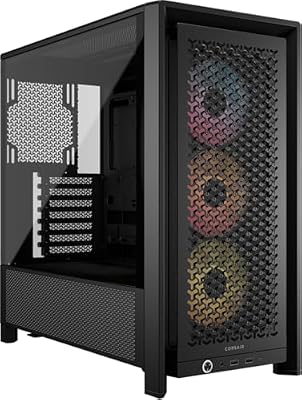
CORSAIR 4000D RS ARGB Frame Customizable Mid-Tower PC Case – Black | 3x Pre-Installed Fans, High Airflow, Fully Modular, Easy InfiniRail Fan Mounting, GPU Anti-Sag, Reverse Motherboard Support


As an Amazon Associate we earn from qualifying purchases. Product prices and availability are accurate as of the date/time indicated.
The CORSAIR 4000D RS ARGB Frame is the best all-round pick for a game development workstation, and the reason is simple: it is built around airflow. It is a modular mid-tower ATX case with a high-airflow front, three pre-installed ARGB fans out of the box, and a clean, practical interior with generous cable management. At around $99 it delivers the cooling, capacity and tidy layout a dev rig wants without overspending.
For game development this is exactly the intent it serves. Long compile and bake jobs push a CPU hard for sustained periods, and the open front and bundled fans keep fresh air moving over the components so thermals stay in check through hours of work. The roomy ATX interior accepts a full-size motherboard, large air or liquid coolers and multiple storage drives, while the modular layout makes adding SSDs and routing cables painless. If you want one case that quietly handles everything a development machine throws at it, the 4000D RS is the obvious starting point.
Pros: Genuine high-airflow design, three fans included, roomy ATX interior with great cable management, strong value.
Cons: ARGB lighting may be unnecessary for a pure work box; mid-tower footprint needs desk or floor space.
2. Corsair iCUE 220T RGB Airflow Tempered Glass Mid-Tower Smart ATX Case
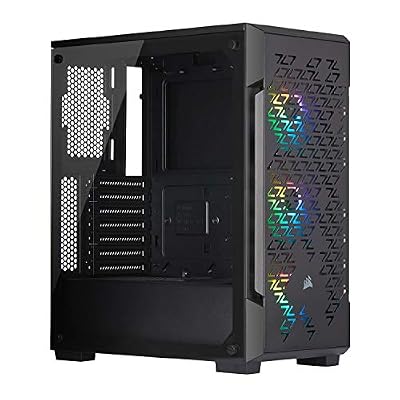
Corsair iCUE 220T RGB Airflow Tempered Glass Mid-Tower Smart ATX Case - High Airflow - Three Included SP120 RGB PRO Fans - Black


As an Amazon Associate we earn from qualifying purchases. Product prices and availability are accurate as of the date/time indicated.
The Corsair iCUE 220T RGB Airflow is the pick for a dev build that wants cool, quiet running with a touch of polish. As the name says, airflow is the point: a high-airflow mesh front feeds the bundled fans, the tempered-glass side panel shows off the build, and the chassis is designed around Corsair’s iCUE ecosystem for fan and lighting control. At around $180 it is a refined mid-tower that keeps temperatures and noise down.
This is the case to choose if you split your day between heavy engine work and playtesting and want a machine that stays composed and unobtrusive. The mesh front and smart fan control let you tune for quiet operation when you are concentrating, then ramp up cooling under a long render, and iCUE makes dialling that balance straightforward. The interior has room for a full ATX board, sizeable coolers and several drives. For a quiet, good-looking and well-cooled development rig, the 220T Airflow is a strong, considered choice.

Pros: High-airflow mesh front, smart iCUE fan control for quiet running, tempered glass, full ATX room.
Cons: iCUE software adds setup overhead; pricier than a plain airflow case.
3. MSI MPG GUNGNIR 110R Premium Mid-Tower Gaming PC Case


As an Amazon Associate we earn from qualifying purchases. Product prices and availability are accurate as of the date/time indicated.
The MSI MPG GUNGNIR 110R is the roomy workhorse of this list. It is a premium mid-tower that ships with four pre-installed fans, includes a tempered-glass side panel, and offers a spacious, well-organised interior with good cable management and clearance for large components. At around $150 it gives a development build plenty of airflow and room to grow out of the box.
For a dev workstation the four bundled fans are the headline benefit: more factory cooling means you spend less on extras and the case moves air effectively from day one, which matters when a project compiles for minutes at a time. The generous interior accommodates a full ATX motherboard, tall air coolers or radiators, a long GPU and multiple storage drives for your engine and assets. If you want a capacious, well-cooled mid-tower that is ready to work without immediate upgrades, the GUNGNIR 110R is a dependable pick.
Pros: Four fans pre-installed, spacious interior, good clearance and cable management, tempered glass.
Cons: RGB-styled rather than understated; larger footprint than compact cases.
4. CORSAIR iCUE Link 3500X RGB Mid-Tower ATX PC Case

CORSAIR iCUE Link 3500X RGB Mid-Tower ATX PC Case – Panoramic Tempered Glass – Reverse Connection Motherboard Compatible – 3X CORSAIR iCUE Link RX120 RGB Fans Included – Black


As an Amazon Associate we earn from qualifying purchases. Product prices and availability are accurate as of the date/time indicated.
The CORSAIR iCUE Link 3500X RGB is the showcase pick for a development build that doubles as a centrepiece. It pairs a panoramic tempered-glass design — wrapping the front and side for a near-frameless view — with Corsair’s iCUE Link ecosystem, which simplifies fan and accessory cabling down to a single connection. At around $160 it is a striking mid-tower with a genuinely clean internal layout.
For game development the appeal is a tidy, expandable interior that still breathes well. The open glass design and iCUE Link fans keep air moving over a hard-working CPU and GPU, while the simplified cabling makes it easy to add fans and storage as a project grows. There is comfortable room for a full ATX board, large cooling and multiple drives. If you want a development rig that looks the part on your desk while still delivering the airflow and drive capacity dev work needs, the 3500X is a compelling option.

Pros: Panoramic glass for a clean showcase look, iCUE Link single-cable fans, good airflow, roomy ATX interior.
Cons: Glass-forward design favours looks; iCUE Link accessories add cost over standard fans.
5. Cooler Master MasterBox Q300L Micro-ATX PC Case

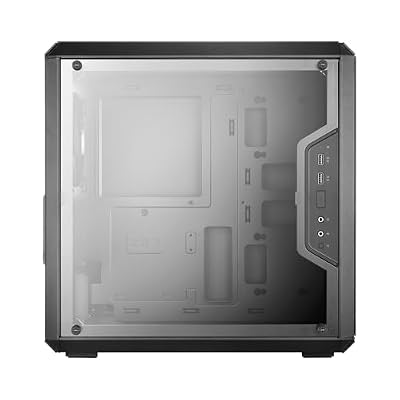
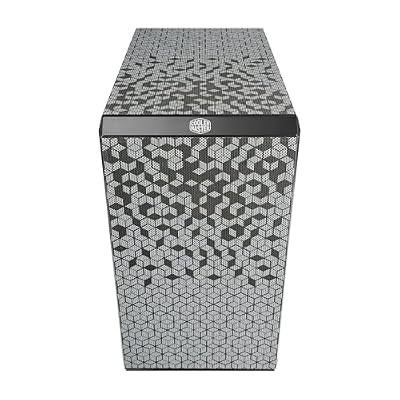
Cooler Master Q300L V1 Micro-ATX PC Case, High Airflow, Transparent Panel | 360mm Graphics Card Support, 240mm AIO Support, Micro-ATX Motherboard, Magnetic Dust Filters, Modular I/O Panel
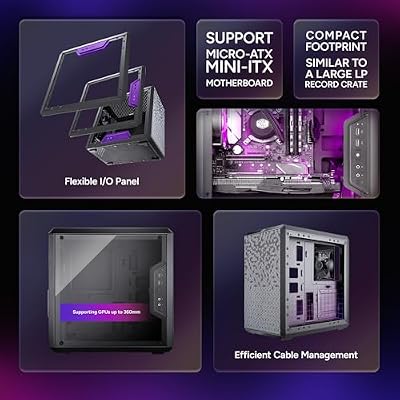


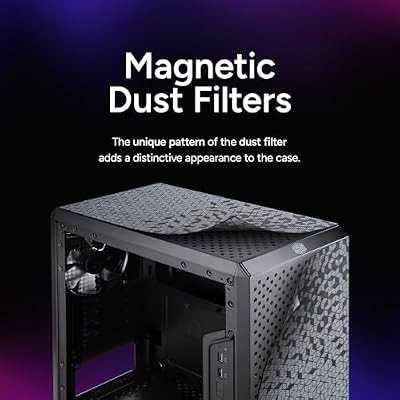




As an Amazon Associate we earn from qualifying purchases. Product prices and availability are accurate as of the date/time indicated.
The Cooler Master MasterBox Q300L is the compact pick here, and it is important to be clear about what it is: a small micro-ATX (mATX) case rather than a roomy full-tower. It packs a surprising amount into a tidy footprint — magnetic dust filters, a ventilated design and flexible fan mounting — and at around $39 it is by far the most affordable case on this list. For a space-conscious dev box it is a clever, budget-friendly option.
Because it is compact mATX, this is the case to choose when desk or room space is limited and your build uses a micro-ATX motherboard rather than a full-size ATX board. It is not the high-capacity, high-airflow chassis the larger cases here are, and storage and cooling room are more constrained, so treat it as a small-form-factor choice rather than an all-out workstation. Within those limits it is genuinely good value: the dust filters keep components clean, the ventilation is reasonable, and it suits a tidy, affordable secondary dev or build machine.
Pros: Very affordable, compact mATX footprint, magnetic dust filters, flexible fan mounting.
Cons: Compact mATX only — limited drive and cooling room; not a high-capacity workstation chassis.
6. HYTE Y70 Touch Infinite Modern Aesthetic Gaming PC Case

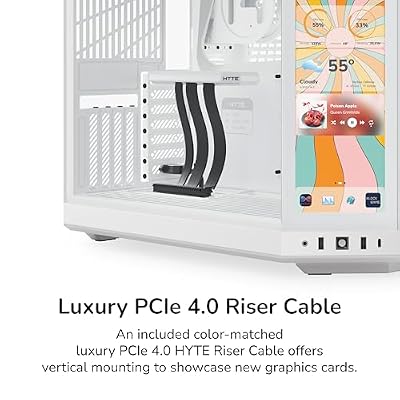
HYTE Y70 Touch Infinite Modern Aesthetic Gaming PC Case - Integrated 2.5K LCD Touchscreen Screen Display - Dual Chamber ATX Desktop Chassis - 10 Fan Capacity - Luxury PCIe 4.0 Riser Cable - Snow White




As an Amazon Associate we earn from qualifying purchases. Product prices and availability are accurate as of the date/time indicated.
Rounding out the list is the HYTE Y70 Touch Infinite, and it is the outlier here by design: this is an aesthetic showcase case first and foremost. Its defining feature is an integrated 2.5K LCD touchscreen built into the chassis, paired with HYTE’s signature wrap-around glass and a modern, statement look. At around $350 it is comfortably the most expensive case on this list, and the price reflects the display and styling rather than raw cooling value.
For game development the honest framing is that you buy this case for the presentation, not because it is the most practical dev chassis. The integrated touchscreen can show system stats, art or a custom dashboard, which can be a fun, useful touch on a creator’s desk, and the spacious glass interior does accommodate a full build. But if your priority is maximum airflow and drive capacity per dollar, the airflow-focused cases above offer better value. Choose the Y70 if you want a workstation that is also a striking centrepiece and you value the LCD and aesthetics — just go in knowing that is what you are paying for.
Pros: Eye-catching integrated 2.5K LCD touchscreen, premium wrap-around glass, spacious statement build.
Cons: Aesthetic/LCD-focused and the priciest here; airflow-per-dollar trails the mesh cases above.
How to Choose a PC Case for Game Development
For a development workstation, airflow is the first thing to weigh. Compiling, baking lightmaps and importing assets push the CPU hard for sustained stretches, so a case with a high-airflow mesh front and fans included — like the CORSAIR 4000D RS, the iCUE 220T Airflow or the MSI GUNGNIR 110R — keeps thermals in check far better than a sealed, glass-fronted enclosure. Prioritise an open intake and bundled fans so your machine stays cool and stable through the longest builds.
Drive capacity is the next consideration, because game projects grow fast. Between your engine install, an OS and tools drive, source control checkouts and large asset libraries, you will likely want several storage drives, so check how many 2.5-inch and 3.5-inch mounts a case offers. The roomy ATX options here — the 4000D RS, GUNGNIR 110R and iCUE Link 3500X — give you space to add SSDs and hard drives over time, whereas the compact Q300L is more limited and better suited to a leaner build.
Noise matters more for a dev box than for a gaming-only PC, because you spend hours concentrating beside it. A case that pairs good airflow with smart fan control, like the iCUE 220T, lets you run quietly while you think and ramp up cooling only when a heavy job demands it. Look for sound-conscious design, room for larger and slower-spinning fans, and fan-control support so you are not fighting a constant whine through the working day.
Finally, match the size and style to your space and your motherboard, and be honest about what you are buying. If you run a full ATX board and want capacity, choose a mid-tower; if space is tight and you use micro-ATX, the compact Q300L fits. And if presentation is part of the appeal, a showcase case like the HYTE Y70 delivers looks and an LCD — just remember the airflow-focused cases give more cooling and capacity per dollar. Set your priorities across airflow, drives, noise and size, and pick the case on this list that lands on them.
Frequently Asked Questions
What matters most in a PC case for game development?
Airflow, drive capacity and quiet running, in roughly that order. Long compiles and asset bakes heat the CPU for sustained periods, so a high-airflow case with fans included — like the CORSAIR 4000D RS or iCUE 220T Airflow — keeps the machine stable. Then you want room for several storage drives and low noise for concentration. Pure aesthetics matter less than they do on a showpiece gaming build.
Do I need a big case, or will a compact one work for a dev rig?
It depends on your motherboard and storage needs. A roomy mid-tower like the GUNGNIR 110R or 4000D RS gives the airflow and multiple drive mounts a growing project benefits from. The Cooler Master Q300L is a compact micro-ATX case — great if space is tight and you use an mATX board, but more limited on drives and cooling, so treat it as a small-form-factor choice rather than a high-capacity workstation.
Is the HYTE Y70 a good choice for a development workstation?
It is a striking case, but it is an aesthetic showcase first, defined by its integrated 2.5K LCD touchscreen and premium glass, and it is the most expensive option here at around $350. It will house a capable dev build and looks fantastic, but if your goal is maximum airflow and drive capacity per dollar, the mesh-fronted cases above are the more practical value. Buy the Y70 for the looks and the display.
How many storage drives should a game-development PC support?
Plan for more than you think you need. A typical dev setup wants a fast NVMe drive for the OS and tools, another for active projects and engine installs, and often a larger drive for asset libraries and backups. Roomy cases like the iCUE Link 3500X, 4000D RS and GUNGNIR 110R provide multiple 2.5-inch and 3.5-inch mounts so you can expand storage as your projects grow.
Related Guides
Affiliate Disclosure: As an Amazon Associate, we earn from qualifying purchases. If you click a link and make a purchase, we may earn a small commission at no extra cost to you. Prices and availability are accurate as of publication and may change.










