

Sound design is half the experience in a modern game, and as a developer you need speakers that tell you the truth about what you are building. When you are playtesting, you want to hear whether a footstep cue reads from the correct direction, whether a mix is muddy, and whether a UI sound sits where it should in the stereo field. That calls for desktop speakers with clean, honest output and dependable stereo imaging rather than artificially boomy bass that hides detail. This guide rounds up the best speakers for game development in 2026, ranked by how clearly they let you hear and place your game’s audio.
- Best Speakers for Game Development at a Glance
- 1. Edifier R1280T Powered Bookshelf Speakers – 2.0 Active Near Field Studio Monitors
- 2. Klipsch ProMedia 2.1 THX Certified Computer Speaker System (Black)
- 3. Bose Companion 2 Series III Multimedia Speakers – for PC
- 4. Logitech Z313 2.1 Multimedia Speaker System with Subwoofer
- 5. Logitech Z130 PC Speakers, Full Stereo Sound, 3.5mm Audio Input
- 6. Redragon GS520 RGB Desktop Speakers, 2.0 Channel PC Computer Stereo Speaker
- How to Choose Speakers for Game Development
- Frequently Asked Questions
- Related Guides
- Related Articles
- Related Guides
Our picks were chosen on what helps a developer evaluate sound: clarity and a relatively neutral character, accurate left-right imaging for judging positional audio, useful connectivity for a workstation, and value. We have spanned from around $28 up to around $170, and we are honest about what each set is: a couple here are near-field studio-style monitors that excel at revealing detail, while others are consumer multimedia speakers that prioritise easy, pleasant sound. Below is an at-a-glance comparison of all six, then a closer look at each and a buyer’s guide built around clarity, imaging, and connectivity for development work.
As an Amazon Associate we earn from qualifying purchases at no extra cost to you.





🛒 Best Price Today on Amazon
Prime members get fast, free shipping on everything above, plus member-only deals. New members get a 30-day free trial — cancel anytime.
Best Speakers for Game Development at a Glance
| Speakers | Best For | Standout Spec | Approx Price |
|---|---|---|---|
| Edifier R1280T Bookshelf Speakers | Honest near-field monitoring | 2.0 active studio-style monitors | around $120 |
| Klipsch ProMedia 2.1 THX | Detailed positional audio | THX-certified 2.1 with sub | around $170 |
| Bose Companion 2 Series III | Clear desktop multimedia | Stereo, easy controls | varies |
| Logitech Z313 2.1 System | Balanced 2.1 on a budget | 2.1 with subwoofer | around $55 |
| Logitech Z130 Stereo Speakers | Simple stereo reference | 2.0 stereo, 3.5mm input | varies |
| Redragon GS520 RGB Desktop | Compact RGB desk pair | 2.0 channel, USB-powered RGB | around $28 |
1. Edifier R1280T Powered Bookshelf Speakers – 2.0 Active Near Field Studio Monitors

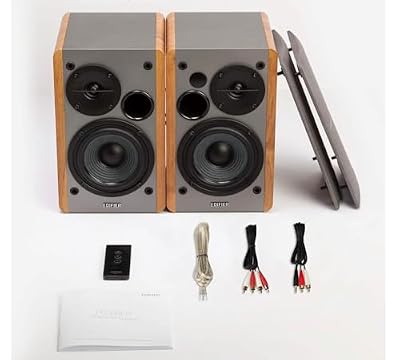
Edifier R1280T Powered Bookshelf Speakers -2.0 Near Field Studio Monitor | 2.0 Active Near Field Studio Monitor Speaker - Wooden Enclosure - 42 Watts RMS Power




As an Amazon Associate we earn from qualifying purchases. Product prices and availability are accurate as of the date/time indicated.
The Edifier R1280T leads this list because it is the closest thing here to a true monitoring speaker, and that is exactly what game development benefits from. These are 2.0 active near-field bookshelf speakers marketed as studio-style monitors, which means they aim for a clearer, more honest presentation than typical consumer speakers rather than an exaggerated bass thump. At around $120 they give a developer a genuinely revealing pair without stepping up to professional monitor prices.
For development work the value is in what you can hear. A relatively neutral, near-field design lets you judge a mix honestly — whether dialogue is clear, whether effects are masking each other, and how sounds sit in the stereo field during playtesting. The pair offers tone controls and multiple inputs for connecting to a PC or interface, and the active design means no separate amplifier is needed. If you want speakers that tell you the truth about your game’s audio rather than flattering it, the Edifier R1280T is the standout.
Pros: Studio-style near-field clarity, honest 2.0 imaging, tone controls and multiple inputs, fair price.
Cons: No dedicated subwoofer; less low-end thump than 2.1 sets.
2. Klipsch ProMedia 2.1 THX Certified Computer Speaker System (Black)


As an Amazon Associate we earn from qualifying purchases. Product prices and availability are accurate as of the date/time indicated.
The Klipsch ProMedia 2.1 is the detailed-positional-audio pick and a long-revered desktop system. It is a THX-certified 2.1 set — two satellites plus a subwoofer — known for crisp, articulate highs from its horn-loaded tweeters and a controlled, defined low end from the dedicated sub. At around $170 it is the premium option here, and its reputation for clarity is why it remains a developer and enthusiast favorite.
For game development the ProMedia’s strength is detail and separation. The horn-loaded tweeters reproduce high-frequency cues — footsteps, UI clicks, ambient detail — with notable crispness, which helps when you are checking how effects read and place in a scene, and the subwoofer gives you a real sense of the low-end content without it bleeding over everything. The 2.1 layout also lets you hear how your game’s mix translates onto a system with a sub. If you want articulate, detailed desktop sound for evaluating positional audio, the Klipsch is a top choice.
Pros: THX-certified clarity, crisp horn-loaded highs, defined subwoofer low end, excellent detail.
Cons: Highest price here; a 2.1 sub is less neutral than flat monitors.
3. Bose Companion 2 Series III Multimedia Speakers – for PC

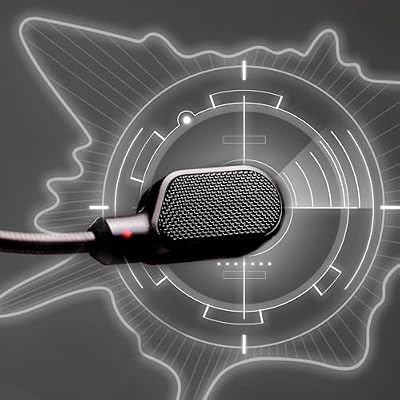
HyperX Cloud III – Wired Gaming Headset, PC, PS5, Xbox Series X|S, Angled 53mm Drivers, Spatial Audio, Memory Foam, Durable Frame, Ultra-Clear 10mm Mic, USB-C, USB-A, 3.5mm – Black




As an Amazon Associate we earn from qualifying purchases. Product prices and availability are accurate as of the date/time indicated.
The Bose Companion 2 Series III is the clear desktop multimedia pick. These are 2.0 stereo computer speakers from Bose, tuned for pleasant, clear sound across music, video, and games, with simple front-panel volume and a headphone jack plus auxiliary input. They are consumer multimedia speakers rather than studio monitors, so it is fair to set expectations: they aim for an enjoyable, accessible sound rather than a ruler-flat one.
For a developer, the Companion 2 works as a clean, no-fuss everyday desktop pair that still resolves stereo content clearly enough for general playtesting and casual sound checks. The Bose tuning keeps voices and effects easy to follow, the controls are simple, and the compact satellites fit a busy dev desk without a separate sub or amp. Just remember they lean toward consumer-friendly sound, so for critical mix decisions you would still defer to a more neutral monitor. As a tidy, clear daily-driver pair, they are a reliable choice.
Pros: Clear Bose-tuned stereo, simple controls, headphone and aux inputs, compact desk fit.
Cons: Consumer multimedia tuning, not flat studio monitors; price varies.
4. Logitech Z313 2.1 Multimedia Speaker System with Subwoofer
The Logitech Z313 is the balanced budget 2.1 pick. It is a compact 2.1 system — two satellites and a small subwoofer — that delivers full-range desktop sound with a touch more low end than a bare stereo pair, controlled from a wired pod. At around $55 it is an affordable way to add a subwoofer to your dev desk and hear bass content your game contains.
For development the Z313 is a practical, low-cost reference for how your audio sounds on a typical consumer 2.1 system — which is genuinely useful, since plenty of players use exactly this kind of setup. The satellites keep voices and effects clear for everyday playtesting, the subwoofer adds presence to explosions and music, and the control pod makes quick volume changes easy while you work. It is a multimedia system rather than a studio monitor, so treat it as a real-world check rather than a mixing reference, but as an affordable, capable 2.1 it earns its place.
Pros: Affordable 2.1 with subwoofer, clear satellites, handy control pod, useful real-world reference.
Cons: Multimedia tuning, not a neutral mixing monitor; modest sub.
5. Logitech Z130 PC Speakers, Full Stereo Sound, 3.5mm Audio Input

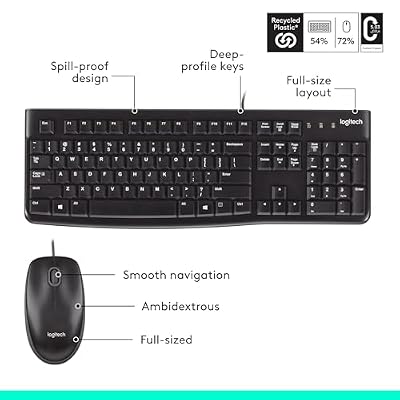
Logitech MK120 Full Size Wired Keyboard and Mouse Combo - Black | Full size wired keyboard, optical wired mouse, USB plug-and-play, Windows only, pc and laptop compatible




As an Amazon Associate we earn from qualifying purchases. Product prices and availability are accurate as of the date/time indicated.
The Logitech Z130 is the simple stereo-reference pick. It is a basic 2.0 stereo set that connects over a single 3.5mm cable and is powered for plug-and-play desktop use, with an on-speaker volume and headphone jack. As an entry-level multimedia pair its job is straightforward, clear stereo sound rather than studio accuracy, and its price reflects that.
For a developer the Z130 serves as an honest, minimal second reference — a way to hear how your game’s audio holds up on the kind of cheap stereo speakers a lot of casual players actually own. Checking a mix across modest hardware like this can reveal whether quiet cues get lost or whether the balance still works without a subwoofer. The single-cable connection and compact size keep a busy desk tidy. It will not replace a monitoring pair for critical work, but as a cheap, simple stereo sanity check it has real value.
Pros: Very simple single-cable stereo, compact, useful as a cheap real-world reference pair.
Cons: Entry-level 2.0 sound, no sub, not for critical monitoring; price varies.
6. Redragon GS520 RGB Desktop Speakers, 2.0 Channel PC Computer Stereo Speaker
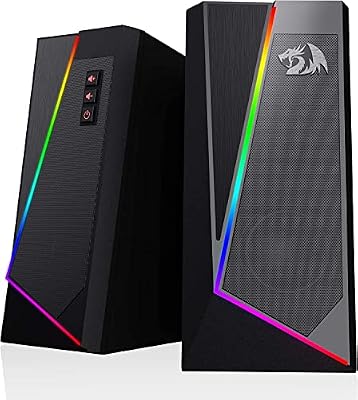
Redragon GS520 Wired 2.0 Channel Stereo Sound Desktop RGB Computer Speakers | Enhanced Auido Quality, Plug & Play USB Powered PC Gaming Speaker, 6 Colorful Backlight Modes, Easy-Access Volume Control


As an Amazon Associate we earn from qualifying purchases. Product prices and availability are accurate as of the date/time indicated.
Rounding out the list is the Redragon GS520, the compact RGB desk pick and the cheapest set here. It is a 2.0-channel USB-powered stereo pair with a slim design and built-in RGB lighting, made to sit neatly on a desk and add a little glow to a battlestation. At around $28 it is an inexpensive, good-looking way to get stereo sound at the workstation.
For development the GS520 is best understood as a budget convenience pair — compact stereo speakers that keep voices and effects audible for everyday playtesting while taking up almost no space and matching an RGB setup. It is firmly a consumer gaming accessory rather than a monitoring tool, so it suits casual sound checks and general use rather than critical mix decisions. If you want affordable, tidy, RGB-lit stereo on your dev desk and you keep a more neutral pair for serious listening, the Redragon GS520 is a sensible, low-cost addition.
Pros: Cheapest pick here, compact USB-powered stereo, RGB lighting, tidy desk footprint.
Cons: Entry-level gaming-accessory sound; not for critical audio evaluation.
How to Choose Speakers for Game Development
Choosing speakers for game development means prioritising clarity over spectacle. As a developer you need to hear what is actually in your audio — whether dialogue is intelligible, whether effects mask one another, whether a cue reads cleanly — so a relatively neutral, honest presentation matters more than booming, exaggerated bass that flatters everything and hides problems. Near-field studio-style monitors like the Edifier R1280T are built for exactly this kind of revealing listening, which is why they lead the list.
Stereo imaging is the next thing to weigh, because so much of a game’s audio is positional. Accurate left-right placement lets you judge whether a footstep comes from the correct side, whether ambience is balanced, and where a UI sound sits in the field during playtesting. A clean stereo pair, or the crisp horn-loaded highs of the Klipsch ProMedia, helps you hear placement clearly. Be wary of speakers that smear the stereo image in favour of a big, undirected wall of sound.
Decide honestly whether you want true monitors or capable multimedia speakers, and use them accordingly. The Edifier and, for detail, the Klipsch are the picks for revealing, evaluative listening; the Bose Companion 2, Logitech Z313 and Z130, and Redragon GS520 are consumer multimedia speakers that are clear and pleasant but tuned for enjoyment rather than flat accuracy. The clever move for a developer is to keep one honest pair for judgement and a typical consumer set as a real-world reference for how players will actually hear your game.
Finally, match connectivity and size to your workstation and budget. A busy dev desk is already crowded, so compact satellites or slim stereo speakers help, and a subwoofer like those in the Klipsch or Z313 adds low-end content at the cost of desk and floor space. Check the inputs match your PC or audio interface, decide whether you need a sub or prefer a clean stereo pair, set your budget, and pick the speakers on this list that fit your role. The best dev speakers are the ones that let you trust what you hear.
Frequently Asked Questions
What kind of speakers are best for game development?
Speakers that present audio honestly rather than flattering it. Near-field studio-style monitors like the Edifier R1280T are ideal because their relatively neutral character lets you judge dialogue clarity, effect masking, and stereo placement accurately during playtesting. Exaggerated, bass-heavy consumer speakers can hide exactly the problems you need to catch, so favour clarity over spectacle for evaluative work.
Are studio monitors necessary, or will multimedia speakers do?
It depends on how critical your listening is. For evaluating mixes and positional audio, a more neutral monitor like the Edifier R1280T, or the detailed Klipsch ProMedia, is genuinely helpful. Consumer multimedia speakers — the Bose Companion 2, Logitech Z313 and Z130, or Redragon GS520 — are clear and pleasant and make excellent real-world references for how players will hear your game, but they are tuned for enjoyment rather than flat accuracy.
Why does stereo imaging matter for a developer?
Because so much game audio is positional. Good left-right imaging lets you confirm a footstep reads from the correct direction, that ambience is balanced, and that UI and effect sounds sit where they should in the field. A clean stereo pair or the crisp, well-separated highs of the Klipsch ProMedia make placement easy to hear; speakers that smear the image make positional judgement harder.
Do I need a subwoofer for game development?
Not strictly. A 2.1 system like the Klipsch ProMedia or Logitech Z313 lets you hear low-frequency content and how your mix translates onto a system with a sub, which is useful. But many developers prefer a clean 2.0 monitor pair like the Edifier for honest, even response, then check bass-heavy content separately. Choose a sub if low-end detail matters to your project; otherwise a quality stereo pair is plenty.
Related Guides
- Best Gaming Speakers
- Best Studio Monitors
- Best Gaming Headsets
- Best DAC and Amp Combos
- Best Microphones for Streaming
- Best Budget Gaming Setup
Affiliate Disclosure: As an Amazon Associate, we earn from qualifying purchases. If you click a link and make a purchase, we may earn a small commission at no extra cost to you. Prices and availability are accurate as of publication and may change.










