

🛒 Best Price Today on Amazon
Prime members get fast, free shipping on everything above, plus member-only deals. New members get a 30-day free trial — cancel anytime.
Top Cpu Thermal Pastes Picks for 2026
Here are our current top cpu thermal pastes picks, compared on real Amazon owner reviews, price, and features. Live prices update below.
As an Amazon Associate we earn from qualifying purchases at no extra cost to you.


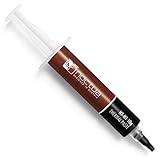


Noctua has built its reputation on quiet, brilliantly engineered coolers, and its thermal paste carries the same no-nonsense philosophy: dependable, easy to apply, and consistent over years of use. If you have just bought a Noctua cooler or simply trust the brand, the natural question is which paste to buy — and whether the popular alternatives people recommend alongside it are worth a look. This guide rounds up the best thermal paste in 2026, leading with Noctua’s own compound and then covering the well-regarded third-party pastes most builders cross-shop against it.
Let us be upfront, because it matters: of the six options below, only the Noctua NT-H1 is an actual Noctua product. The others — ARCTIC MX-4, Thermal Grizzly Kryonaut, and Corsair TM30 — are excellent pastes from rival brands that we have included because they are the ones people genuinely compare with Noctua’s compound. We flag each one’s brand clearly so you are never misled. Our picks were chosen on ease of application, long-term consistency, value, and real-world reliability rather than invented numbers, with prices from around $5 up to around $9. Below is an at-a-glance comparison, then a closer look at each paste and a buyer’s guide to choosing and applying thermal compound correctly.
Best Thermal Paste at a Glance
| Thermal Paste | Best For | Standout Spec | Approx Price |
|---|---|---|---|
| Noctua NT-H1 3.5g | The genuine Noctua pick | Pro-grade, fuss-free, long-lasting | around $9 |
| ARCTIC MX-4 (4 g) | Best-value alternative | Non-curing, easy spread | around $5 |
| ARCTIC MX-4 + Spatula (4 g) | First-time appliers | Includes spreader spatula | around $5 |
| Thermal Grizzly Kryonaut (1 g) | Maximum performance rival | Very high conductivity | around $9 |
| Corsair TM30 (3 g) | Corsair-ecosystem pick | Ultra-low thermal impedance | around $8 |
| ARCTIC MX-4 (8 g) | Bulk / multiple builds | 8g tube, many applications | around $7 |
1. Noctua NT-H1 3.5g, Pro-Grade Thermal Compound Paste

Noctua NT-H1 3.5g, High-Performance Thermal Paste | High-Performance, Easy to Apply and Clean, Good Long-term Stability, for 3-20 Applications


As an Amazon Associate we earn from qualifying purchases. Product prices and availability are accurate as of the date/time indicated.
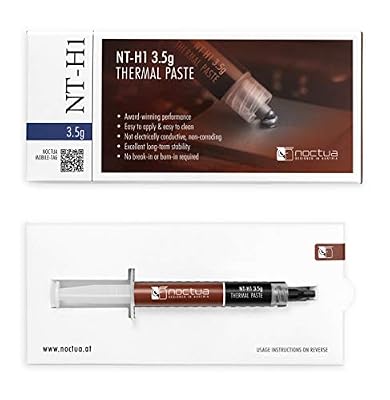
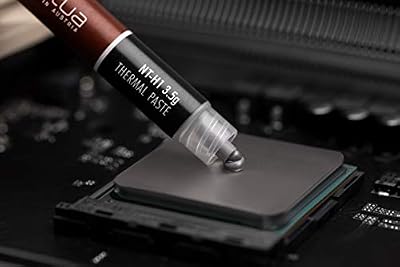
The Noctua NT-H1 is the one paste here that actually wears the Noctua name, and for anyone shopping specifically for Noctua thermal compound it is the answer. It is a pro-grade, hybrid compound that Noctua has shipped with its acclaimed coolers for years, prized for being forgiving to apply, completely non-conductive and non-curing, and rock-solid consistent over a long service life. This 3.5g tube, at around $9, is enough for several CPU applications.
This is the pick when you want genuine Noctua quality and a true fit-and-forget experience. NT-H1 spreads easily, does not require any special technique or burn-in period, and holds its performance for years without drying out or needing reapplication — exactly the dependable behaviour Noctua’s fans expect. If you have paired it with a Noctua cooler or simply want the brand’s own trusted compound rather than a third-party rival, the NT-H1 is the obvious and authentic choice.
Pros: Genuine Noctua compound, fuss-free application, non-curing, exceptional long-term reliability.
Cons: Costs a little more than budget pastes; not the absolute highest-conductivity option.
2. ARCTIC MX-4 (4 g) – Premium Performance Thermal Paste

ARCTIC MX-4 (4 g) - Premium Performance Thermal Paste for All Processors




As an Amazon Associate we earn from qualifying purchases. Product prices and availability are accurate as of the date/time indicated.
A clear note first: the ARCTIC MX-4 is not a Noctua product — it is ARCTIC’s own compound — but it is the paste people most often cross-shop against Noctua’s, so it earns a place here. The MX-4 is a carbon-based, non-conductive paste famous for being one of the easiest compounds to apply, and for staying stable for years with no curing time. This 4g tube sits at around $5, making it outstanding value.
This is the best-value alternative for the builder who likes Noctua’s fuss-free philosophy but wants to spend less. The MX-4 spreads beautifully, is completely non-conductive so a small spill near the socket is harmless, and delivers reliable, set-and-forget performance for typical gaming and productivity CPUs. If you are comparing it directly with NT-H1, treat them as two similarly easy, dependable pastes from different brands — the MX-4 simply comes in cheaper.

Pros: Excellent value, very easy to spread, non-conductive, stable for years (ARCTIC brand, not Noctua).
Cons: Not a Noctua product; performance is strong but not class-leading for extreme overclocks.
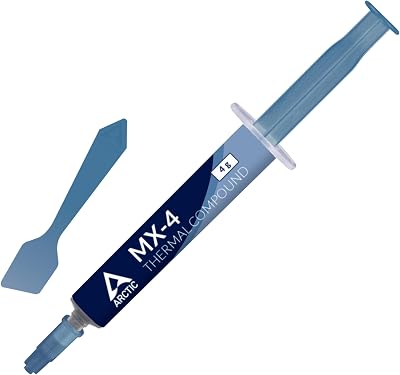
3. ARCTIC MX-4 (incl. Spatula, 4 g) – Premium Performance Thermal Paste


As an Amazon Associate we earn from qualifying purchases. Product prices and availability are accurate as of the date/time indicated.
This is the same ARCTIC MX-4 compound as above — again, an ARCTIC paste rather than a Noctua one — but bundled with a small application spatula. The 4g tube of carbon-based, non-conductive paste is identical, and the included spreader is the only difference, aimed at first-timers who want a little help laying down an even layer. It also sits at around $5.
This is the pick for someone applying thermal paste for the first time, or anyone who prefers the spread method over the simple pea-dot. The spatula makes it easy to coat the heatspreader in a thin, uniform film before seating the cooler, taking some of the guesswork out of the job. The compound itself behaves exactly like the standard MX-4 — easy, non-conductive and stable — so you get the same dependable result with an extra tool in the box. Just remember it is an ARCTIC product, not Noctua’s own.
Pros: Same easy MX-4 compound plus a handy spatula, great for beginners, non-conductive.
Cons: Not a Noctua product; the spatula is the only difference from the standard tube.
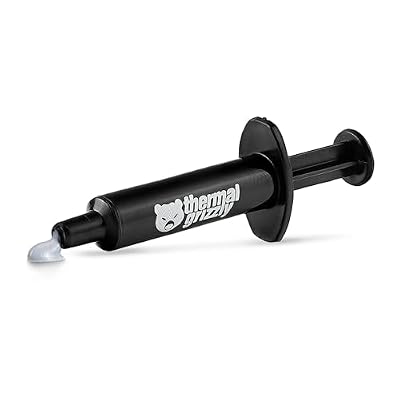
4. Thermal Grizzly Kryonaut – 1 Gram – Extremely High Performance Thermal Paste

Thermal Grizzly Kryonaut 1 g Thermal Paste CPU GPU Overclocking | High-Performance Thermal Paste, for overclocking, non-curing, electrically non-conductive, high long-term stability





As an Amazon Associate we earn from qualifying purchases. Product prices and availability are accurate as of the date/time indicated.
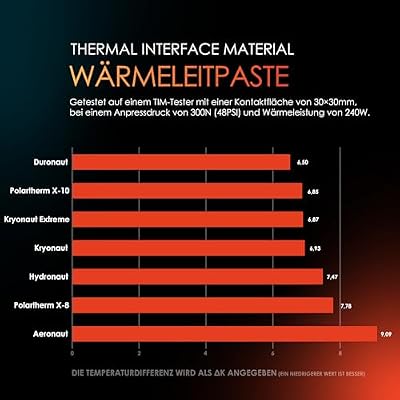
The Thermal Grizzly Kryonaut is, to be clear, a Thermal Grizzly paste and not a Noctua one — but it is the compound enthusiasts most often weigh against Noctua’s when chasing peak thermals, so it belongs in the comparison. Kryonaut is renowned for its very high thermal conductivity and is a long-standing favourite among overclockers and serious builders. This 1g syringe, at around $9, is plenty for a few high-end CPU applications.
This is the alternative to choose when you want the strongest cooling performance and are willing to apply paste a touch more carefully than the ultra-forgiving NT-H1 or MX-4. Kryonaut’s high conductivity makes it a favourite for hot, overclocked chips and demanding builds, and it remains stable across a wide temperature range. If your goal is maximum heat transfer rather than brand loyalty, Kryonaut is the rival many Noctua owners reach for — just know it is a Thermal Grizzly product, not Noctua’s.

Pros: Very high thermal conductivity, favourite for overclockers, stable across a wide range.
Cons: Not a Noctua product; smaller 1g tube and slightly less forgiving to apply.
5. Corsair TM30 Performance Thermal Paste – Ultra-Low Thermal Impedance

Corsair TM30 Performance Thermal Paste | Ultra-Low Thermal Impedance CPU/GPU | 3 Grams|w/applicator, Silver for Desktop


As an Amazon Associate we earn from qualifying purchases. Product prices and availability are accurate as of the date/time indicated.
The Corsair TM30 is another rival rather than a Noctua paste — it is Corsair’s own compound — included because Corsair-ecosystem builders frequently consider it instead of NT-H1. The TM30 is a performance paste marketed for ultra-low thermal impedance, designed to move heat efficiently off the CPU or GPU into the cooler. This roughly 3g tube sits at around $8, a fair price for a capable compound.
This is the pick for someone already invested in Corsair cooling and cases who would rather keep their parts within one brand than mix in Noctua’s paste. The TM30 spreads reasonably and delivers solid, dependable cooling for mainstream and enthusiast builds alike, making it a sensible companion to a Corsair AIO or air cooler. As a Noctua alternative it is perfectly competent — just remember it is a Corsair product, so if you specifically want Noctua’s own compound, the NT-H1 remains your pick.
Pros: Solid all-round performance, ultra-low thermal impedance marketing, fits a Corsair build (Corsair brand).
Cons: Not a Noctua product; a niche pick mainly for those staying in the Corsair ecosystem.
6. ARCTIC MX-4 (8 g) – Premium Performance Thermal Paste

ARCTIC MX-4 (8 g) - Premium Performance Thermal Paste for All Processors

As an Amazon Associate we earn from qualifying purchases. Product prices and availability are accurate as of the date/time indicated.
Rounding out the list is the 8g tube of ARCTIC MX-4 — the same well-loved ARCTIC compound as the earlier entries, but in a larger size. It is not a Noctua product, yet it is the natural choice for anyone who liked the MX-4 comparison and simply wants more of it. At around $7 for double the quantity, this bulk tube is the best value per application on the entire list.
This is the pick for the builder, repair tech, or enthusiast who reapplies paste often or maintains several machines. The 8g tube provides many applications, so you are not buying a fresh syringe for every build, and the MX-4 compound itself is as easy, non-conductive and reliable as ever. If you do enough builds that running out is a real concern, this large tube is the economical way to keep a trusted paste on hand — bearing in mind it is an ARCTIC product rather than Noctua’s own NT-H1.
Pros: Best value per gram, many applications, same easy non-conductive MX-4 compound.
Cons: Not a Noctua product; large tube is overkill for a single build.
How to Choose and Apply Thermal Paste
Choosing thermal paste starts with being clear about what you actually want. If your goal is genuine Noctua compound — because you bought a Noctua cooler or trust the brand — the NT-H1 is the only true Noctua paste here and the right pick. If you are open to alternatives, the ARCTIC MX-4 matches Noctua’s fuss-free, non-curing character for less money, while the Thermal Grizzly Kryonaut chases higher peak performance. Decide whether brand, value or maximum cooling matters most to you before anything else.
Electrical conductivity is the safety factor worth understanding. The NT-H1 and MX-4 are non-conductive, so a small smear that strays onto the socket or components is harmless and easy to clean — ideal for beginners. Higher-end metal-based pastes can perform a touch better but may be electrically conductive, demanding more care. For most gamers and builders, a quality non-conductive compound like NT-H1 or MX-4 is the safer, sensible default that removes a whole category of risk.
Application is where most temperature problems are made or avoided, and less is more. A small pea-sized dot in the centre of the CPU heatspreader, then even pressure as you mount the cooler, lets the paste spread into a thin, air-free layer — which is all you need. The spatula-equipped MX-4 is handy if you prefer to spread a thin film by hand. Avoid the common mistake of applying too much: an over-thick layer insulates rather than conducts, and squeezes out messily around the edges.
Finally, think about quantity and longevity to get the best value. A small tube covers several applications, while the 8g MX-4 suits anyone doing many builds. Quality pastes like NT-H1, MX-4 and Kryonaut are non-curing and stay effective for years, so you should not need to reapply unless you remove the cooler. Clean the old paste off completely with isopropyl alcohol before reapplying, set your priority — authentic Noctua, best value, or peak performance — and pick the compound on this list that matches it. Good paste, applied thinly, is all your CPU needs.
Frequently Asked Questions
Which of these is the only genuine thermal paste?
The Noctua NT-H1 is the sole genuine Noctua product on this list. The others — ARCTIC MX-4, Thermal Grizzly Kryonaut and Corsair TM30 — are excellent pastes from rival brands that builders commonly compare against Noctua’s compound. We have included them as honest alternatives, but if you specifically want Noctua’s own paste, the NT-H1 is the one to buy.
Is Noctua NT-H1 worth it over a cheaper paste like MX-4?
Both are excellent, non-curing, non-conductive pastes that are easy to apply and last for years, so the difference for most users is small. NT-H1 carries Noctua’s name and pedigree and pairs naturally with Noctua coolers, while the ARCTIC MX-4 offers very similar fuss-free behaviour for a few dollars less. Choose NT-H1 for genuine Noctua quality, or MX-4 if value is your priority.
Is thermal paste electrically conductive?
No. The Noctua NT-H1, like the ARCTIC MX-4 here, is non-conductive, which means a small amount straying onto the socket or nearby components will not cause a short and is easy to wipe away. That makes it a safe, beginner-friendly choice. It is still good practice to apply a thin, controlled amount and clean up any excess regardless of the paste.
How often should I replace Noctua NT-H1 paste?
Quality non-curing pastes like NT-H1 stay effective for many years, so you generally only need to reapply when you remove the cooler — for example to change CPU or clean the system. There is no fixed schedule for a healthy build. If you do remove the cooler, clean off the old paste with isopropyl alcohol and apply a fresh thin layer before remounting.
Related Guides
- Best CPU Coolers
- Best AIO Liquid Coolers
- Best CPU Air Coolers
- Best CPUs for Gaming
- Best PC Case Fans
- Best Budget Gaming Setup
Affiliate Disclosure: As an Amazon Associate, we earn from qualifying purchases. If you click a link and make a purchase, we may earn a small commission at no extra cost to you. Prices and availability are accurate as of publication and may change.













