

- Top Pick: BenQ PV3200U 32” 4K UHD Monitor for Video Editing, 95% DCI-P3, 100% Rec.709/sRGB, 2.1ch Speakers, 65W USB-C, Mac Compatible, Factory-Calibrated, Software Calibration, Ergonomic Stand
- Best Value: CUNPU 27 Inch 4K 70Hz Monitor, UHD (3840 * 2160) IPS Ultra-Slim Bezel Monitor for Photo Video Editing, ΔE < 2, 100% DCI-P3, 1.07B+ Colors, PIP-PBP, Adaptive Sync, DP/HDMI, Black
- Premium Choice: Dell UltraSharp U4025QW 40" Class 5K2K WUHD Curved Screen LED Monitor – 21:9
For video editing, the monitor in front of you matters as much as the software behind it. Editors need two things above all: accurate, consistent colour so your footage looks the same to you as it will to your audience, and enough screen real estate to spread out a timeline, preview window and tool panels without constant scrolling. The good news is that you no longer have to spend professional-studio money to get there — in 2026 there are capable options from around $80 to roughly $216 that offer strong sRGB colour, sharp resolutions and generous, even ultrawide, screen sizes.
In this round-up we compare six of the best monitors for video editing you can buy right now, ranging from an affordable colour-capable 24-inch panel up to a 34-inch ultrawide that gives your timeline room to breathe. We weigh up the things that matter for editing — colour coverage, resolution, screen size, panel quality and value — so you can match a display to your workflow and budget. Whether you want the cheapest way into accurate colour or a high-resolution ultrawide for serious project work, there is a pick here for you. Prices are approximate and change often.
As an Amazon Associate we earn from qualifying purchases at no extra cost to you.







🛒 Best Price Today on Amazon
Prime members get fast, free shipping on everything above, plus member-only deals. New members get a 30-day free trial — cancel anytime.
Best Monitors for Video Editing at a Glance
| Product | Best For | Standout Spec | Approx Price |
|---|---|---|---|
| Sceptre Curved 24″ | Tightest budget | 1080p, curved, 98% sRGB | around $80 |
| HP Series 3 27″ | Best colour accuracy | 27-inch FHD IPS, 1300:1 | around $178 |
| Sceptre Curved 27″ | Big-screen value | 27-inch, 99% sRGB, 100Hz | around $98 |
| SANSUI 32″ Curved | Big immersive timeline | 32-inch, 1080p, 240Hz | around $180 |
| SANSUI 27″ QHD | Best resolution value | 1440p, DCI-P3, 200Hz | around $170 |
| SANSUI 34″ Ultrawide | Best for the timeline | 3440×1440 UWQHD, 21:9 | around $216 |
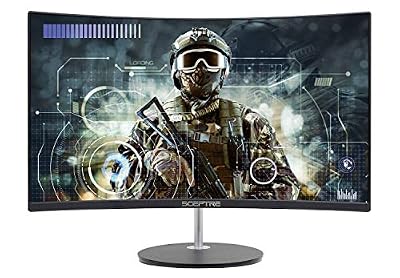
1. Sceptre Curved 24-inch Gaming Monitor

Sceptre Curved 24-inch Gaming Monitor 1080p R1500 98% sRGB HDMI x2 VGA Build-in Speakers, VESA Wall Mount Machine Black (C248W-1920RN Series)



As an Amazon Associate we earn from qualifying purchases. Product prices and availability are accurate as of the date/time indicated.
The Sceptre Curved 24-inch is one of the most affordable ways to get a colour-capable screen onto an editing desk, often selling for around $80. It pairs a 1080p resolution with a gentle 1500R curve and a quoted 98% sRGB colour coverage — strong colour for the price, which is exactly what an editor on a budget wants for accurate previews. Connectivity is generous for a cheap panel, with two HDMI ports plus VGA and built-in speakers, so it is genuinely plug-and-play.
For light editing, learning the craft or as a secondary preview display, the wide sRGB coverage means your footage looks vivid and accurate rather than washed out. The gentle curve adds a little immersion, though for editing the bigger benefit is simply having a colour-capable screen at this price. You will not get the resolution or size of the pricier options here, so detailed timeline work is cramped, but as an affordable, accurate entry point it is excellent value. If you want a larger or sharper screen, the options below are worth a look, and our best budget gaming monitors guide has more affordable picks.
Pros: Very affordable; strong 98% sRGB colour for accurate previews; gentle curve; dual HDMI plus VGA; built-in speakers.
Cons: 1080p only, so timeline space is limited; budget build and stand; small for serious editing.
2. HP Series 3 27-inch FHD IPS Monitor
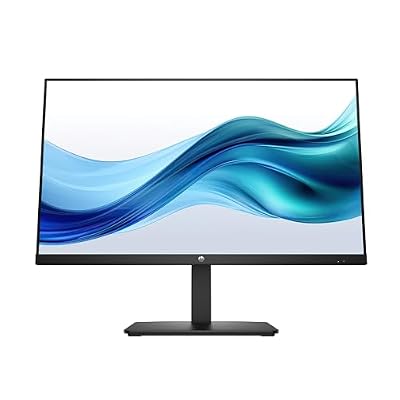
HP Series 3 27 inch FHD Monitor, Full HD Display (1920 x 1080), IPS Panel, 1300:1 Contrast Ratio, 250 Nits, Eye Ease with Eyesafe Certification, Black, 327se (2025)



As an Amazon Associate we earn from qualifying purchases. Product prices and availability are accurate as of the date/time indicated.
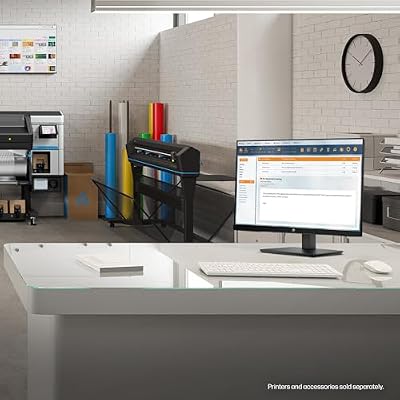
The HP Series 3 27-inch is the colour-accuracy pick of this round-up, and a smart choice for an editor who wants a larger, dependable screen from a major brand — it sells for around $178. It uses a 27-inch IPS panel at Full HD (1920×1080) with a strong 1300:1 contrast ratio. IPS is the panel technology editors gravitate towards: it delivers accurate, consistent colour and wide viewing angles, so the image stays correct whether you are looking dead-on or leaning in to check a detail.
The larger 27-inch size gives you more room for your timeline, preview and panels than a 24-inch display, and the IPS panel’s colour consistency is the real draw for grading and matching footage. HP’s build quality and support network add reassurance for a screen you rely on for client work. It is a Full HD panel, so it is not as pixel-dense as the QHD option below — fine for many editing tasks, though sharper resolutions give crisper text and finer timeline detail. As an accurate, well-built, larger editing display, it is a strong all-rounder. See our best ips monitors guide for more in this class.
Pros: Accurate, consistent IPS colour; wide viewing angles; large 27-inch screen; strong 1300:1 contrast; trusted HP brand and support.
Cons: 1080p resolution is less pixel-dense than QHD; standard refresh rate; not a high-resolution panel.
3. Sceptre Curved 27-inch Prime Monitor 100Hz
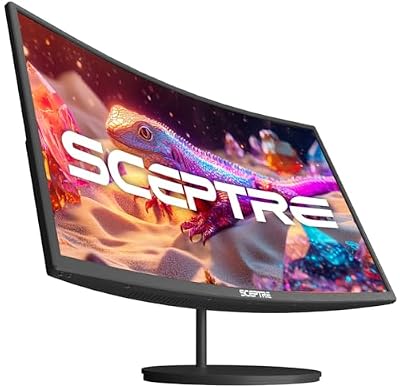
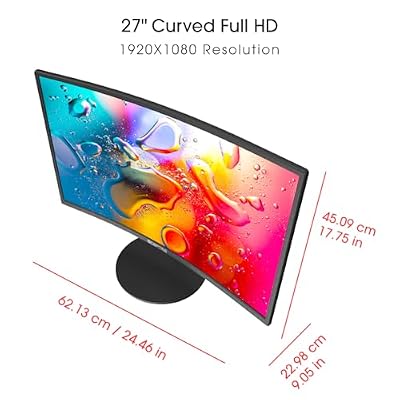
Sceptre Curved 27-inch Prime Monitor up to 100Hz 1080p, HDMI x2, VGA, 99% sRGB, Built-in Speakers, R1500, Machine Black 2025 (C275W-1920RN Series)



As an Amazon Associate we earn from qualifying purchases. Product prices and availability are accurate as of the date/time indicated.
The Sceptre Curved 27-inch Prime is a big-screen value pick for an editor who wants more workspace without spending much — it typically lands around $98. It pairs a 27-inch 1080p panel with a gentle curve and a refresh rate of up to 100Hz, and Sceptre quotes 99% sRGB coverage, so it combines a generous size with accurate colour. Multiple inputs make it easy to integrate into an editing setup alongside other displays.
The larger 27-inch curved panel gives your timeline and preview noticeably more room than a 24-inch screen, and the 99% sRGB coverage keeps colour accurate for grading and previews. The 100Hz refresh is a smoothness bonus for scrubbing and general desktop use, even though editing does not demand high refresh rates. At 27 inches the 1080p resolution is spread over a larger area, so text and fine detail are softer up close than on a QHD panel — a fair trade for the size and price. For a big, affordable, colour-capable editing screen, it is a compelling choice, and our best curved gaming monitors guide compares more curved options.
Pros: Large 27-inch panel for timeline space; strong 99% sRGB colour; up to 100Hz refresh; multiple inputs; affordable for the size.
Cons: 1080p across 27 inches is softer up close; curve is a matter of taste; budget build.
4. SANSUI 32-inch Curved 240Hz Monitor

SANSUI 32 Inch Curved 240Hz Gaming Monitor High Refresh Rate, FHD 1080P | Gaming PC Monitor HDMI DP1.4, 1500R Curvature, 1Ms MPRT, HDR,Metal Stand,VESA Compatible(DP Cable Incl.)




As an Amazon Associate we earn from qualifying purchases. Product prices and availability are accurate as of the date/time indicated.
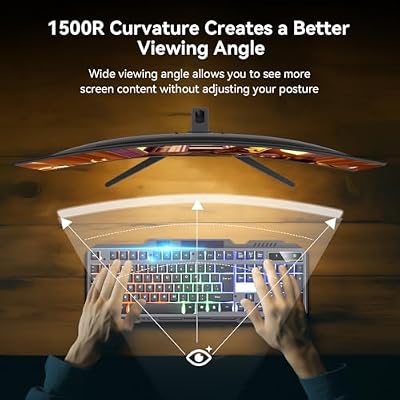
The SANSUI 32-inch Curved is the big-immersive pick here, giving an editor a large canvas for a spread-out timeline at a sensible price of around $180. It pairs a generous 32-inch curved panel with a Full HD (1920×1080) resolution and a very high 240Hz refresh rate. The headline for editing is the sheer size: a 32-inch screen gives your editing software room to display a large preview alongside an expansive timeline and tool panels without feeling cramped.
The curve helps keep the edges of such a large panel comfortable to view, drawing the corners slightly towards you. The 240Hz refresh rate is more than editing needs, but it is a welcome bonus if you also game on the same machine, making this a strong dual-purpose screen. The trade-off is resolution: 1080p across 32 inches is less pixel-dense than a QHD panel, so text and fine timeline detail look softer up close, and the screen rewards a normal viewing distance. For an editor who prioritises a big, immersive workspace and also games, it is a compelling all-rounder. Our best curved gaming monitors guide compares more curved displays.
Pros: Large 32-inch canvas for a spread-out timeline; immersive curve; very high 240Hz refresh for dual-purpose gaming; sensible price for the size.
Cons: 1080p across 32 inches is less sharp up close; lower pixel density than QHD; large footprint on the desk.
5. SANSUI 27-inch QHD 200Hz Gaming Monitor

SANSUI 34-Inch Curved Gaming Monitor UWQHD 3440 x 1440P 200Hz Ultrawide | 34” Ultra Wide Gaming Computer Monitor-PBP, OD 1ms, HDR, 300nits, 130%sRGB, DCI-P3 97%,AI Crosshair,HDMI2.1x2,DP1.4




As an Amazon Associate we earn from qualifying purchases. Product prices and availability are accurate as of the date/time indicated.
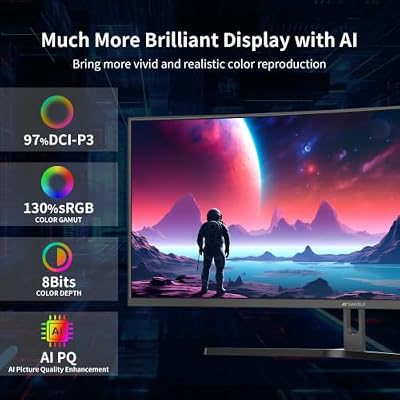
The SANSUI 27-inch QHD is the resolution-value pick of this round-up, and an excellent choice for an editor who wants a sharper image at a keen price — it sells for around $170. It pairs a 27-inch panel with a QHD (2560×1440) resolution and a fast refresh rate of up to 200Hz, and crucially it quotes DCI-P3 colour coverage, a wider colour gamut than standard sRGB that is genuinely useful for colour-critical editing work.
The step up to QHD is the big draw for editors: at 27 inches, 1440p looks noticeably crisper than 1080p, giving you sharper text, finer timeline detail and more usable working space than a Full HD panel of the same size. The wider DCI-P3 colour coverage means it can display a richer range of colours, which matters when grading footage destined for displays that use that gamut. The high 200Hz refresh is a bonus for gaming on the same machine. For an editor who wants the best balance of sharpness, colour and price here, this is the standout, and our best 1440p gaming monitors guide covers more in this class.
Pros: Sharp QHD resolution for fine detail; wider DCI-P3 colour gamut; fast 200Hz refresh for dual-purpose gaming; excellent value for the specification.
Cons: Needs a capable GPU to game at QHD high frame rates; 27 inches is smaller than the ultrawide; colour benefits depend on your workflow.
6. SANSUI 34-inch Curved Ultrawide Monitor
SANSUI 34-Inch Curved Gaming Monitor UWQHD 3440 x 1440P 200Hz Ultrawide | 34” Ultra Wide Gaming Computer Monitor-PBP, OD 1ms, HDR, 300nits, 130%sRGB, DCI-P3 97%,AI Crosshair,HDMI2.1x2,DP1.4
As an Amazon Associate we earn from qualifying purchases. Product prices and availability are accurate as of the date/time indicated.
The SANSUI 34-inch Curved Ultrawide is the timeline champion of this round-up, and a genuinely transformative screen for video editing — it sells for around $216. Its 21:9 UWQHD (3440×1440) panel gives you far more horizontal space than a standard 16:9 monitor, which is exactly what an editing timeline craves: you can see far more of your sequence at once, with your preview and tool panels alongside it, dramatically reducing scrolling and zooming. The gentle curve keeps the wide panel comfortable to view.
The UWQHD resolution is both sharp and spacious — the extra width and height over a standard 1440p panel give you more pixels to work with for a detailed, expansive workspace. For an editor, the combination of ultrawide width and QHD-class sharpness is close to ideal: timelines stretch out, multi-cam layouts have room, and text stays crisp. A refresh rate of up to 200Hz also makes it a strong gaming screen on the same machine. It costs more than the other picks here, but for the workspace it provides it is excellent value. For an editor who wants the best timeline experience, the 34-inch ultrawide is the clear standout. See our best ultrawide monitors guide for more in this format.
Pros: Spacious 21:9 UWQHD for an expansive timeline; sharp 3440×1440 resolution; immersive curve; up to 200Hz for dual-purpose gaming; excellent workspace value.
Cons: Most expensive pick here; ultrawide needs app and game support for best results; large desk footprint.
How to Choose
Choosing a monitor for video editing comes down to balancing colour accuracy, resolution and screen real estate against your workflow and budget — and the right balance depends on how demanding your work is. Start with colour, because for editing it is the single most important factor. A panel with strong sRGB coverage, like the 98 to 99% quoted on the Sceptre models, keeps standard previews accurate, while a wider DCI-P3 gamut, as on the SANSUI 27-inch QHD, lets you work with a richer range of colours for footage destined for wide-gamut displays. IPS panels such as the HP Series 3 add the consistent colour and wide viewing angles that make grading and matching footage reliable, so lean towards them for colour-critical work.
Next, think about resolution and screen real estate, because editing benefits enormously from space to spread out a timeline, preview and panels. A higher resolution like QHD packs in more detail and more usable working area than 1080p at the same size, which is why the SANSUI 27-inch QHD is such a strong value pick. If you would rather have sheer size, a large 32-inch panel gives you a big canvas, though at 1080p it is less pixel-dense up close. For the most transformative editing workspace, an ultrawide like the SANSUI 34-inch lets you see far more of your timeline at once.
Then consider whether the monitor needs to double as a gaming screen. Several picks here pair editing-friendly colour and size with high refresh rates of up to 200 or 240Hz — overkill for editing alone, but a real bonus if the same machine plays games, making them efficient dual-purpose buys. Finally, set a realistic budget. Around $80 to $100 buys an accurate, colour-capable screen for light editing; around $170 to $180 gets you either a sharp QHD panel, a big immersive screen or an accurate IPS display; and around $216 buys the ultrawide that transforms timeline work. Decide which of colour, sharpness or sheer space matters most for your projects, then pick the monitor in your budget that delivers it best.
Frequently Asked Questions
What kind of monitor is best for video editing?
Prioritise colour accuracy and screen space. A panel with strong sRGB coverage keeps previews accurate, while a wider DCI-P3 gamut, like the SANSUI 27-inch QHD’s, suits richer colour work. IPS panels such as the HP Series 3 add consistent colour and wide viewing angles. For workspace, a higher-resolution or ultrawide panel — the SANSUI 34-inch ultrawide is a standout — gives your timeline far more room to breathe.
Is an ultrawide monitor good for video editing?
Yes, very much so. An ultrawide such as the SANSUI 34-inch UWQHD panel gives you far more horizontal space, so you can see much more of your editing timeline at once alongside your preview and tool panels, which dramatically reduces scrolling. The main caveats are that some applications and games need ultrawide support for the best results, and the panel takes up more desk space.
Do I need a 4K monitor for video editing?
Not necessarily. While 4K offers more detail, a sharp QHD (1440p) panel like the SANSUI 27-inch, or an UWQHD ultrawide, gives editors plenty of working space and detail at a far more accessible price. For colour-critical work, accurate colour coverage and a quality IPS-class panel often matter more than raw resolution. None of the monitors in this guide are 4K, yet all are capable editing screens.
Why does colour accuracy matter so much for editing monitors?
Because your footage should look the same to you as it will to your audience. A monitor with strong sRGB or wider DCI-P3 colour coverage, and a consistent IPS-class panel, ensures that the colours you grade and the corrections you make are accurate rather than skewed by the display. That is why the colour coverage figures — 98 to 99% sRGB on the Sceptre models and DCI-P3 on the SANSUI QHD — are worth paying attention to.
Related Guides
- Best Gaming Monitors
- Best IPS Monitors
- Best 1440p Gaming Monitors
- Best Ultrawide Monitors
- Best 4K Gaming Monitors
- Best Curved Gaming Monitors
Affiliate Disclosure: As an Amazon Associate, we earn from qualifying purchases. If you click a link and make a purchase, we may earn a small commission at no extra cost to you. Prices and availability are accurate as of publication and may change.













