

In esports, the monitor is part of your reaction time. A high refresh rate shows you more frames per second, a fast response time keeps fast motion crisp, and together they give competitive players a genuine edge in fast shooters, MOBAs and fighting games. This guide rounds up the best monitors for esports in 2026, focused on the high-refresh 1080p displays that competitive gamers actually favor — because at this level, smooth, low-latency motion matters more than sheer resolution.
- Best Esports Monitors at a Glance
- 1. KOORUI 24″ Gaming Monitor 240Hz 1ms FHD HDR400
- 2. KOORUI 25″ Curved Gaming Monitor 240Hz FHD 1ms
- 3. SANSUI 32″ Curved Gaming Monitor 240Hz FHD 1080P
- 4. Sceptre Curved 27-inch Gaming Monitor up to 100Hz 1080p
- 5. Sceptre Curved 24-inch Gaming Monitor 1080p 98% sRGB
- 6. Blue Light Blocking Glasses for Gaming and Computer Use
- How to Choose the Right Esports Monitor
- Frequently Asked Questions
- Related Guides
- Related Articles
Our picks were chosen on the criteria that count for competitive play: refresh rate, response time, panel size and value, with 1080p as the resolution of choice because it lets even mid-range PCs push the high frame rates esports demands. We have included displays from 22 to 32 inches and refresh rates from 100Hz to a blistering 240Hz, plus an eye-comfort accessory for long sessions, at prices from around $25 to around $180. Below is an at-a-glance comparison, then a closer look at each pick and a buyer’s guide built around the specs that genuinely improve competitive performance.
As an Amazon Associate we earn from qualifying purchases at no extra cost to you. Product prices and availability are accurate as of the date shown and are subject to change.


🛒 Best Price Today on Amazon
Prime members get fast, free shipping on everything above, plus member-only deals. New members get a 30-day free trial — cancel anytime.
Best Esports Monitors at a Glance
| Monitor | Best For | Standout Spec | Approx Price |
|---|---|---|---|
| KOORUI 24″ 240Hz | Best all-round esports monitor | 240Hz, 1ms, HDR400 | around $120 |
| KOORUI 25″ Curved 240Hz | Immersive 240Hz competitive | 25″ curved, 240Hz, 1ms | around $130 |
| SANSUI 32″ Curved 240Hz | Big-screen high refresh | 32″ curved, 240Hz, FHD | around $180 |
| Sceptre 27″ Curved 100Hz | Budget high-refresh entry | 27″ curved, up to 100Hz | around $98 |
| Sceptre 24″ Curved 1080p | Tightest-budget gaming | 24″ curved, 98% sRGB | around $80 |
| Blue Light Blocking Glasses | Eye comfort for long sessions | Anti-fatigue, screen filter | around $25 |
1. KOORUI 24″ Gaming Monitor 240Hz 1ms FHD HDR400

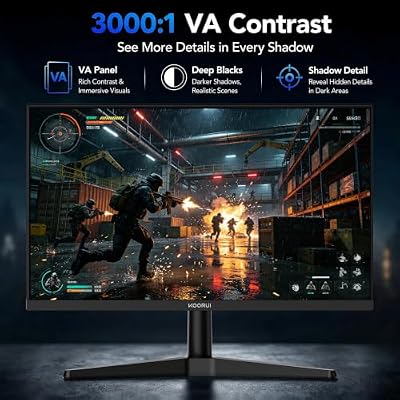
KOORUI 24 Inch Gaming Monitor, 180Hz FHD 1080P VA Display with 3000:1 Contrast, Eye Care, HDMI & VGA, VESA 100x100mm Mountable for Dorm Room, Dual-Screen Setup, PC and Console Gaming



As an Amazon Associate we earn from qualifying purchases. Product prices and availability are accurate as of the date/time indicated.
The KOORUI 24-inch 240Hz is our best all-round esports monitor. It hits the sweet spot for competitive gaming: a 24-inch 1080p panel — the size and resolution most pros prefer because the whole screen sits in your field of view — paired with a 240Hz refresh rate and 1ms response time for exceptionally smooth, low-blur motion. It even adds HDR400 and 90% DCI-P3 color, so it looks good outside of competition. At around $120 it is outstanding value.
This is the monitor to choose if you want a focused, no-compromise competitive display without overspending. The 240Hz refresh and 1ms response are the headline esports specs, and the 24-inch flat 1080p format is exactly what serious players gravitate toward for fast aim and visibility. For the majority of competitive gamers, the KOORUI 24-inch is the obvious starting point and the best balance of speed, size and price here.
Pros: 240Hz refresh, 1ms response, ideal 24″ 1080p esports format, HDR400, great value.
Cons: 1080p only (by design for esports); 24″ is small for general desktop use.
2. KOORUI 25″ Curved Gaming Monitor 240Hz FHD 1ms

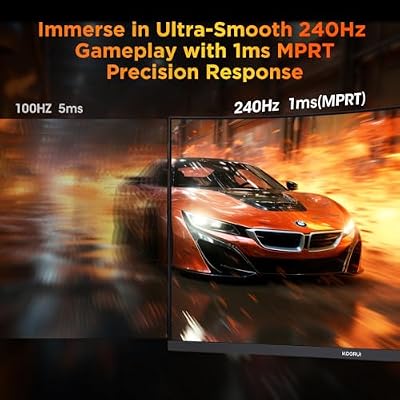
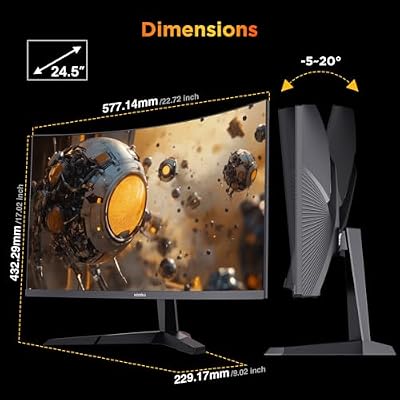
KOORUI 25 inch Curved Gaming Monitor 240Hz FHD 1080P, 1500R 1ms Display



As an Amazon Associate we earn from qualifying purchases. Product prices and availability are accurate as of the date/time indicated.
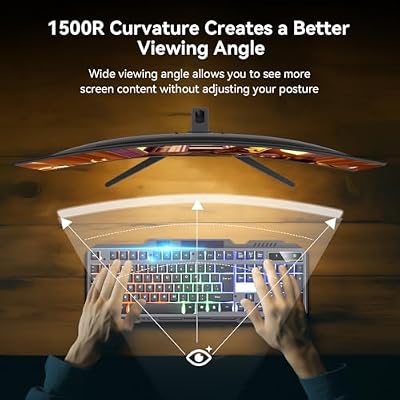
The KOORUI 25-inch curved 240Hz is the immersive competitive pick. It keeps the esports essentials — a 240Hz refresh rate and 1ms response on a 1080p panel — but wraps them in a gently curved 25-inch screen with a 1500R curvature that draws the edges of the display slightly toward you. At around $130 it offers near-identical competitive specs to the 24-inch flat model with a more enveloping feel.
This is the choice for the competitive gamer who wants top-tier refresh and response but prefers the subtle immersion of a curved panel. The 1ms response and 240Hz refresh keep fast motion razor-sharp, while the slight curve can make a single-monitor setup feel more enveloping. If you like the idea of a curved display and the marginally larger 25-inch size, this KOORUI delivers esports-grade speed with a bit more flair.
Pros: 240Hz refresh, 1ms response, immersive 1500R curve, 1080p for high frame rates.
Cons: Curve is a matter of taste; 1080p on 25″ is slightly less sharp than 24″.
3. SANSUI 32″ Curved Gaming Monitor 240Hz FHD 1080P

SANSUI 32 Inch Curved 240Hz Gaming Monitor High Refresh Rate, FHD 1080P




As an Amazon Associate we earn from qualifying purchases. Product prices and availability are accurate as of the date/time indicated.
The SANSUI 32-inch curved 240Hz is the big-screen high-refresh pick. It is the largest display on the list, pairing a 32-inch curved 1080p panel with a 240Hz refresh rate for players who want a commanding, immersive view without giving up competitive smoothness. At around $180 it is the priciest monitor here, reflecting the generous screen size combined with the high refresh rate.
This is the monitor to choose if you want maximum on-screen presence and a high refresh rate for fast games, and you sit a little further back from the display. The 240Hz refresh keeps motion fluid for competitive play, while the 32-inch curved panel is genuinely immersive for single-player titles too. Be aware that 1080p stretched across 32 inches is less pixel-dense than on smaller panels, so this pick favors immersion over sharpness — a fair trade for fans of big-screen high-refresh gaming.
Pros: Large 32″ immersive screen, 240Hz refresh, curved panel, fluid competitive motion.
Cons: 1080p looks less sharp at 32″; most expensive here; big footprint.
4. Sceptre Curved 27-inch Gaming Monitor up to 100Hz 1080p
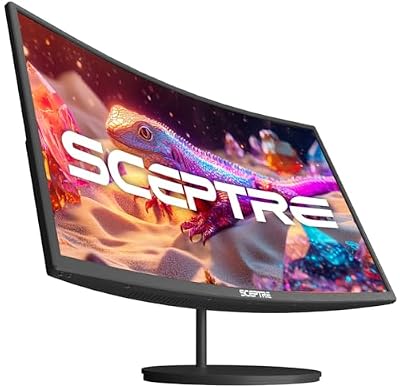
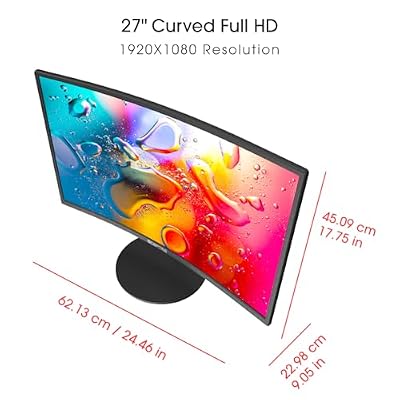
Sceptre Curved 27-inch Prime Monitor up to 100Hz 1080p, HDMI x2, VGA, 99% sRGB, Built-in Speakers, R1500, Machine Black 2025 (C275W-1920RN Series)



As an Amazon Associate we earn from qualifying purchases. Product prices and availability are accurate as of the date/time indicated.
The Sceptre 27-inch curved is the budget high-refresh entry point. At around $98 it offers a 27-inch curved 1080p panel with a refresh rate up to 100Hz and 99% sRGB color — a meaningful step up from a standard 60Hz office display for players dipping into faster gaming without spending much. Dual HDMI and VGA inputs add flexibility for older systems.
This is the pick for the casual or budget competitive gamer who wants a larger, curved screen and smoother-than-60Hz motion at a low price. 100Hz is not in the same league as the 240Hz esports panels above, but it is a clear improvement over a basic monitor and the 27-inch curved format is pleasant for everyday use too. For an affordable, do-a-bit-of-everything gaming monitor, the Sceptre 27-inch is a sensible choice.
Pros: Large 27″ curved screen, up to 100Hz, good 99% sRGB color, very affordable.
Cons: 100Hz is modest for serious esports; not a true high-refresh competitive panel.
5. Sceptre Curved 24-inch Gaming Monitor 1080p 98% sRGB

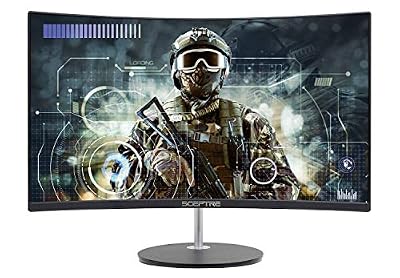
Sceptre Curved 24-inch Gaming Monitor 1080p R1500 98% sRGB HDMI x2 VGA Build-in Speakers, VESA Wall Mount Machine Black (C248W-1920RN Series)



As an Amazon Associate we earn from qualifying purchases. Product prices and availability are accurate as of the date/time indicated.
The Sceptre 24-inch curved is the tightest-budget gaming pick. At around $80 it delivers a 24-inch curved 1080p panel with 98% sRGB color, dual HDMI and VGA inputs, and built-in speakers — a complete, affordable display for a first gaming setup or a secondary screen. The R1500 curve adds a touch of immersion at a price that is hard to argue with.
This is the monitor to choose when budget is the priority and you want a compact 24-inch screen that still does gaming respectably. It is not a high-refresh esports panel, so dedicated competitive players will want one of the 240Hz options, but for casual gaming, school or work it is a capable, good-value all-rounder. As an entry into curved gaming displays, the Sceptre 24-inch is an easy, low-cost recommendation.
Pros: Lowest-cost monitor here, curved 24″ 1080p, 98% sRGB color, built-in speakers.
Cons: Standard refresh rate, not high-refresh; entry-level for serious esports.
6. Blue Light Blocking Glasses for Gaming and Computer Use
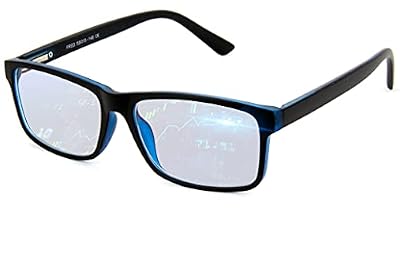
Blue Light Blocking Glasses For Men/Women Anti-Fatigue Computer Monitor Gaming Glasses Reduce Eye Strain Game Glasses


As an Amazon Associate we earn from qualifying purchases. Product prices and availability are accurate as of the date/time indicated.
Not every esports upgrade is a monitor. These blue light blocking glasses are the eye-comfort pick for the long sessions competitive gaming demands. At around $25 they filter blue light from your display to help reduce eye fatigue and strain during extended play, a small accessory that complements any of the monitors on this list rather than replacing one.
This is the pick for the dedicated gamer who spends hours in front of a high-refresh screen and wants to ease eye strain over marathon practice sessions. They will not change your frame rate or reaction time, but reducing fatigue can help you stay comfortable and focused for longer. As an inexpensive companion to a proper esports monitor, anti-fatigue glasses are a sensible addition to a serious competitive setup.
Pros: Reduces eye fatigue in long sessions, very cheap, complements any monitor.
Cons: An accessory, not a monitor; does not affect performance or frame rate.
How to Choose the Right Esports Monitor
For esports, refresh rate is the single most important specification. Measured in hertz, it is how many times per second the monitor updates the image — and a higher number means smoother motion and more up-to-date frames, which directly helps you track and react to fast-moving targets. The 240Hz panels here, like the KOORUI 24-inch and 25-inch and the SANSUI 32-inch, are true competitive displays; the 100Hz Sceptre is a budget step up from 60Hz but not in the same class. Crucially, you also need a PC that can push frame rates near your monitor’s refresh rate to feel the benefit.
Response time is the close second specification, and it works hand in hand with refresh rate. It measures how quickly each pixel changes color; a fast 1ms response, as on the KOORUI panels, keeps fast motion sharp and minimises the ghosting or smearing that can blur enemies in motion. For competitive play you want both a high refresh rate and a low response time — one without the other leaves performance on the table. The two together are what make a monitor feel genuinely fast.
Resolution and panel size are a deliberate trade-off in esports, and the answer differs from general gaming. Competitive players overwhelmingly favor 1080p because it is far easier for a PC to drive at very high frame rates, and they often prefer smaller 24-to-25-inch screens so the entire display sits within their field of view for faster target acquisition. Larger panels like the 32-inch SANSUI are more immersive but spread 1080p across more area, reducing sharpness — great for big-screen fun, less ideal for pure competition. Pick the size that matches how close you sit and how seriously you compete.
Finally, weigh comfort, connectivity and budget together. Long practice sessions reward eye comfort — features like low-blue-light modes, or simple blue light glasses, help reduce fatigue — while the right inputs (HDMI, DisplayPort) ensure the monitor connects to your PC at its full refresh rate. Decide your refresh-rate target, confirm a low response time, choose a size and resolution suited to competitive play, set a budget, and pick the monitor on this list that fits. The best esports monitor is the one that shows you the action a fraction of a second sooner.
Frequently Asked Questions
What refresh rate do I need for competitive esports?
For serious competitive play, aim for a high refresh rate — the 240Hz panels here, like the KOORUI 24-inch, are ideal because they show more frames per second for smoother, more responsive motion. A 100Hz display is a step up from 60Hz for casual play, but dedicated esports gamers benefit from the highest refresh rate their PC can drive. Remember your graphics card must push frame rates near that number to feel it.
Is 1080p better than 1440p for esports?
For competitive esports, 1080p is usually the better choice. It is far easier for a PC to render at the very high frame rates competitive play rewards, which is why the monitors in this guide are 1080p. Higher resolutions look sharper but demand much more from your graphics card, making it harder to sustain 240Hz frame rates in fast games.
Why do esports players prefer smaller monitors?
Many competitive players favor 24-to-25-inch screens because the entire display fits within their field of view, so they can track the whole scene and spot targets without moving their eyes as much. Larger monitors are more immersive but require more eye and head movement to scan. The KOORUI 24-inch and 25-inch sit right in this preferred competitive range.
Does response time really matter for gaming?
Yes. Response time measures how fast pixels change color, and a low figure like 1ms keeps fast motion crisp and reduces ghosting or smearing during quick movements. For esports it works together with a high refresh rate — you want both. A fast refresh rate with a slow response time will still show blur, so the KOORUI panels’ 1ms response is a genuine advantage.
Related Guides
- Best Gaming Monitors
- Best 240Hz Monitors
- Best 1080p Monitors
- Best Monitors for Overclocking
- Best Low Latency Mouse
- Best Gaming Mouse for Esports
Affiliate Disclosure: As an Amazon Associate, we earn from qualifying purchases. If you click a link and make a purchase, we may earn a small commission at no extra cost to you. Prices and availability are accurate as of publication and may change.
Ready to decide? Our #1 pick for 2026 is the KOORUI 24" 240Hz.
Live price & availability on Amazon.


