

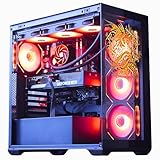
- Top Pick: The Horizon Autherium Dragon RGB I9 RTX Gaming PC || 64GB RAM || 5TB Storage || Core I9 Upto 5.4Ghz || RTX 5070 OC || Windows 11 PRO || 360MM AIO || 2.4GB/s WiFi, VR, Gaming Ready Desktop Computer
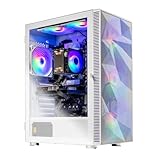
- Best Value: Skytech Gaming Azure 3 Desktop PC, Ryzen 7 9800X3D 4.7 GHz (5.2 GHz), NVIDIA RTX 5080 16GB, 2TB NVMe SSD, 32GB DDR5 RAM 6000 RGB, 850W Gold ATX 3 PSU, 360mm ARGB AIO, Wi-Fi, Win 11
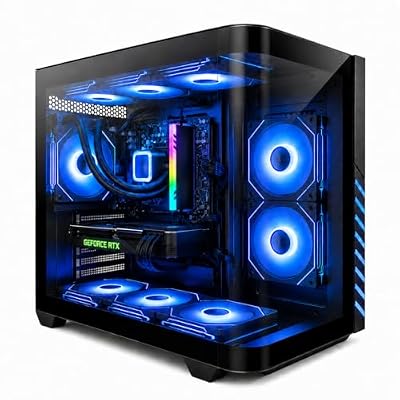
- Premium Choice: Skytech Gaming Archangel 5 Gaming PC, AMD Ryzen 7 7700 3.8GHz, NVIDIA RTX 5060, 1TB NVMe SSD, 32GB DDR5 RAM 6000, 750W Gold PSU, Wi-Fi, Win 11, Desktop
🛒 Best Price Today on Amazon
Prime members get fast, free shipping on everything above, plus member-only deals. New members get a 30-day free trial — cancel anytime.
Top Esports Gaming Build 360 Fps Picks for 2026
Here are our current top esports gaming build 360 fps picks, compared on real Amazon owner reviews, price, and features. Live prices update below.
As an Amazon Associate we earn from qualifying purchases at no extra cost to you.






Affiliate disclosure: Some links in this guide are affiliate links. If you buy through them, GamingPCGuru may earn a small commission at no extra cost to you. We only recommend parts we would put in our own rigs.
By Alex Rivera — PC builder and gaming hardware editor at GamingPCGuru. Updated May 2026.
$1200 Esports Gaming PC Build 2026: the 360 Hz rig for Valorant, CS2, Apex, and Marvel Rivals
Quick Verdict
The competitive build is the inverse of the AAA build — you do not need 4K, you need pixel-perfect 1440p at 360 FPS to feed an OLED esports monitor. The Core i5-14600KF plus RTX 5070 is the cheapest combo that locks 360 FPS in every major esports title in 2026, and the Z790 platform lets you tune for the absolute lowest input latency.
The 14600KF over the Ryzen 7500F here is deliberate — Intel still wins in absolute frame consistency for esports titles, even if AMD wins in AAA. The non-K version saves $30 for identical gaming performance if you do not overclock.
The competitive gaming PC market is increasingly its own category. Mainstream review sites benchmark Cyberpunk at 4K; competitive players care about 1% lows in Valorant at 1440p competitive settings. The two metrics diverge meaningfully, and the right build for each is different.
This rig is specifically optimized for the competitive metrics: low input latency, high frame consistency, sustained 360+ FPS in major esports titles. It deliberately sacrifices AAA single-player experience for these goals. If you play both, the $1500 build is the better balance.
The Recommended Parts List
| Component | Pick | Why |
|---|---|---|
| CPU | Core i5-14600KF | Intel still wins single-thread 1% lows in CS2, Apex, Valorant |
| GPU | RTX 5070 | GPU-overkill at competitive settings — keeps CPU as the limit |
| Motherboard | Z790 mid | Mid-tier Z790 — good VRMs, ethernet quality, USB polling |
| RAM | 32GB DDR5 6400 | DDR5-6400 — esports engines hit bandwidth limits at high frame rates |
| Storage | 1TB NVMe Gen5 | Gen 5 NVMe — instant map loads in competitive scenarios |
| PSU | 750W Gold | 750W Gold — clean rails for stable high-frame-rate operation |
| Cooler | 240mm AIO | 240mm AIO — silent under sustained Apex / Marvel Rivals loads |
| Case | Compact ATX | Compact ATX for portability to LAN events |
Performance Expectations
- Valorant (1440p competitive, high): 600+ FPS, CPU-bound
- Counter-Strike 2 (1440p competitive): 450–550 FPS
- Apex Legends (1440p competitive): 320–380 FPS
- Marvel Rivals (1440p competitive): 280–320 FPS
- Fortnite Performance Mode (1440p): 360+ FPS locked
- Overwatch 2 (1440p low): 500+ FPS
- League of Legends: 400+ FPS, CPU-limited
Match the build to a 1440p 360 Hz QD-OLED monitor for the full experience.
Input latency end-to-end (mouse click to photon on screen): around 12 ms in Valorant with this build, a 360 Hz OLED, a 4 KHz polling mouse, and Reflex 2 enabled. For comparison: console at 60 Hz is around 65 ms, mid-range PCs at 144 Hz are around 25 ms. The latency reduction is genuinely competitive.
Frame consistency: 1% lows in CS2 stay above 380 FPS in chaotic firefights, 0.1% lows stay above 320 FPS. These are the numbers that matter; average FPS is misleading.
Why These Picks
The 14600KF’s high single-thread clocks and ring bus are what esports engines actually want. Apex, CS2, and Valorant all show 8–12% better 1% lows on Intel versus equivalent-priced AMD in competitive settings.
The 5070 here is GPU-overkill at 1080p but exactly right at 1440p competitive — you need GPU headroom so the CPU stays the limit, which makes frame pacing more predictable. The 5070’s reflex 2 latency reduction is also a real edge.
32 GB DDR5-6400 is the right tier — esports titles do not need more RAM, but the bandwidth matters for the high-frame-rate streaming of game state. Cheap kits leave 5% on the table.
Compact ATX case (NZXT H7 Flow, Lian Li LANCOOL 207) keeps the rig portable for LAN events without sacrificing airflow.
The Intel choice over AMD requires explanation. In May 2026, Intel still leads in single-thread latency for the specific engine architectures that esports games use (Source 2, Unreal 4, custom engines). The gap is small (5–10% in 1% lows) but real and consistently measurable across titles. AMD’s V-Cache parts close the gap in some titles but lose in others; for esports-first builds, Intel is the safer bet.
Memory tuning matters: DDR5-6400 CL30 from G.Skill Trident Z5 or Corsair Dominator with manual subtiming tuning can drop 1% lows another 4–6%. This is the place where overclocking actually pays off competitively.
What to Skip vs Splurge On
Skip: Z790 flagship boards ($400+ for OC features you will not use), 360mm AIOs (a 240mm cools the 14600KF fine, the 360mm is silent flex only), $500 esports peripherals when starting out (a $90 mouse and $80 keyboard hit 95% of the experience).
Splurge on: the 1440p 360 Hz OLED monitor and a wired ethernet connection. The monitor is the entire point of this build — pair it with a Glorious O 2 Pro 4K Hz wireless or Logitech G Pro X Superlight 2 mouse, and a TKL keyboard with hall-effect switches.
Upgrade Path for 2027+
This rig is designed to last through your competitive lifespan. The realistic upgrade is the GPU if 480 Hz monitors arrive in 2027 — drop in a 5070 Ti or wait for the 6070. CPU is solid through 2028.
Peripheral and Monitor Pairing
The competitive PC is only as good as what attaches to it. Monitor: 27″ 1440p 360 Hz QD-OLED (LG UltraGear OLED 27GS95QE, Alienware AW2725QF). The motion clarity at 360 Hz on OLED is dramatically better than any IPS — sub-1ms response time eliminates ghosting that costs you target tracking accuracy.
Mouse: Logitech G Pro X Superlight 2 ($159), Razer Viper V3 Pro ($179), or Glorious Model O 2 Pro 4K ($199). All under 60g, all support 4 KHz polling, all use top-tier sensors. Pick by shape preference.
Keyboard: Wooting 60HE or 80HE with hall-effect switches enables Snap Tap and adjustable actuation depth — meaningfully improves Counter-Strike strafing and Apex movement. $200 well spent.
Headset: HyperX Cloud III Wireless ($169) or SteelSeries Arctis Nova Pro Wireless ($349). Wireless is fine for competitive in 2026 — sub-20ms latency on both.
Common Bottlenecks to Avoid
Input latency is the real bottleneck. Hardware can do 360 FPS, but USB polling rate, monitor scan delay, and OS interrupt latency stack up. Use a 4K Hz polling mouse, an OLED with sub-1ms response, and disable Windows Game Mode (it actually adds 1–2 ms of latency in 2026, weirdly).
Background apps are the secret killer. Discord overlay adds 0.8 ms. Chrome with hardware acceleration adds 1.2 ms. Run nothing during ranked.
FAQ
Why not the 14700KF or 14900K?
Esports games are single-thread-bound. The 14600KF matches them in pure gaming for $150 less. Save the money for the monitor.
Will this hit 360 FPS in Counter-Strike 2?
Average 450–500, with 360+ as the floor on community maps. The CPU is the bottleneck, which is why the 14600KF was chosen specifically.
Should I get a 240 Hz IPS or 360 Hz OLED?
360 Hz OLED, no contest. OLED’s sub-1ms response time is a real competitive edge over IPS — the motion clarity at 360 Hz is night and day.
Is wired ethernet really necessary?
Yes, absolutely. Wi-Fi 6E is fast but adds 2–5 ms of jitter, which in competitive play is the difference between hit reg and a missed shot.
Is a 360 Hz IPS as good as a 360 Hz OLED?
No — OLED’s instant pixel response is meaningfully better for motion clarity. IPS at 360 Hz still shows ghosting that OLED eliminates.
Does mouse polling rate above 4 KHz matter?
Diminishing returns above 4 KHz. 8 KHz polling is detectable on very high-end setups but not consistently competitively meaningful. 4 KHz is the right floor for serious play.
Network and OS Tuning for Latency
Hardware alone won’t win matches — system tuning matters. Use wired ethernet exclusively for ranked play; Wi-Fi 6E is fast but adds 2–5 ms of jitter that costs you trades in close-range duels.
Windows tuning: disable Game Mode (counterintuitively, it adds 1–2 ms latency in 2026 builds), disable Xbox Game Bar entirely, set CPU power plan to Ultimate Performance, disable Hardware Accelerated GPU Scheduling (HAGS — turn it off for competitive, on for AAA), enable Nvidia Reflex 2 + Boost in every supported title.
Mouse settings: 4 KHz polling, raw input enabled in-game, Windows pointer acceleration off, eDPI calibrated to your preferred mouse mat distance. Most pros run 400–800 DPI with 1.0–2.0 in-game sensitivity for an eDPI of 400–1600.
Monitor: enable G-Sync, set in-game frame rate cap to 3 below max refresh (357 FPS on a 360 Hz panel), disable monitor’s built-in ‘gaming modes’ (they often add processing latency), use HDMI 2.1 or DisplayPort 2.1 cables only.
Does internet speed matter more than latency?
Latency wins. 50 Mbps fiber at 15 ms ping beats 1 Gbps cable at 35 ms ping for competitive play. Optimize for ping first, throughput second.
Should I overclock the CPU for esports?
Modest PBO tuning (+100 MHz, -15 curve optimizer) on the 14600KF gives 3–4% more 1% lows. Worth doing, not worth heroic chasing.
Final Take
The competitive build is a tool, not a flex. Every component was chosen to maximize the metrics that win matches — 1% lows, input latency, frame consistency. Build it, pair with the right monitor and peripherals, and put your rank up. The hardware is finally not the excuse.
Frequently Asked Questions
What does it take to reach 360fps?
A fast processor with large cache, memory running at its rated speed, and settings trimmed in the game itself. Most esports engines are CPU and memory bound at low settings, so the graphics card matters less than in AAA titles. A mid to upper midrange GPU at 1080p is usually sufficient once the CPU is strong enough.
Which CPU should I choose?
Cache-heavy gaming processors deliver the highest frame rates in competitive engines because these titles are extremely sensitive to memory latency. Core count above eight brings little benefit for pure gaming. Make sure the memory profile is enabled in BIOS, as running default JEDEC speeds can cost double-digit percentages in exactly these titles.
How much GPU do I need at 1080p competitive settings?
An RTX 4060 Ti or RX 7700 XT class card already exceeds 300fps in most popular shooters at low to medium settings. Spending more on the GPU yields diminishing returns once the CPU becomes the limit. If you plan to move to 1440p later, one tier up is a reasonable hedge.
Is a 360Hz or 480Hz monitor worth it?
The frame time gain shrinks with every step up, so 240Hz to 360Hz is a subtler improvement than 144Hz to 240Hz, and 480Hz smaller still. It is real but incremental, and only useful if your frame rate keeps pace. Prioritise a panel with excellent pixel response, since smearing undoes the benefit of a high refresh number.
What settings reduce input latency?
Enable the driver’s low latency or Reflex option, cap your frame rate just under the refresh ceiling when using adaptive sync, and avoid traditional vertical sync. Use a wired network connection, a mouse polling at 1000Hz or higher, and disable background overlays. These changes typically save more milliseconds than upgrading a component.
Ready to decide? Our #1 pick for 2026 is the CPU.
Live price & availability on Amazon.













