As an Amazon Associate we earn from qualifying purchases
Memory is a choice the motherboard decides first: if it takes DDR5, only DDR5 fits, and if it takes DDR4, none of these kits will work. Beyond that line, the differences that matter are capacity, rated speed, latency, voltage, and profile support. This guide explains those criteria, then compares five 32GB DDR5 kits, each rated at 6000MHz, separated by latency, profiles, lighting, and heat spreader design rather than headline speed.
All five picks are matched two-module kits, validated as a set, and several manufacturers here warn against mixing separate kits. If you are also weighing DDR4 or a different capacity, our broader guide to the best memory for gaming covers that ground; this article stays on DDR5 for AM5 and recent Intel builds.
How to Choose DDR5 Memory for Gaming
Start With the Platform and Socket
DDR5 is a physical standard as well as an electrical one. A DDR5 module uses a different notch position from DDR4, so it cannot be seated in a DDR4 slot. In practice, DDR5 belongs to AMD AM5 systems and to Intel boards from the 600 and 700 series onward, with newer Intel chipsets continuing the same standard. If your build uses an AM4 processor, an older Intel socket, or any board specified for DDR4, stop here and shop for DDR4 instead.
Check form factor too. Every kit here is a desktop UDIMM; laptop SO-DIMM memory will not fit a desktop board, even at identical capacity and speed. The listing should say desktop, UDIMM, or DIMM.
Capacity: Why 32GB Is the Mainstream Gaming Size
Capacity decides how much room games, the operating system, voice chat, a browser, and streaming tools have to share. A 16GB kit runs many titles but leaves little headroom for that combined workload. A 32GB kit, usually two 16GB modules, is comfortable without moving into workstation territory. Larger 64GB kits suit a system that also handles heavy creation work or virtual machines; extra capacity the workload never uses does not by itself raise frame rates. Two modules also enable dual-channel mode on mainstream boards, and one matched kit is safer than filling four slots with two separate kits.
Speed Versus Latency
Rated speed and CAS latency need to be read together. Speed, expressed here in MHz or MT/s depending on the listing, describes how many data transfers the memory can complete in a given period. CAS latency describes a delay in clock cycles before the memory responds to a particular request. A lower CAS number at the same speed means fewer cycles of that delay.
All five kits below are rated at 6000MHz, so latency is where they part company. The Kingston and TEAMGROUP kits are listed at CL30, the G.SKILL and Crucial kits at CL36 with different secondary timings, and the Corsair RGB kit at CL38. The secondary numbers, shown as a sequence such as 36-36-36-96, describe additional timing steps in the profile. Treat the full sequence as the specification, not just the first number, and do not assume that two kits with the same headline CL value are timed identically.
A rated speed is a profile speed, not an out-of-the-box state. Kits boot at a default speed first, and the rated speed comes from enabling the XMP or EXPO profile in BIOS or UEFI settings. The board, processor memory controller, and BIOS version all affect whether a profile runs cleanly.
Intel XMP and AMD EXPO Profiles
Intel XMP 3.0 and AMD EXPO store and apply rated memory settings. A kit carrying only one is aimed first at that platform; several kits here carry both, which helps if you are choosing memory before finalising the processor. Match the profile to your platform anyway: AMD builders should confirm EXPO is named, Intel builders XMP 3.0. If a listing names only one, check the motherboard documentation before assuming the rated speed is a one-setting change.
Check the Motherboard QVL
The qualified vendor list, or QVL, for your exact motherboard is the most specific compatibility evidence available, listing kits the board maker has checked, often by exact part number. Search it by part number, not just brand and speed, because kits from one family can differ in timings and voltage. Absence from the QVL does not prove failure, but it means relying on broader platform support. Also confirm clearance, since tall heat spreaders and light bars can sit close to large air coolers.
The Five Kits Compared
CORSAIR Vengeance RGB DDR5 32GB (2x16GB) 6000MHz CL38

This Corsair kit suits a builder who wants visible lighting. Its listing describes ten individually addressable RGB LEDs per module in a panoramic light bar, controlled through Corsair iCUE, on modules rated at up to 6000MHz with CL38-44-44-96 timings at 1.35V. That is the loosest latency here, so it is not the pick for tightest timings; it is the pick for a windowed case where lighting will be seen. The listing names AMD EXPO and Intel XMP, with AMD 600 and 800 series and Intel 600, 700, and 800 series boards listed, and Corsair cautions against combining multiple kits. Suits: a showcase Intel or AMD build where RGB and broad board compatibility outweigh CL38 timing.
Specs
- Capacity and layout: 32GB as 2 x 16GB desktop DIMM modules
- DDR5 speed: up to 6000MHz
- CAS latency and timings: CL38, 38-44-44-96
- Voltage: 1.35V
- Platform and profile support: AMD EXPO and Intel XMP, for AMD 600 and 800 series and Intel 600, 700, and 800 series motherboards as listed
G.SKILL Trident Z5 RGB DDR5 32GB (2x16GB) 6000MT/s CL36

The Trident Z5 RGB kit sits in the middle on timings, at CL36-36-36-96 and 1.35V for 6000MT/s, and its listing covers both Intel XMP 3.0 and AMD EXPO. That makes it a straightforward candidate for RGB memory without the looser CL38 specification of the Corsair kit above.
G.SKILL states that kits are matched sets designed to run together, and mixing kits can cause stability problems or system failure, so add capacity later by replacing the kit. The listing also notes a JEDEC default profile, the fallback state before a profile is enabled. Suits: an Intel or AMD builder who wants RGB modules with CL36 timings and both profile systems named on one listing.
Specs
- Capacity and layout: 32GB as 2 x 16GB desktop U-DIMM modules
- DDR5 speed: 6000MT/s
- CAS latency and timings: CL36, 36-36-36-96
- Voltage: 1.35V
- Platform and profile support: Intel XMP 3.0 and AMD EXPO, with a JEDEC default profile also included as listed
Kingston FURY Beast DDR5 32GB (2x16GB) 6000MT/s CL30

Kingston offers the tightest headline latency in this guide without RGB as the selling point. The FURY Beast kit is listed as 32GB in two 16GB modules at 6000MT/s with CL30, running at 1.35V, in a low-profile black heat spreader design. For a build under a large air cooler, or a case with no window, that plainer, lower module shape is a practical advantage, and the CL30 rating gives it the strongest latency specification here alongside the TEAMGROUP kit.
The product name highlights AMD EXPO, and Kingston’s description of the FURY Beast line also names Intel XMP 3.0 with customisable profiles, plus on-die ECC and dual 32-bit subchannels. Because the title leads with EXPO, AMD AM5 builders are the clearest audience; Intel builders should confirm XMP details for this exact part number, KF560C30BBEK2-32, against their board QVL. Suits: an AMD AM5 build, especially compact or air-cooled, where CL30 timings and a low-profile non-RGB module matter more than lighting.
Specs
- Capacity and layout: 32GB as 2 x 16GB desktop DIMM modules, kit of two
- DDR5 speed: 6000MT/s
- CAS latency and timings: CL30
- Voltage: 1.35V
- Platform and profile support: AMD EXPO named in the product title, with Intel XMP 3.0 also described for the FURY Beast DDR5 line
Crucial Pro Overclocking DDR5 32GB (2x16GB) 6000MHz CL36

Crucial takes a different angle from the RGB-led kits. The Pro Overclocking kit is a black aluminium design from Micron’s own retail brand, listed at 6000MHz with timings of 36-38-38-80 at 1.35V. Its secondary timings differ from the G.SKILL kit’s despite the same CL36 headline, a reminder to compare the full timing string.
Compatibility is broad: Intel XMP 3.0 and AMD EXPO, with Intel Core 12th to 14th generation and AMD Ryzen 7000 series and higher processors named, subject to the board QVL. The listing warns that altering frequency or voltage beyond the rated 6000MHz, 36-38-38-80, and 1.35V specification may damage components, so run the supplied profile rather than pushing settings by hand. Suits: a no-lighting Intel or AMD build from a buyer who prefers a memory maker’s own brand.
Specs
- Capacity and layout: 32GB as 2 x 16GB desktop UDIMM modules, 288-pin
- DDR5 speed: 6000MHz
- CAS latency and timings: CL36, 36-38-38-80
- Voltage: 1.35V
- Platform and profile support: Intel XMP 3.0 and AMD EXPO, for Intel Core 12th to 14th generation and AMD Ryzen 7000 series and higher desktop processors as listed
TEAMGROUP T-Force Delta RGB DDR5 32GB (2x16GB) 6000MHz CL30 White
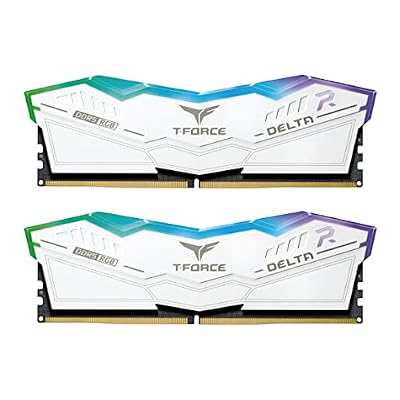
The white T-Force Delta RGB kit pairs the joint-tightest latency here, CL30, with the most distinctive appearance. Its listing describes 120-degree ultra-wide RGB lighting with a smart RGB controller, a geometric heat spreader modelled on a stealth aircraft, and both Intel XMP 3.0 and AMD EXPO support. In a white build, that combination is hard to substitute.
TEAMGROUP tells buyers to check the motherboard QVL first, and notes that processor memory controller quality and BIOS version can affect the operating frequency reached. That applies to any 6000MHz kit, and especially here, since CL30 is the more demanding end of the mainstream range. Voltage is listed as 1.35V and the form factor as a 288-pin DIMM. Suits: a white Intel or AMD build where appearance is primary but CL30 timings are still wanted.
Specs
- Capacity and layout: 32GB as 2 x 16GB desktop DIMM modules, 288-pin
- DDR5 speed: 6000MHz
- CAS latency and timings: CL30
- Voltage: 1.35V
- Platform and profile support: Intel XMP 3.0 and AMD EXPO, with Intel 600 and 700 series chipset compatibility named in the listing
Frequently Asked Questions
Can DDR5 memory be used in a DDR4 motherboard?
No. DDR5 and DDR4 use different notch positions and electrical specifications, so a DDR5 kit does not fit a DDR4 slot. DDR5 requires an AMD AM5 board or an Intel board from the 600 or 700 series onward, with a processor made for that platform. Check the board specification for memory type before ordering.
Is 32GB enough for gaming, or should a new build use 64GB?
For gaming, 32GB as two 16GB modules covers games alongside a browser, voice chat, and streaming tools with room to spare. A 64GB kit becomes relevant when the machine also handles heavy creation work or virtual machines. Extra unused capacity does not raise frame rates, so most gaming builders are better served by a 32GB kit with the right speed, latency, and profile support.
Why does a 6000MHz kit boot at a lower speed at first?
Because the rated speed lives in the XMP or EXPO profile, not the default settings. Kits include a standard default profile so the system starts safely; rated speed, timings, and voltage apply when you enable the correct profile in BIOS or UEFI. Confirm the reported speed afterwards. If the system is unstable, update the BIOS and check the kit on the board QVL by part number.
Should an AMD builder choose EXPO and an Intel builder choose XMP?
Yes, as a starting rule. EXPO is written for AMD AM5 and XMP 3.0 for Intel, and enabling your platform’s profile is the documented route to rated speed. Kits listing both give a documented option on either side; kits listing only one should be matched to that platform or checked carefully against the QVL.
Conclusion
The best kit is not the one with the largest number in its title, because speed is the same across all five here. Decide in order: confirm a DDR5 board, a desktop UDIMM, and the exact part number on the QVL. Then choose the profile matching your processor, and only then compare latency, lighting, and heat spreader height.
On that basis, the Kingston FURY Beast and white TEAMGROUP T-Force Delta RGB lead on listed latency at CL30, the Kingston for a low-profile AMD-focused build and the TEAMGROUP for a white RGB build. The G.SKILL and Crucial kits occupy the CL36 middle ground, one with RGB and one without, while the Corsair trades a looser CL38 timing for ten-zone lighting and wide board compatibility. Any of the five is a coherent 32GB, 6000MHz choice for AM5 or recent Intel, as long as your board QVL agrees.