As an Amazon Associate we earn from qualifying purchases.
Programming and gaming ask a laptop to do two different jobs at once. Code editors, compilers, containers and browser tabs want fast multi-core CPUs and plenty of RAM. Games want a capable GPU, a smooth high-refresh display and cooling that holds up under load. HP covers both sides with two lines: Victus for value and OMEN for higher-end hardware. This guide compares five HP laptops sold on Amazon US, all with discrete NVIDIA graphics, and explains what to check before you buy. For a wider look at programming laptops across brands, see our guide to best gaming laptops for programming.
What to check before you buy an HP laptop for programming and gaming
A laptop that only games well can still frustrate a programmer, and a laptop that only compiles fast can still disappoint a gamer. The checks below cover both jobs.
For programming, core and thread counts matter because builds, test suites and containers run in parallel. Six cores handle everyday development, while eight or more help with large codebases, virtual machines and local AI work. For gaming, the GPU tier matters more: an RTX 4050 with 6GB of video memory handles 1080p gaming, while an RTX 5060 or RTX 5070 with 8GB gives more headroom at higher settings and for GPU-accelerated work.
Power limits are the number most listings hide. The Amazon listings for these models do not publish the GPU total graphics power or the sustained CPU power limit. Compare the published CPU and GPU model names, then confirm the power limits on HP’s spec page for the exact model before buying.
Every model here has a 144Hz IPS panel, which keeps motion smooth in games and scrolling smooth in long files. A 1920 x 1200 or 2560 x 1600 panel shows more lines of code at once than a 1920 x 1080 panel, and an IPS panel gives wider viewing angles for sharing your screen.
16GB of RAM is the minimum for comfortable work with an editor, a browser and a local server. 32GB is the better pick for containers, virtual machines and large projects, and 64GB suits heavy multitasking and local AI work. For storage, 512GB fills up fast once games and toolchains share a drive, so 1TB or more is the safer choice. Check whether the RAM is socketed and whether a second SSD slot exists before you plan an upgrade.
Ports decide how the laptop fits your desk. Look for at least one USB-C port, several USB-A ports, an HDMI port for an external monitor and an RJ-45 Ethernet port. A laptop with a full port set works with a dock, a second monitor and a wired network from day one.
Warranty is the last check and the easiest to skip. HP lists a one-year limited hardware warranty as standard for these consumer models, and some listings are sold through resellers or as bundles. Confirm the warranty term and the seller on the listing before buying.
1. HP Victus 15 Gaming Laptop, Ryzen 7 7445HS, RTX 4050

The Ryzen-powered Victus 15 is the entry point in this guide and the best fit for a programmer who wants a real gaming GPU without paying for flagship hardware. Its six-core Ryzen 7 7445HS boosts up to 4.7GHz, which covers everyday development, web work and 1080p gaming, while the RTX 4050 with 6GB of video memory handles modern games at 1080p with sensible settings. The 15.6-inch FHD IPS panel runs at 144Hz, so code scrolling and fast games both look smooth.
This is also the only model here whose Amazon page I could open directly, and its listing confirms a 70Wh battery, a backlit keyboard, DTS:X Ultra audio, Wi-Fi 6 and a full port set with HDMI 2.1, USB-C 3.2, two USB-A 3.2 ports and RJ-45 Ethernet. At 5.06 lbs it is portable enough for a daily commute.
Upgrade options need a careful read: the listing shows 16GB as its listed maximum memory figure and does not confirm a second SSD slot, so confirm both with HP for this exact configuration before planning an upgrade.
Specs
- CPU: AMD Ryzen 7 7445HS, 6-core, 12 threads, base 3.55GHz, boost up to 4.7GHz, 16MB L3 cache
- GPU: NVIDIA GeForce RTX 4050, 6GB GDDR6
- RAM: 16GB DDR5
- Storage: 512GB SSD
- Display: 15.6-inch FHD 1920 x 1080 IPS anti-glare, 144Hz
- Ports: 1x HDMI 2.1, 1x USB-C 3.2, 2x USB-A 3.2, 1x RJ-45 Ethernet
- Wireless: Wi-Fi 6 (802.11ax)
- Battery: 70Wh
- Weight: 5.06 lbs
- Keyboard: Backlit
- Audio: DTS:X Ultra
- OS: Windows 11 Home
2. HP Victus 15 Gaming Laptop, Intel Core i5-13420H, RTX 4050

The Intel Victus 15 pairs an eight-core Core i5-13420H with the same RTX 4050 graphics, which makes it a strong pick for programmers who run parallel builds and want more CPU threads than the six-core Ryzen model above. The extra cores help when a compiler, a test runner and a local database all run at the same time, while the RTX 4050 still covers 1080p gaming. Its 15.6-inch FHD IPS panel runs at 144Hz, and the listing confirms a backlit keyboard, an HD camera and Wi-Fi 6.
This listing is sold as a bundle with a docking station set, so check the bundle contents on the listing and confirm the dock matches your setup. The 16GB of RAM and 512GB PCIe SSD match the Ryzen model: fine for everyday development, but heavy container work will want more.
Upgrade options are not confirmed by this listing, so confirm the RAM ceiling and SSD slots on HP’s spec page for the exact model before buying.
Specs
- CPU: Intel Core i5-13420H, 8-core
- GPU: NVIDIA GeForce RTX 4050, 6GB GDDR6
- RAM: 16GB
- Storage: 512GB PCIe SSD
- Display: 15.6-inch FHD 144Hz IPS
- Keyboard: Backlit, with numeric keypad
- Camera: HD webcam
- Wireless: Wi-Fi 6
- OS: Windows 11
- Bundle: Sold with a docking station set
3. HP Victus 15 Gaming Laptop, Ryzen AI 7 350, RTX 5060

The Ryzen AI 7 Victus 15 is the step up for programmers who also want a current-generation GPU. Its eight-core Ryzen AI 7 350 boosts up to 5.0GHz, and the RTX 5060 with 8GB of video memory gives more headroom than the RTX 4050 models for higher game settings and GPU-accelerated work. The jump to 32GB of DDR5 RAM is the bigger story for programming: containers, virtual machines and large projects all benefit, and 32GB means you stop closing apps to free memory. The 1TB SSD leaves room for games and toolchains on the same drive, and the 15.6-inch FHD IPS panel runs at 144Hz.
This listing is sold as a bundle with a Thunderobot 7-in-1 USB-C hub, so confirm the hub contents on the listing before buying. Upgrade options are not fully confirmed by this listing, so confirm the RAM ceiling and SSD slots on HP’s spec page. The listing’s model number is TPN-Q279.
Specs
- CPU: AMD Ryzen AI 7 350, 8-core, boost up to 5.0GHz
- GPU: NVIDIA GeForce RTX 5060, 8GB GDDR7
- RAM: 32GB DDR5
- Storage: 1TB SSD
- Display: 15.6-inch FHD 1920 x 1080 IPS, 144Hz
- Model number: TPN-Q279
- Dimensions: 14.09 x 10.04 x 0.93 inches
- OS: Windows 11 Home
- Bundle: Sold with a Thunderobot 7-in-1 USB-C hub
4. HP OMEN 16 Slim Gaming Laptop, Intel Core Ultra 9 285H, RTX 5070

The OMEN 16 Slim is the best all-round pick in this guide for a programmer who games seriously. Its 16-core Intel Core Ultra 9 285H boosts up to 5.4GHz with 24MB of cache, and its integrated AI Boost NPU delivers 13 TOPS for on-device AI features. The RTX 5070 with 8GB of GDDR7 video memory handles 1440p gaming and GPU-accelerated work, while 32GB of DDR5-5600 RAM and a 1TB PCIe NVMe SSD keep large projects responsive. OMEN Tempest Cooling is HP’s answer to sustained loads, which matters when a compile and a game session both run long.
The 16-inch WQXGA panel runs at 1920 x 1200 with a 60-144Hz variable refresh rate, IPS technology, anti-glare coating and 300 nits of brightness, so it shows more lines of code than a 1080p panel. The port set is the best here, with USB-C 10Gbps, three USB-A ports, RJ-45 Ethernet, HDMI 2.1 and a headphone and microphone combo jack, plus Wi-Fi 6E, Bluetooth 5.3 and a 1080p FHD camera. Upgrade options are not confirmed by this listing, so confirm the RAM ceiling and SSD slots on HP’s spec page for the exact model.
Specs
- CPU: Intel Core Ultra 9 285H, 16-core, 16 threads, boost up to 5.4GHz, 24MB cache, Intel AI Boost NPU 13 TOPS
- GPU: NVIDIA GeForce RTX 5070, 8GB GDDR7
- RAM: 32GB DDR5-5600
- Storage: 1TB PCIe NVMe M.2 SSD
- Display: 16-inch WQXGA 1920 x 1200 IPS anti-glare, 60-144Hz, 300 nits, 62.5% sRGB, variable refresh rate support
- Ports: 1x USB-C 10Gbps (Power Delivery 3.0, DisplayPort 1.4, HP Sleep and Charge), 1x USB-A 10Gbps, 2x USB-A 5Gbps, 1x RJ-45, 1x HDMI 2.1, 1x headphone and microphone combo
- Wireless: Wi-Fi 6E, Bluetooth 5.3
- Camera: HP True Vision 1080p FHD with temporal noise reduction
- Audio: HyperX dual speakers
- Keyboard: Full-size 4-zone RGB backlit, numeric keypad, 26-key rollover anti-ghosting
- Cooling: OMEN Tempest Cooling
- OS: Windows 11 Home, Copilot+ PC
5. HP OMEN 17.3 Gaming Laptop, AMD Ryzen AI 9 365, RTX 5070
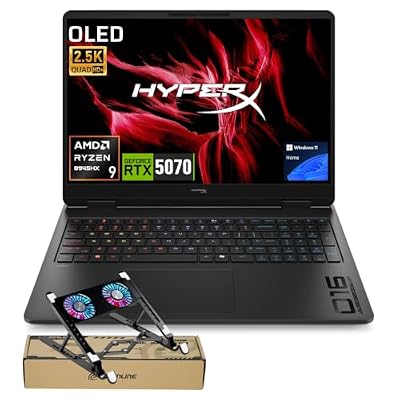
The OMEN 17.3 is the desktop-replacement pick: the biggest screen, the most RAM and the most storage in this guide. Its ten-core AMD Ryzen AI 9 365 boosts up to 5.0GHz with 20 threads, and the RTX 5070 with 8GB of GDDR7 video memory matches the OMEN 16 Slim for gaming and GPU work. The difference is capacity: 64GB of DDR5 RAM and a 2TB PCIe SSD mean you can run several virtual machines, a local database, a full IDE and a game library without juggling storage or memory. The 17.3-inch FHD IPS panel runs at 144Hz, so the extra screen space helps with side-by-side code and documentation.
This is the least portable model here, so treat it as a machine that mostly stays on a desk. The listing also notes a Thunderobot 7-in-1 USB-C hub in the bundle, so confirm the hub contents on the listing. Upgrade options follow the listing text, which describes memory up to 64GB and storage up to 4TB, so confirm the exact upgrade path for this configuration on HP’s spec page. The listing’s model number is TPN-Q299.
Specs
- CPU: AMD Ryzen AI 9 365, 10-core, 20 threads, base 2.0GHz, boost up to 5.0GHz, 8MB L3 cache
- GPU: NVIDIA GeForce RTX 5070, 8GB GDDR7
- RAM: 64GB DDR5
- Storage: 2TB PCIe M.2 SSD
- Display: 17.3-inch FHD 1920 x 1080 IPS, 144Hz
- Keyboard: RGB backlit, numeric keypad
- Model number: TPN-Q299
- OS: Windows 11 Home
- Bundle: Sold with a Thunderobot 7-in-1 USB-C hub
FAQ
How much RAM does a programming and gaming laptop need?
16GB is the minimum for comfortable work with an editor, a browser and a local server. 32GB is the better pick for containers, virtual machines and large projects, and 64GB suits heavy multitasking and local AI work.
Is an RTX 4050 laptop enough for programming and gaming?
Yes, for 1080p gaming and everyday development. The RTX 4050 models here pair a 6GB GPU with a capable CPU and a 144Hz display, which covers most programming work and modern games at sensible settings. Choose an RTX 5060 or RTX 5070 model for higher settings or GPU-accelerated workloads.
Can I upgrade the RAM and SSD in these HP laptops?
It depends on the exact model. The listings here do not all confirm the RAM ceiling or the number of SSD slots, and the Ryzen Victus 15 listing shows 16GB as its listed maximum memory figure. Confirm the upgrade path on HP’s spec page for the exact model before buying.
Which HP laptop here is best for a big screen and heavy multitasking?
The HP OMEN 17.3 with the Ryzen AI 9 365, RTX 5070, 64GB of RAM and a 2TB SSD. Its 17.3-inch display gives the most room for side-by-side code and documentation, and its memory and storage handle several virtual machines and a large game library at once. Treat it as a desktop replacement rather than a daily carry laptop.
Conclusion
The best HP laptop for programming and gaming depends on how much memory and GPU headroom your work needs. The two RTX 4050 Victus 15 models cover everyday development and 1080p gaming at the lowest cost. The Ryzen AI 7 Victus 15 adds 32GB of RAM and a current-generation RTX 5060. The OMEN 16 Slim is the best all-round pick, while the OMEN 17.3 is the desktop replacement for maximum RAM, storage and screen space. Confirm power limits and upgrade options on HP’s spec page before buying.