As an Amazon Associate we earn from qualifying purchases
Farming Simulator looks gentle from the outside. Inside a real save file, the load is very different. A large modded map, dozens of vehicles, hired workers running several fields at once, and a folder full of script mods can push a laptop’s processor, memory, and storage harder than the base game suggests. The best gaming laptop for Farming Simulator is therefore not any laptop that clears the minimum requirements. It is a machine with headroom for mods and long sessions.
This guide compares four gaming laptops currently listed on Amazon US, each with a verified ASIN, a dedicated graphics card with 8GB of video memory, and at least 16GB of RAM. Only manufacturer and listing specifications are used, so processor, graphics power limits where stated, display, memory, storage, ports, cooling, and upgradeability for the exact model can be checked before buying.
What Farming Simulator actually needs
For Farming Simulator 25, the published minimum specification calls for an Intel Core i5-6400 or AMD Ryzen 5 1400 processor, 8GB of RAM, a GeForce GTX 1050 Ti or Radeon RX 470 graphics card with at least 3GB of VRAM and DirectX 12 support, and around 50GB of storage. The recommended specification steps up to an Intel Core i7-10700 or AMD Ryzen 7 3800X, 12GB of RAM, and a GeForce RTX 2070, Radeon RX 5700 XT, or Intel Arc A750 class card with 8GB of VRAM.
Modded play changes the calculation in three ways. First, the processor matters more than in many games. Physics, vehicle systems, workers, and mod scripts compete for CPU time, and a busy map can become processor-limited even when the graphics card has capacity left. A modern HX or HS processor is a safer choice than a chip that only just clears the minimum line.
Second, memory and storage fill quickly. Mods, downloadable content, saves, and large custom maps add up, and a small drive that also holds Windows and other games feels tight within a season. A 1TB SSD is the practical target here, 16GB of RAM is the floor, and 32GB gives more room for heavy mod lists, a browser, and voice chat alongside the game.
Third, sessions are long. Harvesting a large field is not a ten-minute match. Cooling that sustains performance for hours, a comfortable display, and ports for a wheel, pedals, or an external drive matter more than a thin chassis. The same priorities appear in our guide to the best gaming laptop for golf simulator use, where sustained performance matters just as much.
Quick comparison
| Model | ASIN | CPU | GPU | RAM / SSD | Display |
|---|---|---|---|---|---|
| Lenovo Legion 5i | B0DPWQ6WSS | Intel Core i7-13650HX | GeForce RTX 4060 8GB | 32GB / 1TB | 16-inch QHD 165Hz |
| ASUS ROG Strix G16 G614JV-AS74 | B0CRDCXRK2 | Intel Core i7-13650HX | GeForce RTX 4060 | 16GB DDR5 / 1TB | 16-inch 165Hz |
| ASUS TUF Gaming A15 FA507NV-EH74 | B0CJSY4PLN | AMD Ryzen 7 7735HS | GeForce RTX 4060, 140W Max TGP stated | 16GB DDR5 / 1TB | 15.6-inch FHD 144Hz, 100% sRGB |
| MSI Katana A15 AI B8VF-448US | B0CXVGSY2H | AMD Ryzen 7 8845HS | GeForce RTX 4060 | 32GB DDR5 / 1TB | 15.6-inch FHD 144Hz |
1. Lenovo Legion 5i — Best overall for mod-heavy maps

Product: Lenovo Legion 5i Gaming Laptop, 16-inch QHD 165Hz G-SYNC, Intel Core i7-13650HX, 32GB RAM, 1TB SSD, NVIDIA GeForce RTX 4060 8GB — ASIN: B0DPWQ6WSS
This Legion 5i configuration pairs an Intel Core i7-13650HX processor with a GeForce RTX 4060 with 8GB of memory, 32GB of RAM, and a 1TB SSD. That directly addresses the pressures above. The HX processor gives modded maps more headroom, the 32GB of memory is among the most generous fits in this guide, and the 1TB drive leaves real space for a growing mod folder.
The 16-inch QHD panel at 165Hz is also well judged. Farming Simulator does not need 165Hz to be playable, but the higher resolution makes maps, menus, and in-cab details sharper, and the larger workspace is more comfortable for long sessions and for managing mod lists. G-SYNC support, as stated in the listing title, helps keep motion smooth when frame rates vary across a busy map.
For upgradeability, check this exact configuration on Lenovo’s specification page before ordering, and confirm ports and warranty terms on the Amazon listing for this ASIN, since warranty cover can vary by seller. Choose this one for the most balanced machine in the guide, especially for large maps and long mod lists.
2. ASUS ROG Strix G16 G614JV-AS74 — Best for display and cooling focus

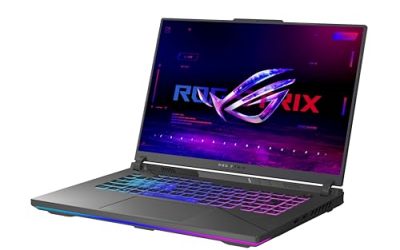
Product: ASUS ROG Strix G16 Gaming Laptop, 165Hz Display, NVIDIA GeForce RTX 4060, Intel Core i7-13650HX, 16GB DDR5, 1TB PCIe Gen4 SSD, Wi-Fi 6E, Windows 11, G614JV-AS74 — ASIN: B0CRDCXRK2
The Strix G16 in this G614JV-AS74 configuration uses the same Core i7-13650HX and RTX 4060 pairing as the Legion, with 16GB of DDR5 memory and a 1TB PCIe Gen4 SSD. Its case rests on the chassis and display: a 16-inch panel at 165Hz, and a cooling design intended to hold performance during extended play rather than only in short bursts. For Farming Simulator, that consistency matters in hour three, not just in the first field. Wi-Fi 6E, as listed, also helps with large mod and game downloads, although a wired connection is steadier for multiplayer farming.
On upgradeability, verify the slot configuration for the G614JV-AS74 on ASUS’s specification page if raising memory or adding storage is planned, because memory is the first thing heavy mod users will want to increase from 16GB. Also check the listing for the graphics power limit and warranty terms for this seller, since Strix configurations sharing the RTX 4060 name can differ between model codes.
Choose this one if display size and cooling headroom matter more than having 32GB fitted from day one.
3. ASUS TUF Gaming A15 FA507NV-EH74 — Clearest stated GPU power limit

Product: ASUS TUF Gaming A15 (2023) Gaming Laptop, 15.6-inch FHD 144Hz, 100% sRGB Display, GeForce RTX 4060, AMD Ryzen 7 7735HS, 16GB DDR5, 1TB PCIe SSD, Wi-Fi 6, Windows 11, FA507NV-EH74 — ASIN: B0CJSY4PLN
The TUF Gaming A15 is clearest on a detail buyers should always check: graphics power. ASUS states a 140W Max TGP for its RTX 4060 in this model. Two laptops can carry the same RTX 4060 name and behave differently if their power limits differ, so a stated figure is worth more than a vague claim. With an AMD Ryzen 7 7735HS processor, it comfortably exceeds the recommended specification on processor and graphics.
The 15.6-inch Full HD 144Hz display is listed with 100% sRGB coverage, suiting a bright, colourful simulation and everyday use. Memory is 16GB of DDR5, fitted as two 8GB modules in this model’s specification, and storage is a 1TB PCIe SSD. Wi-Fi 6 and wired networking cover solo and multiplayer play, and USB connectivity handles wheels and other farming controls.
For upgrades, that two-module layout means moving to a larger memory kit is a replace-both-modules decision, so plan accordingly if 32GB is likely. Confirm storage expansion against the FA507NV-EH74 specification, and check the listing for warranty terms for this exact model code.
Choose this one for a durable, clearly specified RTX 4060 laptop with a 15.6-inch Full HD screen.
4. MSI Katana A15 AI B8VF-448US — 32GB fitted as standard
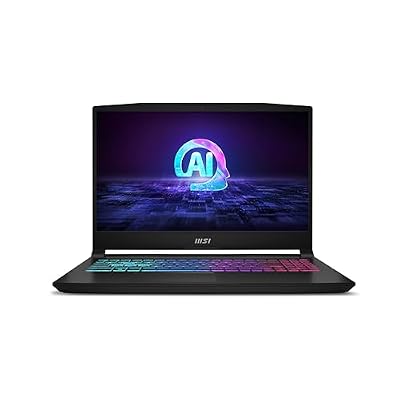
Product: MSI Katana A15 AI 15.6-inch 144Hz FHD Gaming Laptop, Ryzen 7-8845HS, GeForce RTX 4060, 32GB DDR5, 1TB SSD, Cooler Boost 5, Windows 11, B8VF-448US — ASIN: B0CXVGSY2H
This Katana A15 AI configuration stands out for what is already inside: an AMD Ryzen 7 8845HS processor, RTX 4060 graphics, 32GB of DDR5 memory, and a 1TB SSD. For a player who runs a long mod list, keeps guides open in a browser, and does not want to upgrade memory on day one, that standard figure is the main reason to shortlist it.
The 15.6-inch Full HD 144Hz display matches the TUF for resolution and refresh rate, a sensible pairing for an RTX 4060 in this game: high settings at native resolution are a more realistic target than feeding a higher-resolution screen. MSI names its Cooler Boost 5 cooling system in the listing, relevant for the long, steady loads Farming Simulator creates.
Confirm on MSI’s specification page for the B8VF-448US whether memory and SSD configuration matches your expansion plans, read the warranty terms on the Amazon listing for this ASIN, and confirm the port list if a specific wheel, pedal set, or side panel is essential.
Choose this one if 32GB as standard and a newer Ryzen processor are the priorities, and a Full HD panel is acceptable.
How to choose among these four
Start with processor and memory if mods are the priority. All four exceed the published recommended specification, but the Legion 5i and Katana A15 AI, with 32GB fitted, give heavily modded saves the most breathing room without an upgrade. The Strix G16 and TUF Gaming A15 start at 16GB, enough for the base game and a moderate mod list, with expansion as the planned next step.
Next, consider the screen. The Legion’s QHD panel is the sharpest here, the Strix offers a large 16-inch high-refresh display, and the two 15.6-inch Full HD models trade resolution for a simpler setup their graphics cards can drive comfortably.
Then check details listings sometimes bury: the graphics power limit where the manufacturer states it, as ASUS does for the TUF, the exact ports for your controls, and the warranty terms attached to the specific ASIN and seller. Model families share names across many configurations, so the ASIN and model code — G614JV-AS74, FA507NV-EH74, B8VF-448US — guarantee the specification you actually receive.
Finally, treat storage as a mod budget, not just a game install. Every pick here has a 1TB SSD for a reason: the laptop should not force a choice between keeping a favourite map and installing the next one.
Conclusion
The best gaming laptop for Farming Simulator has headroom where this game needs it: a modern processor for modded maps, a dedicated graphics card with 8GB of VRAM, at least 16GB of RAM, a 1TB SSD, and cooling built for long evenings. The Legion 5i is the strongest all-round choice, the Strix G16 suits buyers who value display and cooling, the TUF Gaming A15 offers a clearly stated GPU power limit in a durable design, and the Katana A15 AI fits 32GB as standard. Check the ASIN, model code, and warranty terms before ordering. Any of these four will run a growing farm more comfortably than a minimum-spec laptop.