

This tier is where 4K gaming stops being a stretch goal and starts being a real option. Every machine here pairs an RTX 5070 Ti with 16GB of GDDR7 graphics memory and a current gaming processor. That 16GB matters most, because it keeps textures and ray tracing from becoming a bottleneck.
The five systems below are complete desktops sold on Amazon, compared on graphics card, processor, memory, storage, and power supply. Check the current price and offers on the Amazon product page before buying, since offers change.
As an Amazon Associate, we earn from qualifying purchases.
Quick Answer
Buy the CyberPowerPC Gamer Supreme with a Ryzen 7 9800X3D, an RTX 5070 Ti with 16GB of GDDR7, 32GB of DDR5 memory, and a 2TB NVMe SSD. It is the most balanced 4K-ready config in this tier, with the best gaming processor available and enough storage for a real game library.
Is 4K Worth It at This Tier?
A 4K display is only worth buying into if the graphics card has the memory to feed it. The RTX 5070 Ti clears that bar with 16GB of GDDR7, the same amount as the card one step above it, plus DLSS upscaling and frame generation for demanding titles.
Stay at 1440p if you play fast competitive shooters and care more about frame rate than resolution. Move to 4K for story-driven and open-world games, or if you already own a 4K display. One check first: this much graphics power is wasted on a 1080p screen.
CyberPowerPC Gamer Supreme: The Balanced Pick
The Gamer Supreme gets the balance right. The Ryzen 7 9800X3D is the strongest gaming processor here, with 8 cores, a 4.7 GHz base clock, and a 5.2 GHz boost. With the RTX 5070 Ti and 32GB of DDR5 memory, it handles 4K in story-driven games and high settings at 1440p.
Storage is a full 2TB NVMe SSD, enough for a working library. It ships with liquid cooling, Wi-Fi ready, and Windows 11 Home. The one gap is the power supply: the listing does not state its wattage, so confirm it before buying.
Specs
| Spec | Detail |
|---|---|
| GPU | RTX 5070 Ti, 16GB GDDR7 |
| CPU | Ryzen 7 9800X3D, 8 cores, 4.7–5.2 GHz |
| RAM | 32GB DDR5 |
| Storage | 2TB NVMe SSD |
| PSU | Not stated |
| Cooling | Liquid cooling |
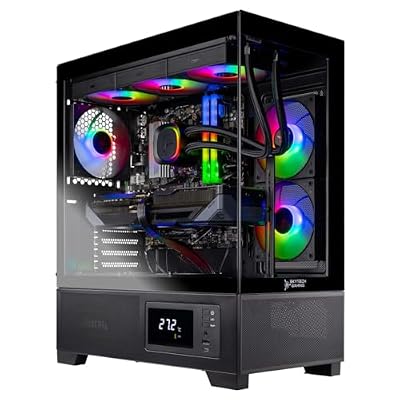


Skytech King 95: The Premium Showcase
The King 95 is the most complete package in this tier. It pairs the same Ryzen 7 9800X3D with the RTX 5070 Ti, but adds 32GB of DDR5 memory at 6000, a 2TB NVMe SSD, and a 360mm ARGB cooler. The 850W Gold ATX 3 power supply is stated plainly in the listing, which leaves room for a future graphics upgrade.
The King 95 case is the other reason to pick it: a premium tower with ARGB fans, Wi-Fi, and Windows 11 Home. Watch for two look-alike traps: a King 95 variant with the newer Ryzen 7 9850X3D is a different machine, and a 1TB King 95 config is a different listing. Confirm model ST-KING95-1866-B-AM and the 2TB storage on the product page.
Specs
| Spec | Detail |
|---|---|
| GPU | RTX 5070 Ti, 16GB GDDR7 |
| CPU | Ryzen 7 9800X3D, 8 cores, 4.7–5.2 GHz |
| RAM | 32GB DDR5 6000 RGB |
| Storage | 2TB NVMe SSD |
| PSU | 850W Gold ATX 3 |
| Cooling | 360mm ARGB AIO |
MSI Aegis R2 AI: The Intel Workhorse
The Aegis R2 is the Intel option, and it earns its place by being the strongest multitasking machine here. The Core Ultra 9 285 has 24 cores, which makes it the best choice here for buyers who stream, edit video, or run heavy background work alongside their games. The RTX 5070 Ti is the same 16GB card as the other picks, so 4K gaming performance sits in the same class.
It ships with 32GB of DDR5 memory and a 2TB NVMe SSD, plus Wi-Fi 7 and a USB Type-C port, and it is rated VR-ready. Cooling is air-based rather than liquid, which keeps the build simpler and quieter at idle. Check two things before buying: the listing does not state the power supply wattage, and do not confuse this listing with the B2NVR9-1450US Aegis R2 config, a different machine also sold as a certified refurbished unit, or with the RTX 5070 non-Ti Aegis R2.
Specs
| Spec | Detail |
|---|---|
| GPU | RTX 5070 Ti, 16GB GDDR7 |
| CPU | Core Ultra 9 285, 24 cores |
| RAM | 32GB DDR5 |
| Storage | 2TB NVMe SSD |
| PSU | Not stated |
| Cooling | Air cooling |
Lenovo Legion Tower 5: The Clean Starter
The Legion Tower 5 is the most restrained machine in this roundup, and that is a strength. It pairs the Ryzen 7 9800X3D with the RTX 5070 Ti and 32GB of DDR5 memory, in a clean Eclipse Black tower with a 240mm RGB liquid cooler. There is no flashy glass showcase here, just a well-built desktop from a major maker with a one-year parts and labor warranty and three months of PC Game Pass included.
The compromise is storage: 1TB instead of 2TB. That is enough for a handful of large modern games, but a buyer with a big library will need to manage installs or add a second drive later. The memory is two 16GB sticks with two of the four slots free, so adding memory later is straightforward. Stock signals conflicted at writing time, so check the live Amazon listing, and confirm model 90YJ00A9US, since the Legion Tower 5i with an Intel processor is a different machine.
Specs
| Spec | Detail |
|---|---|
| GPU | RTX 5070 Ti, 16GB GDDR7 |
| CPU | Ryzen 7 9800X3D, 8 cores, 4.7–5.2 GHz |
| RAM | 32GB DDR5, 2 x 16GB |
| Storage | 1TB SSD |
| PSU | Not stated |
| Cooling | 240mm RGB AIO |
Skytech Azure 3 Plus: The Step-Down Pick
The Azure 3 Plus is the most affordable way into this tier, and it makes one clear trade to get there: the previous-generation Ryzen 7 7800X3D instead of the 9800X3D. The 7800X3D is still a strong gaming processor with 8 cores, a 4.2 GHz base clock, and a 5.0 GHz boost, and at 4K the graphics card does most of the work anyway, so the difference shows up mainly at 1440p.
Everything else stays in tier: the RTX 5070 Ti with 16GB of GDDR7, 32GB of DDR5 memory, an 850W Gold ATX 3 power supply, and a 360mm ARGB liquid cooler. The memory runs at 5600 rather than 6000, and storage is 1TB rather than 2TB. Do not confuse this listing with the Azure 3 config that pairs the 9800X3D with an RTX 5080. Confirm model ST-AZURE3PLUS-1957-B-AM on the product page.
Specs
| Spec | Detail |
|---|---|
| GPU | RTX 5070 Ti, 16GB GDDR7 |
| CPU | Ryzen 7 7800X3D, 8 cores, 4.2–5.0 GHz |
| RAM | 32GB DDR5 5600 RGB |
| Storage | 1TB NVMe SSD |
| PSU | 850W Gold ATX 3 |
| Cooling | 360mm ARGB AIO |
When to Move Up or Down a Tier
Moving up to the 2000 tier guide buys a step up in graphics power, toward the RTX 5080 class, plus more storage headroom and stronger cooling. It is the right move if you play at 4K with ray tracing turned up, or if you plan to keep the machine for five years or more without a graphics upgrade. The 2500 tier guide goes further still.
Dropping to the 1600 prebuilt tier is the right call if you play at 1440p and have no 4K monitor in your plans. That tier uses the RTX 5070 and RX 9070 class with a Ryzen 7 9700X and a 750W supply. The extra step up to this tier buys exactly three things: the RTX 5070 Ti class with 16GB of graphics memory instead of 12GB, the Ryzen 7 9800X3D instead of the 9700X, and an 850W power supply instead of 750W. If none of those three changes how you play, save the step and stay below.
How to Choose
Start with 4K readiness, because that is what this tier is for. The graphics card must have 16GB of graphics memory, and the RTX 5070 Ti is the card that delivers it here. A 12GB card can run 4K in lighter titles, but it runs out of headroom in demanding games.
Next, check the processor pairing. At 4K the graphics card carries most of the load, but the processor still sets the ceiling for frame-rate consistency, and the Ryzen 7 9800X3D is the strongest gaming processor in this roundup. The Core Ultra 9 285 is the better pick if streaming and editing matter as much as gaming, while the 7800X3D is the step down. Then check memory, storage, and power: 32GB of DDR5 is the right amount, 2TB is the practical size for a modern library, and 850W with an ATX 3 rating is the headroom this tier should have.
Who Should Skip It
Skip this tier if you play at 1080p. These machines are built for 1440p ultra and 4K, and a 1080p display leaves most of their graphics power unused. Skip it if your monitor is 1440p and you are happy with it, since the extra graphics memory and processor strength only pay off when you move to 4K. Buyers on a tight budget should look at the tier below.
Frequently Asked Questions
Is the RTX 5070 Ti enough for 4K gaming?
Yes, with the right expectations. The 16GB of GDDR7 graphics memory and support for DLSS upscaling and frame generation make 4K playable in demanding titles, and very smooth in lighter ones. Turn ray tracing up in the heaviest games and upscaling does its work.
Does the Ryzen 7 9800X3D matter at 4K?
Less than at 1440p, but it still matters. At 4K the graphics card carries most of the load, so the processor gap narrows, yet the 9800X3D keeps frame rates steadier in CPU-heavy scenes and in games that lean on the processor.
Is 32GB of DDR5 memory enough?
Yes. 32GB covers gaming, streaming, and multitasking at the same time, and it is the amount every machine in this roundup ships with. Only buyers who edit large video projects should look for more.
Should I buy a 1TB or 2TB SSD?
Buy 2TB if you keep a large game library installed. Modern games are large, and 1TB fills up fast, which means uninstalling to make room. A 1TB machine is fine if you play a few games at a time.
Final Verdict
The 1700 tier is the first one where 4K gaming is genuinely on the table, and the CyberPowerPC Gamer Supreme is the pick that proves it, with the Ryzen 7 9800X3D, the RTX 5070 Ti, 32GB of DDR5, and a 2TB SSD in one balanced package. The Skytech King 95 is the premium alternative for buyers who want the full spec sheet, while the MSI Aegis R2 suits streamers and creators.
If 4K is not in your plans, drop to the 1600 prebuilt tier and save the step. If 4K with ray tracing turned up is the goal, move to the 2000 tier guide instead.







