As an Amazon Associate we earn from qualifying purchases.
A thin gaming laptop has to run modern games well and disappear into a bag without weighing you down. The five laptops here were chosen from their Amazon US listings for that balance: a dedicated RTX graphics chip, a high-refresh display, and a slim, light chassis.
Thin does not mean identical. Two laptops can share the same graphics chip and still play very differently, because a slim chassis limits how much heat the cooling system can move. Two notes: the listings for two of the five laptops do not confirm the tier, and the guide says so where that applies. One listing is a seller-upgraded configuration and another names a third-party seller. If a listing does not confirm a detail you care about, confirm it on the listing before buying.
What to Check Before You Buy a Thin Gaming Laptop
A 14-inch machine under 2 cm thick and under 4 lb is easy to carry all day, and a 16-inch machine can still count as thin if it stays close to that thickness.
The graphics power limit matters more than the graphics name. Makers set a total graphics power, or TGP, for each model, and the same RTX 4060 can run at 65 W in one thin chassis and 100 W in another. ASUS lists the TUF Gaming A14 with an RTX 4060 at up to 100 W with Dynamic Boost, while the 2024 HP OMEN Transcend 14 pairs its RTX 4060 with a 65 W limit, according to Laptop Media.
OLED panels give deep blacks and vivid color. A 120 Hz or faster refresh rate keeps motion smooth, and a 2560 x 1600 resolution looks sharp on a 14-inch or 16-inch panel, though a high native resolution asks more of the graphics chip.
Most thin gaming laptops ship with 16 GB of soldered memory that cannot be upgraded later, so choose the size at purchase. Storage is usually a PCIe SSD, and some models have a second M.2 slot.
Look for HDMI 2.1 for an external display, a Thunderbolt or USB4 port for a fast dock or drive, and at least one full-size USB-A port. Warranty terms are short on most gaming laptops, so read the warranty line on the listing.
1. ASUS ROG Zephyrus G14 (2024)

The Zephyrus G14 is the lightest laptop in this guide, at 3.2 lb and 0.64 inches thick. The listing pairs an 8-core AMD Ryzen 9 8945HS processor, boosting up to 5.2 GHz, with an RTX 4060 with 8 GB of GDDR6 memory and 16 GB of LPDDR5X memory onboard. The 14-inch OLED display runs at 2880 x 1800 and 120 Hz, with response times as low as 3 ms, Dolby Vision HDR, and Adaptive-Sync.
Connectivity includes Wi-Fi 6E, Bluetooth 5.3, two USB 3.2 Type-A ports, one USB 3.2 Type-C port, one USB4 Type-C port, HDMI 2.1, a microSD reader, and a combo audio jack. The battery is a 73 Wh unit with a 180 W adapter. Note that this listing is a seller-upgraded configuration, with the box opened to install a 2 TB PCIe SSD and a bundled Dockztorm hub, while the standard configuration ships with a 1 TB drive. Confirm the exact configuration, seller terms, and warranty on the listing. The 16 GB of memory is onboard and cannot be upgraded later.
Specs
- Processor: AMD Ryzen 9 8945HS, 8 cores, up to 5.2 GHz
- Graphics: NVIDIA GeForce RTX 4060, 8 GB GDDR6
- Memory: 16 GB LPDDR5X onboard
- Storage: 1 TB or 2 TB PCIe SSD, as listed
- Display: 14-inch OLED, 2880 x 1800, 120 Hz, Dolby Vision, Adaptive-Sync
- Ports: 2 x USB 3.2 Type-A, 1 x USB 3.2 Type-C, 1 x USB4 Type-C, HDMI 2.1, microSD reader, combo audio jack
- Connectivity: Wi-Fi 6E, Bluetooth 5.3
- Battery: 73 Wh, 180 W adapter
- Weight and thickness: 3.2 lb, 0.64 inches
- Warranty: Limited, as listed
2. MSI Stealth 14 Studio A13VF

The MSI Stealth 14 Studio is the high-refresh pick here. Its 14-inch IPS-level display runs at 1920 x 1200 with a 165 Hz refresh rate and a 3 ms response time, with 100 percent sRGB coverage. The lower resolution suits the RTX 4060 well, since the graphics chip has fewer pixels to drive at high settings.
The laptop pairs an Intel Core i7-13620H processor with an RTX 4060 with 8 GB of GDDR6 memory, 16 GB of DDR5 memory, and a 1 TB PCIe SSD, in a chassis 19 mm thick and 3.75 lb in weight. The port list is strong for a thin machine: one USB Type-A port, one Thunderbolt 4 port, one USB Type-C port, HDMI 2.1, an RJ45 Ethernet jack, and a combo audio jack. The keyboard is a SteelSeries per-key RGB unit, and the battery is a 4-cell 72 Whr unit.
The listing does not state the warranty length, whether the memory is socketed or soldered, or whether a second drive slot is fitted, so confirm all three on the listing before buying.
Specs
- Processor: Intel Core i7-13620H
- Graphics: NVIDIA GeForce RTX 4060, 8 GB GDDR6
- Memory: 16 GB DDR5
- Storage: 1 TB PCIe SSD
- Display: 14-inch IPS-level, 1920 x 1200, 165 Hz, 3 ms, 100 percent sRGB
- Ports: 1 x USB Type-A, 1 x Thunderbolt 4, 1 x USB Type-C, HDMI 2.1, RJ45 Ethernet, combo audio jack
- Connectivity: Wi-Fi 6, Bluetooth
- Battery: 4-cell 72 Whr
- Weight and thickness: 3.75 lb, 19 mm
- Warranty: Not stated; confirm on the listing
3. ASUS TUF Gaming A14

The TUF Gaming A14 is the toughest laptop here, built around a 1.46 kg, 1.69 cm chassis with MIL-STD-810H durability and a hinge that opens 180 degrees. Inside, it pairs an AMD Ryzen AI 9 HX 370 processor with an RTX 4060 and a dedicated MUX switch. ASUS lists the graphics chip at up to 100 W with Dynamic Boost, which is a strong power limit for a 14-inch chassis and helps the laptop hold frame rates in demanding games.
Memory is 16 GB of LPDDR5X, storage is a 1 TB PCIe Gen 4.0 SSD, and the display is a 14-inch WQXGA panel at 2560 x 1600 with a 165 Hz refresh rate, 100 percent sRGB coverage, and G-Sync support. The listing states Windows 11 Home, Wi-Fi 6E, and a 1-year warranty, but it does not list the full port set.
The 16 GB of memory is onboard, and the listing states a maximum memory size of 16 GB, so memory cannot be upgraded after purchase. Storage is the flexible part: ASUS states the A14 has dual 2280 NVMe SSD slots, so a second drive can be added later.
Specs
- Processor: AMD Ryzen AI 9 HX 370, 12 cores
- Graphics: NVIDIA GeForce RTX 4060, 8 GB GDDR6, up to 100 W with Dynamic Boost
- Memory: 16 GB LPDDR5X, maximum 16 GB as listed
- Storage: 1 TB PCIe Gen 4.0 SSD, dual 2280 NVMe slots per ASUS
- Display: 14-inch WQXGA, 2560 x 1600, 165 Hz, 100 percent sRGB, G-Sync
- Ports: Not fully listed; confirm on the listing
- Connectivity: Wi-Fi 6E
- Weight and thickness: 1.46 kg, 1.69 cm
- Warranty: 1 year, as listed
4. ASUS ROG Zephyrus G16 (2025)

The Zephyrus G16 is the 16-inch option here, with the fastest screen in the guide: a 16-inch ROG Nebula OLED display at 2560 x 1600 and 240 Hz, which suits competitive games far better than a 120 Hz panel and gives more room for multitasking.
An Intel Core Ultra 9 285H processor pairs with an RTX 5070 Ti laptop GPU with 12 GB of GDDR7 memory, and ASUS lists a maximum graphics power of 120 W with NVIDIA Advanced Optimus. Memory is 32 GB of DDR5, and storage is a 2 TB SSD. The listing shows Windows 11 Pro in a black finish, with ROG Intelligent Cooling and Xbox PC Game Pass listed as included extras.
This listing pairs a 5070 Ti graphics chip with 32 GB of memory and a 2 TB drive, and the listing does not confirm the tier for this configuration, so confirm it on the listing before buying. The listing also does not state the weight or thickness for this exact configuration, so confirm those figures too. Thunderbolt connectivity is listed, and the listing shows a limited warranty. Memory is 32 GB installed and 32 GB maximum, so buy the memory you need at purchase.
Specs
- Processor: Intel Core Ultra 9 285H
- Graphics: NVIDIA GeForce RTX 5070 Ti, 12 GB GDDR7, up to 120 W maximum graphics power
- Memory: 32 GB DDR5, maximum 32 GB as listed
- Storage: 2 TB SSD
- Display: 16-inch OLED, 2560 x 1600, 240 Hz, ROG Nebula
- Ports: Thunderbolt listed; full list not stated
- Connectivity: Wi-Fi 802.11ax
- Weight and thickness: Not stated; confirm on the listing
- Warranty: Limited, as listed
5. HP OMEN Transcend 14 (2025)
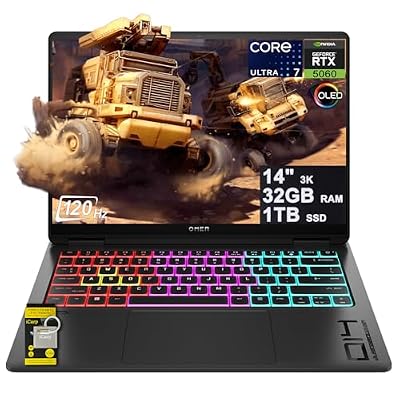
The HP OMEN Transcend 14 is the memory leader here. Its listing pairs an Intel Core Ultra 7 255H processor with 32 GB of memory and an RTX 5060 with 8 GB of GDDR7 memory, twice the memory of most thin gaming laptops at this size, which helps multitasking, streaming software, and games that stream large textures.
The display is a 14-inch 3K OLED panel at 120 Hz, with 100 percent DCI-P3 color coverage and HDR 500 nits brightness. Storage is a 1 TB SSD, and the keyboard is an RGB backlit HyperX unit. The listing shows Windows 11.
Two cautions apply. The listing does not confirm the tier for this configuration, so confirm it on the listing before buying, and the listing title names a third-party seller, so confirm the seller, the exact configuration, and the warranty too. The listing excerpt does not state the weight, thickness, battery size, or full port list, or whether the memory can be changed later or a second drive slot is fitted, so confirm those details on the listing.
Specs
- Processor: Intel Core Ultra 7 255H, 16 cores
- Graphics: NVIDIA GeForce RTX 5060, 8 GB GDDR7
- Memory: 32 GB
- Storage: 1 TB SSD
- Display: 14-inch 3K OLED, 120 Hz, 100 percent DCI-P3, HDR 500 nits
- Ports: Not stated; confirm on the listing
- Connectivity: Not stated; confirm on the listing
- Battery: Not stated; confirm on the listing
- Weight and thickness: Not stated; confirm on the listing
- Warranty: Not stated; confirm on the listing
How to Choose Between Them
Pick the Zephyrus G14 for the lightest OLED laptop, the Stealth 14 Studio for high refresh rates and wired Ethernet, the TUF Gaming A14 for durability with a fixed 16 GB memory ceiling, the Zephyrus G16 for the biggest, fastest screen and strongest graphics chip, and the OMEN Transcend 14 for 32 GB of memory in a 14-inch body. Confirm the flagged details on the listing first.
For a wider set of options in this tier, see our guide to the best gaming laptop under 1500.
FAQ
Is a thin gaming laptop good for everyday work as well as gaming?
Yes. Each one pairs a modern processor with fast storage and a sharp display, and the OLED models also suit photo and video work, thanks to their wide color coverage. Check the memory size before buying, since soldered memory cannot be upgraded later.
Does a thin chassis make a gaming laptop overheat?
A thin chassis leaves less room for cooling, so thin laptops manage heat by setting a power limit for the graphics chip, which is why the same chip can run at different power limits in different machines.
How much memory does a thin gaming laptop need in 2026?
16 GB is enough for most games and everyday multitasking, and three laptops here ship with that amount. 32 GB gives more headroom for streaming and content creation, and two laptops here ship with 32 GB. Since most thin laptops use soldered memory, choose the size at purchase.
Can I upgrade the storage in a thin gaming laptop later?
The TUF Gaming A14 has dual M.2 slots, so a second drive can be added later. The other laptops here use a single PCIe SSD, and the listing does not always confirm a second slot, so check the drive slots on the listing before buying.
Conclusion
The best thin gaming laptop under 1500 is the one that matches your screen, memory, and portability needs. The Zephyrus G14 is the lightest OLED pick, the Stealth 14 Studio is the high-refresh value pick, the TUF Gaming A14 is the toughest pick, the Zephyrus G16 has the fastest screen, and the OMEN Transcend 14 has the most memory in a 14-inch body. Check the power limit, memory, and warranty on the listing before buying.