As an Amazon Associate we earn from qualifying purchases.
A gaming laptop is only a good buy if it is actually for sale in the configuration you want. One model name can hide three different memory sizes, and a display can be a different panel from the one in the photo. Every laptop below is a current model listed on Amazon US, and every specification quoted comes from that listing or from the manufacturer’s specification sheet for the exact model code.
One decision comes before any specification: a laptop trades upgrade headroom for portability, and a desktop trades portability for upgrade headroom. If you are still weighing the two, see our guide to best gaming desktop PCs for sale for the desktop side of the same choice. The five laptops below cover the useful range: a 16-inch all-rounder, a fast 165Hz screen, a balanced 15-inch Lenovo, a proven MSI workhorse and a compact HP.
How to Read a Gaming Laptop Listing Before You Buy
A listing is a contract for one exact configuration, not for the model name in general. Two listings can share the name ASUS TUF Gaming A16 and still differ in processor, memory, storage and operating system edition. The model code is the key. Below, the codes are AN16-41-R148 for the Acer, B13VEK-277US for the MSI and 83DX00B2US for the Lenovo. Match the code before you order, and check the listing again at checkout, because a seller can change the configuration behind the same page.
Read the listing in this order: the processor and graphics card first, because they set the ceiling for everything the machine can run; then the memory and storage, because 8GB of memory and a 512GB drive fill up fast; then the display, because a 144Hz or 165Hz panel changes how smooth games feel; then the ports. Last, the warranty: the listings below do not publish a warranty length for the exact configuration, so confirm the warranty terms on the listing before buying. The same care applies to availability: a listing can stay visible after the stock behind it has gone, so if a listing shows no current offer, treat that as the listing telling you to wait or to pick a different configuration.
The Five Picks at a Glance
| Laptop | CPU | GPU | Display | RAM and Storage |
|---|---|---|---|---|
| ASUS TUF Gaming A16 | Ryzen 7 7445HS | RTX 4050 6GB | 16-inch WUXGA IPS 144Hz | 32GB DDR5, 1TB SSD |
| Acer Nitro 16 AN16-41-R148 | Ryzen 5 7640HS | RTX 4050 | 16-inch WUXGA IPS 165Hz | 8GB DDR5, 512GB Gen 4 SSD |
| Lenovo LOQ 15 83DX00B2US | Ryzen 7 8845HS | RTX 4050 6GB | 15.6-inch FHD IPS 144Hz | 16GB RAM, 512GB SSD |
| MSI Katana 15 B13VEK-277US | Core i7-13620H | RTX 4050 6GB | 15.6-inch Full HD | 16GB DDR5, 1TB NVMe SSD |
| HP Victus 15 | Ryzen 7 7445HS | RTX 4050 6GB | 15.6-inch FHD IPS 144Hz | 16GB RAM, 512GB SSD |
All five use the same graphics tier, the RTX 4050 with 6GB of dedicated memory. At this tier the differences that matter are the processor, the display, the memory you get on day one and the ports.
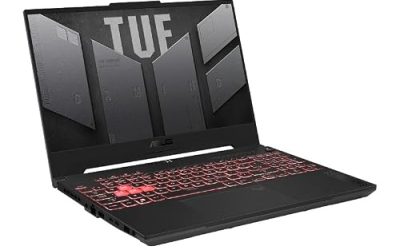
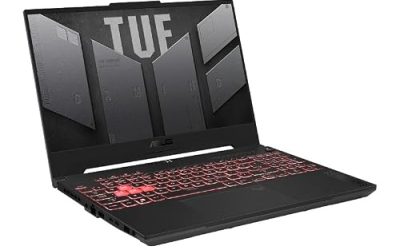
1. ASUS TUF Gaming A16

The ASUS TUF Gaming A16 is the strongest all-round pick here, because it is the only one of the five that ships with 32GB of memory and a 1TB drive in the configuration listed. A 16GB machine can feel fine on day one and tight a year later, when a game, a browser with many tabs and a voice chat app all want memory at the same time. Starting at 32GB removes that squeeze, and a 1TB drive leaves room for a modern game library.
The processor is the AMD Ryzen 7 7445HS, a six-core chip with a boost clock up to 4.7GHz, paired with the NVIDIA GeForce RTX 4050 laptop graphics card with 6GB of GDDR6 memory. The display is a 16-inch WUXGA panel, 1920 by 1200, IPS, with a 144Hz refresh rate, G-SYNC and an anti-glare finish. Connectivity includes USB4 and Wi-Fi 6, and the machine ships with Windows 11 Pro. Confirm the free slots, the maximum supported capacity and the warranty terms on the listing before buying.
Specs
- CPU: AMD Ryzen 7 7445HS, 6 cores, up to 4.7GHz boost
- GPU: NVIDIA GeForce RTX 4050 6GB GDDR6
- Display: 16-inch WUXGA 1920 by 1200 IPS, 144Hz, G-SYNC, anti-glare
- RAM: 32GB DDR5
- Storage: 1TB SSD
- Connectivity: USB4, Wi-Fi 6
- Operating system: Windows 11 Pro
2. Acer Nitro 16 AN16-41-R148

The Acer Nitro 16 AN16-41-R148 is the pick for a buyer who cares most about the screen. Its 16-inch WUXGA display runs at 165Hz, the fastest refresh rate of the five laptops here, and that extra headroom shows up in fast games. The panel is IPS, at 1920 by 1200, so it shares the taller aspect ratio of the ASUS above.
The processor is the AMD Ryzen 5 7640HS, a six-core chip, paired with the NVIDIA GeForce RTX 4050 laptop graphics card. The configuration listed here ships with 8GB of DDR5 memory and a 512GB Gen 4 SSD, the thinnest starting configuration in this guide, so plan a memory upgrade and confirm the exact slot count and maximum supported capacity in the manufacturer’s manual before ordering parts. Ports are a strength: USB4 Type-C at up to 40 Gbps, a second USB-C port with DisplayPort output, two USB 3.2 Gen 2 ports, USB 2.0, HDMI 2.1, Ethernet and a headphone and microphone jack. Wireless is Wi-Fi 6E with Killer Ethernet E2600, and the keyboard is a four-zone RGB backlit unit.
Specs
- CPU: AMD Ryzen 5 7640HS, 6 cores
- GPU: NVIDIA GeForce RTX 4050
- Display: 16-inch WUXGA 1920 by 1200 IPS, 165Hz
- RAM: 8GB DDR5
- Storage: 512GB PCIe Gen 4 SSD
- Connectivity: USB4 Type-C, USB-C with DisplayPort, 2 USB 3.2 Gen 2, USB 2.0, HDMI 2.1, Ethernet, Wi-Fi 6E
- Keyboard: 4-zone RGB backlit
3. Lenovo LOQ 15 83DX00B2US

The Lenovo LOQ 15, model 83DX00B2US, is the balanced pick. The AMD Ryzen 7 8845HS is an eight-core processor, which gives this machine more room for streaming, recording and background tasks while a game runs than the six-core chips in the ASUS, Acer and HP picks.
The graphics card is the NVIDIA GeForce RTX 4050 with 6GB of memory, the display is a 15.6-inch Full HD IPS panel at 144Hz, and the configuration ships with 16GB of RAM and a 512GB SSD: enough memory for modern games without the squeeze of an 8GB machine, and enough storage for a handful of large games. The listing records HDMI, USB-C and Wi-Fi 6, and the machine ships in Luna Grey with Windows 11 Home. The listing does not state the slot count or maximum supported memory for this configuration, so confirm both in the manual and the warranty terms on the listing before buying.
Specs
- CPU: AMD Ryzen 7 8845HS, 8 cores
- GPU: NVIDIA GeForce RTX 4050 6GB
- Display: 15.6-inch FHD IPS, 144Hz
- RAM: 16GB
- Storage: 512GB SSD
- Connectivity: HDMI, USB-C, Wi-Fi 6
- Operating system: Windows 11 Home
4. MSI Katana 15 B13VEK-277US

The MSI Katana 15 B13VEK-277US is the proven workhorse of the five, and its specification sheet is unusually complete, which makes it the easiest of the five to judge. The processor is the Intel Core i7-13620H, a 13th generation chip with a 1.8GHz base clock, paired with the NVIDIA GeForce RTX 4050 laptop graphics card with 6GB of GDDR6 memory. The graphics card runs at up to 105W of maximum graphics power with Dynamic Boost, a figure MSI publishes on its specification sheet for this model.
The display is a 15.6-inch Full HD panel. The listing for this exact configuration does not publish the refresh rate, so confirm it on the listing before buying. The configuration ships with 16GB of DDR5 memory and a 1TB NVMe SSD, and the machine runs Windows 11 Home, with a Type-C port. MSI publishes two memory slots supporting DDR5 memory up to 64GB in total, with a 1TB PCIe Gen 4 SSD installed. Confirm the free storage slot count in the manual before ordering a second drive, and confirm the warranty terms on the listing before buying.
Specs
- CPU: Intel Core i7-13620H, 1.8GHz base clock
- GPU: NVIDIA GeForce RTX 4050 6GB GDDR6, up to 105W maximum graphics power with Dynamic Boost
- Display: 15.6-inch Full HD
- RAM: 16GB DDR5, 2 slots, up to 64GB maximum
- Storage: 1TB NVMe SSD PCIe Gen 4
- Connectivity: Type-C
- Operating system: Windows 11 Home
5. HP Victus 15

The HP Victus 15 is the compact, quiet value pick. It shares the AMD Ryzen 7 7445HS processor and the RTX 4050 graphics card with the ASUS, but in a smaller 15.6-inch body with a standard 16GB of memory and a 512GB SSD. The display is a 15.6-inch Full HD IPS panel at 144Hz, the right match for the RTX 4050. The Victus line is deliberately plain, with a backlit keyboard, a numeric keypad, USB-C and Wi-Fi 6, and Windows 11.
Two warnings apply to this pick more than to the others. First, there are renewed Victus 15 listings on Amazon US for similar configurations, including one that shows as currently unavailable, so check that the listing you open is for a new unit and that it shows a current offer before you buy. Second, the listing for this exact configuration does not publish a warranty length or the memory type, so confirm the warranty terms and the exact memory specification on the listing before buying, and confirm the slot count and maximum supported capacity in the manufacturer’s manual before ordering parts.
Specs
- CPU: AMD Ryzen 7 7445HS, 6 cores, up to 4.7GHz boost
- GPU: NVIDIA GeForce RTX 4050 6GB
- Display: 15.6-inch FHD IPS, 144Hz
- RAM: 16GB
- Storage: 512GB SSD
- Connectivity: USB-C, Wi-Fi 6
- Keyboard: Backlit, with numeric keypad
- Operating system: Windows 11
How to Choose Between the Five
Start with the display size and the memory, because those are the two things you live with every day. If you want the biggest screen and the most memory on day one, take the ASUS TUF Gaming A16. If you play fast competitive games and want the smoothest panel, take the Acer Nitro 16 and plan a memory upgrade. If you stream or multitask while you play, take the Lenovo LOQ 15, with its eight-core processor. If you want the clearest upgrade path, take the MSI Katana 15. If you want the smallest, plainest machine that still plays properly, take the HP Victus 15, and check carefully that the listing is for a new unit.
Then check the power limits: every laptop here runs its RTX 4050 within a laptop power envelope, and the exact figure varies by model. MSI publishes up to 105W for the Katana 15, and the other listings do not publish a graphics power figure for their exact configurations. Do not assume two laptops with the same graphics card name perform the same; confirm the figure on the listing or in the manufacturer’s specification sheet for the exact model code before you buy. Finally, check the listing once more at checkout: the model code, memory, storage, display, ports, warranty and availability.
FAQ
Which of these gaming laptops is best for a first gaming laptop?
The ASUS TUF Gaming A16 is the simplest first pick, because it ships with 32GB of memory and a 1TB drive, so it needs no upgrade in its first year.
Do I need to upgrade the memory on the Acer Nitro 16?
Yes, because the listed configuration ships with 8GB of DDR5 memory, which fills quickly with a game and background apps open, so confirm the slot count and maximum capacity in the manual before ordering parts.
Can these laptops run modern games at 1080p?
Yes, all five pair an RTX 4050 with 6GB of memory and a 1080p-class display, a combination built for 1080p play.
What should I check on the listing before I buy any of these laptops?
Check the model code, the memory and storage, the display refresh rate, the ports, the warranty terms and the availability, because listings can change configuration behind the same page.
Conclusion
The best gaming laptops for sale are the ones whose listings you can verify: an exact model code, a processor and graphics card that match the listing, and memory and storage you can live with. Pick the one that matches how you play and confirm the listing at checkout.