

- Top Pick: TV Antenna for Smart TV Indoor, Digital TV Antenna for Local Channels | HD Digital Antenna with Amplifier Signal Booster for Local Channels Supports 4K 1080p-16.5 ft Long Cables
- Best Value: HIDB TV Antenna for Smart TV Indoor, Digital TV Antenna for Local Channels | OTA Digital HD Signal Antenna with Magnetic Base and 10ft Cable for Easy Setup
- Premium Choice: DAANT TV Antenna Indoor Long Range | Supports 4K 1080p Smart TV Signal Reception with 16ft HDTV Coax Cable
Cutting the cable bill leaves one question that no streaming app can answer: can you pull your local channels out of the air? An indoor TV antenna is the lowest-commitment way to find out, and the results depend far more on where you live and where you put the antenna than on the box it comes in. Local news, network prime time and weather alerts are all broadcast free over the air, but a thin flat panel in a basement apartment and a wire dipole in a second-floor window will not give the same channel list.
This guide is for renters, apartment dwellers and anyone who needs a no-drill option for a smart TV in 2026. Eight indoor models are compared here. One outdoor mast antenna from the original brief was left out because it needs roof or mast mounting and does not fit an indoor-only search. Everything below is based on what each listing says about cable length, amplification, mounting style and supported signal types.
Quick Picks
As an Amazon Associate we earn from qualifying purchases at no extra cost to you.

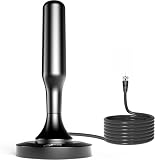


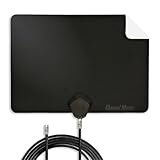


| Product | Best for | Key spec from the title |
|---|---|---|
| Intelbras amplified antenna | Mid-distance placement | Amplifier booster, 16.5 ft cable |
| HIDB magnetic antenna | Quick, tidy setup | Magnetic base, 10 ft cable |
| DAANT long-range antenna | Window placement away from the TV | 16 ft coax, 4K and 1080p support |
| BEIMQN indoor/outdoor antenna | Flexible mounting spots | Indoor/outdoor, amplifier, 4K and 8K |
| URIIU long-range antenna | Far-from-the-TV mounting | 33 ft coax, amplifier, older TV support |
| Channel Master FLATenna | Wall-flat look, NextGen TV | 12 ft coax, NextGen TV, 4K |
| UltraPro Hover | Shelf placement behind the TV | Top-mount design, VHF and UHF |
| Bwxsyws 360 antenna | Basic budget-tier setups | 360-degree reception, 4K and 1080p |
How to Choose
Check the broadcast bands and standards
Local stations use both UHF and VHF, so an antenna that covers only one can leave a few channels missing. The UltraPro Hover title says VHF and UHF explicitly. The Channel Master FLATenna also mentions NextGen TV, the newer broadcast standard, which matters if stations in your market are rolling it out. Do not read “supports 4K” as a performance claim; antennas pass the broadcast signal and your TV does the decoding.
Treat range claims with caution
Some titles quote very large distances, including a 5000+ mile figure. Over-the-air television is limited by line of sight, terrain and walls, so no indoor antenna reaches that far. Look up how far you are from the nearest broadcast towers and which direction they lie, then buy for that reality. If towers sit in several directions, a 360-degree design can be easier than a directional one.
Amplifiers help in some homes, hurt in others
Several listings include a signal booster. An amplifier can help with weak signals or a long cable run, but in a strong-signal location it can overload the tuner and make reception worse. If you live close to towers, a non-amplified flat antenna often works fine. The ones with boosters here are the Intelbras, BEIMQN and URIIU.
Plan the cable and mounting
Cable lengths in these titles run from 10 feet on the HIDB to 33 feet on the URIIU. Longer cables let you place the antenna in a window while the TV sits on the opposite wall, but extra length adds a little signal loss. Magnetic bases, adhesive flat panels and top-mount designs are all drill-free, so choose by where you can physically put it.
The 8 Best Options
Intelbras Amplified Indoor Antenna
A smart-TV antenna with an amplifier and a 16.5 ft cable, suited to apartments where the best reception spot is a few steps from the TV. The title notes support for 4K and 1080p, so it is aimed at current sets rather than old tube TVs. The longer lead is the practical selling point: you can park the antenna in the window and keep the TV where the furniture wants it, without buying an extension cable.
- Strength: the amplifier helps when the signal is weak or the cable is long.
- Strength: a 16.5 ft cable gives flexible placement.
- Trade-off: an amplifier can overload a tuner when the towers are close.
Skip it if you live near broadcast towers and want a simpler setup.
HIDB Magnetic-Base Antenna
A compact option with a magnetic base and a 10 ft cable, built for easy setup. It suits buyers who want to attach the antenna to a metal surface or window frame and move on. It is a sensible secondary antenna for a bedroom or kitchen TV, where the goal is a handful of local channels rather than full coverage.
- Strength: the magnetic base simplifies mounting on suitable surfaces.
- Strength: the title states OTA digital HD reception for local channels.
- Trade-off: 10 ft is the briefest cable in this group, which limits placement.
Skip it if the TV is far from your best reception spot.
DAANT Long-Range Indoor Antenna
A plain, long-range-labeled antenna with a 16 ft HDTV coax cable, aimed at smart TVs. It suits buyers who want a middle-length cable without extra electronics, and it is a fair first step to see whether your home gets usable reception before you try anything more elaborate. Pair it with a window sill or curtain rod and a fresh channel scan.
- Strength: the 16 ft cable lets you place the antenna near a window.
- Strength: the title lists 4K and 1080p smart TV support.
- Trade-off: the title does not mention an amplifier or specific bands.
Skip it if you want a stated signal booster or NextGen support.
BEIMQN Indoor/Outdoor Antenna
An amplified antenna described as indoor or outdoor, with 4K and 8K support in the title. It suits buyers who might begin by the window and later move the antenna to a porch or attic if the first spot disappoints. The title also quotes a 200 percent wider reach, which is a marketing comparison with no baseline, so treat it as a hint rather than a promise.
- Strength: indoor/outdoor flexibility gives more mounting options.
- Strength: it includes an amplifier signal booster.
- Trade-off: its “200% wider reach” claim is marketing, so verify your own reception.
Skip it if you want a thin, wall-flat design.
URIIU Long-Range Amplified Antenna
The extra-long-cable choice, with 33 ft of coax, an amplifier and support for older TVs in the title. It suits large rooms or setups where the TV is far from the best window, such as a living room with the screen on an interior wall. Those cable lengths also help when you want to hide the run behind trim or furniture.
- Strength: the 33 ft coax cable allows very distant placement.
- Strength: the title mentions older-TV support as well as 4K and 1080P.
- Trade-off: the 5000+ mile claim is not realistic, and the long cable adds some loss.
Skip it if you want a short, tidy cable run.
Channel Master FLATenna
A flat indoor antenna with a 12 ft coax cable, supporting 4K smart TVs, OTA broadcasts and NextGen TV. It suits buyers who want the antenna to vanish against a wall or window and who live in a market where newer broadcasts are on the way. A well-known brand name and a clean flat profile also make it an easy choice for guests or family who just want the TV to work.
- Strength: NextGen TV support is named directly.
- Strength: a flat design suits tight spaces and rental apartments.
- Trade-off: the title lists no amplifier, so weak-signal homes may see fewer channels.
Skip it if you are far from towers and want a booster.
UltraPro Hover Indoor Antenna
A top-mount design that sits on or behind the TV, covering VHF and UHF with 360-degree reception. It suits buyers who do not want to run wires across a room and who like a model number they can look up to compare with other listings. Because it rides with the TV, the shelf placement is simple, though it may not sit at the best height.
- Strength: VHF and UHF coverage is stated in the title.
- Strength: easy mounting on top of the set keeps things tidy.
- Trade-off: the TV location may not be the best reception spot.
Skip it if your TV sits in an interior room with no windows nearby.
Bwxsyws 360-Degree Indoor Antenna
A basic budget-tier antenna with 360-degree reception and 4K and 1080p support. It suits first-time buyers who want a low-risk way to try over-the-air channels, or anyone setting up a second TV where perfect reception is not essential. With few stated details, plan to experiment with placement.
- Strength: 360-degree reception removes the need to aim carefully.
- Strength: the title says it works for all types of HDTV.
- Trade-off: the listing gives little detail on cable length or amplification.
Skip it if you need a stated cable length or NextGen support.
Which One Fits Your Situation
You live in a rental with no drilling allowed
The Channel Master FLATenna or the HIDB magnetic antenna both mount without tools, and the FLATenna adds NextGen TV support. Both leave walls untouched, which is what most leases care about, and either can be repositioned in seconds when you rescan.
Your best window is across the room
The URIIU with 33 ft of coax, or the Intelbras at 16.5 ft, lets you place the antenna in the window while the TV stays put. Pick the amplified pair only if you are a fair distance from the towers; in strong-signal areas, the unamplified DAANT is the safer bet.
You are on a tight budget tier
The Bwxsyws or DAANT give a simple way to try over-the-air TV before you commit to a better antenna. If the channel list is short, you have lost little and learned which direction the towers lie.
You want flexibility to move it later
The BEIMQN indoor/outdoor antenna keeps your options open if you later take it to a porch or attic. That makes it a good pick for homes where the first window attempt may not pan out.
Common Mistakes
- Believing extreme range claims, then being surprised by weak reception.
- Adding an amplifier in a strong-signal area and losing channels to overload.
- Skipping the channel rescan after moving the antenna.
- Hiding the antenna behind the TV or a metal cabinet.
- Buying on “4K” labels, when the antenna simply passes the broadcast signal.
Related guides
- Combination Smoke And Carbon Monoxide Detectors
- Aio Liquid Coolers For High Performance Gaming
- Graphics Cards For Low Wattage Power Supplies
Frequently Asked Questions
Do I need an amplified antenna?
Not always. Amplifiers help with weak signals and long cables, but in strong-signal areas they can overload the tuner. If an amplified model gives you fewer channels, unplug the booster or try an unamplified one.
Where should I put an indoor antenna?
Near a window, as high as practical, and facing the direction of the towers. Rescan channels each time you move it, because a spot that is only a foot or two better can add several stations. Avoid placing it behind metal or next to routers and power bricks.
Is NextGen TV support important?
Only if stations in your area broadcast it and your TV can receive it. Otherwise standard digital broadcasts work with any model here.
Why does the antenna find fewer channels at night?
Signal conditions change with weather, interference and household electronics. Move the antenna and rescan to find a cleaner position.











