As an Amazon Associate we earn from qualifying purchases


A 1080p TV can still make a sensible PC gaming display when you want a larger, more relaxed screen than a typical desk monitor. At 32 to 40 inches, Full HD keeps interfaces readable at a moderate distance, lets a modest graphics card hold a steady frame rate, and gives you built-in speakers and streaming on the same screen. The trade-offs are clear: most TVs here are native 60Hz panels designed first for video, and their processing can add delay if left on. Choosing well means matching size to seating distance, confirming native 1080p, and checking only the gaming features the manufacturer actually publishes.
This guide explains those criteria, then looks at five Full HD TVs for different setups, from a dorm desk to a small living room. If you are also considering larger or higher-resolution screens, our guide to the best PC gaming TV covers that wider field, while the picks below stay strictly within native 1080p.
How to Choose a 1080p TV for PC Gaming
Screen size and viewing distance
A 32-inch TV is the only size here that behaves plausibly on a desk. At roughly two to three feet, it keeps the whole image in view, and pixels are small enough that interfaces look reasonably crisp. A 40-inch TV usually overwhelms a desk. In a small room, three to six feet from a chair or sofa, that extra area helps: menus are easier to read and co-operative play is more comfortable. Choose 32 inches for desk-first and 40 inches for room-first setups, and measure stand width first, because TV feet are often spread wide apart.
Panel type and backlight
Most 1080p TVs use an LED-backlit LCD panel, described as LED, Direct LED, or Full Array LED, terms that refer mainly to backlight arrangement. Direct and Full Array designs spread light more evenly, helping uniformity in dark scenes. One pick below uses a QLED panel, adding a quantum dot layer intended to widen colour reproduction. Panel marketing alone does not guarantee a better picture. TVs may also apply processing that makes desktop text look soft; a PC or Game mode, where offered, usually reduces it.
Native 1080p, refresh rate, and HDMI
Every pick here has a native resolution of 1920 by 1080, listed as 1080p or Full HD. That matters because many smaller TVs are only 720p despite emphasising HD in large type. Set the PC to 1920 by 1080 so the desktop and games map cleanly without an extra scaling step.
All five TVs are listed at a native 60Hz refresh rate, so they can display up to 60 frames per second, aligning with a PC targeting a locked 60 frames per second. If you play competitive shooters well above that rate, a high-refresh gaming monitor remains the better tool. Higher motion rates in some listings are processing features, not the native panel rate.
For HDMI, two inputs are enough for a PC plus one console. Look for ARC if a soundbar is planned, because ARC sends TV audio over the same cable. Where a listing publishes variable refresh support, that is noted below; where it does not, this guide does not assume it.
Game mode and input lag
Input lag is the delay between your PC sending a frame and the TV showing it. Game mode matters because it typically bypasses processing that adds delay. Only some manufacturers publish a specific figure for these models, and figures depend on test method, so this guide states a number only where the listing publishes one and otherwise describes the mode without inventing a measurement. On every set: enable game or PC mode for the PC input, disable motion interpolation and noise reduction for that input, and keep output at native resolution and refresh rate.
The Picks
TCL 32-Inch Class S3 1080p LED Smart TV with Fire TV (32S350F)
The TCL S3 is the most desk-friendly starting point here. TCL lists a 32-inch LED panel at 1080p with a 60Hz refresh rate, a bezel-less FullView design, and Direct LED backlighting, and describes this model as able to double as a PC monitor. That fits a dorm desk, bedroom workstation, or second display area where the TV also streams on its own through Fire TV.
The listing states two HDMI inputs, one with ARC, so a PC and a soundbar, or a PC and a console, can stay connected without a switcher. Bluetooth personal audio allows compatible headphones to pair directly with the TV for late sessions. The listing does not publish a specific input lag figure, so judge it as a standard 60Hz TV to run in its lowest-processing picture mode. Strategy games, indie titles, and older PC games suit it best.
Specs
- Screen size: 32 inches
- Panel type: LED with Direct LED backlight
- Native resolution: 1080p Full HD (1920 x 1080)
- Refresh rate: 60Hz
- HDMI ports: 2 HDMI inputs, 1 with ARC
- Smart platform: Fire TV, with Alexa and Apple AirPlay support
VIZIO 32-Inch Full HD 1080p Smart TV (VFD32M-08)
VIZIO’s 32-inch model is another desk-scale option, built around a Full Array LED backlight and Active Pixel Tuning, which VIZIO describes as adapting the picture for contrast and colour. The listing confirms 1080p resolution, a 60Hz refresh rate, and HDR10 support for compatible video content. The ThinFrame design keeps the bezel narrow, which helps when the TV sits close on a desk.
Published details include HDMI variable refresh support, aimed at reducing tearing with a compatible source. No input lag measurement is stated in the listing used here, so the honest summary is a 60Hz set for PC and console use rather than high-refresh play. Bluetooth headphone support, Google Cast, and Apple AirPlay are also listed. Against the TCL, the decision is platform and features, not resolution or refresh rate.
Specs
- Screen size: 32 inches
- Panel type: LED with Full Array LED backlight and Active Pixel Tuning
- Native resolution: 1080p Full HD (1920 x 1080)
- Refresh rate: 60Hz
- HDR format: HDR10
- Smart platform: VIZIO OS, with Google Cast and Apple AirPlay support
- Audio feature: DTS Virtual:X, Bluetooth headphone capable
INSIGNIA 32-Inch Class FE Series LED Full HD Smart Fire TV

The Insignia FE Series is a straightforward 32-inch Fire TV for a desk or small room. The listing confirms an LED display at 1080p with a 60Hz refresh rate, Fire TV as the operating system, Apple AirPlay support, and DTS TruSurround for the built-in speakers. Nothing here is exotic, and that is the point: a simple screen for a PC that splits its time between games and streaming.
Product information lists two HDMI ports, plus USB, optical audio, ethernet, and Wi-Fi, and notes HDMI ARC support. Two ports cover a PC and one other source, though several consoles may require a switch. No input lag figure or game mode claim is highlighted in the listing, so this guide makes neither claim. Run the PC input with processing reduced at 1920 by 1080 and 60Hz, and expect a competent, relaxed experience in titles that do not depend on very high frame rates.
Specs
- Screen size: 32 inches
- Panel type: LED-backlit LCD
- Native resolution: 1080p Full HD (1920 x 1080)
- Refresh rate: 60Hz
- HDMI ports: 2 total HDMI ports, with ARC support listed
- Smart platform: Fire TV, with Alexa voice remote and Apple AirPlay support
- Audio feature: DTS TruSurround
Hisense 40-Inch Class A4 Series FHD 1080p Smart Fire TV (40A4NF)
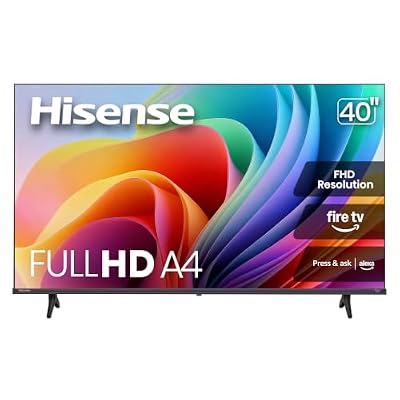
Stepping up to 40 inches moves the Hisense A4 out of desk territory and into small-room territory. Hisense lists this 2025 model with a 40-inch Full HD panel at 1080p, a 60Hz refresh rate, DTS Virtual:X audio, a slim bezel design, and Fire TV with Alexa built in. Sitting a few feet away in a gaming chair or on a small sofa is the natural arrangement, and the larger picture makes interfaces and subtitles easier to follow at that distance.
The benefit is scale at a resolution a mid-range graphics card can drive comfortably, aiming for a stable 60 frames per second at 1920 by 1080 to match the panel. Hisense markets a game mode on this series; enable it for the PC input and treat any published figure as applying to that mode and the manufacturer’s test conditions. Check the stand footprint before buying furniture, and plan the HDMI run in advance, because the PC will often sit in a media unit rather than beside a keyboard.
Specs
- Screen size: 40 inches
- Panel type: LCD with LED backlight, Full HD
- Native resolution: 1080p Full HD (1920 x 1080)
- Refresh rate: 60Hz
- Smart platform: Fire TV, with Alexa built in
- Audio feature: DTS Virtual:X
- Design: Slim bezel design, 2025 model
Hisense 40-Inch Class QD4 Series Hi-QLED FHD Smart Fire TV (40QD4QF)

The second Hisense is also 40 inches and native 1080p, but it changes panel technology. The QD4 uses what Hisense calls Hi-QLED, a QLED panel with Quantum Dot Color, alongside DTS Virtual:X, Fire TV with Alexa built in, and a slim bezel design. The listing confirms a 40-inch screen, 1080p resolution, and a 60Hz refresh rate. If colour from streaming and colourful games is a priority within Full HD, this is the pick aimed most directly at that concern.
The fundamentals do not change: native 60Hz, PC output at 1920 by 1080, and the lowest-processing mode for the PC input. Hisense promotes a game mode here, but no specific figure is stated in the main listing used here, so none is presented as a measured result. Choose the QD4 for the quantum dot panel, or the A4 if a standard LED panel meets your needs. Confirm the exact model suffix before ordering.
Specs
- Screen size: 40 inches
- Panel type: QLED (Hi-QLED) with Quantum Dot Color
- Native resolution: 1080p Full HD (1920 x 1080)
- Refresh rate: 60Hz
- Smart platform: Fire TV, with Alexa built in
- Audio feature: DTS Virtual:X
- Design: Slim bezel design, 2025 model
Which One Fits Your Setup?
Start with the room, not the brand. For a desk, the shortlist is the three 32-inch models: the TCL S3, with two HDMI inputs and Bluetooth headphone pairing; the VIZIO, with a Full Array backlight and published HDMI variable refresh support; and the simplest Insignia FE.
For a small room, choose between the two 40-inch Hisense sets, both native 1080p at 60Hz on Fire TV. The A4 is the standard LED model; the QD4 steps up to QLED. Neither class turns a PC into a high-refresh competitive setup.
Whichever model you choose, set PC output to 1920 by 1080 at 60Hz, enable game or PC mode for that input if offered, turn off motion smoothing, and check desktop text clarity before launching a game.
FAQ
Can a 1080p TV work well as a PC gaming display?
Yes, with the right expectations. A native 1080p TV suits story games, strategy titles, sports games, and couch play at 60 frames per second, and doubles as a streaming screen. It is less suited to competitive play above 60Hz, or to close desk work where a smaller monitor keeps text finer.
Should a PC be set to 1080p or a higher resolution on these TVs?
Set the PC to 1920 by 1080, the native resolution of every TV here. Sending a higher resolution asks the TV to scale the image back down, adding processing without adding detail the panel can show. A native signal keeps the desktop and games mapped directly to the panel.
Does game mode really matter on a 60Hz TV?
It matters because picture processing, not refresh rate alone, is a major source of delay on TVs. A game or PC mode typically reduces that processing for the selected input, so mouse and controller inputs feel more direct. A published lag figure, where a manufacturer gives one, reflects that manufacturer’s test method and mode.
Is 32 inches or 40 inches better for PC gaming?
Neither is universally better. A 32-inch TV fits a desk a few feet away and keeps the whole screen in view. A 40-inch TV suits a chair or sofa several feet away in a small room, where its larger picture is easier to read and share. Choose by seating distance and furniture first, then compare panels and features within that size.
Conclusion
The best 1080p TV for PC gaming is the one whose size matches your seating, whose native Full HD panel matches your PC output, and whose published features match how you play. For a desk, look first at the 32-inch TCL S3, VIZIO, and Insignia FE. For a small room, compare the 40-inch Hisense A4 and QLED QD4. All five run at native 60Hz, accept a PC over HDMI, and reward a few careful picture settings, making a modest Full HD TV a comfortable, versatile gaming screen.