

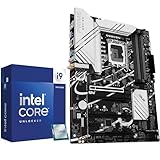
- Top Pick: Micro Center CPU Motherboard Combo – Intel i9-14900K 14th Gen 24-Cores LGA 1700 Desktop Processor Bundle with TUF Gaming Z790-Plus WiFi Gaming Motherboard
- Best Value: ASUS ROG Strix Z890-E Gaming WiFi Intel® Z890 LGA 1851 ATX Motherboard, Advanced AI PC-Ready, 18+2+1+2 Stages, DDR5, WiFi 7, 7X M.2, Thunderbolt™ 4, USB Type-C®, AI Overclocking, Cooling & Networking
- Premium Choice: MSI PRO B760-P WiFi DDR4 ProSeries Motherboard – Supports 12th/13th/14th Gen Intel Processors, LGA 1700, DDR4, PCIe 4.0, M.2, 2.5Gbps LAN, USB 3.2 Gen2, HDMI/DP, Wi-Fi 6E, Bluetooth 5.3, ATX
Shopping for an i9 motherboard sounds simple until you realize that “i9” covers more than one socket. A Core i9-14900K, 13900K, or 12900K drops into LGA 1700, while the newer Core Ultra chips use LGA 1851 boards such as the Z890 family. Buy the wrong socket and the processor physically will not fit. On top of that, a flagship chip pulls serious power, so the board’s power delivery, cooling surface, and memory support matter more than they do for a mid-range processor.
This guide is for builders pairing a high-end Intel processor with a board that will not hold it back. Every pick is judged only from facts stated in its listing title: socket, memory type, listed power stages, M.2 slot counts, wireless standard, and processor generations supported. Where a title is silent, that detail is treated as unknown, so confirm the CPU support list with the board maker before you finalize a 2026 parts list.
Quick Picks
As an Amazon Associate we earn from qualifying purchases at no extra cost to you.




| Product | Best for | Key spec from the title |
|---|---|---|
| Micro Center i9-14900K + TUF Gaming Z790-Plus WiFi bundle | One-box CPU and board purchase | i9-14900K, 24 cores, LGA 1700 |
| ASUS ROG Strix Z890-E Gaming WiFi | Top-tier new-socket build | LGA 1851, 18+2+1+2 stages, 7x M.2, WiFi 7 |
| MSI PRO B760-P WiFi DDR4 | Reusing DDR4 memory | 12th/13th/14th Gen support, DDR4, WiFi 6E |
| Micro Center i9-14900K + ASUS Z790 Max Gaming WiFi7 bundle | DDR5 bundle with WiFi 7 | 24 cores, 32 threads, DDR5, ATX |
| ASUS Z790-AYW WiFi W II | Fast ports and storage | PCIe 5.0, 3x M.2, 12+1 DrMOS, USB4 |
| MSI PRO Z790-A WiFi II | Memory overclocking headroom | 80A SPS VRM, DDR5 7800+ MT/s, 4x M.2 |
| ASUS ROG Strix Z890-A Gaming WiFi | Core Ultra Series 2 builds | LGA 1851, 16+2+1+2 stages, 5x M.2 |
| MSI Z790 Gaming Plus WiFi (Renewed) | Lower-tier LGA 1700 DDR5 builds | DDR5, PCIe 5.0, 2.5Gbps LAN, Renewed |
How to Choose
Match the socket to the processor
LGA 1700 boards, including every Z790 and B760 listed here, are the home of 12th, 13th, and 14th Gen processors, so they suit an i9-14900K. The two Z890 boards use LGA 1851, which belongs to the Core Ultra generation; the Z890-A title says “Core Ultra Series 2 Ready,” and neither Z890 title names a 14900K. If your heart is set on a specific i9, confirm the board’s CPU support list before anything else.
Power delivery and cooling surfaces
A top-end Intel chip draws a lot of power under load, so look at the stated power stage counts and VRM descriptions. The Strix Z890-E lists 18+2+1+2 stages, the Z890-A lists 16+2+1+2, the Z790-AYW lists 12+1 DrMOS, and the PRO Z790-A mentions an 80A SPS VRM. Higher counts generally signal more headroom, but the title will not tell you about heatsink size, so check photos for VRM covers. Sustained all-core workloads such as rendering or long gaming sessions are where weak power delivery shows up, so the more demanding your use, the more this section should drive your decision.
Memory type and storage slots
DDR4 and DDR5 are not interchangeable. The MSI PRO B760-P is the only DDR4 board here, which helps if you own kits already; the rest list DDR5. M.2 slot counts run from three on the Z790-AYW to seven on the Strix Z890-E, so count your drives before choosing. PCIe 5.0 is listed on several boards and helps future graphics cards and storage. Also check how many of those M.2 slots share bandwidth with SATA ports, a detail that titles never mention but the manual does.
Networking, ports, and what to ignore
WiFi 7 appears on the two Strix Z890 boards and the Z790 Max combo; the rest list WiFi 6 or 6E. A 2.5G LAN port is a sensible baseline. Thunderbolt 4 and USB4 matter only if you own compatible gear. Ignore vague phrases like “AI overclocking” until you know you will overclock, and note that entry-level boards usually trim M.2 slots, USB-C ports, and VRM heatsinks.
The 8 Best Options
Micro Center i9-14900K + TUF Gaming Z790-Plus WiFi Bundle
This listing pairs a 24-core i9-14900K on LGA 1700 with a TUF Gaming Z790-Plus WiFi board, so the socket question is settled for you. It suits buyers who want a matched processor and board in one order.
- The CPU and board are guaranteed to share a socket.
- A 14th Gen i9 with 24 cores is named directly in the title.
- Trade-off: the title says little about memory type or slot counts on the board.
Skip it if you already own a processor or want the new LGA 1851 platform. A bundle also locks you into the board that comes with it, which is fine for a standard gaming build but limiting if you had a specific memory or storage plan.
ASUS ROG Strix Z890-E Gaming WiFi
A flagship-style ATX board with a long feature list: 18+2+1+2 power stages, DDR5, WiFi 7, seven M.2 slots, Thunderbolt 4, and USB Type-C.
- Seven M.2 slots suit storage-heavy builds.
- WiFi 7 and Thunderbolt 4 appear together.
- Trade-off: it uses LGA 1851, so it is not for a 14900K.
Skip it if your processor is an LGA 1700 i9. It fits a builder starting fresh on the newest platform who wants plenty of storage and fast wireless, and who is comfortable choosing a Core Ultra chip.
MSI PRO B760-P WiFi DDR4
The only DDR4 board in the group. The title lists support for 12th, 13th, and 14th Gen processors, PCIe 4.0, M.2, 2.5Gbps LAN, WiFi 6E, Bluetooth 5.3, and ATX sizing.
- DDR4 support lets you keep existing memory.
- WiFi 6E, Bluetooth 5.3, and 2.5Gbps LAN cover the networking basics.
- Trade-off: it is a B760 board, so it lacks the Z-series feature tier.
Skip it if you want heavy overclocking or the newest PCIe generation. It is a practical landing spot for an upgrader who is keeping an older DDR4 kit and wants a 14th Gen chip without rebuying memory.
Micro Center i9-14900K + ASUS Z790 Max Gaming WiFi7 Bundle
Another matched pairing: an i9-14900K with 24 cores and 32 threads plus an ASUS Z790 Max Gaming WiFi7 board with DDR5. The title also notes integrated Intel UHD Graphics 770 on the processor.
- Integrated graphics give you a fallback display output.
- DDR5 and WiFi 7 are both named.
- Trade-off: the title does not give power stage or M.2 counts.
Skip it if you only need a bare board. The integrated graphics are a small safety net while you wait on a graphics card or troubleshoot a new build.
ASUS Z790-AYW WiFi W II
A Z790 ATX board on LGA 1700 with PCIe 5.0, three M.2 slots, 12+1 DrMOS power stages, DDR5, WiFi 6, and 2.5Gb LAN. The port list is the standout, with 10Gbps USB-C connectors, Thunderbolt, and USB4.
- Thunderbolt and USB4 are named in the title.
- Aura Sync RGB support is listed.
- Trade-off: WiFi 6 is a step behind the WiFi 7 boards.
Skip it if you want seven M.2 slots or the latest wireless standard. It suits someone with fast external drives and docks who values USB4 and Thunderbolt connectivity over raw storage count.
MSI PRO Z790-A WiFi II
This one focuses on power and memory. The title lists an 80A SPS VRM, DDR5 memory boost to 7800+ MT/s, PCIe 5.0 x16, four Gen4 M.2 slots, WiFi 6E, and 2.5G LAN, with 12th to 14th Gen support.
- The 80A SPS VRM suggests solid power delivery for a power-hungry i9.
- Four Gen4 M.2 slots allow a roomy storage setup.
- Trade-off: it carries WiFi 6E instead of WiFi 7.
Skip it if you need Thunderbolt 4 or the newest socket. The memory boost figure matters mostly to tweakers, so casual builders may care more about the VRM and slot count.
ASUS ROG Strix Z890-A Gaming WiFi
A step down from the Z890-E but still feature-rich: LGA 1851, 16+2+1+2 stages, DDR5, WiFi 7, 2.5G LAN, five M.2 slots, Thunderbolt 4, and Core Ultra Series 2 readiness.
- Five M.2 slots and WiFi 7 are strong for the tier.
- The Core Ultra Series 2 label makes its target clear.
- Trade-off: it will not accept an i9-14900K.
Skip it if your current processor is LGA 1700. It is the more sensible of the two Strix boards for someone who wants the new platform without the full flagship feature list.
MSI Z790 Gaming Plus WiFi (Renewed)
The lower-tier LGA 1700 DDR5 board in the group, listed as renewed. The title names 12th to 14th Gen support, PCIe 5.0, M.2 slots, 2.5Gbps LAN, USB 3.2 Gen2, WiFi 6E, and Bluetooth 5.3.
- It covers the DDR5 and PCIe 5.0 basics.
- WiFi 6E and Bluetooth 5.3 are both included.
- Trade-off: renewed condition means you should read return terms and warranty details.
Skip it if you want a factory-new board with premium power delivery. It is best viewed as a value-minded route into DDR5 on LGA 1700 for a straightforward build.
Which One Fits Your Situation
You want the easiest possible i9 purchase
One of the two Micro Center bundles removes socket guesswork. The TUF Gaming Z790-Plus pairing is the straightforward choice, while the Z790 Max Gaming WiFi7 pairing adds WiFi 7.
You already own an i9 on LGA 1700
The MSI PRO Z790-A WiFi II and ASUS Z790-AYW WiFi W II are the stronger Z790 options on paper, one for its VRM and memory listing, the other for its port selection.
You are reusing DDR4 memory
Take the MSI PRO B760-P WiFi DDR4. It is the only board here that lists DDR4, and it still names support for 14th Gen processors, so an i9 upgrade does not force a memory purchase at the same time.
You are building on the newest platform
Choose the Strix Z890-E for maximum features or the Strix Z890-A for a lighter tier, and plan a Core Ultra processor rather than a 14900K.
Common Mistakes
- Buying an LGA 1851 board and expecting a 14th Gen i9 to fit.
- Pairing DDR5 memory with the DDR4 board, or the reverse.
- Judging power delivery by the stage count alone without checking the heatsinks.
- Skipping the CPU support list and BIOS version note for older boards, which can matter when a board shipped before a newer processor launched.
- Choosing a board for its seven M.2 slots when you will only ever fill two of them.
Related guides
- Aio Liquid Coolers For High Performance Gaming
- How To Lower Input Delay In Competitive Shooters
- Wireless Gaming Headsets Under 100 For Pc
Frequently Asked Questions
Which boards here take an i9-14900K?
The LGA 1700 boards: the two Micro Center bundles, the Z790-AYW, the PRO Z790-A, the PRO B760-P, and the Z790 Gaming Plus. Always confirm BIOS support.
Do I need a Z-series board for an i9?
Not strictly. A B760 board can run an i9, but Z-series boards typically bring stronger power delivery and more expansion. If you plan to run the processor hard for long sessions, the Z790 options are the safer pairing.
Is WiFi 7 necessary?
No. WiFi 6E is enough for most home networks, and a wired 2.5G connection is often faster and steadier.
Is a renewed board a bad idea?
Not automatically, but read the seller’s return policy and warranty terms before buying. Inspect the socket pins and the board on arrival, and keep the packaging until the build is stable.

















