A 4K monitor shows a photo or a video timeline at a working distance. A true 5K or 6K monitor shows it at print density. At 5120 by 2880 on a 27-inch panel, or 6016 by 3384 and above on a 32-inch panel, density passes 200 pixels per inch, interface text renders at the ideal scaling point, and a 4K timeline fits with room left for scopes and tool panels. For photographers and video editors, density is only half the purchase. The other half is colour: wide-gamut panels, factory calibration with a stated accuracy target, and calibration support that keeps the panel honest over time.

This guide compares five monitors that meet the full definition: a true 5K (5120 by 2880) or 6K-class native resolution, a wide gamut with published factory calibration, and Thunderbolt or USB-C connectivity with power delivery. Ultrawide panels at 5120 by 2160 are a different, gaming-led class and are not included.
As an Amazon Associate, we earn from qualifying purchases.
The Short Answer
For most photo and video professionals, the ASUS ProArt Display 6K PA32QCV is the balanced pick: a 32-inch 6K panel with 98 percent DCI-P3 coverage, Calman Verified factory calibration and dual Thunderbolt 4 ports. The LG UltraFine evo 6K is the connectivity flagship, with Thunderbolt 5 and the widest published gamut. The Dell UltraSharp 32 6K adds a built-in 4K webcam and the strongest hub. On a 27-inch desk, the ASUS ProArt Display 5K PA27JCV is the value entry into this class, and the Samsung ViewFinity S9 is the pick for a matte screen with a built-in camera.
What Separates a Pro 5K or 6K Monitor From a Sharp 4K Panel
Pixel density and scaling. A 27-inch 5K panel and a 32-inch 6K panel both land near 218 pixels per inch, the density at which macOS renders a doubled interface with no fractional scaling blur. The Dell and LG panels use a slightly taller 6144 by 3456 canvas, adding vertical room for timelines.
Gamut and accuracy, as published. Every monitor here covers at least 98 percent of DCI-P3, the working space for video. The LG adds published Adobe RGB coverage of 99.5 percent, which matters for print-bound photography. Accuracy figures are factory claims: ASUS rates both ProArt models below a Delta E of 2 and Calman Verified, Samsung rates the ViewFinity S9 below a Delta E of 2, and Dell publishes factory calibration. Treat those as manufacturer figures, not independent measurements.
Calibration support. A factory report ages. The ProArt models support hardware calibration through ASUS ProArt Calibration software, which writes corrections to the monitor’s internal lookup table, and the LG works with LG Calibration Studio.
Ports, power and brightness. One Thunderbolt cable should carry the image, charge the laptop and attach peripherals to the monitor’s hub; published power delivery runs from 96 watts on most models to 140 watts on the Dell. These are SDR-first editing panels, rated between 450 and 600 nits with VESA DisplayHDR 500 or 600 certification on most models — not HDR mastering displays.
ASUS ProArt Display 6K PA32QCV
The PA32QCV is the monitor this category was missing for years: a true 6K panel, at 6016 by 3384 on a 31.5-inch IPS screen, built for colour work rather than adapted from a gaming line. ASUS rates it at 218 pixels per inch, 98 percent DCI-P3 coverage and factory accuracy below a Delta E of 2, with Calman Verified status and a calibration report in the box. The LuxPixel anti-glare coating holds contrast under studio lighting without the sparkle of a heavy matte layer. The panel carries VESA DisplayHDR 600 certification, with peak brightness rated at 600 nits.
Connectivity is dual Thunderbolt 4, so a second monitor or a storage chain can hang off the display, with up to 96 watts of power delivery, plus DisplayPort 1.4, HDMI and a USB hub with Auto KVM. The Light Sync ambient sensor adjusts brightness and colour temperature to the room, and ProArt Calibration support stores a colorimeter profile in the monitor itself.
Specs
- Size and resolution: 31.5-inch IPS, 6016 by 3384, 218 ppi
- Colour: 98 percent DCI-P3, factory calibrated below Delta E 2, Calman Verified
- HDR and brightness: VESA DisplayHDR 600, 600 nits peak as published by ASUS
- Ports: 2x Thunderbolt 4 with up to 96 W power delivery and daisy chaining, DisplayPort 1.4, HDMI, USB hub, Auto KVM
- Pro features: hardware calibration support, LuxPixel anti-glare coating, ambient light sensor
Tier: premium — the balanced 6K pick for mixed photo and video desks.
LG UltraFine evo 6K 32U990A-S
LG’s UltraFine evo 6K is the connectivity flagship of this class and, on published figures, the gamut leader. Its 31.5-inch Nano IPS Black panel runs 6144 by 3456 at a rated 224 pixels per inch, with published coverage of 99.5 percent of Adobe RGB and 98 percent of DCI-P3 and true 10-bit colour. IPS Black doubles the contrast of a conventional IPS panel of this size, rated at 2000 to 1, an advantage when judging shadow detail.
The headline is Thunderbolt 5, a first on a 6K monitor: one port in, one port out, so two of these displays can daisy chain from one laptop connection, with up to 96 watts of charging. DisplayPort 2.1 and HDMI 2.1 cover workstation cards, and a USB-C hub with KVM is built in. LG rates brightness at 450 nits typical, with VESA DisplayHDR 600 certification.
Specs
- Size and resolution: 31.5-inch Nano IPS Black, 6144 by 3456, 224 ppi as published by LG
- Colour: 99.5 percent Adobe RGB and 98 percent DCI-P3 as published, 10-bit
- HDR and brightness: VESA DisplayHDR 600, 450 nits typical as published, 2000 to 1 contrast
- Ports: Thunderbolt 5 in and out with up to 96 W power delivery and daisy chaining, DisplayPort 2.1, HDMI 2.1, USB-C hub, KVM
- Pro features: hardware calibration support, built-in speakers, height, tilt and pivot stand
Tier: premium — the flagship for Adobe RGB stills work and Thunderbolt 5 desks.
Dell UltraSharp 32 6K U3224KB

Dell’s UltraSharp 32 6K pairs the same 6144 by 3456 canvas with the strongest hub and collaboration hardware in this guide. The 31.5-inch IPS Black panel is rated at 223 pixels per inch, 99 percent DCI-P3 and 99 percent Display P3 coverage, a 2000 to 1 contrast ratio and 450 nits, with VESA DisplayHDR 600 certification and published factory calibration.
What sets it apart is everything around the panel. A 4K HDR webcam with AI auto-framing sits in the top bezel, with a microphone array and speakers built in. The Thunderbolt 4 hub delivers up to 140 watts of power and adds a 2.5 gigabit Ethernet port, a deep USB hub and Auto KVM. For a professional whose day mixes grading with client calls, it replaces the monitor, the dock and the webcam in one purchase.
Specs
- Size and resolution: 31.5-inch IPS Black, 6144 by 3456, 223 ppi
- Colour: 99 percent DCI-P3 and 99 percent Display P3, factory calibrated
- HDR and brightness: VESA DisplayHDR 600, 450 nits as published, 2000 to 1 contrast
- Ports: Thunderbolt 4 with up to 140 W power delivery, HDMI 2.1, DisplayPort 1.4, USB hub, 2.5 GbE Ethernet, Auto KVM
- Pro features: built-in 4K HDR webcam with AI auto-framing, microphone array and speakers
Tier: premium — the flagship for hybrid editing and client-facing desks.
Samsung ViewFinity S9

The ViewFinity S9 is the 27-inch option for professionals who work under bright or mixed lighting. Its matte IPS panel runs 5120 by 2880 at 218 pixels per inch, a finish none of the glossy rivals here match, and Samsung rates it at 99 percent DCI-P3 coverage with factory calibration below a Delta E of 2 and Pantone Validated status. Published brightness is 600 nits, the joint highest figure in this guide.
Samsung builds in the extras other brands leave out: a detachable 4K SlimFit camera, a Smart Calibration mode that uses a smartphone to adjust the panel, and the Tizen smart platform with streaming apps and AirPlay. Connectivity runs through Thunderbolt 4 with laptop charging, a Mini DisplayPort input and a USB hub. The compromises are the 27-inch canvas, which suits photo retouching better than wide timelines, and a smart interface some professionals will never open.
Specs
- Size and resolution: 27-inch IPS with matte finish, 5120 by 2880, 218 ppi
- Colour: 99 percent DCI-P3, factory calibrated below Delta E 2, Pantone Validated
- HDR and brightness: HDR10, 600 nits as published by Samsung
- Ports: Thunderbolt 4 with power delivery, Mini DisplayPort, USB hub
- Pro features: detachable 4K camera, smartphone-based Smart Calibration, built-in smart platform and speakers
Tier: premium — the 27-inch pick for bright rooms and a camera built in.
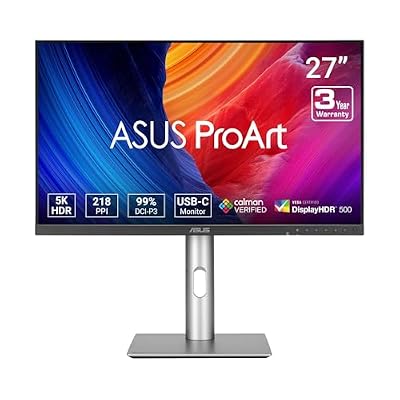
ASUS ProArt Display 5K PA27JCV
The PA27JCV brings the ProArt formula down to 27 inches and 5K, and it is the most accessible way into this class. The IPS panel runs 5120 by 2880 at 218 pixels per inch, with published coverage of 99 percent of DCI-P3 and 100 percent of sRGB, factory accuracy below a Delta E of 2 and Calman Verified status. It carries VESA DisplayHDR 500 certification and the same LuxPixel coating as its 6K sibling.
Connectivity is a single USB-C input with DisplayPort alternate mode and 96 watts of power delivery, backed by HDMI 2.1, DisplayPort 1.4 and a USB hub with Auto KVM. The Light Sync ambient sensor from the larger ProArt is here too, adjusting the panel to the room. Photographers at a smaller desk, or editors building a matched pair, get the flagship’s calibration workflow at 27 inches.
Specs
- Size and resolution: 27-inch IPS, 5120 by 2880, 218 ppi
- Colour: 99 percent DCI-P3 and 100 percent sRGB, factory calibrated below Delta E 2, Calman Verified
- HDR and brightness: VESA DisplayHDR 500 as published by ASUS
- Ports: USB-C with DisplayPort alternate mode and 96 W power delivery, HDMI 2.1, DisplayPort 1.4, USB hub, Auto KVM
- Pro features: hardware calibration support, LuxPixel anti-glare coating, ambient light sensor
Tier: mid-range — the entry point into true 5K colour work.
Who Should Pick Which, and Who Should Skip This Class
Choose the ASUS ProArt 6K for one balanced 6K panel for stills and video, the LG if Adobe RGB coverage or Thunderbolt 5 chaining leads your list, and the Dell if the monitor must also be your dock, webcam and network connection. At 27 inches, the ViewFinity S9 suits bright rooms, while the ProArt 5K suits a smaller desk or a matched pair.
Skip this class if your deliverable is HDR mastering, which needs a dedicated reference monitor, or if your work is primarily gaming: every panel here is a 60 Hz editing display, and readers looking for a high-refresh OLED gaming panel in a 5K-class resolution should start with our look at OLED 5K gaming monitors instead.
Frequently Asked Questions
Is 5K or 6K actually better than 4K for photo and video editing?
Yes, for two reasons. The density, above 200 pixels per inch on every monitor here, keeps interface text and fine detail sharp at normal viewing distances, and the extra canvas lets a 4K timeline or a large image sit at full size with panels and scopes still visible. For delivery in 4K or below, the gain is workspace and sharpness, not a better final file.
Which colour space matters more, DCI-P3 or Adobe RGB?
It follows your output. Video work is graded in DCI-P3, and every monitor here covers at least 98 percent of it as published. Still photography destined for print benefits from Adobe RGB, where the LG UltraFine evo 6K leads with 99.5 percent published coverage. Web-only work lives in sRGB, which all five cover in full.
Do I still need a colorimeter if the monitor is factory calibrated?
For paid client work, yes, over time. Factory calibration figures, such as the below Delta E 2 ratings published for the ProArt and Samsung models, describe the panel on the day it was boxed. Panels drift, so a colorimeter paired with the manufacturer’s hardware calibration software is how the accuracy is maintained.
Will one Thunderbolt cable run these monitors and charge my laptop?
Yes. Every monitor here connects over a single Thunderbolt or USB-C cable that carries the picture and charges the host, with published power delivery from 96 watts on most models to 140 watts on the Dell. The LG goes further, with a Thunderbolt 5 output that can daisy chain a second 6K display from the same laptop port.
Final Verdict
The ASUS ProArt Display 6K PA32QCV is the default recommendation: true 6K density, verified factory calibration and dual Thunderbolt 4. The LG UltraFine evo 6K is the better buy for print-first photographers and Thunderbolt 5 desks, and the Dell UltraSharp 32 6K earns its place when the display must replace a dock and webcam too. On smaller desks, the Samsung ViewFinity S9 and ASUS ProArt Display 5K deliver the same density and calibration discipline at 27 inches.
Product and ASIN Reference
| Product | ASIN |
|---|---|
| ASUS ProArt Display 6K PA32QCV | B0F23LR6JQ |
| LG UltraFine evo 6K 32U990A-S | B0FR547FXH |
| Dell UltraSharp 32 6K U3224KB | B0C8JKXFBY |
| Samsung ViewFinity S9 (LS27C900PANXZA) | B0CB71BY87 |
| ASUS ProArt Display 5K PA27JCV | B0D6C6F2L8 |