Every gaming mouse on the market falls into one of two shape families. A symmetrical mouse is mirrored down its centre line, so the left and right sides curve the same way and the shell stays neutral under your hand. An ergonomic mouse is sculpted for one hand, almost always the right, with a slanted top, a shaped thumb rest and sides that follow the natural resting angle of your fingers. The sensor, switches and wireless hardware inside the two families are often identical, which means the shape itself is the decision. This comparison walks through the differences that actually decide the choice: how each shell meets your grip, which hand sizes each one serves, and which genres reward which geometry.


As an Amazon Associate, we earn from qualifying purchases.
The Verdict Up Front
Pick a symmetrical mouse if you aim with your fingertips or a claw grip, flick and lift the mouse constantly, play competitive FPS titles, or use your left hand. Pick an ergonomic mouse if you rest your whole palm on the shell, play long sessions in MMOs, RPGs and strategy games, and want your wrist held at a relaxed angle with extra buttons under your thumb. Neither family is more accurate than the other. Accuracy comes from a shape your hand can hold the same way every time, and the two families simply suit different hands and different grips.
Side-by-Side Comparison
| Factor | Symmetrical | Ergonomic |
|---|---|---|
| Shell shape | Mirrored sides, centred hump or low flat profile | Slanted top, contoured right side, thumb rest |
| Hand support | Fingers and fingertips guide the mouse | Whole palm rests on the shell |
| Best grips | Fingertip and claw | Palm and relaxed claw |
| Aim style | Fast flicks, frequent lifts, wide arm sweeps | Smooth tracking, gliding movements, minimal lifting |
| Left-hand use | Often usable, sometimes with side buttons on one side only | Right-handed only in almost all gaming models |
| Button layout | Two main clicks, wheel, one or two side buttons | More side buttons, thumb clusters on MMO models |
| Typical weight direction | Built as light as possible for fast movement | Comfort first, weight is a secondary concern |
| Long-session comfort | Depends on your fingers staying active | Shell carries the hand, less grip effort |
| Learning curve | Neutral feel most players already know | The slant feels odd for a few days, then disappears |
Symmetrical Mice: Built for Movement
A symmetrical shell gives your fingers nothing to rest on and nothing to fight. The sides are usually straight or gently curved, the hump sits in the middle or toward the rear, and the mouse moves exactly where your fingertips push it. That neutrality is why the shape dominates competitive FPS play: when you lift and re-centre the mouse dozens of times a minute, a shell that feels the same at every angle is easier to control than one that locks your hand into a single posture.
The trade-off is support. Because the shell does not cradle your palm, your fingers and forearm do more of the work of holding and steering. Fingertip and claw players prefer exactly that, since a floating palm is what makes micro-corrections fast. Palm-grip players, on the other hand, often find a symmetrical mouse leaves the back of their hand hovering, which can feel tiring over a long evening.
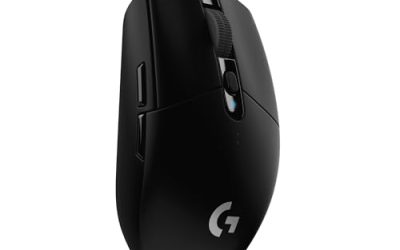
Two symmetrical examples show the range of the family. The Razer Viper V3 Pro is a featherweight esports shell built around fingertip and claw aiming, with optical switches and a flagship sensor. The Logitech G PRO X Superlight 2 follows the same safe, medium shape that competitive players have used for years. At the accessible end, the Logitech G305 LIGHTSPEED uses a smaller symmetrical egg shape that suits smaller hands and claw grips.
Razer Viper V3 Pro
Specs
- Shape: symmetrical, medium
- Weight: 54 grams
- Sensor: Razer Focus Pro 35K optical
- Switches: Razer Optical Gen-3
- Connection: Razer HyperSpeed wireless
- Tier: premium
Logitech G PRO X Superlight 2
Specs
- Shape: symmetrical, medium
- Weight: 60 grams
- Sensor: Logitech HERO 2 optical
- Switches: LIGHTFORCE hybrid optical-mechanical
- Connection: Logitech LIGHTSPEED wireless
- Tier: premium
Logitech G305 LIGHTSPEED
Specs
- Shape: symmetrical, small
- Weight: 99 grams
- Sensor: Logitech HERO optical
- Switches: mechanical
- Connection: Logitech LIGHTSPEED wireless, AA battery
- Tier: budget
Ergonomic Mice: Built for Support
An ergonomic shell starts from the shape of a resting hand. The top tilts down toward the right, the left side carries a thumb rest or wing, and the right side is scalloped so your ring and little fingers have somewhere to sit instead of dragging on the desk. When you lay your palm on it, the mouse fills your hand and your fingers fall onto the buttons without reaching. That support is the whole point: the shell holds your hand so your muscles do not have to.
This is the shape that rewards long sessions. MMO, RPG and strategy players who keep a hand on the mouse for hours get a wrist angle closer to a handshake position and, on many models, a cluster of extra thumb buttons for skills and macros. The cost is freedom of movement. A sculpted shell assumes one grip, so fingertip aiming feels cramped, and lifting the mouse mid-flick is harder because your fingers are wrapped around contours instead of resting on flat sides.
The Razer DeathAdder V3 shows the performance end of the family: a classic right-handed ergonomic shape kept very light, with a top-tier sensor and optical switches, aimed at players who palm-grip but still play shooters. The Logitech G502 HERO is the comfort-and-buttons end, with a pronounced thumb rest, eleven programmable buttons and adjustable weights so you can tune the balance to your hand.
Razer DeathAdder V3

Specs
- Shape: ergonomic, right-handed, large
- Weight: 59 grams
- Sensor: Razer Focus Pro 30K optical
- Switches: Razer Optical Gen-3
- Connection: wired, true 8000 Hz polling
- Tier: mid-range
Logitech G502 HERO

Specs
- Shape: ergonomic, right-handed, medium-large
- Weight: 121 grams, with adjustable add-on weights
- Sensor: Logitech HERO 25K optical
- Switches: mechanical
- Buttons: 11 programmable
- Connection: wired
- Tier: mid-range
Grip, Hand Size and Platform Fit
Grip decides more than genre does. Fingertip players touch the mouse only with their fingers, so they need the flat, low sides of a symmetrical shell. Claw players arch their fingers and pull the mouse into their palm with fingertip pressure, which works on both families, though most prefer a symmetrical shell with a rear hump to push against. Palm players rest everything on the shell, and they are the group ergonomic shapes were designed for.
Hand size narrows the field further. Small hands under about 17 centimetres suit compact symmetrical mice such as the G305. Medium hands have the widest choice in both families. Large hands over about 20 centimetres need a long shell, which is where big ergonomic models such as the DeathAdder line earn their place, since a too-short symmetrical mouse forces a large hand into a cramped claw.
Connection and platform support rarely separate the families. Both come in wired, 2.4 GHz wireless and Bluetooth versions, and both work on Windows and macOS for gaming, though the configuration software for some brands is Windows-only, so Mac players should check the software before choosing. Left-handed players have almost no ergonomic options and should start with symmetrical shapes, checking whether the side buttons sit on the left side only or on both.
Who Should Pick Which
Choose a symmetrical mouse if you play competitive FPS or fast arena games, aim with fingertip or claw grip, lift the mouse often, have small or medium hands, or use your left hand. Choose an ergonomic mouse if you palm-grip, play MMOs and RPGs where extra thumb buttons matter, sit in sessions that run for hours, have large hands, or feel wrist strain on a flat mouse. If you want a shortlist of the sculpted options before deciding, our guide to the best ergonomic gaming mouse picks for 2026 compares the leading right-handed shapes in detail.
Frequently Asked Questions
Is a symmetrical or ergonomic mouse better for FPS games?
Symmetrical mice are the more common choice in competitive FPS play because fingertip and claw grips allow faster lifts, flicks and micro-corrections. Ergonomic mice still work well for palm-grip FPS players, and several professional players use them. The deciding factor is your grip, not the genre alone.
Are ergonomic gaming mice better for wrist pain?
They can help if your discomfort comes from gripping a flat mouse tightly for hours, because the slanted shell holds your hand at a more relaxed angle and carries more of its weight. They are not medical devices, and pain that continues needs a professional opinion, but many long-session players find the supported posture noticeably easier.
Can left-handed players use ergonomic gaming mice?
Almost all ergonomic gaming mice are sculpted for the right hand only, so left-handed players are far better served by symmetrical models. Look for a symmetrical shell with side buttons on the right side of the shell, or buttons on both sides, so the thumb buttons stay reachable.
Does mouse shape affect sensor performance?
No. The same flagship sensors ship in both shape families, and tracking quality, polling rates and click latency depend on the hardware and firmware, not the shell. Shape affects how consistently you can move the mouse, which is why it changes your aim in practice even though the sensor numbers are identical.
Final Verdict
The symmetrical vs ergonomic gaming mouse question is really a question about how your hand works. Symmetrical shells give fingertip and claw players a neutral, light tool built for speed, lifting and flicking, and they are the only real option for left-handed players. Ergonomic shells give palm players a supported, relaxed posture with room for extra buttons, which pays off across long MMO, RPG and strategy sessions. Match the shape to your grip and hand size first, then compare sensors and switches inside that family, and you will end up with a mouse that disappears under your hand.
Product and ASIN Reference
| Product | ASIN |
|---|---|
| Razer Viper V3 Pro | B0CW25XR5R |
| Logitech G PRO X Superlight 2 | B09NBWL8J5 |
| Logitech G305 LIGHTSPEED | B07CMS5Q6P |
| Razer DeathAdder V3 | B0B6XTDJS1 |
| Logitech G502 HERO | B07GBZ4Q68 |