

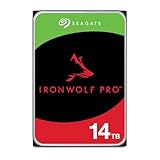
- Top Pick: Seagate IronWolf Pro 14TB NAS Internal Hard Drive HDD – CMR 3.5 Inch SATA 6Gb/s 256MB Cache for RAID Network Attached Storage, Data Recovery Service – Frustration Free Packaging (ST14000NEZ008)
- Best Value: BUFFALO TeraStation Essentials 2025 4-Bay Value Desktop NAS 16TB (4x4TB) with Hard Drives Included
- Premium Choice: BUFFALO LinkStation 220 4TB 2-Bay NAS Network Attached Storage with HDD Hard Drives Included NAS Storage that Works as Home Cloud or Network Storage Device for Home
Hard drives for RAID are not interchangeable with the bare drive you would drop into a gaming tower. Once several disks are bound into one array, the controller expects each member to answer promptly, tolerate constant vibration from its neighbors and report errors in a predictable way. That is why shoppers searching for RAID drives keep landing on NAS-rated models, and why a spec like CMR recording matters more here than a flashy cache number.
This guide sorts eight listings in the 2026 market into two groups. Three are bare internal drives from Seagate’s IronWolf line, meant for a NAS you already own or plan to build. The other five arrive ready to use: two Buffalo network storage boxes, a LaCie two-drive desktop RAID unit and a SanDisk Professional G-RAID bundle. Two enclosure-only products that explicitly say “NO RAID/NAS” in their titles were left out, since they do not fit the topic.
Quick Picks
As an Amazon Associate we earn from qualifying purchases at no extra cost to you.



| Product | Best for | Key spec from the title |
|---|---|---|
| Seagate IronWolf Pro 14TB | Heavier NAS workloads | CMR, SATA 6Gb/s, 256MB cache, data recovery service |
| BUFFALO TeraStation Essentials 4-Bay | Small office with a ready array | 16TB (4x4TB) with drives included |
| BUFFALO LinkStation 220 4TB | Basic home cloud | 2-bay NAS with drives included |
| BUFFALO LinkStation 220 8TB | Home cloud with more space | 2-bay NAS, 8TB, drives included |
| Seagate IronWolf 14TB | Home or small-business NAS builds | CMR, 3.5 inch, SATA, 256MB cache |
| LaCie 2big RAID 16TB | Mac and PC desktop storage | USB-C, 7200 RPM enterprise class drives |
| SanDisk Professional G-RAID 16TB Bundle | Creative fast-offload workflows | Thunderbolt 3, RAID 0, 7200RPM Ultrastar drives |
| Seagate IronWolf 10TB | Mid-capacity array members | CMR, 7200 RPM, 256MB cache |
How to Choose
Confirm CMR recording and a NAS-rated design
Conventional magnetic recording, listed as CMR in several of these titles, writes tracks without overlapping them, so rebuilds and constant writes stay steady. Drives that use shingled recording can slow dramatically during an array rebuild. A product that says “for RAID Network Attached Storage” in its name has been tuned for that job, including firmware that handles error recovery quickly instead of stalling the whole array.
Pick capacity based on your RAID level
Usable space depends on the layout. Mirroring two drives gives you the capacity of one. Striping, as in RAID 0, adds capacity and speed but removes redundancy, so one failure loses everything. Parity layouts such as RAID 5 or RAID 6 need three or four drives respectively and give up one or two drives’ worth of space. Large 10TB and 14TB members make arrays compact, but a rebuild after a failure takes longer as capacity grows.
Decide between bare drives and ready-made boxes
Bare internal drives are ideal when you already own a NAS or a motherboard with spare SATA ports. Pre-populated units such as the Buffalo and LaCie products save setup time and arrive with drives matched to the enclosure. The trade-off is that a closed box limits what you can upgrade later. Look at bay counts, because a 2-bay device allows mirroring but not parity.
Look at the connection and the rescue extras
Internal drives use SATA 6Gb/s. External RAID boxes differ: USB-C suits laptops and desktops, while Thunderbolt 3 offers much more bandwidth for editing from the array. Several listings mention data recovery or rescue services, which can matter when irreplaceable files live on the array. Remember that RAID protects against a drive failing, not against deleted files, theft or fire, so a separate backup stays essential.
The 8 Best Options
Seagate IronWolf Pro 14TB
This is the heavier-duty sibling in the IronWolf family, a 14TB, 3.5-inch SATA 6Gb/s drive with CMR and a 256MB cache that is described as made for RAID network storage. It suits prosumers building a multi-bay NAS who want large members and a model number (ST14000NEZ008) that is easy to match against a NAS compatibility list. In a four-bay box, four of these would make a very large pool of storage for media libraries and backups.
- CMR recording and a 256MB cache fit sustained NAS use.
- The listing includes a data recovery service, a useful safety net.
- Trade-off: a 14TB drive means long rebuild windows when a disk fails.
Skip it if your NAS has only two bays and you want a modest-capacity mirror.
BUFFALO TeraStation Essentials 4-Bay
A desktop network storage unit with four bays and 16TB total made of four 4TB drives, all included. It targets small offices and home labs that want shared folders without picking individual disks. The practical point is that you get a complete array in one purchase rather than assembling parts, which also means one support path if something goes wrong.
- Four bays leave room for parity-based layouts rather than only mirroring.
- Drives are included, so setup starts with the box rather than with a shopping list.
- Trade-off: the title gives no cache, recording type or speed details for the drives inside.
Skip it if you want to pick your own drive model or reuse disks you already own.
BUFFALO LinkStation 220 4TB
A two-bay NAS with drives included, positioned in its title as a home cloud or network storage device. Two bays make this a straightforward option for mirroring family photos and documents, and the home-cloud wording suggests it is meant for people who would rather not manage a server. It is the entry point in this group.
- Pre-installed drives remove compatibility guesswork.
- The home-cloud framing suits remote access to personal files.
- Trade-off: four terabytes is small if you keep video libraries or large game archives.
Skip it if you expect your data to grow quickly or want parity RAID.
BUFFALO LinkStation 220 8TB
The same two-bay design as its smaller sibling, with 8TB of capacity and drives included. It fits households that outgrew a single external disk and want a shared location for backups from several laptops and phones. Because it is sold with disks installed, there is nothing to match or format before the first use.
- Double the capacity of the 4TB version without changing the footprint.
- Two bays support the simplest forms of redundancy.
- Trade-off: with only two bays, a mirrored layout leaves roughly half of the raw space as usable capacity.
Skip it if you want a four-drive array or an expandable system.
Seagate IronWolf 14TB
The standard IronWolf drive: 14TB, 3.5-inch, SATA, CMR, 256MB cache and explicitly made for RAID network storage. It is the more restrained choice for a NAS you are filling gradually, adding one drive at a time as the library grows. Its model number (ST14000VN0008) makes it easy to match against the drive lists many NAS makers publish.
- CMR recording and a NAS focus match array behavior.
- Large capacity reduces the number of bays needed for a given total.
- Trade-off: the title does not state a rotational speed, so do not assume performance details.
Skip it if you want the added recovery service shown on the Pro listing.
LaCie 2big RAID 16TB
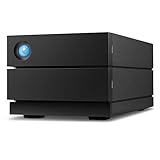
A two-drive desktop unit with 16TB, USB-C and 7200 RPM enterprise-class drives, built for Mac and PC. The design is aimed at creators and small studios who want shared capacity on a desk without building a NAS. Both Mac and PC are named, which helps in mixed households where one machine edits and another games.
- USB-C connectivity fits modern laptops and desktops.
- Enterprise-class 7200 RPM drives and rescue services are listed.
- Trade-off: it is a direct-attached unit, not a networked device, so sharing across rooms needs extra gear.
Skip it if you need several users to reach the files at the same time over a network.
SanDisk Professional G-RAID 16TB Bundle
This three-item bundle combines a 16TB RAID 0 unit with two 1TB PRO-BLADE SSD Mags. It offers Thunderbolt 3, 7200RPM Ultrastar drives and an integrated SSD Mag slot for moving fast project files. It reads as a tool for photographers and video teams who offload footage on location and then edit from the array.
- Thunderbolt 3 gives far more bandwidth than USB-C for demanding transfers.
- The integrated slot lets you swap SSD modules for on-location work.
- Trade-off: RAID 0 offers speed and capacity but no redundancy, so one drive failure can lose everything.
Skip it if protecting data from a drive failure is your main reason for choosing RAID.
Seagate IronWolf 10TB
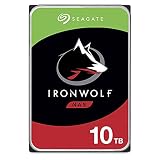
A 10TB CMR drive at 7200 RPM with a 256MB cache and SATA 6Gb/s, labeled for RAID network storage. It is the mid-capacity member here and works well in a four-bay build where several mid-size drives beat two giant ones. Its model number (ST10000VN0008) appears in the title, so compatibility lookups are simple.
- The listing states 7200 RPM, giving a clear speed target.
- Lower capacity shortens rebuild times compared with 14TB members.
- Trade-off: more drives are needed to reach a given total capacity.
Skip it if you need to cram the largest possible storage into a two-bay enclosure.
Which One Fits Your Situation
You are building your own multi-bay NAS
Choose from the Seagate IronWolf 10TB, IronWolf 14TB or IronWolf Pro 14TB. The 10TB suits four-bay builds, while the Pro with its recovery service suits larger arrays holding hard-to-replace files.
You want a family cloud with minimal setup
The BUFFALO LinkStation 220 in 4TB or 8TB gives a drives-included two-bay box. Pick the 8TB if video clips and photo libraries are already filling your devices.
You run a small office and need parity
The BUFFALO TeraStation Essentials has four bays and 16TB total, which makes layouts beyond simple mirroring possible, and shared folders suit several staff members.
You edit video or photos at a desk
The LaCie 2big RAID is easy to plug into a Mac or PC over USB-C. For faster offload with Thunderbolt 3, the SanDisk Professional G-RAID bundle fits, but remember its RAID 0 layout needs a separate backup.
Common Mistakes
- Treating RAID as a backup; it does not protect against deletion, ransomware or a failed controller.
- Mixing bare drives with different recording types or speeds in the same array.
- Choosing RAID 0 for important data because the speed is appealing.
- Buying a two-bay box and expecting parity protection, which needs more drives.
- Forgetting that very large drives take a long time to rebuild after a failure.
Related guides
- Aio Liquid Coolers For High Performance Gaming
- How To Lower Input Delay In Competitive Shooters
- External Hard Drives For Music Production
Frequently Asked Questions
Can I use a normal desktop drive in a RAID array?
You can, but it is a gamble. Desktop drives are not tuned for continuous multi-drive operation or for the error-recovery timing a RAID controller expects, so NAS-rated models are the safer match.
Do I need drives of identical size?
Not always, but arrays generally treat every member as the size of the smallest one. Using matching drives keeps the math simple and avoids wasted capacity.
Is a pre-built unit better than separate drives?
It is simpler, since the drives arrive installed and paired with the enclosure. Separate drives give freedom to upgrade and replace members individually, which many builders prefer.
Why does the CMR label matter?
CMR drives write tracks without overlap, which helps keep sustained writes and array rebuilds consistent. That is why NAS-oriented listings highlight it prominently.















