Ghost of Tsushima Director’s Cut is one of the friendliest big PC ports of recent years, and that changes what a sensible GPU buy looks like. Nixxes built the port without ray tracing, so plain raster speed decides your frame rate, and the official tiers top out at hardware many gaming PCs already have. Before picking a card, it is worth checking where your current rig lands in the full Ghost of Tsushima PC requirements, because a lot of readers will find they need less than they feared. This guide matches five cards you can actually buy to the three resolutions most people play at, using published benchmark results rather than guesswork.


As an Amazon Associate, we earn from qualifying purchases.
Quick Picks
- 1080p, tightest spend: MSI GeForce RTX 4060 Ventus 2X Black 8G OC. TechPowerUp’s launch benchmark puts the RTX 4060 class exactly on the line for 60 frames per second at 1080p with the highest settings, native resolution.
- 1440p 60, native: Gigabyte Radeon RX 7700 XT Gaming OC 12G. The RX 7700 XT is one of the cards TechPowerUp names for 60 at 1440p, and its 12 GB of memory leaves room for frame generation later.
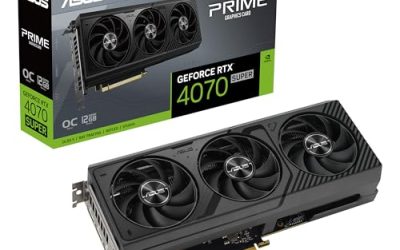
- 1440p high refresh, with DLSS: ASUS Prime GeForce RTX 4070 Super OC Edition. A step above the 1440p floor, with DLSS 3 frame generation to push toward high-refresh monitors.
- 4K 60, native: Sapphire Pulse Radeon RX 7900 XT. Sony’s own Very High tier names the RX 7900 XT for 4K at 60, and TechPowerUp’s results agree.
- Fastest raster pick: Sapphire Pulse Radeon RX 9070 XT. TechSpot found the RX 9070 XT ahead of the RTX 5070 Ti at every resolution it tested in this game.
What the Published Benchmarks Say
TechPowerUp tested 35 graphics cards in the game at launch, at the Very High preset and native resolution. Its conclusions set the shape of this guide. Reaching 60 frames per second at 1080p takes an RTX 4060, RX 7600 or Arc A770 class card. At 1440p, the 60 line sits at the RTX 4070, RTX 3070 Ti, RX 6800 and RX 7700 XT. At 4K it gets serious: the RX 6900 XT managed only 53 frames per second, and breaking 60 took an RX 7900 XT or RTX 4080 class card. TechPowerUp also noted that the game runs a little better on AMD hardware than its charts usually predict, and that dropping a few settings can recover a large amount of performance, roughly 40 percent, so a card one tier down can often be tuned to the same target.
VRAM is the other half of the story, and here the news is good. TechPowerUp’s memory testing found the game allocating around 10 GB, yet 8 GB cards held up fine even at 4K with the highest settings; its RTX 4060 Ti comparison showed no performance difference between the 8 GB and 16 GB versions in this title. The one caution is frame generation, which raised memory use by roughly 2 to 3 GB in TechPowerUp’s testing, so an 8 GB card that cruises at native settings has less headroom once frame generation is switched on.
Upscaling support is unusually complete. The port ships with DLSS, FSR and XeSS upscaling, NVIDIA DLAA, and both major frame generation systems, DLSS 3 and FSR 3, which is a rare pairing. Notebookcheck’s testing showed what that buys at the top end: DLSS Quality lifted an RTX 4080 from about 65 frames per second to about 103 at 4K on the Very High preset. One honest caveat for newer AMD cards: the game uses FSR 3, not the later FSR 4, so an RDNA 4 card’s newest upscaling mode does not apply here, and its advantage in this title is raw raster speed.
MSI GeForce RTX 4060 Ventus 2X Black 8G OC
The 1080p pick. TechPowerUp’s benchmark puts the RTX 4060 class right on the 60 line at 1080p on the highest settings with no upscaling, which makes this the cheapest sensible way into the game at full detail. The Ventus 2X Black is MSI’s compact dual-fan version, with a modest factory overclock and a single 8-pin power connector, so it drops into almost any existing build, including older systems with smaller power supplies. Its 8 GB of memory is enough for this game at 1080p and 1440p according to TechPowerUp’s VRAM testing, though it is the card here with the least frame generation headroom at 4K, a resolution it is not really bought for. DLSS 3 frame generation is available when you want a high-refresh 1080p picture instead.
Specs
- GPU: GeForce RTX 4060, Ada Lovelace
- Memory: 8 GB GDDR6, 128-bit
- Boost clock: 2490 MHz
- Power: 115 W, one 8-pin connector
- Outputs: 3x DisplayPort 1.4a, 1x HDMI 2.1a
- Tier: budget
Gigabyte Radeon RX 7700 XT Gaming OC 12G
The native 1440p pick. TechPowerUp names the RX 7700 XT among the cards that hold 60 frames per second at 1440p on the highest settings, and this game favouring AMD hardware plays to its strengths. The 12 GB memory buffer is the real argument over similarly priced 8 GB rivals: it covers the game’s allocation at every resolution and still leaves room for FSR 3 frame generation, which the port supports on any card. Gigabyte’s Gaming OC version adds a triple-fan WINDFORCE cooler and a factory overclock to a boost of 2599 MHz. It needs two 8-pin connectors and a stronger power supply than the RTX 4060, which is the main build consideration.
Specs
- GPU: Radeon RX 7700 XT, RDNA 3
- Memory: 12 GB GDDR6, 192-bit
- Boost clock: 2599 MHz
- Power: 245 W board power, two 8-pin connectors
- Outputs: 2x DisplayPort 2.1, 2x HDMI 2.1
- Tier: mid-range
ASUS Prime GeForce RTX 4070 Super OC Edition

The 1440p high-refresh pick. The RTX 4070 Super sits a clear step above the RTX 4070 that TechPowerUp places on the 1440p 60 line, so it holds that target with headroom to spare and pushes well past it with DLSS upscaling. Its party trick in this game is DLSS 3 frame generation, which suits a 1440p high-refresh monitor better than chasing native frames alone. The Prime is ASUS’s straightforward triple-fan design with a 2.5-slot cooler and an OC mode boost of 2550 MHz. Power draw is a moderate 220 W through a single 16-pin connector, and an adapter cable is included for older power supplies. The 12 GB buffer is comfortable here; TechPowerUp found this game far less memory-hungry than most recent ports.
Specs
- GPU: GeForce RTX 4070 Super, Ada Lovelace
- Memory: 12 GB GDDR6X, 192-bit
- Boost clock: 2550 MHz in OC mode
- Power: 220 W, one 16-pin connector
- Outputs: 3x DisplayPort 1.4a, 1x HDMI 2.1a
- Tier: mid-range
Sapphire Pulse Radeon RX 7900 XT

The native 4K pick. Sony’s own Very High tier specifies the RX 7900 XT for 4K at 60 frames per second, and TechPowerUp’s 35-card benchmark backs that up: this class of card breaks the 4K 60 barrier at native resolution where the previous generation’s flagships fall short. The 20 GB memory buffer is the largest in this guide, which makes frame generation at 4K a non-issue on the memory side, and FSR 3 frame generation is built into the game. Sapphire’s Pulse keeps the design simple and compact for a card of this class. The trade-offs are power and size: at 315 W it wants a quality 750 W class power supply and two 8-pin connectors, and it will not fit the smallest cases.
Specs
- GPU: Radeon RX 7900 XT, RDNA 3
- Memory: 20 GB GDDR6, 320-bit
- Boost clock: up to 2450 MHz
- Power: 315 W board power, two 8-pin connectors
- Outputs: 2x DisplayPort 2.1, 2x HDMI 2.1
- Tier: premium
Sapphire Pulse Radeon RX 9070 XT

The fastest raster pick, and the current-generation option. In TechSpot’s testing of the game, the RX 9070 XT finished ahead of the RTX 5070 Ti at every resolution and preset tested, with the widest gap, about 14 percent, at 1440p on the Very High preset. That makes it the strongest card here for high-refresh 1440p and a very comfortable 4K card, with 16 GB of memory covering the game’s needs plus frame generation headroom. Sapphire’s Pulse version runs close to reference clocks with a boost up to 2970 MHz and a 304 W board power through two 8-pin connectors. The honest limitation is software, not speed: this title ships FSR 3 rather than FSR 4, so the card wins on raw raster performance, and buyers specifically wanting DLSS frame generation should look at the RTX 4070 Super above instead.
Specs
- GPU: Radeon RX 9070 XT, RDNA 4
- Memory: 16 GB GDDR6, 256-bit
- Boost clock: up to 2970 MHz
- Power: 304 W board power, two 8-pin connectors
- Outputs: 2x DisplayPort 2.1a, 2x HDMI 2.1
- Tier: premium
Resolution Targets at a Glance
| Target | Settings | Published result | Pick |
|---|---|---|---|
| 1080p at 60 | Very High, native | TechPowerUp: RTX 4060 class reaches 60 at the highest settings | MSI RTX 4060 Ventus 2X Black |
| 1440p at 60 | Very High, native | TechPowerUp: RX 7700 XT and RTX 4070 class reach 60 | Gigabyte RX 7700 XT Gaming OC |
| 1440p high refresh | Very High, DLSS or FSR | TechSpot: RX 9070 XT leads the RTX 5070 Ti by about 14 percent at 1440p Very High | ASUS RTX 4070 Super Prime or Sapphire RX 9070 XT Pulse |
| 4K at 60 | Very High, native | Sony’s Very High tier names the RTX 4080 and RX 7900 XT; TechPowerUp agrees | Sapphire RX 7900 XT Pulse |
| 4K high refresh | Very High, upscaling | Notebookcheck: DLSS Quality took an RTX 4080 from about 65 to about 103 frames per second | Sapphire RX 9070 XT Pulse with FSR, or a DLSS card |
Frequently Asked Questions
How much VRAM does Ghost of Tsushima actually need?
Less than most recent ports. TechPowerUp measured the game allocating around 10 GB but found 8 GB cards performed fine even at 4K with the highest settings, with no gap between the 8 GB and 16 GB versions of the same GPU. Budget for more only if you plan to use frame generation, which added roughly 2 to 3 GB of memory use in the same testing.
Does Ghost of Tsushima use ray tracing?
No. Nixxes shipped the port without ray tracing, which is the main reason mid-range cards perform so well in it. Frame rates are set by raster performance, so older flagship cards and current mid-range cards both do better here than in ray-traced releases.
Which frame generation works with which card?
Both kinds are in the game, which is unusual. DLSS 3 frame generation requires an RTX 40 series card. FSR 3 frame generation works across AMD, NVIDIA and Intel cards, so the Radeon picks in this guide can use it too. Either one pairs with its matching upscaler, and XeSS upscaling is also available for Intel cards.
Is 8 GB of VRAM enough for 1440p in this game?
Yes, at native settings. TechPowerUp’s testing showed 8 GB holding up even at 4K, and 1440p is lighter. The picks above still favour 12 GB and up for 1440p because the extra memory costs little, covers frame generation, and leaves the card better placed for other, heavier games you will play on the same machine.
Final Verdict
Ghost of Tsushima rewards buying for your monitor, not for the badge on the box. At 1080p, the MSI RTX 4060 Ventus 2X Black covers the game’s highest settings at 60 frames per second and asks almost nothing of the rest of your PC. At 1440p, the Gigabyte RX 7700 XT Gaming OC is the native 60 pick, while the ASUS Prime RTX 4070 Super adds DLSS 3 frame generation for high-refresh screens. For 4K, the Sapphire Pulse RX 7900 XT is the card Sony’s own top tier names, and the Sapphire Pulse RX 9070 XT is the fastest option here if you want headroom above 60 or a high-refresh 1440p picture. Every card in this guide clears its target in published testing, so the right choice is simply the one matched to your resolution.
Product and ASIN Reference
| Product | ASIN |
|---|---|
| MSI GeForce RTX 4060 Ventus 2X Black 8G OC | B0C7W8GZMJ |
| Gigabyte Radeon RX 7700 XT Gaming OC 12G | B0CGC5P7H3 |
| ASUS Prime GeForce RTX 4070 Super OC Edition | B0D7KTZHXN |
| Sapphire Pulse Radeon RX 7900 XT | B0BR6L7TKR |
| Sapphire Pulse Radeon RX 9070 XT | B0DTHMPWFR |