

- Top Pick: Graphics Card GPU Brace Support, Video Card Sag Holder Bracket, GPU Stand (L, 74-120mm)
- Best Value: acer GPU Support Bracket, GPU Stand with Magnet Non-Slip Base,(L, 70-120mm)
- Premium Choice: Uyubao GPU Support Bracket, Gpu Anti Sag Bracket, Graphics Card GPU Brace Support, Video Card Sag Holder Bracket, GPU Stand with Magnet & Non-Slip Sheet, L(74-120mm)
If you have built or upgraded a gaming rig in the last two years, you have probably noticed something unsettling the moment you close the side panel: your graphics card is drooping. That downward tilt at the far end of the card is called GPU sag, and in 2026 it has gone from a cosmetic annoyance to a genuine hardware concern. Flagship cards like the NVIDIA RTX 5090 and RTX 5080, along with AMD’s Radeon RX 9070 XT, now ship with enormous triple-fan and quad-fan coolers that can weigh well over four pounds. All of that mass hangs off a single PCIe slot and one or two thin retention brackets, and gravity does the rest.
- Why Heavy GPUs Sag in 2026
- Types of GPU Support Brackets and Anti-Sag Holders
- 2026 GPU Support Bracket Comparison Table
- How to Install a GPU Support Bracket
- Compatibility and Aesthetics Considerations
- Verdict: Which GPU Support Bracket Should You Buy?
- Related Guides
- Frequently Asked Questions
- Related Articles
GPU sag matters because the weight is not evenly distributed. The heaviest part of a modern card is usually the cooler shroud at the far end, which is exactly where there is no support. Over months of use, that leverage stresses the PCIe x16 slot, can crack solder joints on the card’s PCB, and in worst-case scenarios damages the slot on your motherboard, an expensive component to replace. Heat cycling makes it worse: as the card warms and cools, materials expand and contract while under constant mechanical load. A five-dollar to twenty-five-dollar support bracket is cheap insurance against a card and a motherboard that together can cost well over two thousand dollars.
As an Amazon Associate we earn from qualifying purchases at no extra cost to you.




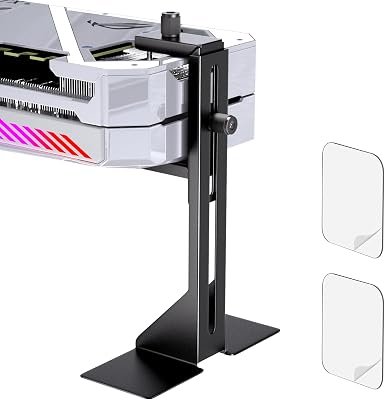


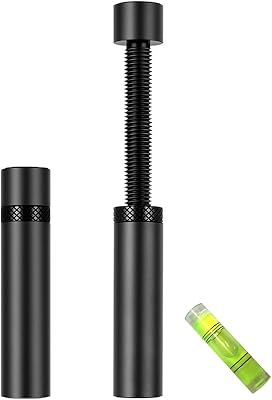
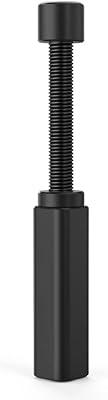
Beyond protection, anti-sag holders have become a legitimate part of the aesthetic build scene. RGB support brackets, magnetic holders, and sleek aluminum struts now sit front and center behind tempered glass, doing a job and looking good while they do it. In this guide we break down the main types of GPU support brackets, how to install them, compatibility gotchas, and which models are worth your money in 2026.
As an Amazon Associate we earn from qualifying purchases…
🛒 Best Price Today on Amazon
Prime members get fast, free shipping on everything above, plus member-only deals. New members get a 30-day free trial — cancel anytime.
Why Heavy GPUs Sag in 2026
The root cause of GPU sag is simple physics: leverage. A graphics card is anchored at two points, the PCIe slot connector and the I/O shield screwed to the case. Everything beyond those two anchors is a cantilever, and the coolers on current-generation cards keep getting longer and heavier. The RTX 5090 Founders Edition and its partner variants routinely stretch past 13 inches and 2200 grams, while custom RX 9070 XT models pack vapor chambers and heatpipe arrays that add real heft.
Three factors have made the problem more acute this generation:
- Cooler mass: To tame 350W-plus power draw quietly, manufacturers use bigger heatsinks and heavier metal shrouds, concentrating weight far from the slot.
- Card length: Longer cards mean a longer lever arm, multiplying the downward force on the PCIe connector.
- Backplate and reinforcement: Full metal backplates protect the PCB but add even more weight to an already strained card.
Left unsupported, a sagging card can develop micro-fractures, intermittent display artifacts from a partially seated connector, or contact issues that cause the system to drop the GPU entirely. If you are already thinking about thermals and stability, it is worth reading our companion guide on optimizing GPU cooling and airflow so your support and cooling strategy work together.
Types of GPU Support Brackets and Anti-Sag Holders
Not every anti-sag solution works for every build. The right choice depends on your case size, whether you have a tempered glass panel, and how much you care about the look. Here are the four main categories.
Adjustable Strut and Jack-Style Brackets
These are the most common and most versatile supports. They sit on the floor of the case (usually on top of the PSU shroud) and extend a vertical post up to the underside of the GPU. Jack-style models use a threaded screw mechanism so you can dial in the exact height, similar to a car jack. Strut-style versions use telescoping segments or notched steps. Because they are height-adjustable, they fit almost any card and case combination, which is why brands like EZDIY-FAB and generic aluminum kits dominate this segment.
Magnetic GPU Holders
Magnetic supports place a strong magnet at the base that clings to any steel surface inside your case. They are quick to position, tool-free, and easy to move around. The tradeoff is that they only grip ferrous metal, so they will not stick to aluminum cases or the tempered glass side. They are ideal for steel mid-towers where you want fast installation without hunting for screw holes.
Corner-Mount and PCIe Bracket Supports
Some supports anchor to the case’s rear expansion-slot area or bridge across to a corner, holding the card up from the end rather than from below. These keep the floor of your case clear, which is handy in builds with a vertical GPU mount or lots of cable routing. They typically require a compatible mounting point, so check your case layout first.
RGB and Aesthetic Support Brackets
For builds that live behind glass, RGB support brackets combine function with a lighting element, usually addressable ARGB that syncs with your motherboard software. Lian Li and Cooler Master both offer premium models with anodized aluminum bodies and diffused light bars. They cost more, but they turn a purely functional part into a design feature.
2026 GPU Support Bracket Comparison Table
| Bracket | Type | Adjustable Height | Best For | Approx Price (2026 USD) |
|---|---|---|---|---|
| Generic Aluminum Strut Kit | Adjustable strut | Yes (telescoping) | Budget builds, any case | $8 |
| EZDIY-FAB Jack-Style Support | Jack / screw-adjust | Yes (threaded) | Precise fit, heavy cards | $14 |
| Cooler Master Universal Holder | Adjustable strut | Yes | Reliable mid-tower builds | $19 |
| Lian Li ARGB Support Bar | RGB aesthetic | Yes | Show builds behind glass | $28 |
| Magnetic Steel-Base Holder | Magnetic | Yes (post) | Steel cases, tool-free setup | $12 |
How to Install a GPU Support Bracket
Installing an anti-sag holder takes about five minutes and requires no special tools beyond a screwdriver for some models. Follow these steps for a clean, secure fit:
- Power down and unplug: Fully shut off the system and disconnect the power cable before working inside the case.
- Measure the gap: Note the distance between the underside of your GPU (usually the front edge of the cooler) and the surface below it, typically the PSU shroud.
- Position the base: Place the bracket directly beneath the heaviest, most drooping part of the card, near the far end where sag is worst.
- Adjust the height: Raise the post until it gently lifts the card back to level. Do not over-tighten, you want to relieve the sag, not push the card upward and stress the slot in the opposite direction.
- Secure and verify: Lock the mechanism, then wiggle the case lightly and confirm the card stays level. Reconnect power and boot to make sure the GPU is detected normally.
A properly installed bracket should make the card sit perfectly horizontal with no visible tilt. If you are doing this as part of a larger upgrade, our walkthrough on building a high-end gaming PC step by step covers where a support fits into the overall assembly order.
Compatibility and Aesthetics Considerations
Before buying, confirm a few compatibility details. First, check your case’s internal clearance, small form-factor and ITX cases may not have room for a floor-standing strut. Second, if you run a vertical GPU mount, standard floor brackets will not work and you will need a corner or PCIe-anchored model. Third, magnetic holders require a steel surface, so verify your case is not aluminum or that the mounting spot is ferrous.
On the aesthetic side, think about sightlines. A support directly under the center of the card is often hidden by the GPU itself, keeping the look clean. RGB models are meant to be seen, so plan cable routing for the ARGB header and match the lighting to the rest of your build. If lighting harmony matters to you, pair the bracket with the advice in our guide to the best RGB components and lighting setups. And if you are still choosing the card itself, our roundup of the best graphics cards for 1440p and 4K gaming pairs nicely with picking the right support for its weight.
Verdict: Which GPU Support Bracket Should You Buy?
For most builders in 2026, an adjustable jack-style bracket like the EZDIY-FAB model offers the best balance of price, adjustability, and secure hold, especially for heavy RTX 5080, RTX 5090, and RX 9070 XT cards. If you want a trusted brand with clean styling, the Cooler Master universal holder is a safe, sturdy pick. Builders on a tight budget can get real protection from a simple generic aluminum strut for under ten dollars, and it will do the core job just fine.
If your build is a showpiece behind tempered glass, spend the extra money on a Lian Li ARGB support bar to turn a functional part into a lighting accent. And for steel cases where you value speed and simplicity, a magnetic holder gets you set up in seconds. Whichever you choose, the important thing is that you choose one, an unsupported multi-thousand-dollar GPU hanging on a single slot is a risk no serious builder should take.
Frequently Asked Questions
Do I really need a GPU support bracket for my card?
If your graphics card is a modern mid-range or high-end model, yes, it is strongly recommended. Cards like the RTX 5080, RTX 5090, and RX 9070 XT are heavy enough to noticeably sag and stress the PCIe slot over time. A support bracket costs a fraction of the card’s price and protects both the GPU and your motherboard from long-term mechanical damage.
Can GPU sag actually damage my motherboard?
Yes. Sustained downward force can crack the PCIe x16 slot, damage solder joints, or cause the connector to seat improperly, leading to display artifacts or the card dropping out entirely. Repairing or replacing a damaged motherboard slot is far more expensive and time-consuming than installing a cheap anti-sag holder up front.
Will a support bracket fit my small form-factor or ITX case?
It depends on internal clearance. Many floor-standing strut and jack-style brackets need vertical room above the PSU shroud that compact cases may not have. Measure the gap under your GPU before buying, and for very tight builds consider a corner-mount or PCIe-anchored support instead of a floor model.
Do RGB support brackets need special software to control the lighting?
Most addressable RGB brackets connect to a standard 3-pin 5V ARGB header on your motherboard and are controlled through your board’s lighting software, such as those from ASUS, MSI, or Gigabyte. As long as your motherboard has a free ARGB header, you can sync the bracket’s lighting with the rest of your components without any extra hardware.

















