- Top Pick: AMD Ryzen 7 9800X3D
- Runner-up: AMD Ryzen 7 7800X3D
- Also consider: ASUS Prime GeForce RTX 5060 Ti 16GB
Two graphics cards can post the same average frame rate and feel completely different to play on. One holds a steady rhythm from frame to frame, while the other delivers most frames quickly and then stalls on a few, producing visible hitches in busy scenes. The average cannot tell these two apart, because an average only describes the middle of the distribution. The 1 percent low exists to describe the edge of it: the pace of the slowest frames you actually experience, which is where smoothness is won or lost.
As an Amazon Associate, we earn from qualifying purchases.
Quick Answer
The 1 percent low is the frame rate of the slowest 1 percent of frames in a benchmark run, expressed as an FPS figure. It measures consistency rather than speed. A small gap between the average and the 1 percent low means even pacing and smooth play. A large gap means stutter, and the usual causes are the CPU, memory capacity, or VRAM limits rather than raw GPU power.
Frames Are Times Before They Are Rates
Every frame your system produces takes a certain number of milliseconds to render. That duration is the frametime, and it is the raw measurement underneath every FPS number. A frame that takes 8.3 milliseconds corresponds to 120 FPS. A frame that takes 16.7 milliseconds corresponds to 60 FPS. A single frame that takes 50 milliseconds corresponds to 20 FPS for that instant, and your eyes register it as a hitch even if the frames around it were fast.
Benchmarks record thousands of these frametimes during a run. The average FPS is calculated from the mean frametime across the whole run. The problem is that a mean is easily flattered: a long stretch of very fast frames in a quiet corridor can mathematically cancel out a cluster of slow frames in a firefight, even though the firefight is the part you remember. Percentile statistics fix this by sorting all the frametimes from fastest to slowest and asking a different question: how slow were the worst frames, taken as a group?
What the Percentile Actually Counts
The 1 percent low takes the slowest 1 percent of all recorded frames and averages their frametimes, then converts that figure back into FPS. In a run that captures 10,000 frames, the 1 percent low is built from the 100 slowest frames. The 0.1 percent low goes further and uses only the 10 slowest, which makes it a measure of the worst spikes rather than general consistency.
This is why the 1 percent low is always lower than the average, and why that is not a defect in the hardware. It is a different statistic answering a different question. The average tells you how fast the game ran overall. The 1 percent low tells you how bad it got during the moments that stress the system: scene transitions, asset streaming, physics-heavy fights, and crowded areas. Reviewers who report both numbers are giving you the shape of the experience, not just its center.
A useful way to read the pair is the ratio between them. If a game averages 110 FPS with a 1 percent low of 95, the slowest frames are close to the typical frame and the game will feel even. If the same average comes with a 1 percent low of 55, half your perceived smoothness disappears exactly when the action peaks. The second system is not slower on paper, but it will feel worse in the hand.
Why the CPU Owns the Lows
Averages are usually limited by the graphics card, because the GPU does the bulk of the rendering work frame after frame. The slowest frames, though, are frequently caused by the CPU. Before the GPU can draw a frame, the processor has to run game logic, prepare draw calls, and hand the work over. When a scene suddenly loads new assets, spawns many objects, or runs heavy AI and physics, that preparation stalls, the GPU waits, and one frametime stretches out.
This is why processors with large caches, such as AMD’s 3D V-Cache models, often show their biggest advantage in the 1 percent low rather than the average. Keeping game data in a large on-chip cache reduces trips to system memory during exactly the chaotic moments that produce slow frames. It is also why a CPU upgrade can transform how a game feels while barely moving its average FPS, and why pairing a fast graphics card with an older processor tends to show up first as poor lows at 1080p, where the GPU finishes its work quickly and waits on the CPU more often.
Memory matters at the edges too. Running out of VRAM forces texture swapping that lands in individual frames as spikes. A nearly full system memory pool, or memory running at low speed with loose timings, adds latency to the same stall points. None of these problems lower the average very much, because they affect a minority of frames. That minority is precisely what the 1 percent low measures.
Parts That Move the 1 Percent Low
AMD Ryzen 7 9800X3D
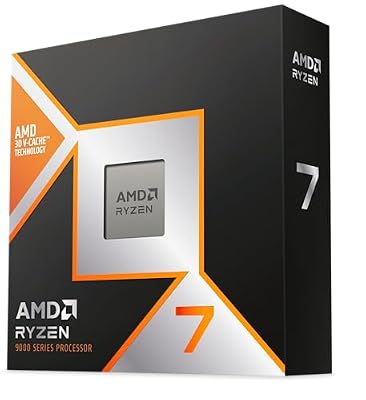
The current reference point for gaming lows, because its stacked cache keeps frame preparation fed during the spikes that create slow frames.
Specs:
– Cores and threads: 8 cores, 16 threads
– Boost clock: up to 5.2 GHz
– Cache: 96MB of L3 cache with 3D V-Cache
– Socket: AM5
AMD Ryzen 7 7800X3D

The previous generation of the same idea, and still one of the strongest processors for percentile performance in CPU-limited games.
Specs:
– Cores and threads: 8 cores, 16 threads
– Boost clock: up to 5.0 GHz
– Cache: 96MB of L3 cache with 3D V-Cache
– Socket: AM5
ASUS Prime GeForce RTX 5060 Ti 16GB

The 16GB of memory is the relevant figure here: enough VRAM headroom keeps texture streaming out of individual frames at 1440p.
Specs:
– Memory: 16GB GDDR7
– CUDA cores: 4,608
– Interface: PCIe 5.0 x8
– Outputs: HDMI 2.1b, DisplayPort 2.1b
Sapphire Pulse Radeon RX 9070 XT

A high average frame rate with matching lows, helped by 16GB of memory and strong raster performance at 1440p.
Specs:
– Memory: 16GB GDDR6
– Compute units: 64
– Boost clock: up to 2.97 GHz
– Interface: PCIe 5.0 x16
Alienware AW2725DF QD-OLED Monitor

Averages and lows are only visible if the display can show them; a 360Hz panel with near-instant pixel response keeps frame pacing readable instead of smearing it.
Specs:
– Panel: 26.7-inch QD-OLED
– Resolution: 2560 x 1440
– Refresh rate: 360Hz
– Response time: 0.03ms gray-to-gray
How to Choose
Start by deciding which statistic you are shopping for. If a review only lists averages, treat its conclusions as incomplete for smoothness and look for frametime graphs or percentile figures before comparing two parts. When you compare processors, weight the 1 percent low more heavily than the average, especially for 1080p and high-refresh play, because that is where CPU limits surface. When you compare graphics cards, check that the model you pick has enough VRAM for your resolution and settings, since memory exhaustion attacks the lows first.
Next, match the upgrade to the bottleneck. Raise the resolution or graphics settings and watch whether the lows improve relative to the average: if they do, the CPU was the limit. If the lows stay poor at every setting while the average scales, suspect VRAM capacity or storage streaming. Finally, read the 0.1 percent low as a spike detector rather than a buying metric. It is the least stable statistic between runs, so use it to spot problems, not to rank products separated by small margins.
Who Should Skip
Skip percentile analysis entirely if you play mostly turn-based, strategy, or slow-paced games where a single slow frame has no gameplay cost, or if your display is a basic 60Hz panel, because the screen cannot show differences above its own refresh ceiling anyway. Skip chasing lows if your current 1 percent low already sits close to your average and above your monitor’s refresh rate in the games you play; there is nothing left to fix. And skip upgrading the graphics card to cure stutter until you have confirmed the cause, because CPU and memory limits are the more common source of poor lows and a faster GPU will not move them.
Frequently Asked Questions
Is a low 1 percent low always caused by a weak CPU?
No. The CPU is the most common cause, but VRAM exhaustion, slow storage during asset streaming, background tasks, and unstable memory settings all produce slow frames too. The statistic tells you that spikes exist, not which component caused them, so diagnosis still matters before buying anything.
Why is the 1 percent low always lower than the average FPS?
Because it is calculated only from the slowest slice of frames in the run. By construction it excludes the fast majority, so it must sit below the average. A healthy result is a 1 percent low that stays within roughly three quarters of the average in the same test.
Should I care about the 0.1 percent low when buying hardware?
Only as a warning sign. It is built from a tiny sample of the very worst frames, so it varies a lot between identical runs. Use it to notice severe spikes in a review, but rank products by the average and the 1 percent low instead.
Can settings changes improve the 1 percent low?
Yes. Lowering texture quality to fit VRAM, reducing crowd or draw-distance settings that load the CPU, and capping the frame rate just below a value your system holds steadily can all tighten the lows, sometimes more than they change the average.
Final Verdict
The average frame rate describes how fast a game ran; the 1 percent low describes how it felt. Reading both together explains most of the gap between benchmark charts and real play, and it points your upgrade money at the right component: cache-rich CPUs and adequate memory for consistency, GPU power for the average. When a review gives you only one number, it has told you only half the story.