Buying for a PC gamer is easy to get wrong in a specific way: you grab something flashy that looks like “gamer gear” but doesn’t actually fit their setup, their games, or how they play. The good news is the best gifts in this space are usually peripherals and accessories, not core components, so you don’t need to know their exact rig specs. You just need to know their budget and a few habits (do they play competitively, do they wear headphones for hours, do they care about RGB at all).
Here’s a practical breakdown by price tier, with honest notes on where cheaper is genuinely fine and where spending more actually buys something real.
Under $50
This tier is mostly about small, daily-use upgrades. Nobody’s getting a new GPU for $50, but you can meaningfully improve comfort or convenience.
A good large mouse pad is an underrated gift. If someone’s still using a mousepad the size of a coaster, a full desk-sized pad changes how their mouse actually moves, especially for low-sensitivity players who swing their arm a lot. It’s cheap, it’s not personal in a way that can go wrong, and it’s an upgrade almost everyone appreciates even if they wouldn’t buy it themselves.
Cable management kits, a basic headset stand, or a controller charging dock also live in this range. None of these are exciting to unwrap, but they solve small daily annoyances, which is honestly what a lot of good gifts do. Don’t overthink this tier: skip anything that claims to “boost FPS” or similar, since at this price it’s almost always a gimmick (software overlays, “gaming” USB hubs with no real benefit, that kind of thing).
Under $100
This is where you can give something that changes their actual play experience, not just their desk setup.
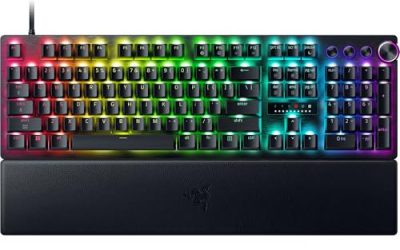
A mechanical keyboard is the single best gift in this range for most PC gamers. If they’re currently on a membrane keyboard that came bundled with their PC, switching to mechanical switches is a noticeable difference in both feel and consistency. The catch: switch preference is personal. Linear switches (like reds) are quiet-ish and smooth, tactile switches have a bump you feel mid-press, and clicky switches are loud and divisive, some people love the sound, others, and their roommates, do not. If you don’t know their preference, a linear or tactile board is the safer default. Browse mechanical gaming keyboards in this price range and you’ll find solid options without needing a $150+ board with hot-swappable switches, which is a nice-to-have, not a necessity, for most people.
A wired or wireless gaming headset also fits here, but there’s a real trade-off to flag: at under $100, wireless headsets usually mean compromises in battery life or audio quality compared to a wired set at the same price. If they already own decent headphones, a dedicated gaming headset isn’t always an upgrade, it’s mainly about the built-in mic. If they stream, call teammates often, or play competitively, the mic matters. If they mostly play single-player or already have a separate mic, you might be better served by the next tier instead.
Under $200
This is the tier where you start buying things that are hard to self-justify but genuinely great to receive: a nicer chair cushion, a quality webcam, or, most commonly, a step up in mouse and headset quality where the difference is actually felt rather than marketed.
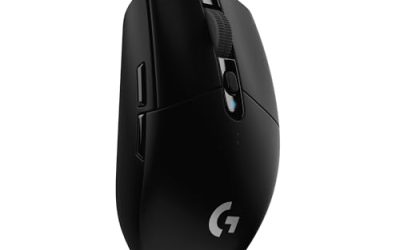
Wireless gaming mice in this range solve the real problems of cheaper wireless mice: input lag and inconsistent battery life. If the recipient plays anything twitchy (shooters, fighting games), a quality wireless mouse removes the cord drag that affects aim at the margins. It’s a legitimate upgrade, not a luxury flex. Look at wireless gaming mice here rather than in the under-$50 tier, where you’ll often get a wireless mouse with noticeable lag or weak battery life.
A capture card or a dedicated webcam fits here too, but only for someone who streams or records, don’t buy this speculatively for someone who’s never mentioned wanting to.
| Budget | Best gift type | Good for | Skip if… |
|---|---|---|---|
| Under $50 | Mouse pad, headset stand, cable kit | Anyone, low risk | They already have a tidy, upgraded desk |
| Under $100 | Mechanical keyboard | Daily PC users, typists, gamers alike | They’re attached to a specific switch feel you don’t know |
| Under $100 | Gaming headset | Streamers, team-game players | They already have good headphones + mic |
| Under $200 | Wireless gaming mouse | Competitive/twitchy game players | They play mostly slower, single-player games |
| Under $200 | Webcam / capture card | Active streamers only | They’ve never mentioned streaming |
What to buy based on who they are
If you don’t know their game preferences well, go generic and useful: mouse pad, keyboard, cable management. If they’re a known competitive player (ranked shooters, MOBAs), prioritize input devices, mouse and keyboard, over anything cosmetic. If they’re a casual or story-game player, comfort items matter more than performance gear; a headset or chair accessory beats a high-polling-rate mouse they’ll never push to its limit. If they stream or create content, the webcam/capture card tier is the one that actually gets used, everything else is secondary to that.
One more honest note: if you’re not sure at all, a gift card to a specific retailer avoids the single biggest failure mode in PC gaming gifts, which is buying a peripheral that doesn’t suit their grip style, desk size, or existing setup. It’s a less personal gift, but it has a 0% chance of ending up in a drawer.
FAQ
Is a gaming mouse actually different from a regular mouse?
Yes, mainly in sensor consistency and polling rate, meaning the cursor tracks more predictably at high speeds. For casual use the difference is small, but for fast-paced games it’s noticeable, especially going from a basic office mouse to a dedicated gaming one.
Should I worry about switch type when buying a mechanical keyboard?
A little, but don’t overthink it. Linear or tactile switches are safe defaults for someone you’re not sure about. Clicky switches are the one type worth avoiding unless you know they specifically want that sound, since it’s genuinely loud for shared spaces.
Are wireless peripherals reliable enough for gaming now?
At the mid-to-upper price range, yes, modern wireless mice and keyboards have low enough latency that most players won’t notice a difference from wired. At the very low end, lag and battery issues are more common, so it’s worth spending a bit more if wireless matters to them.
What if I don’t know what PC parts they already have?
You don’t need to. Peripherals, mouse, keyboard, headset, mouse pad, work independently of their specific GPU or CPU, which is exactly why they make safer gifts than anything related to the PC’s internals.