- Top Pick: Razer Tartarus V2 Left-Handed Gaming Keypad, 32 Programmable Keys, Black
- Best Value: VSDINSIDE Macro Keypad, Stream Controller Deck Gaming Streaming Shortcut Keyboard, 18 Programmable Keys Customizable Visual AI Pad USB Soundboard for OBS, YouTube, Desk Office Setup, Laptop, PC, Mac
- Premium Choice: Redragon K585 Wired One-Handed RGB Gaming Keypad, Tactical 42-Key Layout
Affiliate disclosure: As an Amazon Associate we earn from qualifying purchases. This post contains affiliate links — if you buy through them we may earn a small commission at no extra cost to you. This never affects our recommendations.
As an Amazon Associate we earn from qualifying purchases at no extra cost to you.





In a hurry? See the top-rated Gaming Macro Pad deals available right now:
🛒 Check Gaming Macro Pad Prices on Amazon →🛒 Best Price Today on Amazon
Prime members get fast, free shipping on everything above, plus member-only deals. New members get a 30-day free trial — cancel anytime.
Start 30-Day Prime Free Trial →See Today’s Amazon DealsIntroduction
If you’ve ever tried to juggle a full MMO ability rotation, manage streaming overlays, or execute frame-perfect combos while reaching across a standard keyboard, you already know the pain. Macro pads exist to solve exactly that problem — they put your most critical hotkeys, macros, and shortcuts within thumb’s reach, letting your muscle memory work smarter instead of harder. Whether you’re raiding in Final Fantasy XIV with 30 active abilities, switching scenes in OBS mid-stream, or issuing rapid commands in a real-time strategy game, a dedicated macro pad can be the difference between fumbling and flowing.
The market in 2026 has matured significantly. You’re no longer choosing between a cheap membrane pad and an expensive niche device. Today’s lineup spans everything from analog thumbstick keypads designed for MMO veterans to LCD-button stream decks used by full-time content creators. The form factors, key counts, and software ecosystems vary wildly — and picking the wrong one for your workflow is a real risk if you don’t know what to look for.
This guide cuts through the noise. We evaluated five of the strongest contenders across gaming, streaming, and productivity use cases, weighing build quality, programmability, software depth, and price-to-value ratio. Here’s what actually holds up in 2026.
Quick Comparison Table
| Product | Keys | Analog Input? | Software | Best For | Price Range |
|---|---|---|---|---|---|
| Razer Tartarus Pro | 32 | Yes (analog stick) | Razer Synapse 3 | MMO / Action RPG | $80–$100 |
| Elgato Stream Deck MK.2 | 15 LCD | No | Stream Deck Software | Streamers / Content Creators | $130–$150 |
| Koolertron Single Hand Keyboard | 46 | No | Standalone programming | Budget / Productivity | $40–$60 |
| Azeron Cyborg Gaming Keypad | 26+ | Yes (analog joystick) | Azeron App | FPS / Controller hybrid users | $120–$160 |
| Redragon K585 DITI | 42 | No | Redragon Software | Budget Gaming / Hybrid setup | $35–$55 |
Top 5 Best Gaming Macro Pads in 2026
Razer Tartarus Pro
The Razer Tartarus Pro remains the gold standard for MMO and action RPG players in 2026. Its 32 fully programmable keys — arranged in an ergonomic left-hand layout — are backed by Razer’s analog optical switches, which detect input at 32 levels of actuation depth. That means light presses can trigger slower in-game actions while harder presses execute full-speed commands, a feature that translates directly into smoother ability queuing and variable movement control. Razer Synapse 3 handles macro assignment, per-key RGB, and profile management with one of the deepest software ecosystems in the peripheral space.
Pros:
- Analog switch actuation adds genuine gameplay depth
- 32 keys plus an 8-way directional pad covers nearly any MMO layout
- Synapse 3 integration works across the entire Razer ecosystem
- Comfortable wrist rest for long sessions
Cons:
- Synapse 3 requires cloud login to unlock full functionality
- Premium price compared to competitors at same key count
- Analog feature has limited game support outside specific titles
Elgato Stream Deck MK.2 (15 Keys)
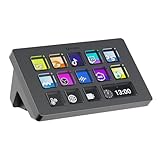
The Elgato Stream Deck MK.2 is the definitive macro pad for streamers and content creators, and it earned that title by doing one thing better than everyone else: each of its 15 keys has an individual LCD screen that displays a live icon, label, or animated image. That visual feedback eliminates the guesswork of memorizing which blank key does what. The Stream Deck software supports native integrations with OBS, Twitch, YouTube, Spotify, Adobe apps, and hundreds of third-party plugins — you can trigger scene switches, run Twitch alerts, control audio levels, launch applications, and send keystrokes all from the same device.
Pros:
- LCD keys provide instant visual confirmation of function
- Massive plugin library covers virtually every streaming and creative tool
- Folder-style pages let you store hundreds of macros behind 15 physical keys
- Build quality is excellent; sturdy desk stand is adjustable
Cons:
- Not optimized for in-game use — no analog input, awkward in fast-paced gaming
- Requires Stream Deck software running in background
- Pricier than gaming-focused alternatives at similar key counts
Koolertron Single Hand Mechanical Keyboard
The Koolertron Single Hand Mechanical Keyboard is the sleeper pick on this list — a 46-key fully programmable mechanical pad that doesn’t require any software to configure. Every key is remapped directly on the hardware itself using a built-in programming mode, which means your macros survive across any PC without installing drivers. It ships with your choice of mechanical switch (typically Blue, Red, or Brown variants), and the layout is generous enough to cover both gaming macros and productivity shortcuts without cramping your fingers.
Pros:
- Hardware-level programming — no software required, fully portable
- 46 keys is one of the highest counts in this price bracket
- Mechanical switches with your choice of actuation type
- Extremely affordable entry point
Cons:
- No dedicated software means complex macro sequences are harder to build
- No analog input or thumbstick
- RGB lighting is basic compared to premium competitors
- Build feel is budget-grade — lighter plastic construction
Koolertron Single Hand Mechanical Keyboard
Azeron Cyborg Gaming Keypad
The Azeron Cyborg Gaming Keypad takes a completely different design philosophy — it’s a tower-style keypad that wraps around your hand like a gaming controller, with finger columns of programmable keys and a full analog joystick at the base. It’s the closest thing on the market to fusing a keyboard and controller into a single left-hand device. FPS players who want the precision of mouse aim combined with analog movement control will find this layout uniquely powerful. The Azeron software allows per-key assignment, analog sensitivity tuning, and profile storage, while the 3D-printed chassis means fit can be customized.
Pros:
- Analog joystick delivers true variable-speed movement in supported games
- Ergonomic tower design reduces finger travel across keys
- Highly customizable both physically and in software
- Strong choice for controller-to-keyboard converts who miss analog sticks
Cons:
- Steep learning curve — takes days to adapt to the layout
- Higher price point for what is essentially a niche input device
- Software is functional but less polished than Razer or Elgato
- Not ideal for streaming or non-gaming productivity tasks
Redragon K585 DITI One-Handed Keyboard
The Redragon K585 DITI is built for budget-conscious gamers who want a full one-handed gaming keyboard rather than a minimal pad. Its 42-key layout mirrors the left half of a traditional keyboard closely enough that most players can adapt within hours, and it adds five dedicated macro keys along the top row for custom binds. Redragon’s software allows basic macro recording and RGB customization, and the blue mechanical switches deliver a satisfying tactile click that holds up well for extended gaming sessions. For the price, the build is surprisingly solid.
Pros:
- Familiar QWERTY-adjacent layout minimizes adaptation time
- Five dedicated macro keys on top of standard key layout
- Mechanical switches at a budget price point
- Stable, weighted base prevents sliding during intense use
Cons:
- No analog input
- Redragon’s software is functional but basic compared to Synapse or Stream Deck
- Five macro keys is modest compared to dedicated macro pads
- RGB implementation is limited to per-zone rather than per-key on some units
Redragon K585 DITI One-Handed Keyboard
How to Choose the Best Gaming Macro Pad
Gaming vs Streaming Use Case
This is the first filter to apply. If your primary use is in-game — executing ability rotations, issuing rapid commands, managing cooldowns — you want a device optimized for fast tactile input and, ideally, analog capabilities. The Razer Tartarus Pro and Azeron Cyborg are built for this. If your priority is stream management, scene switching, and application control, the Elgato Stream Deck MK.2 is in a category by itself. Trying to use a Stream Deck as a gaming macro pad mid-match is awkward; trying to use a Tartarus to run stream overlays is unnecessarily complicated.
Key Count
More keys means more macros on a single profile layer — but it also means a larger footprint and more to memorize. For MMO players, 30+ keys with profile layers is typically the target. For streamers managing scenes and alerts, 15 LCD keys with folder-based pages can scale to hundreds of functions. For casual gaming or hybrid productivity use, 40+ keys on a compact pad like the Koolertron offers volume without the premium price.
Analog Inputs
Analog input is a niche but meaningful feature. If you play games that support variable input depth — certain action RPGs, open-world titles, or racing games — analog switch actuation on the Tartarus Pro or the joystick on the Azeron changes how you interact with movement and abilities. If you play primarily strategy games, MOBAs, or shooters where digital on/off input is standard, analog is irrelevant and you shouldn’t pay extra for it.
Software Ecosystem
Software depth determines long-term usability. Razer Synapse 3 is powerful but requires an account. Stream Deck’s plugin library is unmatched for content creation workflows. Koolertron’s hardware programming is the most portable option — no software dependency at all. Redragon’s software covers the basics but won’t satisfy power users. Before committing, verify that the software ecosystem supports the specific games, applications, or integrations you actually use.
Budget
The honest breakdown: $35–$60 gets you solid mechanical keys and basic macro support (Koolertron, Redragon). $80–$100 gets you premium build quality, deeper software, and analog input (Razer Tartarus Pro). $120–$160 buys specialized hardware for specific workflows — analog tower design for FPS players (Azeron) or LCD-key streaming control (Stream Deck MK.2). Don’t overspend on features you won’t use.
Final Verdict
For most gamers, the Razer Tartarus Pro is the best gaming macro pad in 2026. It hits the right balance of key count, ergonomics, analog capability, and software depth. Synapse 3’s macro editor is comprehensive enough to handle complex MMO rotations, the 32-key layout leaves room for full ability sets plus modifiers, and the analog optical switches add a layer of control that no other pad at this price offers.
For MMO and action RPG specialists who want to push deeper into analog control, the Azeron Cyborg is worth the investment and the learning curve. It’s a polarizing device that won’t suit everyone, but players who adapt to it rarely go back.
Streamers and content creators should ignore the gaming-focused pads entirely and go straight to the Elgato Stream Deck MK.2. Nothing else on the market matches its visual key labeling, plugin ecosystem depth, or workflow integration breadth. For players on a tight budget who just want more hotkeys without complexity, the Koolertron remains the best value pick — hardware-level programming, 46 keys, and zero software dependency make it a practical workhorse that punches well above its price.
Frequently Asked Questions
What is a gaming macro pad used for?
A macro pad is a compact set of programmable keys for binding complex actions, ability rotations, hotkeys, or stream controls. It frees up your main keyboard and speeds up repetitive inputs.
Is a macro pad allowed in competitive games?
Simple key rebinds are generally fine, but multi-action macros that automate gameplay can violate the rules of competitive titles. Check each game policy before using complex macros.
How many keys should a gaming macro pad have?
6-12 keys covers most needs. Streamers and creators may want more, plus rotary dials or screens. Choose based on how many bindings you actually use day to day.
Can I use a macro pad for streaming and apps?
Yes. Macro pads are great for scene switching, muting, launching apps, and editing shortcuts. Many include software for per-application profiles that switch automatically.
Related Articles
Looking for more on this topic? Browse the hand-picked guides below — each one applies the same scoring rubric used in this review.