Hogwarts Legacy punishes a laptop in ways a smaller game does not. Flying across the open world streams new areas constantly, Hogsmeade crowds the processor, and turning on ray tracing loads an already busy graphics chip even harder, so the real decision is not simply which RTX badge looks best. A low-wattage GPU, a single stick of memory, or only 8GB of system RAM in some cheaper configurations can leave an otherwise familiar model name feeling underpowered here.
This guide is for players who want the game to stay smooth at the laptop screen’s native resolution, for buyers weighing ray-traced lighting against a steadier frame rate, and for anyone replacing an older machine outright. Every pick below was chosen from the product name and specifications shown on its Amazon product page, then checked against the memory and storage layout for that exact model.
Quick Picks
As an Amazon Associate we earn from qualifying purchases.
| Product | Best for | Key spec from title |
|---|---|---|
| ASUS ROG Strix G16 (G614JV-AS74) | Full-power RTX 4060 play at 1080p-class resolution | RTX 4060 at 140W Max TGP |
| Acer Predator Helios 16 (PH16-71-74UU) | Sharper 1600p screen for exploring Hogwarts | 16-inch 2560 x 1600 165Hz G-SYNC display |
| Dell G16 7630 (G7630-9343GRY-PUS) | Strongest graphics step in this list | NVIDIA GeForce RTX 4070 8GB GDDR6 |
How to Choose
GPU tier and wattage for this game
Two laptops can both say RTX 4060 and behave very differently, because the power limit decides how hard that chip can work. For this title, favour a high-wattage configuration and treat ray tracing as an optional extra rather than a starting assumption. Digital Trends, in its Hogwarts Legacy settings coverage, notes that the game is very demanding on video memory and recommends lowering texture, view distance and material quality when stutter appears. An RTX 4070 gives more headroom at 1600p, while a full-power RTX 4060 is the sensible match for 1080p or 1200p screens.
RAM and SSD capacity as the practical floor
Treat 16GB of system memory as the floor, not a generous allowance, and plan a move to 32GB if you keep chat, a browser or recording tools open while playing. The official requirements summarised by Digital Trends call for 16GB even at the minimum level, with 32GB recommended once you move past 1080p. Storage matters just as much: the game needs a large install, so a 1TB SSD leaves room for patches and other titles, whereas a 512GB drive fills quickly and forces deletions sooner than most buyers expect.
Display size, refresh and resolution for exploration
A 16-inch, 16:10 panel suits this game well because the extra vertical space helps in menus, spell lists and map work, while the wider view still feels cinematic outdoors. Match the panel to the graphics chip instead of chasing numbers alone. If you are also weighing a desktop card for the same game, our guide to the best GPU for Hogwarts Legacy breaks down that side of the decision. A 165Hz screen will not make a demanding open-world title run at 165 frames per second, but it does leave room for smoother play in lighter indoor scenes.
Upgradeability, ports and warranty
Check what you can change later before you pay for capacity you may not need today. Two SO-DIMM slots and a second M.2 bay, as several picks here offer, let you move from 16GB to 32GB or add storage without replacing the whole laptop, while soldered memory would lock that decision at checkout. Confirm the warranty term on the exact listing, look for HDMI and USB-C with display output for an external monitor, and keep the model code from the title when you register the machine or order parts.
The 3 Best Options
ASUS ROG Strix G16 (G614JV-AS74)

For a player who wants the graphics chip allowed to stretch its legs, this Strix configuration pairs its RTX 4060 with a stated 140W Max TGP, which is exactly the detail that separates stronger 4060 laptops from weaker namesakes. The 1920 x 1200 screen keeps the workload sensible for that chip, and the 1TB drive avoids an immediate storage shuffle. On upgradeability, an ASUS ROG forum response for the G614JV confirms two memory sockets and two SSD slots, with one SSD slot already in use, so adding a second drive is the easy first upgrade.
Specs
- Model: G614JV-AS74, Eclipse Gray
- Processor: Intel Core i7-13650HX
- Graphics: NVIDIA GeForce RTX 4060 Laptop GPU at 140W Max TGP
- Memory: 16GB DDR5-4800MHz
- Storage: 1TB PCIe Gen4 SSD
- Display: 16-inch FHD 165Hz, 100% sRGB
- Wireless: Wi-Fi 6E
- Operating system: Windows 11 Home
- Battery: 90Wh
Best for: Players who want a full-power RTX 4060 matched to a 1200p screen rather than an oversized panel.
Watch out for: Confirm the listing really is the G614JV-AS74 with the 140W figure, because other Strix G16 variants use weaker graphics chips.
ASIN: B0CRDCXRK2
Acer Predator Helios 16 (PH16-71-74UU)
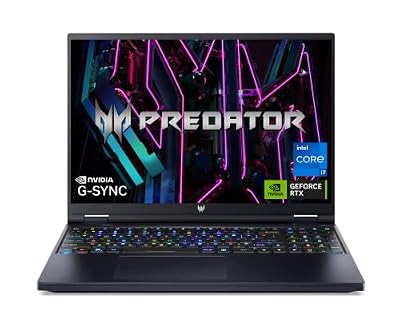
Choose this Helios if the view matters as much as the hardware behind it. Its 2560 x 1600 panel gives Hogwarts, the castle interiors and the surrounding highlands more detail than a 1080p screen, and G-SYNC helps smooth the uneven moments that open-world travel can produce. The Core i7-13700HX and RTX 4060 pairing still asks for sensible settings at that resolution, especially with ray tracing off. For upgrades, the manual for this exact PH16-71-74UU model describes two DDR5 slots up to 32GB and two PCIe M.2 slots, so neither memory nor storage is sealed in.
Specs
- Model: PH16-71-74UU
- Processor: 13th Gen Intel Core i7-13700HX
- Graphics: NVIDIA GeForce RTX 4060
- Display: 16-inch 2560 x 1600 165Hz G-SYNC
- Memory: 16GB DDR5
- Storage: 1TB Gen 4 SSD
- Wireless: Killer Wi-Fi 6E
Best for: Players who prioritise a sharper 1600p display for exploration and are comfortable tuning settings to match it.
Watch out for: At native 1600p, plan to use upscaling and keep ray tracing off or low, since the RTX 4060 has to push considerably more pixels here.
ASIN: B0BXMNSXDD
Dell G16 7630 (G7630-9343GRY-PUS)

This Dell is the step up for anyone unwilling to compromise as far on graphics settings. The RTX 4070 sits above every 4060 in this roundup, and it is paired with a Core i9-13900HX, a combination aimed squarely at a 2560 x 1600 screen. Notebookcheck coverage of this G16 configuration notes that both memory and SSD can be upgraded later, and a second M.2 slot is available for added storage. That flexibility matters, because the sensible long-term move here is adding a second drive or more memory rather than replacing a still-capable graphics chip.
Specs
- Model: G7630-9343GRY-PUS, Metallic Nightshade
- Processor: Intel Core i9-13900HX
- Graphics: NVIDIA GeForce RTX 4070 8GB GDDR6
- Display: 16-inch QHD+ 2560 x 1600 165Hz, 3ms
- Memory: 16GB DDR5 RAM
- Storage: 1TB SSD
- Operating system: Windows 11 Home
Best for: Buyers who want the strongest graphics option here for higher settings at 1600p.
Watch out for: This is a large, heavy desktop-replacement style machine, so check the listed weight and dimensions if you plan to carry it daily.
ASIN: B0C3HZ6PV4
Which One Fits Your Situation
You want ray tracing, but not at any cost
Start with the Dell G16 and its RTX 4070, because extra graphics headroom is what ray-traced shadows and reflections consume first in this game. Keep expectations measured even there: use upscaling, test one ray-tracing setting at a time, and be ready to turn it off in Hogsmeade if the frame rate becomes uneven during busy scenes.
You play mostly on the laptop screen at home
Either Acer or the ASUS makes sense, and the choice is really about resolution. Pick the Predator Helios 16 for the sharper 1600p view, or the Strix G16 if you would rather let a full-power RTX 4060 work at 1200p with less need to lower settings. Both give you a second SSD slot for a growing library.
You keep other apps open while you play
Start with any pick here at 16GB, then plan the upgrade to 32GB rather than hunting for a factory 32GB listing. Hogwarts Legacy already wants 16GB as its baseline, so the extra memory leaves breathing room for voice chat, a guide in the browser, or capture software. All three families here expose SO-DIMM slots, which makes that later step straightforward.
You travel, but still want a big screen
None of these is a light ultraportable, so choose by the smallest compromise you can accept and budget for a proper padded bag. The Strix G16 keeps the display workload modest, which helps when you are away from your usual desk setup, but every model here is a 16-inch machine that rewards a short, deliberate carry over daily commuting.
Common Mistakes
- Buying by GPU name alone and ignoring the wattage, so a low-power RTX 4060 laptop performs well below a full-power model with the same badge.
- Choosing a configuration with less than 16GB of RAM, even though 16GB is the game’s stated minimum rather than a comfortable target.
- Turning on every ray-tracing option at native 1600p before checking how the game runs with upscaling and more modest settings.
- Filling a 512GB SSD with the game, patches and two other large titles, then having no room left for updates.
- Assuming every version of a model has the same slots, screen or graphics power, instead of checking the exact model code in the listing title.
Frequently Asked Questions
Is an RTX 4060 laptop enough for Hogwarts Legacy?
Yes, provided it is a high-wattage configuration paired with at least 16GB of system memory and an SSD. Expect to tune settings at 1440p or 1600p and to use upscaling there. At 1080p or 1200p, a full-power RTX 4060 such as the Strix configuration is a much more comfortable match.
How much RAM does Hogwarts Legacy really need on a laptop?
Plan on 16GB as the minimum you should accept, because that figure appears even in the game’s lowest official tier. Digital Trends recommends considering 32GB once you move past 1080p, partly because Windows and background apps consume memory alongside the game itself. A laptop with two SO-DIMM slots lets you make that jump later.
Should I enable ray tracing on a gaming laptop for this game?
Only after you have a stable baseline without it. Ray tracing adds shadows, reflections and ambient occlusion work on top of an already demanding open world, and laptop graphics chips have a fixed power budget. Enable one effect at a time, keep upscaling on, and judge the result in Hogsmeade rather than in a quiet indoor room.
Can I upgrade the RAM and SSD in these laptops later?
In the Strix G16 and Helios 16 families, specifications describe two SO-DIMM slots and two M.2 slots, and Notebookcheck notes the same upgrade path for memory and storage on the Dell G16. Always confirm the exact model code first, because a different suffix can mean a different board, screen or memory layout.