

The Xbox Wireless Controller is still the safest default for PC in 2026 — Windows speaks its language natively, so it works the moment you plug it in. But it is no longer the automatic answer. Hall-effect sticks, back paddles and Steam Input have made this a competitive category, and the best gaming controllers for PC now depend more on what you play than on the logo.
- Best Gaming Controllers for PC in 2026, by Use Case
- XInput vs DirectInput: Why Xbox Controllers “Just Work”
- Wired vs Wireless: Dongle, Bluetooth, and Real Latency
- Hall-Effect Sticks: The Biggest Long-Term Buying Factor
- Back Paddles and Trigger Stops: Who Benefits
- The DualSense on PC: Adaptive Triggers and Haptics
- Fighting, Racing and Shooters Want Different Things
- Budget vs Pro Tier: Is a Pro Controller Worth 3x?
- Battery Life: Replaceable vs Built-In
- Frequently Asked Questions


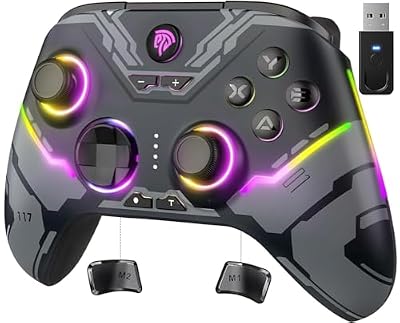
Best Gaming Controllers for PC in 2026, by Use Case
Find the row matching how you actually play, then read the section explaining why.
| You mostly play | Prioritise | Type of controller | Skip if |
|---|---|---|---|
| Third-person action, platformers, Game Pass | Zero-setup XInput compatibility | Standard Xbox Wireless Controller (or its wired sibling) | You want paddles or drift-proof sticks |
| Competitive shooters on pad | Paddles, trigger stops, 2.4GHz dongle | Pro tier: Xbox Elite Series 2, Razer Wolverine V3 Pro, Victrix Pro BFG | You play shooters on mouse and keyboard |
| Long RPG and single-player sessions | Hall-effect sticks, battery life, comfort | 8BitDo Ultimate 2, GameSir Cyclone 2, GuliKit KingKong 3 Max | You need native adaptive triggers |
| PlayStation ports on PC | Haptics and adaptive triggers over USB | Sony DualSense (or DualSense Edge) | Your library is mostly Xbox-first |
| Fighting games | D-pad quality, or a stick/leverless board | Hori Fighting Commander OCTA, or an arcade stick | You only play fighters casually |
| Racing and sims | Full analogue trigger travel | Any good pad, then a force-feedback wheel | You have no desk space for a wheel |
| Tight budget | Reliability over features | Wired Xbox-layout pad under $35 | You want wireless at any cost |
XInput vs DirectInput: Why Xbox Controllers “Just Work”
Windows has two controller standards. XInput is the modern one Microsoft built around the Xbox 360 pad, and it is what nearly every PC game of the last fifteen years expects: fixed button names, analogue triggers on separate axes, rumble. DirectInput is the older, looser standard that generic pads, sticks and wheels report through, and games must interpret it themselves — hence a no-name pad arriving with scrambled face buttons.
Steam Input is the translator, and in 2026 it is excellent: it intercepts a DualSense, DualShock 4, Switch Pro Controller or generic pad and presents it as a virtual Xbox controller, with gyro aiming, per-game bindings and community layouts. Inside Steam, almost anything behaves like an Xbox pad. Outside Steam — Epic, Game Pass apps, emulators — you fall back on the controller’s own compatibility, which is where a DS4 needs DS4Windows and cheap pads fall apart. Most third-party pads dodge this with a switch that boots them in XInput mode; if you take one thing from this guide, buy a pad with that switch for your gaming PC build.
Wired vs Wireless: Dongle, Bluetooth, and Real Latency
Wired is still the lowest-latency option and never needs charging, which is why a wired Xbox-style controller is a legitimate buy rather than a compromise: same shell, same XInput behaviour, often a third the price of a pro pad. The downsides are cable snag and the corners makers cut on stick quality at that price.
Among wireless options, the connection type matters more than wired versus wireless does. A dedicated 2.4GHz dongle adds a millisecond or two over USB and is invisible in play. Bluetooth is the variable one: fine for single-player, but prone to interference in a crowded 2.4GHz band and inconsistent enough that competitive players avoid it. Xbox pads also use a proprietary protocol needing the Xbox Wireless Adapter or a motherboard with it built in. If one room stutters and another does not, audit it alongside your router setup for gaming.
Hall-Effect Sticks: The Biggest Long-Term Buying Factor
Stick drift is not bad luck. Traditional sticks use potentiometers — a wiper dragging across a resistive track — and that track wears. Debris collects, readings turn noisy, and the game reads movement with your thumb off the stick. It is a function of hours played.
Hall-effect sticks replace contact with magnets and a sensor reading the magnetic field, so nothing rubs and nothing wears. TMR sticks work the same contactless way with lower power draw. Such a pad is far more likely to still be usable in three years, and usually adds tighter deadzone control.
That shifts the value argument. A $50–$70 hall-effect pad from 8BitDo, GameSir or GuliKit can outlast a $180 pro controller still shipping potentiometers. Between two similar pads, hall-effect wins — it decides whether you buy this controller again in eighteen months. Sony’s DualSense Edge instead uses replaceable stick modules: a real fix, but a paid one.
Back Paddles and Trigger Stops: Who Benefits
Back paddles let you jump, slide or crouch without lifting your right thumb off the aim stick. In a shooter that is a mechanical advantage, not a gimmick — claw grip exists because players wanted this before hardware offered it. Two paddles capture most of the benefit.
Trigger stops shorten the pull so the trigger clicks like a mouse. Pure upside in shooters, an active negative in racing, where you need full travel to modulate throttle and brake. Buy switchable stops, not permanently short triggers.
Everyone else can skip both. Put the money toward a high-refresh gaming monitor or a better gaming headset — both change more games than paddles do.
The DualSense on PC: Adaptive Triggers and Haptics
Sony’s DualSense is the most interesting controller on PC and the most conditional. Its headline features — adaptive triggers that stiffen and resist, and fine-grained haptics in place of rumble — do work on PC, but generally only over USB and only in games that explicitly implement them: mainly the PlayStation Studios ports (the Spider-Man games, God of War Ragnarök, Returnal, Horizon, Ghost of Tsushima) plus scattered third-party titles.
Everywhere else a DualSense is a well-built pad with good sticks, an excellent touchpad-and-gyro combination through Steam Input, and ordinary rumble. Still good — just do not pay the premium expecting trigger resistance in every shooter you own. Over Bluetooth, assume those features are off.
The older DS4 controller is simpler: cheap and capable inside Steam, one of the better D-pads around, and it needs DS4Windows elsewhere. If you own one, test it before buying.
Fighting, Racing and Shooters Want Different Things
Fighting games live or die on the D-pad. A mushy floating disc eats quarter-circle inputs however good the rest of the pad is, which is why Sony controllers and fight pads like the Hori Fighting Commander OCTA punch above their price, and why serious players move to an arcade stick.
Racing wants the opposite: long, linear trigger travel, plus trigger rumble to feel wheel lock. A wheel earns its cost once you run sims regularly. Shooters want paddles, trigger stops, dongle wireless and gyro aiming where supported — gyro through Steam Input is the most underrated accuracy upgrade on a pad, and closes real ground on a gaming mouse.
Budget vs Pro Tier: Is a Pro Controller Worth 3x?
Usually not, with one exception. A $180 pro pad buys paddles, trigger stops, swappable sticks, onboard profiles and a case. If you compete in shooters and use the paddles every session that is defensible; otherwise you are paying triple for a carry case.
The exception is durability. A pro pad with hall-effect or replaceable sticks that lasts four years costs less per year than three $60 pads that drift out after fourteen months each. Judge the tier on sticks and warranty, not accessory count — mid-range hall-effect pads are the smart buy, as mid-range parts are in a budget gaming PC.
Battery Life: Replaceable vs Built-In
Xbox pads still ship with AA batteries, which sounds dated but is the most repairable design here: when capacity fades you spend a few dollars, not a repair fee. Built-in lithium cells are tidier and charge over USB-C, but have a fixed lifespan and are rarely serviceable. Roughly, DualSense runtime sits lowest, Xbox pads on AAs in the middle, hall-effect pads highest. Choose by how you charge: for long desk sessions a pad you can play while charging makes it moot, and tidy cable routing removes the last annoyance.
Frequently Asked Questions
Is the wired controller for Xbox any good on PC?
Yes, and it is underrated. A wired Xbox-layout pad gives the same native XInput compatibility as the wireless version with no pairing, no batteries and marginally lower latency, usually for well under half the price. The trade-offs are the cable and the ordinary potentiometer sticks most budget wired pads use, so drift remains a long-term risk. As a second controller, or a first pad on a new rig, it makes sense.
Do I need a hall-effect controller, or is it marketing?
It is a genuine engineering difference. Conventional sticks wear physically because a contact drags across a resistive track, which is the root cause of drift. Hall-effect and TMR sticks read a magnetic field instead, with no contact and nothing to wear down. That does not make a pad immune to every fault, but it removes the most common reason controllers get thrown away.
Will a DS4 or DualSense work in games outside Steam?
Inside Steam both work everywhere, because Steam Input translates them into a virtual Xbox controller. Outside Steam — Epic Games Store, Game Pass apps, standalone launchers, emulators — support depends on the individual game, and many either ignore the pad or map buttons wrongly because they expect XInput. DS4Windows fixes this by creating the same virtual Xbox device system-wide: free and reliable, but one more thing to run.
Does wireless add noticeable input lag for competitive play?
With a dedicated 2.4GHz dongle, no — the difference from wired is a millisecond or two and effectively unmeasurable in play. Bluetooth is the variable one: acceptable for single-player, but more prone to interference and inconsistent timing, which is why competitive players stay on a dongle or a cable. A cable also removes battery level as a variable mid-match.
Are back paddles worth it if I do not play shooters?
Probably not. Paddles pay off when you need to press a button without lifting a thumb off the aim stick, which is mainly a shooter and action-game problem. In strategy, story-driven, racing or platform games that conflict rarely arises, so the paddles go unused while adding cost and accidental presses. Spend the money on stick quality instead.
















