

- Top Pick: HP 17 inch Business Laptop Computer • 2026 Edition • Latest AMD Ryzen 5 CPU • 16GB RAM • 512GB SSD • 17.3" FHD Display • Numeric Keypad • Long Battery Life • Windows 11 with Office 365 for The Web
- Best Value: HP 2027 Everyday Laptop, Intel CPU, 628GB Storage (With Ext 500GB HDD) | 1TB Cloud Storage, Office 365, Copilot AI, Windows 11, WiFi 6, Long Battery Life, Lightweight, Study & Work, Willow Green
- Premium Choice: Apple 2026 MacBook Air 15-inch Laptop with M5 chip: Built for AI, 15.3-inch Liquid Retina Display, 16GB Unified Memory, 512GB SSD, 12MP Center Stage Camera, Touch ID, Wi-Fi 7; Midnight
Fast is the most overloaded word in laptop shopping. To one buyer it means a machine that wakes instantly and opens a hundred browser tabs without a stutter. To another it means a processor that exports video in minutes, or a charger that refills the battery during a coffee break. Before comparing models, decide which kind of speed you actually feel day to day, because the specs that deliver each one are different, and a listing can excel at one while ignoring the others.
This guide covers seven laptops whose titles point toward speed in a concrete way: current-generation chips from Apple, newer Ryzen 7000-series processors, generous memory, quick solid-state storage and fast-charging support. It suits students tired of a slow machine, remote workers juggling many apps, and anyone buying in 2026 who wants a laptop that will still feel quick in three years. Everything below is judged from the listed specifications only.
Quick Picks
As an Amazon Associate we earn from qualifying purchases at no extra cost to you.




| Product | Best for | Key spec from the title |
|---|---|---|
| HP 17 Business Laptop | Large-screen multitasking | Ryzen 5, 16GB RAM, 512GB SSD, 17.3-inch FHD |
| MacBook Air 15-inch (M5) | Big-screen speed in a thin body | M5 chip, 16GB unified memory, 512GB SSD, Wi-Fi 7 |
| MacBook Air 13-inch (M5) | Portable all-day speed | M5 chip, 16GB unified memory, 13.6-inch display |
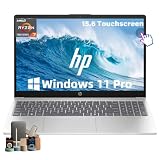
| HP 15.6 Touchscreen | Heavy multitasking on Windows | Ryzen 7 7730U, 32GB RAM, 1TB SSD |
| MacBook Neo 13-inch | Light everyday tasks on Apple silicon | A18 Pro chip, 8GB unified memory, 256GB SSD |
| BIRDPLAY 17.3 | Core i7 clock speed with backlit keys | Core i7 up to 4.5 GHz, 16GB RAM, 512GB SSD |
| HP 17 FHD Laptop | Newer Ryzen 5 with fast charging | R5 7430U, 16GB RAM, 512GB SSD, Windows 11 Pro |
How to Choose
Memory sets how many things stay fast at once
A quick processor cannot rescue a machine that runs out of memory and begins swapping to disk. For Windows laptops, 16GB is the practical baseline today, and 32GB suits heavy browser use, spreadsheets, virtual machines and photo editing together. Apple lists unified memory, which the processor and graphics share, so 16GB there behaves differently from 16GB on a Windows machine, and an 8GB configuration is best reserved for lighter workloads.
Processor generation beats raw megahertz
A clock speed figure such as up to 4.5 GHz looks impressive but says little by itself, because architecture and core design matter more than the number. Newer families, such as the M5 and A18 Pro from Apple or the Ryzen 7000-series U-chips from AMD, are designed to do more work per watt. Look for a named model number in the title. A listing that says only Intel CPU gives you nothing to compare.
Storage speed and capacity
Solid-state storage is the single biggest reason a modern laptop feels instant compared with an older hard drive model. Aim for 512GB or more so the drive is not near full, since a nearly full SSD slows down. Where a listing counts cloud storage or an attached external drive in its total capacity, ignore that figure and look at the internal SSD alone.
Windows buyers should also glance at the version of the operating system. Windows 11 Pro adds business management features, while Home is enough for personal use, and neither changes raw speed.
Charging, ports and where corners are cut
Fast charging, Wi-Fi 6 or Wi-Fi 7, and a lightweight chassis are the features that make a laptop feel quick away from a desk. Budget models cut corners with small SSDs, 8GB of memory, and unnamed processors, while premium models spend the difference on chips, displays and build. Remember that a bigger screen adds comfort for multitasking but not extra speed.
What to ignore: slogans such as Built for AI, Ultra-Fast WiFi or Powerful Performance read well but are not measurements. Trust the numbers you can verify on the spec line, namely the chip model, the amount of memory, the internal SSD size and the wireless standard, and treat everything else as decoration.
The 7 Best Options
HP 17 Business Laptop (Ryzen 5)
A 17.3-inch FHD screen, a Ryzen 5 processor, 16GB of RAM and a 512GB SSD make this a balanced productivity machine. The title also lists a numeric keypad, long battery life and Windows 11 with Office 365 for the web, so it reads as an office workhorse more than a speed demon.
- Strength: 16GB of memory plus an SSD supports comfortable multitasking.
- Strength: the large panel and number pad suit spreadsheet-heavy days.
Trade-off: a 17-inch body is bulky to carry. Skip it if you commute daily. It fits a buyer who spends most hours at one desk and wants a roomy screen, a number pad and enough memory that a dozen browser tabs and a spreadsheet can coexist.
MacBook Air 15-inch (M5)
Apple pairs its M5 chip with 16GB of unified memory and a 512GB SSD, then wraps it in a 15.3-inch Liquid Retina display. The title adds Wi-Fi 7, a 12MP Center Stage camera and Touch ID. It is the choice for buyers who want a current-generation chip and a roomy screen without a thick chassis.
- Strength: current M5 silicon with 16GB of unified memory.
- Strength: Wi-Fi 7 and a 512GB SSD future-proof the setup.
Trade-off: it sits at the premium tier. Skip it if you need Windows-only software. Creative users who want a larger canvas for timelines and layouts, but dislike thick laptops, are the natural audience, and the Touch ID reader keeps sign-ins quick.
MacBook Air 13-inch (M5)
The same M5 chip, 16GB of unified memory and 512GB SSD arrive in a smaller 13.6-inch Liquid Retina package. It carries the same camera, Touch ID and Wi-Fi 7 features, so the practical choice between the two Airs is screen size and portability, not the headline components.
- Strength: identical chip and memory to the larger Air in a more portable frame.
- Strength: Touch ID speeds up logins and approvals.
Trade-off: less screen area for side-by-side windows. Skip it if you edit on the laptop screen all day. Students and frequent flyers will appreciate that the specification is the same as the larger sibling, so choosing this one gives up inches, not silicon.
HP 15.6 Touchscreen (Ryzen 7 7730U)
This is the memory leader among the Windows options: 32GB of RAM and a 1TB SSD beside a Ryzen 7 7730U with Radeon graphics. The 15.6-inch FHD touchscreen, Copilot key, fast charge and Windows 11 Pro make it a strong generalist for demanding workloads.
- Strength: 32GB of RAM leaves room for dozens of tabs and apps.
- Strength: 1TB of storage and Windows 11 Pro suit work and study.
Trade-off: the listing does not mention dedicated gaming graphics. Skip it if you want high-frame-rate gaming. It is the pick for analysts, students and remote workers whose day involves many windows at once, and the touchscreen adds a handy way to scroll long documents.
MacBook Neo 13-inch (A18 Pro)
The Neo uses an A18 Pro chip with 8GB of unified memory and a 256GB SSD, plus a 1080p FaceTime HD camera and a Liquid Retina display. It is the most modest Apple configuration here, aimed at browsing, writing, streaming and school work on efficient silicon.
- Strength: a modern chip designed for efficiency.
- Strength: compact 13-inch body for travel.
Trade-off: 8GB and 256GB leave little headroom for growth. Skip it if you keep large photo or video libraries. It suits a second laptop for the couch or a first laptop for a younger student, where quick wake-up and simple apps matter more than expandability.
BIRDPLAY 17.3 Inch Laptop (Core i7)
The headline is a Core i7 processor rated up to 4.5 GHz alongside 16GB of RAM and a 512GB SSD in a 17.3-inch body. The title also notes Wi-Fi 6, a backlit keyboard, a numeric pad and expandable storage.
- Strength: Core i7 and 16GB cover multitasking and everyday creative work.
- Strength: expandable storage adds flexibility later.
Trade-off: the title does not name the exact processor model, which makes direct comparisons hard. Skip it if you want a documented chip. Buyers who want a bigger screen with Windows 11 Home and a bit of expansion room can treat it as a flexible desk machine.
HP 17 FHD Laptop (Ryzen 5 7430U)
Here the title names the chip: a Ryzen 5 7430U, with 16GB of RAM, a 512GB SSD and a 17.3-inch FHD IPS display. Windows 11 Pro, a Copilot key, fast charging and Wi-Fi 6 round out a clear, well-documented spec sheet for students and business users.
- Strength: a named processor model makes this easy to research.
- Strength: fast charging and an IPS panel help day-to-day use.
Trade-off: it is a large laptop. Skip it if weight and portability rank above screen size. The clear labeling makes it the easiest Windows option here to research against competing listings.
Which One Fits Your Situation
You want maximum multitasking on Windows
The HP 15.6 Touchscreen with 32GB of RAM and a Ryzen 7 7730U is the clear pick, with the Windows 11 Pro license helping on workplace networks.
You travel and want a modern chip
The MacBook Air 13-inch (M5) combines the M5 chip, 16GB of unified memory and a smaller footprint, while the MacBook Neo covers lighter travel use.
You want a large screen without a heavy tower feel
The MacBook Air 15-inch (M5) delivers a 15.3-inch display in a thin body, and the HP 17 FHD with a named Ryzen 5 7430U serves Windows buyers.
You want the lightest possible daily carry
The MacBook Neo 13-inch keeps things compact for light use, but the 13-inch Air with M5 is the better fit once your workload includes photo editing or many open apps.
You live in spreadsheets and documents
The HP 17 Business Laptop adds a numeric keypad and a roomy 17.3-inch FHD screen, backed by 16GB of RAM.
Common Mistakes
- Chasing a gigahertz figure while ignoring how much memory the laptop has.
- Counting cloud storage or a bundled drive as if it were internal SSD space.
- Buying a listing with an unnamed processor and assuming it is current.
- Overlooking the internal drive size because a listing advertises a big combined storage total.
- Choosing 8GB of memory for work that keeps many apps open.
- Choosing a large screen when portability is what you actually need.
Related guides
- Battery Operated Smoke And Carbon Monoxide Detectors
- Combination Smoke And Carbon Monoxide Detectors
- Aio Liquid Coolers For High Performance Gaming
Frequently Asked Questions
Is 8GB of memory enough for a fast laptop?
For light browsing and writing, an 8GB Apple configuration can be fine because of how unified memory works. For multitasking on Windows, 16GB is the safer baseline, and 32GB is worth seeking if you keep many large documents, tabs and chat apps open together.
Does a higher GHz number mean a faster laptop?
Not by itself. Core design, efficiency and generation matter, so compare named chip models instead of clock speeds alone. A newer chip at a lower stated speed can finish the same job sooner than an older chip with a bigger number.
Does fast charging matter?
It matters if you work away from outlets, since a short top-up can add usable hours between meetings. It does not change how quickly the laptop runs tasks, so treat it as a convenience feature and not a performance one.
Are the 17-inch models good for travel?
They suit desk use and occasional carrying. Frequent travelers will find the 13-inch MacBook options far easier to pack.









