

- Top Pick: Eightwood WiFi 6E Tri-Band Antenna 6GHz 5GHz 2.4GHz Gaming WiFi Antenna | RP-SMA Magnetic Base Antenna with 6.5ft Extension Cable for PC Desktop Computer PCIe WiFi 6E Card, Router
- Best Value: External WiFi 6 6E Tri-Band Antenna 6GHz 5.8GHz 2.4GHz Magnetic Base Antenna with RP-SMA Connector for PC Desktop Computer Asus Rog Strix Gigabyte Aorus Gaming WiFi Motherboard Card, Slinkdsco
- Premium Choice: Bingfu Dual Band WiFi 2.4GHz 5GHz 5.8GHz 3dBi MIMO RP-SMA Male Bluetooth Antenna (2-Pack) for PC Computer WiFi Router Wireless Network Card USB Adapter Security IP Camera Video Surveillance Monitor
If your desktop’s wireless card is bolted to the rear I/O panel, the stubby antennas that shipped with it sit behind a metal case, a monitor and a tangle of cables, which is a poor spot for picking up a signal. Swapping them for an external antenna that sits on top of the desk or climbs the side of the case is one of the simplest upgrades for a PC that disconnects, slows down in the next room, or never finds the 6GHz band it was sold for. The decision is not about raw power, it is about connector, band support and where the antenna can physically go.
This guide is for desktop owners with a PCIe or motherboard-integrated wireless card, plus anyone repurposing the same antennas on a router. The seven picks below were chosen for 2026 builds, and each comparison relies only on what the product title states: bands, mount style, cable length and pack quantity. Items from the original list that were USB adapters with built-in antennas were left out, since they are a different product type.
Quick Picks
As an Amazon Associate we earn from qualifying purchases at no extra cost to you.




| Product | Best for | Key spec from the title |
|---|---|---|
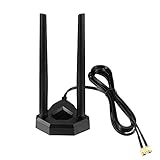
| Eightwood WiFi 6E Tri-Band (cable) | Moving the antenna off the case | Tri-band, magnetic base, 6.5ft extension cable |
| Slinkdsco WiFi 6/6E Tri-Band | Gaming motherboard cards | Tri-band, magnetic base, RP-SMA |
| Bingfu Dual Band 2-Pack | Older dual-band setups | 2.4GHz and 5GHz, 3dBi MIMO, 2-pack |
| Eightwood Dual Band (cable) | Wi-Fi 5 cards with a long reach | Dual band, RP-SMA, 6.5ft cable |
| Eifagur WiFi 6/6E Tri-Band | Simple magnet-mount upgrade | /6GHz, magnetic base |
| Superbat WiFi 6/6E 2-Pack | Spare or multi-device use | Tri-band, omni-directional, 2-pack |
| Eightwood WiFi 6E Magnet Mount | Desktop top placement | Tri-band, RP-SMA, magnet mount base |
How to Choose
Match the connector and quantity first
Almost every PCIe and motherboard wireless card uses RP-SMA, the same screw-on connector style found on many routers, and every listing here says so or implies it, but confirm that your card has the same connector before you order. Count the ports on your card as well. Most cards have two antenna ports, and a single antenna leaves one port bare, so look for a 2-pack or plan to buy two units.
Choose the bands that match the card
A tri-band antenna (2.4GHz, 5GHz and 6GHz) is only useful if your card is Wi-Fi 6E or newer; if it is an older dual-band card, a dual-band antenna works just as well. Buying tri-band for a Wi-Fi 5 card will not add the 6GHz band. For a Wi-Fi 6E card, though, a tri-band antenna is a must, because a dual-band model leaves the newest band without proper coverage.
Mounting and cable length
Magnetic bases stick to the metal top of a case or a shelf bracket, giving you height without drilling. An extension cable such as the 6.5ft versions below lets you reach a window sill or the edge of a desk. Longer cable adds a small amount of signal loss, so run only as much cable as you need, and avoid coiling the excess in a tight bundle. If the tower already sits on top of the desk, a cable may not be needed at all, and a simple magnet-mount model keeps the setup tidier.
What to ignore
Gain numbers (dBi) look decisive, but only one listing in this group states one. Higher gain also narrows the vertical coverage, which can hurt in multi-floor homes. Look for omni-directional designs and sensible placement over a headline number, and be wary of listings that promise range without naming bands or connector type. A listing that names its bands, connector and any included cable gives you the facts needed to compare it with the others.
The 7 Best Options
Eightwood WiFi 6E Tri-Band with Extension Cable
This one targets owners who want the antenna away from the chassis. The title shows tri-band support across 2.4GHz, 5GHz and 6GHz, an RP-SMA magnetic base and a 6.5ft extension cable, designed for PCIe WiFi 6E cards and routers.
- Strength: the 6.5ft cable lets you put the antenna on top of a desk or a high shelf.
- Strength: tri-band coverage fits a 6E card.
- Trade-off: the listing does not state the quantity per pack, so confirm you will receive enough for both card ports.
Skip it if your card only supports Wi-Fi 5, since the 6GHz coverage would go unused. It also makes less sense if the tower already sits on the desk, where a plain magnet-mount model does the same job without extra cable to manage.
Slinkdsco External WiFi 6/6E Tri-Band
The title calls out compatibility with ASUS ROG Strix and Gigabyte Aorus gaming motherboards and cards, which makes it the clearest match for owners of those boards. It lists a magnetic base and an RP-SMA connector across 6GHz, 5.8GHz and 2.4GHz.
- Strength: board-specific compatibility is spelled out in the title.
- Strength: a magnetic base makes placement flexible.
- Trade-off: no cable length is listed, so reach is limited to the antenna’s own lead.
Skip it if you need to place the antenna more than a short distance from the card. Owners of other motherboard brands can still use it, but the explicit board mention is the main reason to pick it over the other tri-band options.
Bingfu Dual Band 3dBi MIMO 2-Pack
Bingfu’s listing is the plainest of the group: two dual-band antennas covering 2.4GHz and 5GHz with a stated 3dBi gain and an RP-SMA male connector, applicable to PC, router, wireless cards and USB adapters.
- Strength: a 2-pack matches the two ports on most cards.
- Strength: it is the only listing with a stated gain figure, so you know what you are getting.
- Trade-off: dual-band only, with no 6GHz coverage and no extension cable.
Skip it if you own or plan to buy a Wi-Fi 6E card. It also is not the best fit when the tower is tucked into a cabinet, because without a cable the antennas cannot leave the immediate area of the card.
Eightwood Dual Band with 6.5ft Cable
This is the dual-band sibling of the first pick. It lists 2.4GHz and 5GHz, RP-SMA, a 6.5ft extension cable, and fits PCI and PCIe wireless and Bluetooth cards and motherboards as well as routers.
- Strength: the long cable solves the hidden-behind-the-case problem.
- Strength: broad compatibility with PCI and PCIe cards.
- Trade-off: no 6GHz support.
Skip it if your adapter is Wi-Fi 6E, because you would gain the cable but miss the newest band. For an older Wi-Fi 5 machine in a far corner of the room, though, this is the more sensible match.
Eifagur WiFi 6/6E Tri-Band Magnetic Base
A no-frills tri-band option. The title lists 2.4GHz, 5GHz and 6GHz, a magnetic base and compatibility with PC desktops, gaming motherboards, routers and PCI cards.
- Strength: tri-band coverage with a simple magnet mount.
- Strength: described as suitable for both desktop cards and routers.
- Trade-off: no cable length or pack quantity is given, so it is harder to plan placement.
Skip it if you need a defined extension cable to reach a window or desk edge. Because the listing leaves out quantity, read the item description closely so you do not end up with one antenna for a two-port card.
Superbat WiFi 6/6E Tri-Band 2-Pack
The title lists tri-band 2.4GHz, 5GHz and 6GHz coverage, RP-SMA male connectors and an omni-directional design, sold as a 2-pack. It also names routers, PCIe cards, IP security cameras and USB adapters as applications.
- Strength: a 2-pack covers both card ports with spares for a router or camera.
- Strength: omni-directional design spreads coverage evenly around the antenna.
- Trade-off: no mount type or cable is mentioned, so check how it will sit on your setup.
Skip it if magnetic mounting is a must. It is better suited to people who want a few spare tri-band antennas on hand than to anyone planning a precise placement on a steel case.
Eightwood WiFi 6E Tri-Band Magnet Mount
This second tri-band Eightwood listing drops the long cable and focuses on a magnet-mount base. It lists RP-SMA, 6GHz, 5GHz and 2.4GHz, and notes use with PC desktops, gaming motherboards, PCIe Bluetooth cards and routers.
- Strength: tri-band support and a magnet mount for easy top-of-case placement.
- Strength: mentions Bluetooth card compatibility, handy for combined cards.
- Trade-off: no extension cable is listed, so reach depends on the built-in lead.
Skip it if you need a longer cable run, in which case the first pick is the better match. It is the simplest choice for a standard desktop where the case already sits in an open spot.
Which One Fits Your Situation
You have a Wi-Fi 6E card and the case sits under the desk
The Eightwood WiFi 6E Tri-Band with the 6.5ft extension cable gets the antenna up where signal is cleaner without relocating the tower.
You own an ASUS ROG Strix or Gigabyte Aorus board
The Slinkdsco antenna names those boards directly, which removes guesswork about fit.
Your card is an older dual-band model
Choose the Bingfu 2-Pack or the Eightwood Dual Band with cable, depending on whether you need the extra reach.
You want spares for a router or camera too
The Superbat 2-Pack is built around multi-device use, giving you more antennas for the same order.
Before buying, take two minutes to open the case side or read the card’s manual to confirm the number of ports and the connector style. That single step prevents most returns in this category.
Common Mistakes
- Buying tri-band antennas for a card that cannot use 6GHz.
- Ordering one antenna when the card has two ports.
- Coiling a long cable behind the case, which defeats the point of moving the antenna.
- Judging by a gain number while ignoring placement and clearance from metal surfaces.
- Skipping a check of the connector type before ordering.
Related guides
- Battery Operated Smoke And Carbon Monoxide Detectors
- Combination Smoke And Carbon Monoxide Detectors
- Aio Liquid Coolers For High Performance Gaming
Frequently Asked Questions
Will a new antenna make my Wi-Fi faster?
It improves how well the card hears the router, which can raise stability and signal strength at a distance. It cannot exceed the speed of the card or the router, and it will not fix a congested channel or a weak connection upstream of your desk.
Do I need a Wi-Fi 6E antenna for a Wi-Fi 6 card?
Not necessarily. A Wi-Fi 6 card uses 2.4GHz and 5GHz, so a dual-band antenna is enough, though a tri-band model will still work with it.
Where should the antenna go?
High and clear of metal, with a line of sight toward the router when possible. A magnetic base on a case top or shelf is a common starting point. If the signal is still weak, try rotating the antennas to different angles, since vertical and angled positions can pick up different reflections in the room.
Can I use these on a router?
Several listings above mention routers, so as long as the connector matches, yes. Match the band support to the router’s capabilities, and remember that swapping antennas on a router changes nothing about its maximum speed, only how well it covers the space.












