

Sunlit living rooms punish TVs in two ways: reflections wash out dark scenes, and a dim panel simply cannot compete with daylight. The best TV for a bright room is not just the one with the biggest brightness number. It is the one that pairs a strong backlight with a screen surface that handles glare.
When you shop, weigh three things: backlight type (Mini LED and full array designs usually go brighter than basic edge-lit panels), the screen coating or glare-handling feature, and where the windows sit relative to the TV. The eight sets below are described from their listing titles alone, and none lists a brightness number in the visible text, so confirm peak brightness on the full spec sheet.
Quick Picks
| Product | Best for | Key spec from the title |
|---|---|---|
| Samsung M70H 55-Inch | Mid-size sunny living rooms | Mini LED, 4K, Vision AI Companion |
| Samsung M70H 65-Inch | Large open-plan rooms | Mini LED, 4K, Pure Spectrum Color |
| Philips 7985 50-Inch | Dens and media rooms with mood lighting | 4K QLED, Ambilight, Dolby Vision, 4 HDMI |
| Hisense 32QD4HSR | Small bright kitchens | 32-inch, Hi-QLED, HD, full array LED |
| TCL 55T7 | Gaming in a bright room | 4K, 120Hz, QLED, Game Accelerator 240 |
| Hisense 65U6 Pro | Bright rooms with consoles | Mini-LED ULED 4K, native 144Hz, Fire TV |
| Panasonic W80 43-Inch | Glare-prone small spaces | 43-inch, QLED 4K, Glare Free Pro |
| Sony BRAVIA 3 II 65-Inch | Anti-glare family rooms | LED 4K, Anti-Glare, XR Processor |
How to Choose
Backlight and peak brightness
Mini LED packs many small LEDs behind the panel, which lets a TV push brightness higher in zones. Full array backlights also sit behind the screen, while edge-lit designs sit on the sides. Look for the backlight type in the title and a peak brightness figure on the spec sheet, often given in nits. If a listing gives no figure, check the manufacturer’s page rather than assuming.
Glare and screen coating
Anti-glare or low-reflection coatings reduce window and lamp reflections. Titles may call this “Anti-Glare” or “Glare Free.” Because coatings differ by model, verify the feature on the manufacturer’s page and look at how the screen appears in the listing photos taken in lit rooms.
HDR formats and room placement
HDR formats such as Dolby Vision and HDR10+ shape how highlights are displayed, but they do not replace a bright panel. Place the TV so that windows are to the side rather than behind you or directly opposite. A wall mount that tilts slightly can also reduce reflections from lamps.
Gaming, ports and platform
For a console or PC, check the refresh rate, VRR and HDMI version. HDMI 2.1 supports 4K at 120 Hz, but not every port may carry it. Confirm the smart platform (Roku, Fire TV, Google TV) matches the services you use.
The 8 Best Options
Samsung M70H 55-Inch Mini LED

A 55-inch Mini LED 4K set with Samsung’s Vision AI Companion, Mini LED Processor 4K and Pure Spectrum Color. Mini LED backlighting is the main reason it earns a place on a bright room list. It is a sensible starting point for a living room where the TV faces a window wall and you want a screen size that most stands and wall mounts handle easily.
- Strength: Mini LED backlight at a mid-size screen.
- Strength: 4K with a dedicated Mini LED processor.
- Limit: the title is cut off, so check brightness and port details.
Skip it if you want a stated anti-glare feature; this title does not list one.
Samsung M70H 65-Inch Mini LED
The same series in a 65-inch size, with Mini LED, 4K and Pure Spectrum Color. A larger panel suits an open living area where the TV is the focal point and sits across the room. The extra width makes sports and movies easier to follow from a couch several steps back, but make sure the stand or mount you plan to use is built for a set this size.
- Strength: 65-inch Mini LED 4K panel.
- Strength: Vision AI Companion and Mini LED Processor 4K.
- Limit: details after the cutoff, such as refresh rate, are not visible.
Skip it if your room is small or you need the screen to be tucked into a corner.
Philips 7985 50-Inch QLED Ambilight

A 50-inch 4K QLED Roku TV with Ambilight, built-in LED lights that glow on the wall behind the set. It supports Dolby Vision, HDR10 and HLG, and offers Dolby Atmos with four HDMI ports. The lights add a soft glow around the screen, which can make evening viewing in a mixed-lighting room feel less harsh than a black wall behind a bright picture.
- Strength: Ambilight with Dolby Vision, Dolby Atmos and four HDMI.
- Strength: QLED color on a Roku platform.
- Limit: no brightness or anti-glare feature is stated.
Skip it if your priority is raw brightness over atmosphere.
Hisense 32QD4HSR Hi-QLED Roku TV
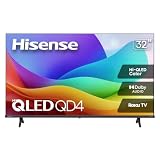
A small 32-inch HD set with Hi-QLED color and a full array LED backlight. It fits a kitchen or breakfast nook where light pours in, though the title does not give brightness, so check the spec sheet. Treat it as a secondary screen for a counter, shelf or breakfast nook rather than a home theater centerpiece.
- Strength: full array LED with Hi-QLED at a small size.
- Strength: Roku platform with Dolby Audio.
- Limit: HD resolution and a small screen.
Skip it if you want a main living room TV.
TCL 55T7 4K 120Hz QLED Google TV

A 55-inch QLED with 120Hz, Dolby Vision HDR and Atmos, HDR10+, Game Accelerator 240 and VRR. It suits a console player whose room gets plenty of light. It also covers streaming duty through Google TV, so one remote handles both the console input and the apps.
- Strength: 120Hz with VRR and Game Accelerator 240.
- Strength: Dolby Vision, HDR10+ and Google TV.
- Limit: no anti-glare feature or brightness is visible in the title.
Skip it if you need a bigger panel or a named glare coating.
Hisense 65U6 Pro Mini-LED ULED

A 65-inch Mini-LED ULED 4K Fire TV with native 144Hz, Motion Rate 480 and Dolby Vision. Hi-QLED is also listed, so this is the most gaming-minded Mini LED choice here. The Fire TV platform brings a large app catalog, which makes it a flexible hub for a family room.
- Strength: Mini-LED with native 144Hz.
- Strength: Dolby Vision and Motion Rate 480.
- Limit: title cut off, so check HDMI port details.
Skip it if you prefer Roku or Google TV to Fire TV.
Panasonic W80 43-Inch Glare Free Pro

A 43-inch QLED 4K Fire TV with Glare Free Pro, the only title here that names a glare feature in those words. It also lists HDR10+, Dolby Vision, Dolby Atmos and Game Mode. The compact size makes it a reasonable pick for a bedroom, a sunroom or a small apartment where a large screen would crowd the space.
- Strength: Glare Free Pro named in the title.
- Strength: Dolby Vision, HDR10+ and Game Mode.
- Limit: 43 inches is small for a large room.
Skip it if you want a screen above 55 inches.
Sony BRAVIA 3 II 65-Inch

A 65-inch LED 4K Google TV with Anti-Glare, the XR Processor, Dolby Vision and Atmos. Sony pairs the glare feature with a large screen, which suits a room with large windows. Google TV with Gemini is named in the title, and the title mentions 120Hz, but the text is cut off, so check the spec sheet for details.
- Strength: Anti-Glare with a 65-inch 4K panel.
- Strength: XR Processor and Dolby Vision/Atmos.
- Limit: it is a standard LED design, not Mini LED.
Skip it if you want Mini LED backlighting.
Which One Fits Your Situation
A sunny living room with large windows
The Sony BRAVIA 3 II and Panasonic W80 list glare features in their titles, while the Samsung M70H and Hisense 65U6 Pro rely on Mini LED backlights. Choose by whether you want glare handling or a backlight emphasis, and compare brightness figures on the manufacturer’s page. Close the blinds during the day as an experiment, then open them again, and note which picture still looks readable in both conditions.
A console or PC in a bright space
The Hisense 65U6 Pro (native 144Hz) and TCL 55T7 (120Hz, VRR) are the gaming-minded options. Pair them with a console and place the screen so windows do not sit opposite. If you stream your gameplay, a bright room also helps your camera, so a TV with a stable picture beside your setup keeps the shot easy to light.
A den or media room with mixed lighting
The Philips 7985 adds Ambilight and four HDMI ports. It suits setups with a console, streaming box and soundbar, and the Roku platform keeps everyday streaming simple for the whole household.
A small kitchen or bedroom
The Hisense 32QD4HSR or Panasonic W80 43-inch fits where a large TV will not.
Common Mistakes
- Buying on screen size and ignoring brightness and coating.
- Placing the TV opposite a window.
- Assuming “QLED” means bright; check the backlight type.
- Relying on photos instead of the spec sheet for brightness.
- Skipping a tilting wall mount where lamps reflect.
Frequently Asked Questions
What matters most for a bright room?
Peak brightness and a glare-handling screen. A Mini LED or full array backlight helps with the first, and a coating helps with the second.
Is Mini LED better than QLED for bright rooms?
They are not exclusive. Mini LED describes the backlight, while QLED describes the color layer, and many TVs combine them.
Do I need a matte screen?
A low-reflection screen helps, but placement and window curtains also matter.
Where should I look for brightness numbers?
Check the manufacturer’s spec sheet for peak brightness, usually in nits.











