

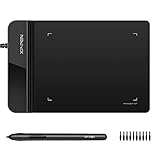
- Top Pick: Drawing Tablet XPPen G430S OSU, Graphic Drawing Tablet with 8192 Levels Pressure Battery-Free Stylus, 4 x 3 inch Ultrathin, for OSU Game, Online Teaching Compatible with Window/Mac Black
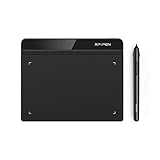
- Best Value: Drawing Tablet XPPen StarG640 Digital Graphic Tablet 6×4 Inch Art Tablet with Battery-Free Stylus Pen Tablet for Mac, Windows and Chromebook (Drawing/E-Learning/Remote-Working)
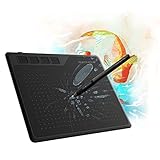
- Premium Choice: GAOMON S620 Graphics Drawing Tablet, 6.5×4, 8192 Pressure & 4 Hot Keys | Battery-Free Stylus, Ultra-Slim & Portable, for Beginners, Students & Creators in Digital Art, Note-Taking & OSU
Players who switch from a mouse to a pen for osu are chasing one thing: smoother, more precise aim on a rhythm map. A drawing tablet delivers that through absolute positioning, where every spot on the pad matches a spot on your screen. The catch is that osu has little in common with illustration software. Pressure levels hardly matter, while active area, pen weight and driver behavior matter a lot, so the spec sheet you read for art does not transfer cleanly.
This guide ranks ten tablets that name osu in their titles or fit the use plainly, from pocket-sized pads to full 10×6 inch surfaces. It is written for newer players picking a first tablet in 2026 and for experienced mouse users curious about pen play. Every comment below is drawn from the product titles and listed specs rather than from any claim of personal use, so read the full listing for details such as driver support before buying.
Quick Picks
As an Amazon Associate we earn from qualifying purchases at no extra cost to you.


| Product | Best for | Key spec from the title |
|---|---|---|
| XPPen G430S | Smallest-area osu play | 4 x 3 inch, 8192 levels |
| XPPen G640 | Plain 6×4 pad with Chromebook support | 6×4 inch, battery-free stylus |
| GAOMON S620 | Portable pad with shortcut keys | 6.5×4 inch, 4 hot keys |
| HUION H420X | Compact pad for several systems | 4.17×2.6 inch, PC/Mac/Linux/mobile |
| HUION Inspiroy H950P | Large area with tilt | 8×5 inch, 8 hot keys, tilt |
| HUION 420 OSU | Tiny pad for light desks | 4 x 2.23 inch |
| HUION HS64 | Beginner pad with shortcut keys | 6.3×4 inch, 4 hot keys |
| XPPen Deco 01 V3 | Wide-sweep aim | 10×6 inch, 16K pressure, 8 keys |
| XPPen Deco 640 | Standard 6×4 with fine pressure steps | 6×4 inch, 16384 levels |
| XPPen IT640 | Tilt support in a 6×4 body | 6×4 inch, 60 degree tilt |
How to Choose
Active area
Active area is the single decision that shapes your aim. Small pads in the 4×3 inch range reward wrist movement and suit players who like tight, quick motions. A 6×4 inch pad is the common middle ground, and 8×5 or 10×6 inch surfaces favor arm-driven sweeps. Match the size to your desk: a large pad is hard to use if the keyboard sits close by.
Pressure levels and pen type
Pressure numbers such as 8192 or 16384 are art features. Osu does not use them, so do not pay more for the larger figure. Look for a battery-free stylus instead, because it has no charging step and tends to feel lighter in the hand. Tilt support, listed on two models here, only matters if you plan to draw as well.
Compatibility and drivers
Check that the listing names your operating system. Most titles list Windows and Mac, and several add Android, Linux or Chromebook. Players also need the tablet to run in osu mode with minimal smoothing, so a manufacturer driver that is simple and lightweight is a plus. Be cautious with listings that name no operating system at all.
Shortcut keys and build
Hot keys can be mapped to retry or pause during a map, which is useful for practice. Four to eight keys is plenty. Ignore claims about ultra-thin bodies unless portability matters, and remember that budget pads can cut corners on surface texture, which affects how the pen glides.
The 10 Best Options
XPPen G430S
This is the tablet built around the smallest play area in the group. The title lists 8192 levels of pressure, a battery-free stylus, a 4 x 3 inch ultrathin body, and support for osu, online teaching, and Windows and Mac systems. It is a sensible first pad for someone who wants to try pen play without clearing half the desk, and the teaching mention means it can double as a simple writing tablet for video calls.
- Strength: the 4 x 3 inch footprint fits on a crowded desk.
- Strength: the title names osu directly and lists a battery-free stylus.
- Trade-off: the compact surface demands small, precise wrist control and leaves little room for art.
Skip it if you prefer large arm sweeps while playing.
XPPen G640
This pad is the plain 6×4 inch option from XPPen, described as a digital graphic art tablet with a battery-free stylus. The title lists support for Mac, Windows and Chromebook and mentions drawing, e-learning and remote work, so it works as a general tablet as well. Students on school-issued laptops are the obvious audience, and osu is a bonus use rather than the headline.
- Strength: 6×4 inches balances wrist and arm movement for most players.
- Strength: Chromebook support widens where it can run.
- Trade-off: the title does not mention osu or give a pressure figure.
Skip it if you want a tablet marketed specifically for rhythm play.
GAOMON S620
The S620 is a portable pad aimed at beginners, students and creators. The title lists a 6.5×4 inch area, 8192 pressure levels, four hot keys, a battery-free stylus, an ultra-slim body, and uses including note-taking and osu. The wider 6.5-inch edge gives a little extra horizontal travel, which some players prefer when their cursor speed is set low.
- Strength: four hot keys can be assigned to retry or pause.
- Strength: the 6.5×4 inch surface is slightly wider than a standard 6×4 pad.
- Trade-off: the title does not list the supported systems.
Skip it if you need to confirm Linux or Android support from the title.
HUION H420X
This compact pad targets players who want a tiny footprint across many systems. The title lists 8192 pen pressure levels, a battery-free stylus, a 4.17×2.6 inch area and work with PC, Mac, Linux and mobile for osu, design and teaching. Players who split time between a desktop and a Linux laptop will appreciate that the listing is explicit about which systems it covers.
- Strength: the tiny area suits tight wrist-based aim.
- Strength: Linux and mobile support is broader than most rivals.
- Trade-off: there are no hot keys listed in the title.
Skip it if you want shortcut keys on the pad.
HUION Inspiroy H950P
This is the large-surface choice. The title lists an 8×5 inch area, 8192 pen pressure, eight hot keys, a battery-free stylus, tilt and Android support, with uses spanning osu, animation, painting and photo editing. Because it is built for artists first, it makes the most sense for someone who wants one tablet for illustration projects and the occasional rhythm session.
- Strength: the 8×5 inch area gives room for arm-driven sweeps.
- Strength: eight hot keys and tilt make it a capable art tablet too.
- Trade-off: it needs more desk space than the 6×4 pads.
Skip it if your desk is small or you prefer wrist aim.
HUION 420 OSU
The name leaves no doubt about its target. The title lists a digital stylus, a 4 x 2.23 inch area, and uses including drawing, writing, design and animation, with Mac and Windows support. It reads as a no-frills pad for desks where space is scarce, and the shorter 2.23 inch height forces very small, deliberate motions.
- Strength: the 4 x 2.23 inch surface is the smallest in this group.
- Strength: the title names osu in the product name.
- Trade-off: the title gives no pressure figure and does not state a battery-free stylus.
Skip it if you want a pen with a confirmed battery-free design.
HUION HS64
The HS64 is framed as a beginner osu tablet. The title lists 8192 pen pressure, a battery-free stylus, a 6.3×4 inch area, an ultra-slim build, four hot keys, and support for Windows, Mac, Android and Linux. New players who want shortcut keys and a mid-size surface without a long learning curve are the target buyer, and the broad system list keeps the pad useful if you change computers.
- Strength: it pairs four hot keys with broad system support.
- Strength: 6.3×4 inches is a comfortable mid-size area.
- Trade-off: it offers no tilt support listed.
Skip it if you want tilt for drawing.
XPPen Deco 01 V3
This is the wide surface for players who prefer big gestures. The title lists a 10×6 inch area, a 16K battery-free stylus and eight keys, with uses covering digital art, teaching and osu on Mac, PC, Android and Chromebook. The title also calls it designed for beginners, which makes it a reasonable pick for a family member learning digital art alongside a player.
- Strength: the 10×6 inch pad suits arm-driven aim.
- Strength: eight keys and broad system support add flexibility.
- Trade-off: it demands the most desk space on this list.
Skip it if you play with a tight, wrist-based style.
XPPen Deco 640
This purple pad is the standard 6×4 inch XPPen. The title lists 16384 pressure levels, a battery-free stylus and an osu drawing pad design for drawing, teaching and editing on PC, Mac and Android. Treat the fine pressure steps as a bonus for sketching, since the part that matters for osu is the familiar 6×4 inch surface.
- Strength: the 6×4 inch area suits most play styles.
- Strength: the title names osu directly.
- Trade-off: the higher pressure number is an art feature that osu does not use.
Skip it if you want hot keys on the pad.
XPPen IT640
The IT640 packs tilt into the same 6×4 inch footprint. The title lists 16384 pressure levels, a battery-free stylus, 60 degree tilt support, and compatibility with Android, Windows and macOS for beginners. It is the simplest 6×4 inch pad here, so it suits a buyer who wants a clean surface without a row of buttons along the edge.
- Strength: tilt support helps if you draw as well as play.
- Strength: it is described as an osu drawing pad for beginners.
- Trade-off: no hot keys are listed.
Skip it if you need shortcut keys on the pad.
Which One Fits Your Situation
You aim with your wrist
The XPPen G430S and the HUION H420X are the compact picks. Both keep the surface small, which suits quick, tight motions.
You swing from the elbow
The XPPen Deco 01 V3 and the HUION Inspiroy H950P give you room to sweep. Choose the Deco if you want the widest surface.
You want hot keys for retry and pause
The GAOMON S620 and the HUION HS64 each list four hot keys in a mid-size body. Pick whichever lists your operating system.
You also draw
The XPPen IT640 adds tilt in a 6×4 inch body, so it suits someone who splits time between osu and sketching.
Common Mistakes
- Paying extra for pressure levels that osu never uses.
- Buying a large pad for a small desk and finding the keyboard in the way.
- Skipping the operating-system check, then discovering driver support is missing.
- Assuming every pen is battery-free without reading the title.
- Switching tablet size abruptly instead of adjusting settings over several sessions.
Related guides
- Combination Smoke And Carbon Monoxide Detectors
- Aio Liquid Coolers For High Performance Gaming
- Graphics Cards For Low Wattage Power Supplies
Frequently Asked Questions
Do pressure levels matter for osu?
No. Osu tracks position rather than pressure, so a higher figure is only useful if you also draw.
What size tablet do most osu players use?
Many choose compact pads around 6×4 inches or smaller. Players who like large arm movements move up to 8×5 or bigger.
Is a battery-free stylus better?
Generally yes, since it needs no charging and tends to be lighter. The listing should state it clearly.
Can I use a drawing tablet for art too?
Yes. Models with more hot keys, tilt or larger areas, such as the Inspiroy H950P, serve both purposes.










