

- Top Pick: OMOTON Bluetooth Tablet Keyboard Rechargeable with Backlit, Oversize Keycap | Ultra-Slim Wireless Keyboard for Samsung Tablet, iPad, Smartphone, Android/iOS/Windows, Foldable Stand, Travel Office, Black
- Best Value: Ultra-Slim Bluetooth Keyboard Portable Mini Wireless Keyboard Rechargeable for Apple iPad iPhone Samsung Tablet Phone Smartphone iPadOS iOS Android (10 inch Black)
- Premium Choice: Arteck Compact Wireless Bluetooth Keyboard for iPad Tablet iPhone PC Black
A tablet turns into a real writing machine the moment a keyboard joins it, but the wrong one makes the whole setup feel worse than typing on glass. The decision behind this search is mostly about fit: which keyboards pair over Bluetooth with the operating system you own, how much desk or lap space you have, and whether you want a slim travel board or a full-size layout with a number pad. A keyboard that is great for an iPad on a train table can be awkward for an Android tablet balanced on a couch cushion.
This 2026 guide covers seven standalone Bluetooth keyboards, from palm-sized mini boards to a foldable full-size model, and a multi-device classic that works across phones, tablets, and laptops. Two keyboard-and-mouse combo sets from the same search were left out, since they answer a different question. The notes below lean strictly on what each listing says, so they point out compatibility lists, charging type, and layout rather than any claims about typing feel.
Quick Picks
As an Amazon Associate we earn from qualifying purchases at no extra cost to you.


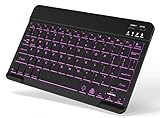
| Product | Best for | Key spec from the title |
|---|---|---|
| OMOTON Bluetooth Tablet Keyboard | Dark rooms and travel | Rechargeable, backlit, foldable stand |
| Ultra-Slim 10-Inch Mini Keyboard | Carrying in a small bag | 10 inch, rechargeable, iPadOS/iOS/Android |
| Arteck Compact Keyboard | Basic, no-frills pairing | Compact, for iPad, tablet, iPhone, PC |
| Arteck Universal Backlit Keyboard | Evening typing | Backlit, for iPad, tablet, PC |
| Logitech K480 | Switching between devices | Multi-device, Windows/macOS/iPadOS/Android/Chrome OS |
| Backlit Small Portable Keyboard (iPad A16 listing) | Recent iPad generations | Backlit, rechargeable, iPad A16/11th/10th/9th gen |
| ProtoArc XK01 Foldable | Full-size typing on the road | 105 keys, number pad, Bluetooth 5.1, USB-C |
How to Choose
Operating System and Compatibility
Almost every Bluetooth keyboard pairs with any tablet, but the extras do not always carry over. Dedicated iOS-style function keys, for example, may not map cleanly to Android or Windows. Look at the compatibility line in the title: a keyboard that names iPadOS, Android, Windows, macOS, and Chrome OS is built to be flexible, while one that names only iPad models is tuned for that family. Check that your exact tablet generation is covered if the listing gets specific, and ignore broad slogans like universal when no operating systems are named.
Size, Layout, and Key Travel
Mini keyboards around 10 inches wide are easy to carry, but expect compressed keys and shared function layers. A full-size layout with a number pad and keycaps near 0.65 inches wide, like the ProtoArc listing describes, feels closer to a desktop board and suits spreadsheets and long documents. If you mostly answer messages and edit short notes, a compact board is plenty. If you write for hours, favor larger keycaps and a proper number row. Layout also matters for punctuation: shrunken boards often move the apostrophe, brackets, or arrow keys to awkward corners, so read the key map before buying.
Power: Rechargeable Versus Battery
USB-C charging is the current standard and means you can top the keyboard up from the same cable as your tablet. Rechargeable models spare you the hassle of buying coin or AAA cells, but they need a charging habit, and a forgotten cable can leave you without a keyboard on a trip. Backlit models draw extra power, so look for a way to dim or switch off the lights. Titles rarely list battery life numbers, so do not assume a long runtime unless the listing states it.
Connection Features and Stands
Bluetooth 5.1 listed on the box is a good sign for stable pairing and reconnecting. Three-device switching lets you jump between a tablet, phone, and laptop with a key press. A foldable or built-in stand matters on a plane tray or a small desk, because tablets that lean against a bag strap are prone to tipping. Skip anything that leaves you guessing about stand support if you will type away from a desk. As a rule of thumb, a stand slot should hold your tablet at a slight backward angle, with room for a case, since many tablets are used in a protective cover.
The 7 Best Options
OMOTON Bluetooth Tablet Keyboard
This ultra-slim board is rechargeable and backlit, with oversize keycaps and a foldable stand. The listing names Samsung tablets, iPad, smartphones, and Android, iOS, and Windows systems, which gives it a wide compatibility story aimed at travel and office use.
- Strength: backlighting helps in dim cabins and evening couch sessions.
- Strength: the foldable stand and slim body suit a tablet-plus-keyboard travel kit.
- Trade-off: an ultra-slim board usually means shallow keys that some typists find unfamiliar.
Skip it if you want a number pad or a full-size layout. Buyers who want one rechargeable keyboard to follow a tablet from desk to flight are the ideal audience, and students with a small bag will like the slim profile.
Ultra-Slim 10-Inch Mini Keyboard
A portable mini wireless keyboard in a 10 inch size, listed for iPad, iPhone, Samsung tablets, and phones. It is rechargeable and names iPadOS, iOS, and Android support, which makes it a flexible small companion.
- Strength: the small footprint fits a tablet bag or a coat pocket.
- Strength: rechargeable design avoids replacing batteries.
- Trade-off: the title carries no brand name or backlight mention, so expect the basics only.
Skip it if you plan long writing sessions or want a stand. It suits someone who answers emails and chats on the go more than someone drafting reports, or a parent who wants a spare board for a family tablet.
Arteck Compact Keyboard
The Arteck Compact Wireless Bluetooth Keyboard is pitched at iPad, tablets, iPhone, and PC. The description keeps things simple: compact size and Bluetooth connectivity across a mix of devices, in black.
- Strength: broad device list includes PC as well as phones and tablets.
- Strength: a no-nonsense compact format keeps the keyboard easy to pack.
- Trade-off: no backlight or charging details are stated in the title.
Skip it if you type in dim rooms or want a model with a stated stand. It works for a person who wants a plain, familiar-brand board for a tablet and a spare laptop, with nothing to learn beyond the pairing steps.
Arteck Universal Backlit Keyboard
This Arteck model adds backlighting to the universal wireless concept and lists iPad, tablet, and PC use. That makes it the pick for someone who wants the Arteck formula but works late or in poor light.
- Strength: backlighting makes evening typing easier on the eyes.
- Strength: universal compatibility covers tablets and computers.
- Trade-off: the title does not name charging type, so check the specifics before buying.
Skip it if you want a travel-sized foldable board. It suits home use where the keyboard stays near a tablet stand and a charging cable, such as a kitchen counter or a reading chair.
Logitech K480
The K480 is built around switching between devices, with the title naming Windows, macOS, iPadOS, Android, and Chrome OS. It is described as compact and compatible with PC, Mac, laptop, smartphone, and tablet.
- Strength: one of the widest operating system lists in this group.
- Strength: multi-device design suits people who rotate between phone, tablet, and laptop.
- Trade-off: the title mentions no backlight or rechargeable battery.
Skip it if you need a travel-slim board or illumination. It is the sensible choice for a shared desk where different devices take turns on the same keyboard, such as a home office with a laptop, a phone, and a tablet.
Backlit Small Portable Keyboard (iPad A16 Listing)
This unbranded board calls out recent iPad generations by name, including the iPad A16 and the 11th, 10th, and 9th generations, plus iPad Air, Pro, and Mini and Galaxy Tab models. It is backlit, small, portable, and rechargeable.
- Strength: the detailed iPad compatibility list reduces the guesswork.
- Strength: backlit and rechargeable in a small package.
- Trade-off: no brand name appears in the title, so support details are unclear.
Skip it if you want a full-size layout. It fits students and travelers using a current iPad who want one portable, lit board, especially if reading the compatibility list matters to them.
ProtoArc XK01 Foldable
The XK01 is the full-size option: 105 keys, a number pad, 0.65-inch keycaps, three-device Bluetooth 5.1 switching, and USB-C charging. It folds for travel and is listed for laptop, tablet, and phone use.
- Strength: full layout with a number pad suits spreadsheets and data entry.
- Strength: three-device switching and USB-C charging fit modern setups.
- Trade-off: a foldable full-size board takes more space on a small tray table than a mini model.
Skip it if you only type short messages. It is for people who write or crunch numbers on a tablet while traveling, and who value a proper number pad over the smallest possible footprint.
Which One Fits Your Situation
Writing Long Documents on a Tablet
The ProtoArc XK01 offers the roomiest layout, with 105 keys and a number pad. It is the closest listing to desktop typing, and the foldable design keeps it portable.
Working from a Dim Hotel Room or Couch
The OMOTON board and the Arteck Universal Backlit keyboard both list backlighting. OMOTON adds a foldable stand and rechargeable power, so it suits travelers best.
Juggling a Phone, Tablet, and Laptop
The Logitech K480 is built for multi-device use and names the broadest operating system list. The ProtoArc XK01 also supports three-device switching if you want a larger layout.
Using a Current iPad
The iPad A16 listing spells out the 11th, 10th, and 9th generations plus iPad Air, Pro, and Mini, which is helpful if you want clarity before pairing. The 10-inch mini keyboard works for lighter tasks.
Common Mistakes
- Buying a mini keyboard for long-form writing, then fighting compressed keys.
- Ignoring compatibility lines and assuming function keys map to every operating system.
- Skipping a stand, so the tablet balances precariously on a lap or tray table.
- Choosing backlighting but forgetting that lit keys drain a rechargeable battery faster.
- Overlooking Bluetooth version and multi-device switching when you own several gadgets, which forces a slow re-pairing routine every time you change screens.
Related guides
- Combination Smoke And Carbon Monoxide Detectors
- Aio Liquid Coolers For High Performance Gaming
- Graphics Cards For Low Wattage Power Supplies
Frequently Asked Questions
Will a Bluetooth keyboard work with any tablet?
Generally yes, since Bluetooth is a common standard. Special function keys may behave differently across systems, so check that your operating system is named in the listing.
Is a rechargeable keyboard better than a battery model?
Rechargeable boards charge over USB-C and remove the need for spare cells, which is handy for travel. Battery models can keep going with a quick swap. Pick based on whether you prefer charging habits or swapping habits.
Do I need a stand built into the keyboard?
If you type on a plane tray or a small desk, yes, a foldable stand reduces tipping. At a desk with a tablet holder, a separate stand is fine.
What size keyboard is best for a 10-inch tablet?
A mini or compact board around the tablet width keeps the setup tidy. For long writing, a full-size foldable layout like the XK01 gives more comfort.










