Why a Compact PC with 8GB of RAM Still Makes Sense
A compact PC with 8GB of RAM covers everyday computing without taking over a desk. The five machines below all ship with 8GB of DDR4 memory and a 256GB SSD, and each one is small enough to sit behind a monitor, on a shelf, or in a media cabinet. They suit web browsing, office work, media playback, and light multitasking, and every pick here drives at least one 4K display. If you need a machine you can carry between rooms, see our guide to the best 8GB RAM laptops for portable options with the same amount of memory.
As an Amazon Associate we earn from qualifying purchases.
What to Check Before You Buy
Eight gigabytes of RAM is a baseline, not a finish line, so check how the memory is fitted first. A single SO-DIMM slot caps total memory at whatever the processor supports, while two slots let you add a second stick later, and a matched pair runs in dual-channel mode, which helps integrated graphics. None of the five picks uses soldered memory, so every one can be opened and upgraded, but the ceiling differs by model and is set by the processor as much as by the board.
Storage matters just as much. All five picks include a 256GB M.2 SSD, enough for Windows and everyday programs, but photo and video libraries fill that quickly. Check whether the slot takes NVMe or SATA drives, whether there is a second slot for a later drive, and the lane count: a slot wired for two PCIe lanes will not let a fast NVMe drive reach its full speed.
Ports decide how the machine fits your desk. Count the video outputs first, because two HDMI or DisplayPort outputs let you run two monitors without an adapter. Then check the USB layout, the Ethernet speed, and the Wi-Fi generation: a 2.5GbE port only helps if your network supports it, and Wi-Fi 6 only helps if your router does. Finally, confirm the operating system on the listing, since some configurations are sold barebones or with Linux.
1. Beelink Mini S12 Pro

The Beelink Mini S12 Pro is the most balanced pick in this guide. It runs on the Intel N100, a four-core, four-thread chip that boosts to 3.4GHz and sips power at a 6W TDP, which keeps the little chassis quiet under office workloads. The 8GB DDR4-3200 module and the 256GB M.2 PCIe SSD cover Windows 11 Pro, a browser full of tabs, and office software, and the dual HDMI outputs drive two 4K displays at 60Hz. Wi-Fi 6, Bluetooth 5.2, and Gigabit Ethernet are built in.
The upgrade path is straightforward but capped: the single SO-DIMM slot takes up to 16GB, the N100 processor’s official memory limit, so buy the 16GB configuration up front if you expect heavier multitasking. The M.2 SSD can be replaced with a drive up to 2TB. This is the pick for a home office desk, a media centre, or a low-power home server that stays on around the clock.
Specs
- Intel N100 (4C/4T, up to 3.4GHz, 6W TDP); 8GB DDR4-3200 SO-DIMM, one slot, 16GB maximum; 256GB M.2 PCIe SSD, up to 2TB; dual HDMI 4K at 60Hz; Wi-Fi 6; Bluetooth 5.2; Gigabit Ethernet; 4x USB 3.2; Windows 11 Pro.
2. GMKtec NucBox G3 Plus

The GMKtec NucBox G3 Plus is the newest chip in this guide. It runs on the Intel N150, a four-core, four-thread chip that boosts to 3.6GHz, with 8GB of DDR4 memory and a 256GB PCIe M.2 SSD. Dual HDMI outputs support two 4K displays, and the 2.5GbE Ethernet port is faster than the Gigabit ports on the older picks, which helps if you move large files across a home network. Wi-Fi 6 and Bluetooth 5.2 are included, and the machine ships with Windows 11 Pro.
Where the G3 Plus stands out is storage expansion: a second M.2 slot, a 2242 SATA slot, lets you add a second drive up to 2TB without touching the system drive. The RAM side is more limited, with a single SO-DIMM slot and a practical ceiling of 16GB set by the N150 processor. That makes this the pick for a dual-monitor office setup or a home network machine where the second drive slot and the faster Ethernet port matter more than a large RAM upgrade later.
Specs
- Intel N150 (4C/4T, up to 3.6GHz); 8GB DDR4 SO-DIMM, one slot, 16GB maximum; 256GB M.2 PCIe SSD plus second M.2 2242 SATA slot, up to 2TB; dual HDMI 4K; Wi-Fi 6; Bluetooth 5.2; 2.5GbE Ethernet; USB 3.2; Windows 11 Pro.
3. GMKtec NucBox G3S
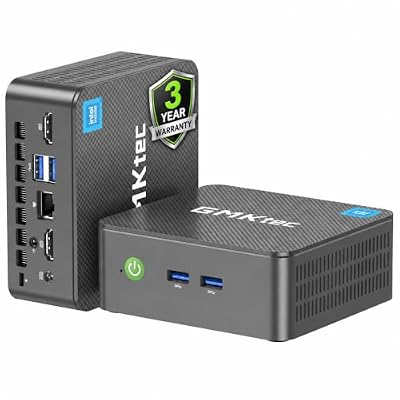
The GMKtec NucBox G3S is the budget pick of the five. It runs on the Intel N95, a four-core, four-thread chip that boosts to 3.4GHz, with 8GB of DDR4 memory and a 256GB M.2 SSD. Dual HDMI outputs support two 4K displays, and three USB 3.2 ports cover a keyboard, a mouse, and an external drive. It ships with Windows 11 Pro and suits basic office work, web browsing, and media playback.
The trade-offs are in connectivity: Wi-Fi 5 and Bluetooth 5.0 are a generation behind the other picks, and the Ethernet port is Gigabit rather than 2.5GbE, so this is not the machine for a network-heavy setup. Before ordering an upgrade stick, confirm the RAM slot layout on the Amazon listing, because the listed configurations vary. For a second machine, a homework station, or a simple desk setup, the G3S covers the basics at the lowest cost of entry in this guide.
Specs
- Intel N95 (4C/4T, up to 3.4GHz); 8GB DDR4; 256GB M.2 SSD; dual HDMI 4K; 3x USB 3.2; Wi-Fi 5; Bluetooth 5.0; Gigabit Ethernet; Windows 11 Pro.
4. GMKtec NucBox G3 Pro
The GMKtec NucBox G3 Pro is the pick for buyers who plan to upgrade. It runs on the Intel Core i3-10110U, a two-core, four-thread chip that boosts to 4.1GHz, with 8GB of DDR4 memory and a 256GB SSD. It has four USB 3.2 ports, Wi-Fi 6, Bluetooth 5.2, and an Intel i226-V Ethernet port, and it drives two 4K displays. The i3-10110U is a 10th-generation chip, older than the N-series processors in the other picks, but it remains capable for office work, browsing, and media playback, and its stronger single-thread performance helps everyday responsiveness.
The upgrade headroom is the best in this guide: two DDR4 SO-DIMM slots let you add a second stick for dual-channel memory, and there are two M.2 storage slots, one M.2 2280 PCIe slot and one M.2 2242 SATA slot. Note a conflict in the published figures: the manufacturer lists RAM expansion to 64GB, while the Amazon spec table lists a 32GB maximum, so treat 32GB as the safe ceiling. Choose this one if you want a small PC that can grow with a second drive and more memory over time.
Specs
- Intel Core i3-10110U (2C/4T, up to 4.1GHz); 8GB DDR4, two SO-DIMM slots, 32GB safe ceiling; 256GB SSD; M.2 2280 PCIe plus M.2 2242 SATA slots; 4x USB 3.2; Wi-Fi 6; Bluetooth 5.2; Intel i226-V Ethernet; dual 4K display; Windows 11 Pro.
5. GEEKOM MiniAir 11

The GEEKOM MiniAir 11 is the smallest machine in this guide: 117 x 112 x 34.2 mm, 524 g, and it ships with a VESA mount, so it can bolt to the back of a monitor and disappear entirely. It runs on the Intel Celeron N5095, a four-core, four-thread chip that boosts to 2.9GHz at a 15W TDP, with 8GB of DDR4 memory expandable to 32GB and a 256GB M.2 2280 SSD expandable to 1TB. Windows 11 Pro is pre-installed.
Two limits matter before buying. The M.2 slot is wired for two PCIe lanes rather than four, so a faster NVMe drive will still work but will not reach its full rated speed, and the two USB-C ports are data-only with no DisplayPort Alt Mode, so video runs through the HDMI 1.4 port and the Mini DisplayPort. Wi-Fi 5, Bluetooth 4.0, Gigabit Ethernet, and an SD card reader round out the connectivity. Choose this one for the smallest footprint, a monitor-mounted setup, or a quiet media machine.
Specs
- Intel Celeron N5095 (4C/4T, up to 2.9GHz, 15W TDP); 8GB DDR4, expandable to 32GB; 256GB M.2 2280 SSD, expandable to 1TB, PCIe x2 slot; HDMI 1.4 plus Mini DisplayPort; 2x USB-C data-only; USB 3.2; Wi-Fi 5; Bluetooth 4.0; Gigabit Ethernet; SD card reader; VESA mount included; 117 x 112 x 34.2 mm; 524 g; Windows 11 Pro.
Which Configuration Suits You
For everyday office work and web browsing, any of the five picks works, so choose by size and ports rather than by chip. All five support dual displays, but the G3 Plus and the G3 Pro add the faster 2.5GbE port, which helps when large files move across the network. For a machine that stays on around the clock as a home server or media box, the Beelink Mini S12 Pro is the natural fit: the N100 runs at a 6W TDP and the chassis stays quiet, though its single RAM slot caps memory at 16GB.
If you expect to upgrade later, the GMKtec NucBox G3 Pro is the only pick with two RAM slots and two M.2 slots, so choose it when future expansion matters more than having the newest chip. The G3 Plus is the middle ground, with the newest processor and a second drive slot but a single RAM slot. For the smallest desk footprint, the GEEKOM MiniAir 11 wins on size and on the included VESA mount, provided you accept its two-lane M.2 slot and older Wi-Fi 5 and Bluetooth 4.0.
Before ordering, read the exact configuration line on the Amazon listing: the 8GB and 256GB figures here apply to the specific ASIN listed under each pick, not to every variant of the same model name.
FAQ
Is 8GB of RAM enough for a compact PC in 2026?
Yes, for everyday use. Eight gigabytes covers web browsing, office software, video calls, and media playback. It becomes tight with virtual machines, large photo edits, or dozens of heavy programs open at once. If that describes your workload, choose a pick with two RAM slots, such as the GMKtec NucBox G3 Pro, or buy a 16GB configuration.
Can I upgrade the RAM in these compact PCs later?
Yes, with limits. None of the five picks uses soldered memory. The Beelink Mini S12 Pro and the GMKtec NucBox G3 Plus each have a single SO-DIMM slot capped at 16GB by their processors. The GEEKOM MiniAir 11 supports up to 32GB, and the GMKtec NucBox G3 Pro has two slots, with 32GB as the safe ceiling. Match the DDR4 SO-DIMM speed and check the listing for the exact slot count before ordering.
Do these mini PCs come with Windows installed?
The five picks here ship with Windows 11 Pro pre-installed, according to their Amazon listings and manufacturer pages. Some of the same model names are also sold as barebones units or with Linux, so confirm the operating system on the exact ASIN page before ordering. A barebones unit needs its own RAM, storage, and operating system license.
What is the difference between the N100, N95 and N150 chips?
All three are low-power Intel Alder Lake-N and Twin Lake processors with four cores and four threads. The N95 boosts to 3.4GHz and is the oldest, the N100 also boosts to 3.4GHz but runs at a lower 6W TDP, and the N150 is the newest, boosting to 3.6GHz. In everyday use the difference is small, so choose by RAM slots, storage slots, and ports rather than by chip alone.