

- Top Pick: Capture Card, 4K HDMI Video Capture Card, Game Capture Card, 1080P 60FPS Video Capture Device, HDMI to USB 3.0 Capture Card for Streaming, Work with Camera/Xbox/PS4/PS5/PC/OBS
- Best Value: Capture Card 4K HDMI Video Streaming to USB 3.0 1080P 60FPS Capture Device
- Premium Choice: acer USB 3.0 HDMI Capture Card, 4K HDMI Loop-Out, 1080P 60Hz for Streaming
Affiliate disclosure: As an Amazon Associate we earn from qualifying purchases. This post contains affiliate links — if you buy through them we may earn a small commission at no extra cost to you. This never affects our recommendations.
A capture card is essential for console streamers and PC gamers who want a dual-PC streaming setup. In 2026, the best capture cards offer 4K60 passthrough, 1080p60 capture, and near-zero latency — giving your stream professional-quality footage without impacting gameplay performance.
In a hurry? See the top-rated Capture Cards for Streaming deals available right now:
🛒 Check Capture Cards For Streaming Prices on Amazon →🛒 Best Price Today on Amazon
Prime members get fast, free shipping on everything above, plus member-only deals. New members get a 30-day free trial — cancel anytime.
Start 30-Day Prime Free Trial →See Today’s Amazon DealsBest Capture Cards for Streaming
As an Amazon Associate we earn from qualifying purchases at no extra cost to you.








Internal vs External Capture Cards
External USB Capture Cards — Easiest Setup
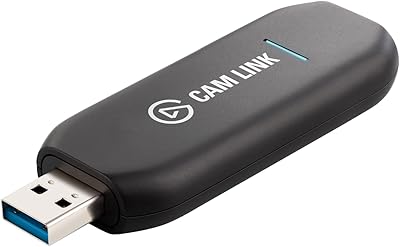
External capture cards connect via USB between your console/gaming PC and your streaming PC. Plug-and-play with OBS — no PCIe slot required. Best for console streamers and dual-PC setups where the streaming PC may be a laptop. The Elgato HD60 X is the benchmark here: 4K60 HDR passthrough, 1080p60 capture, compatible with PS5, Xbox Series X, and PC.
Internal PCIe Capture Cards — Maximum Performance
Internal cards slot into a PCIe lane on your motherboard. They offer lower CPU overhead, higher bandwidth, and 4K60 capture (versus 4K passthrough only on most USB cards). AVerMedia’s 4K Capture Card Pro is the premium internal option. Best for dedicated streaming PCs that will run 24/7.

Key Specs to Evaluate
Capture Resolution and Frame Rate
For Twitch/YouTube streaming, 1080p60 capture is sufficient — streams are transcoded anyway. 4K60 capture matters for recording local footage for YouTube in native 4K. Most viewers watch at 1080p or below regardless.
Passthrough Resolution
Passthrough lets you play on your TV/monitor at full quality while the card captures the signal separately. 4K60 HDR passthrough is the 2026 standard — essential for PS5 and Xbox Series X gameplay.
Software Compatibility
All major capture cards work with OBS Studio. Elgato’s 4K Capture Utility is excellent. AVerMedia RECentral is more feature-rich. Ensure your card is compatible with your streaming software before buying.

Do I Need a Capture Card for PC Gaming?
No — if you game and stream on the same PC, OBS captures your screen directly. You only need a capture card for: console streaming, dual-PC setups where the gaming PC is separate from the streaming PC, or capturing HDMI output from any external source.
Frequently Asked Questions
Can I use a capture card with PS5 and Xbox?
Yes — any HDMI capture card works with PS5 and Xbox Series X. For PS5, ensure the card supports HDCP bypass (PS5 requires HDCP to be disabled in settings for capture). Xbox Series X doesn’t have this restriction.
Does a capture card add latency?
The capture card itself adds 0–1 frame of latency to the captured signal. But passthrough (your TV/monitor connection) bypasses the card entirely — you play on your display with zero added latency, and the card captures a copy of the signal.
What’s the best capture card for beginners?
The Elgato HD60 X is the easiest recommendation — USB powered, works out of the box with OBS, excellent software, 4K60 passthrough. It’s pricier than some alternatives but saves hours of setup frustration.
Related Articles
Looking for more on this topic? Browse the hand-picked guides below — each one applies the same scoring rubric used in this review.
















