

Affiliate disclosure: As an Amazon Associate we earn from qualifying purchases. This post contains affiliate links — if you buy through them we may earn a small commission at no extra cost to you. This never affects our recommendations.
- Best Overall: Logitech StreamCam — The 1080p60 Streaming Standard
- Best 4K: Logitech Brio 4K — Ultra HD Streaming Quality
- Best Budget: Razer Kiyo — Built-In Ring Light
- Best AI-Powered: Insta360 Link — Auto-Tracking Camera
- Streaming Webcam Setup Guide
- Frequently Asked Questions
- Related Articles
- Related Articles
A high-quality webcam for streaming is the face of your content — blurry, poorly lit facecam footage undermines viewer trust and makes your stream look amateurish regardless of how good your gameplay is. In 2025, the best streaming webcams offer 1080p60 or 4K30 resolution, AI-powered auto-framing, background replacement, and low-light enhancement that make you look professional without studio lighting equipment.
As an Amazon Associate we earn from qualifying purchases at no extra cost to you.





In a hurry? See the top-rated Webcam for Streaming deals available right now:
🛒 Check Webcam For Streaming Prices on Amazon →🛒 Best Price Today on Amazon
Prime members get fast, free shipping on everything above, plus member-only deals. New members get a 30-day free trial — cancel anytime.
Start 30-Day Prime Free Trial →See Today’s Amazon DealsBest Overall: Logitech StreamCam — The 1080p60 Streaming Standard
The Logitech StreamCam is purpose-built for streaming with a vertical shooting mode for TikTok/Instagram content, portrait auto-framing that keeps your face centered as you move, and a fast f/2.0 aperture that performs beautifully in low light. The USB-C connection delivers clean 1080p60 footage to OBS, Streamlabs, or any streaming software without configuration. Logitech’s Capture software adds real-time background blur, color correction, and multi-camera scene switching. The best webcam for streaming at the 1080p price tier.
Best 4K: Logitech Brio 4K — Ultra HD Streaming Quality
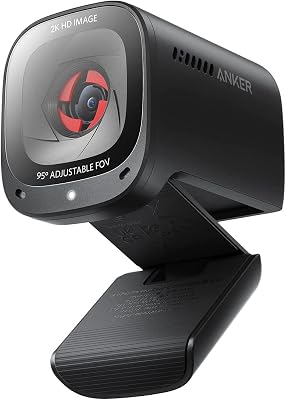
The Logitech Brio is the most popular 4K streaming webcam, delivering 4K30 or 1080p60 output with HDR support. Its ultra-wide 90-degree field of view suits both single-person and group streaming, and RightLight 3 AI adapts exposure automatically in changing lighting conditions. Windows Hello facial recognition adds a productivity benefit for dual-use streaming/work setups. Best webcam for streaming for professional streamers who want the sharpest possible facecam image.
Best Budget: Razer Kiyo — Built-In Ring Light
The Razer Kiyo solves the streaming lighting problem with a built-in ring light that illuminates your face evenly without purchasing a separate key light. At 1080p30 (720p60 for smoother motion), it delivers adequate streaming quality for casual-to-moderate streamers. The ring light has adjustable brightness for different room lighting conditions. Best budget streaming webcam that eliminates the need for a separate lighting investment.
Best AI-Powered: Insta360 Link — Auto-Tracking Camera
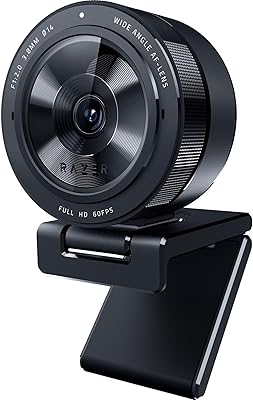
The Insta360 Link uses a gimbal-stabilized 4K sensor with AI auto-tracking that physically rotates the camera to follow your face as you move — perfect for streamers who stand up, gesture, or move around during streams. Portrait mode, whiteboard mode, and desk view presets add versatility. The 4K AI-enhanced image quality is exceptional. Best webcam for streaming for active streamers who don’t stay still during their streams.
Streaming Webcam Setup Guide
Lighting: More Important Than Camera Resolution
A $50 webcam with good lighting looks better than a $200 webcam in poor lighting. Position a ring light or key light (Elgato Key Light, Neewer LED panel) facing you from 45 degrees above eye level. Avoid backlit setups where windows behind you wash out the camera exposure. Good lighting is the single highest-impact upgrade for streaming video quality.

Webcam Positioning for Streaming
Mount your webcam at eye level or slightly above — looking down at a webcam below your monitor creates an unflattering angle. Use a webcam mount or monitor mount to position it precisely. Maintain 18–24 inches of distance from the lens for a natural facial framing.
Frequently Asked Questions
Is 1080p or 4K better for streaming?
Most streaming platforms (Twitch, YouTube Live) recommend 1080p60 for facecam. 4K webcams downscale to 1080p for streaming with slightly better sharpness, but the difference is minimal at typical facecam overlay sizes. 4K benefits most from local recording for YouTube VODs viewed at full resolution.
Do I need a DSLR instead of a webcam?
DSLR/mirrorless cameras (via capture card) deliver significantly better image quality than webcams — shallow depth of field, better low-light performance, and 4K60 capability. If video quality is a top priority and budget allows, a Sony ZV-E10 or Canon M50 Mark II via Elgato Cam Link 4K is the professional streaming setup. For most streamers, a quality webcam is more practical and cost-effective.
Why does my webcam look bad on stream?
Most common causes: insufficient lighting (most important factor), low bitrate allocating too few resources to facecam overlay, incorrect OBS scene crop making the webcam appear pixelated, or auto-exposure fluctuating due to background light changes. Fix lighting first — it solves 80% of webcam quality issues.
Related Articles
Looking for more on this topic? Browse the hand-picked guides below — each one applies the same scoring rubric used in this review.
















