

- Top Pick: Webcam Streaming Kit for Gaming Setup–1080P HD Camera, RGB USB Microphone & LED Light, All-in-One Streaming Accessories for Twitch, YouTube, Zoom, WFH. PC/Mac Compatible (Capture Card Needed for PS5)
- Best Value: TENLAMP G3 Creator Audio Mixer Bundle with Microphone for Streaming Podcast
- Premium Choice: Roku Streaming Stick (4K) User Guide (Updated Edition): A Simple, Step-by-Step Setup, Streaming, and Troubleshooting Manual for Beginners and Seniors
Affiliate disclosure: As an Amazon Associate we earn from qualifying purchases. This post contains affiliate links — if you buy through them we may earn a small commission at no extra cost to you. This never affects our recommendations.
Starting a stream in 2026 has never been easier — OBS Studio is free, platforms like Twitch and YouTube take minutes to set up, and the hardware required is more affordable than ever. This guide covers every piece of equipment you need to start streaming at a professional-enough level to build an audience.
In a hurry? See the top-rated Streaming Setup for Beginners deals available right now:
🛒 Check Streaming Setup For Beginners Prices on Amazon →🛒 Best Price Today on Amazon
Prime members get fast, free shipping on everything above, plus member-only deals. New members get a 30-day free trial — cancel anytime.
Start 30-Day Prime Free Trial →See Today’s Amazon DealsBest Beginner Streaming Equipment
As an Amazon Associate we earn from qualifying purchases at no extra cost to you.



The Essential Streaming Setup (Priority Order)
1. Microphone — Most Important
Audio quality matters more than video quality on streams. Viewers tolerate mediocre webcam footage but immediately leave for poor audio. Invest in a USB microphone before anything else.
Budget pick: HyperX SoloCast ($50) — cardioid USB mic, tap-to-mute, plug-and-play. Sounds far better than any headset mic.
Mid-range: Blue Yeti ($100) — versatile polar pattern selection, excellent sound quality, industry standard for beginner-intermediate streamers. Wide cardioid pattern picks up voice clearly even with minor positioning variance.

2. Lighting — Underrated Essential
A $20–30 ring light or $40–60 key light dramatically improves webcam quality without touching the camera hardware. Even phone cameras look professional with proper lighting. A single key light positioned 45° to the side and slightly above eye level is the classic setup.
Best option: Elgato Key Light or Elgato Key Light Air ($50–100) — adjustable color temperature, app-controlled, desk-mounted. Transforms stream quality immediately.
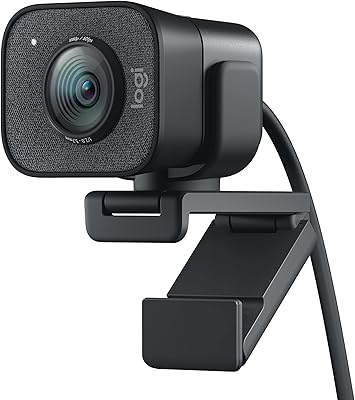
3. Webcam — Good Enough Beats Great
For streaming, 1080p30 is sufficient — Twitch and YouTube compress video anyway. The Logitech C920 at $70 delivers excellent 1080p footage and is the most widely used streaming webcam worldwide. The Elgato Facecam ($100) offers 1080p60 for smoother facial motion in high-motion scenes.
4. Capture Card — Only for Console Streamers
PC gamers don’t need a capture card — OBS captures directly from the GPU. Console streamers need an HDMI capture card between the console and PC. The Elgato HD60 X is the go-to recommendation.

Free Software: OBS Studio
OBS Studio is free, open-source, and the industry-standard streaming software. It handles scene management, audio mixing, streaming/recording, and transitions. The learning curve is moderate — invest 2–3 hours learning OBS before going live. Streamlabs OBS offers a more beginner-friendly interface built on OBS.
PC Requirements for Streaming
With NVENC hardware encoding (RTX 20-series or newer): any 6-core CPU handles 1080p60 streaming without frame drops. With software x264 encoding: 8+ cores recommended. An i5-12400 or Ryzen 5 5600X is excellent for simultaneous gaming + streaming.
Frequently Asked Questions
What do you need for a basic game streaming setup?
At minimum: a capable PC (or capture card for console), a decent USB microphone, a webcam, one key light, and software like OBS Studio or Streamlabs. Audio quality matters more than video to viewers, so prioritise the mic first.
How do you set up OBS for streaming?
Install OBS Studio, sign in via Settings > Stream to your platform (Twitch/YouTube), set output to 1080p60 at 6000kbps for Twitch, add a Display or Game Capture source plus your mic and webcam, then hit Start Streaming. Use the Auto-Configuration Wizard for safe starting settings.
How much should I spend on my first streaming setup?
$100–150 for a USB mic and basic lighting is the minimum meaningful investment. A full setup with webcam, mic, and lighting runs $200–300. Don’t over-invest at the start — upgrade as your channel grows and you understand what your audience actually values.
Do I need a greenscreen for streaming?
No — greenscreens require consistent, wrinkle-free fabric and even lighting to work properly. Start with a clean, uncluttered background or a virtual background in your streaming software. Greenscreens are a nice upgrade once you’re consistently streaming, not a day-one requirement.
Which platform should beginners stream on?
Twitch for gaming streams (largest gaming community, best discovery features for new streamers with raids and hosting). YouTube for recorded content that can rank in search results over time. Kick is growing but still smaller. Start with Twitch for live gaming in 2026.
Related Articles
Looking for more on this topic? Browse the hand-picked guides below — each one applies the same scoring rubric used in this review.














